Do you think IIT Guwahati certified course can help you in your career?
Introduction
Have you ever noticed that we cannot use particular words like for, if, else, NULL, etc., to declare our functions and variables in programming? These unique words are called keywordsin programming.
This article will discuss keywords and their importance in programming languages. We will explore various keywords present in the Rprogramming language. We will also discuss some practices we should consider while using these keywords. But let us first learn a bit more about keywords in programming.
What are Keywords in Programming
Keywords are a set of certain predefined words that are reserved for internal use in programming. Keywords are the building block of any program. Keywords help in defining any statement in the program. Every language, whether it is C, C++, Java, Python, R, Javascript, etc., has some predefined keywords. Although these keywords might differ from language to language, they are present in each language.
Keywords are a significant part of programming languages due to the following reasons.
Building Blocks - Keywords are the building blocks of any programming language. Keywords help to shape up the syntax of any program. Keywords also act as a bridge between the programmer and the language.
Consistency - Suppose if there were no predefined keywords in programming languages. Then each programmer would use different keywords for the same purpose. This would have created inconsistencies among code written by different users.
Readability - Keywords also ensure that the readability in a codebase is maintained. Keywords make the code more intuitive for the programmers to understand.
Structure and Flow - Keywords help to maintain the structure and flow of the program. Conditional statements such as (if-else), and loops (for, while) help the programmers to shape up the flow of the program.
Keywords in R Language
Like all other programming languages, R language has some keywords that cannot be used as variable or function names. This section will discuss some of the essential keywords in the R language.
if
"if" is a decision-making keyword in the R programming language. This keyword decides whether a particular code block will be executed depending on a specific condition.
Syntax:
if ( condition ) {
	....Code block....
}
else
"else" is also a decision-making keyword in the R programming language. The main difference between the if and the else keyword is that the else keyword can't be used independently. On the other hand, we can use the if keyword independently without the if keyword.
"for" is also an essential keyword in R programming. This keyword is used to create loops that can iterate for a fixed amount of times.
Syntax:
for ( variable in start:end ){
	....Code block....
}
The above syntax variable is the iterating variable, and [start, end] is the for-loop range.
while
"while" is a type of control statement that runs a code block repeatedly until the condition becomes false.
Syntax:
while( condition ){
…….Code block…….
}
break
"break" is a type of jump statement used to terminate or jump out of the loop.
Syntax:
while ( condition 1 ){
	....Code block 1....
	if ( condition 2 ){
		....Code block 2....
		break;
	}
}
repeat
Like the while and the for keywords, repeat is also used to run a code block repeatedly. The difference between repeat and other loop statements is that to exit a repeat statement; we have to set the break condition inside the code block.
The "function" keyword is used to declare functions in the R language. This keyword is used before the function body to express the function.
Syntax:
func1 = function ( condition ) {
	....Code block....
}
next
The "next" keyword is used in loop statements to skip the current iteration of the loop and continue to the next iteration. This keyword is similar to the "continue" keyword in other languages.
Syntax:
for ( var in start:end) {
	if ( condition ){
		....Code block....
		next
	}
}
TRUE/FALSE
The True and False keywords represent boolean values in the R language. If the condition is satisfied, then the interpreter returns true. Otherwise, it returns false.
Syntax:
var1 = (condition)
If the condition is true, the value of var1 will be set to TRUE, else it will be set as FALSE.
Example
An example code to demonstrate the use of each of the above keywords is shown below.
Code
age <- 19

# use of if else keywords
if (age >=18) {
	print("You are eligible to get a driver's license.")
}
else {
	print("You are not eligible to get a driver's license.")
}

# use of for and while loops
for( i in 1:5 ){
	print(paste("You are candidate number:", i))
}

i <- 1
while (i<=5) {
	print(paste("You are candidate number:", i))
	i <- i+1
}

#use of repeat keyword
i <- 1
repeat {
	print(paste("You are candidate number:", i))
	i <- i+1
	if (i>5) {
		# use of break statement
		break;
	}
}

myFunc <- function (a, b) {

	# use of bool keyword
	res <- (a<b)
	return (res)
}

myFunc(10, 5)
myFunc(3, 5)
Output
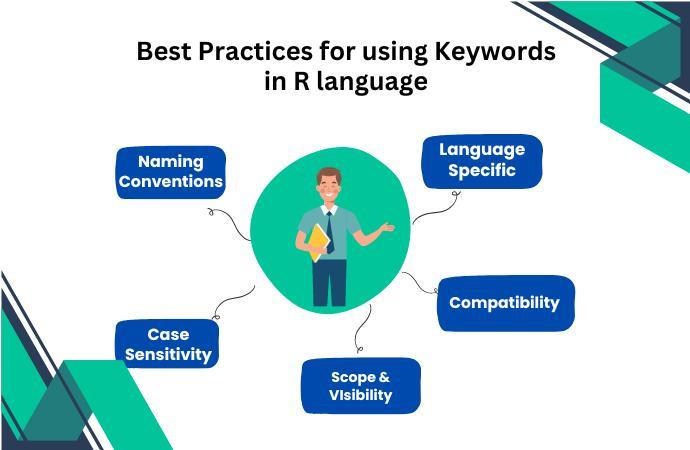
Best Practices for Using Keywords in R Language
In the previous section, we discussed the keywords in the R language. In this section, we will look at some tips we should follow while using keywords in the R language.
Naming Conventions - While naming variables, we should stick to the naming conventions of the programming language. For example, many programming languages use camel case capitalization in naming their variables.
Language-specific- Some keywords are only available in a few particular programming languages. We must adequately use these keywords to avoid syntax errors.
Case-sensitivity - In some programming languages (including R), keywords are case-sensitive. We should carefully check the capitalization while using keywords in R programming.
Compatibility - While using keywords, we should check the cross-platform compatibility of keywords. If we need to run our program on multiple platforms, the keywords should not have any platform restrictions.
Scope and Visibility - Keywords can have limited visibility depending on their scoping rules. We should keep these constraints in mind while using these keywords.
Frequently Asked Questions
Is it possible to generate user-defined keywords in R language?
No, generating user-defined keywords in the R programming language is impossible. Instead of keywords, we can use user-defined identifiers in our code to modify our program.
What are the key features of Keywords in programming?
Keywords are unique predefined words reserved for internal use in a programming language. Keywords are unique, case-sensitive, definedscope, have dedicatedmemory in the program, and cannotbeoverridden by the user.
How many Keywords are present in R language
There are a total of twenty-one keywords in the R language. These keywords include if, else, while, for, break, next, repeat, NULL, TRUE, function, Inf, NA, in, NaN, etc.
Conclusion
In this article, we discussed keywords in programming and their importance. We discussed some of the essential keywords in R language with code examples. In the end, we concluded by briefly discussing some best practices to keep in mind while using keywords and some frequently asked questions.
So now that you have learned about keywords in R language, you can refer to similar articles.







 1+ registered

