Do you think IIT Guwahati certified course can help you in your career?
Introduction
Multimedia is a beautiful combination of text, audio, images, animations, videos, & interactive content forms, transforming how we interact with digital information. It's more than just media; it's a way to enhance, educate, & entertain using various digital platforms. From educational materials to entertainment & advertising, multimedia has a broad application range, making it a pivotal aspect of modern digital experiences.
In this article we will talk in detail about Multimedia. It’s components, advantages will also be discussed.
Categories of Multimedia
Multimedia can be broadly categorized into linear and nonlinear types, each offering unique interaction levels for the users.
Linear Multimedia
This type operates in a predetermined sequence without any interaction from the end user. It's akin to watching a movie or a presentation where the flow of information is controlled by the creator, not the viewer. Linear multimedia is straightforward, with a clear beginning, middle, and end, making it ideal for storytelling or presenting information in a structured format.
Nonlinear Multimedia
Unlike linear, nonlinear multimedia allows users to interact and control the content. Video games, interactive websites, and educational software fall under this category. Here, the user can make choices that affect the sequence and outcome of the content, leading to a more engaging and personalized experience. The design of nonlinear multimedia is more complex, as it needs to anticipate and respond to user inputs.
Both categories serve different purposes and are chosen based on the intended user experience. While linear multimedia is excellent for conveying a specific message or narrative, nonlinear multimedia offers a more immersive and interactive environment, encouraging exploration and engagement.
Now, let's look at some code that might be involved in creating a simple nonlinear multimedia application, such as an interactive quiz.
# Simple Interactive Quiz Example in Python
Python
Python
def start_quiz():
    score = 0
    questions = [
        {"question": "What is the capital of France?", "answer": "Paris"},
        {"question": "What is 2 + 2?", "answer": "4"},
        {"question": "What is the largest planet in our solar system?", "answer": "Jupiter"}
    ]

    for q in questions:
        user_answer = input(q["question"] + " ")
        if user_answer.lower() == q["answer"].lower():
            print("Correct!")
            score += 1
        else:
            print("Wrong! The correct answer is", q["answer"])

    print(f"Quiz completed! Your score is {score}/{len(questions)}.")

if __name__ == "__main__":
    start_quiz()
You can also try this code with Online Python Compiler
What is the capital of France? Paris
Correct!
What is 2 + 2? 4
Correct!
What is the largest planet in our solar system? Mars
Wrong! The correct answer is Jupiter
Quiz completed! Your score is 2/3.
This Python script presents a simple quiz to the user, demonstrating a basic form of nonlinear multimedia interaction. Users can input their answers, directly affecting the outcome, which is their score.
Applications of Multimedia
Multimedia finds its applications across various fields, significantly enhancing user experience and interaction. Here are some key areas where multimedia plays a crucial role:
Education
Multimedia transforms traditional learning by incorporating interactive elements like videos, animations, and simulations, making complex subjects more accessible and engaging for students. E-learning platforms often utilize multimedia to cater to various learning styles.
Entertainment
The entertainment industry heavily relies on multimedia for movies, music, video games, and virtual reality experiences, providing immersive and captivating content that engages audiences in ways that were once unimaginable.
Advertising & Marketing
Multimedia is a powerful tool in marketing, used to create compelling advertisements and promotional materials. It combines audio, video, animation, and interactive features to grab attention and convey messages effectively.
Art & Design
Artists and designers use multimedia to explore new forms of expression, combining traditional techniques with digital media to create innovative artworks and designs.
Communication
Multimedia enhances the way we communicate, through video calls, multimedia messaging, and social media platforms, making interactions more personal and expressive.
Information & Kiosks
Public information systems, like those in museums, parks, and tourist spots, use multimedia to provide interactive and informative content to visitors, improving their experience and understanding of the subject matter.
Each of these applications leverages the unique capabilities of multimedia to convey information, tell stories, and create experiences that are rich, dynamic, and engaging.
Let's consider an example relevant to the entertainment industry, where multimedia components are combined to create an immersive video game experience.
class Game:
    def __init__(self):
        self.background_music = load_music("background.mp3")
        self.character_sprites = load_images(["sprite1.png", "sprite2.png"])
        self.level_design = load_level("level1.json")
   def start(self):
        play_music(self.background_music)
        while self.is_running():
            for event in get_user_input():
                if event.type == "MOVE":
                    move_character(event.direction)
                elif event.type == "JUMP":
                    character_jump()
            update_screen(self.character_sprites, self.level_design)
def load_music(file):
    # Function to load background music
    pass
def load_images(images):
    # Function to load character sprites
    pass
def load_level(level_file):
    # Function to load level design from a file
    pass
def play_music(music):
    # Function to play background music
    pass
def get_user_input():
    # Function to get user input (e.g., keyboard, mouse)
    pass
def move_character(direction):
    # Function to move the character in the game
    pass
def character_jump():
    # Function to make the character jump
    pass
def update_screen(sprites, level):
    # Function to update the game screen based on current game state
    pass
# To start the game
game = Game()
game.start()
This pseudo-code outlines the structure of a simple video game that incorporates audio (background music), visual elements (character sprites and level design), and interactivity (user input handling) to create an engaging multimedia experience.
Components of Multimedia
Text
The backbone of most multimedia content, text provides context, explanations, and narratives. It's crucial for captions, headlines, and instructions, making information accessible even when audio or video might not be practical.
Graphics
Graphics, including photographs and illustrations, add visual interest and can often communicate concepts more effectively than text alone. They're essential for breaking up text and illustrating points in a way that's quick to understand.
Audio
Audio enhances the emotional and sensory experience of multimedia content. From background music to voiceovers and sound effects, audio adds depth and dimension, making content more memorable and engaging.
Video
Video combines visuals, motion, and sound to tell stories and demonstrate concepts dynamically. It's a powerful tool for tutorials, storytelling, and conveying complex information in an accessible way.
Animation
Animation brings static images to life, adding excitement and emphasis. It can simplify complex ideas, add humor, or provide visual breaks in content to maintain viewer interest.
Interactivity
Interactivity allows users to engage with content, making choices, answering questions, or exploring content paths. This active participation enhances learning and personalizes the user experience.
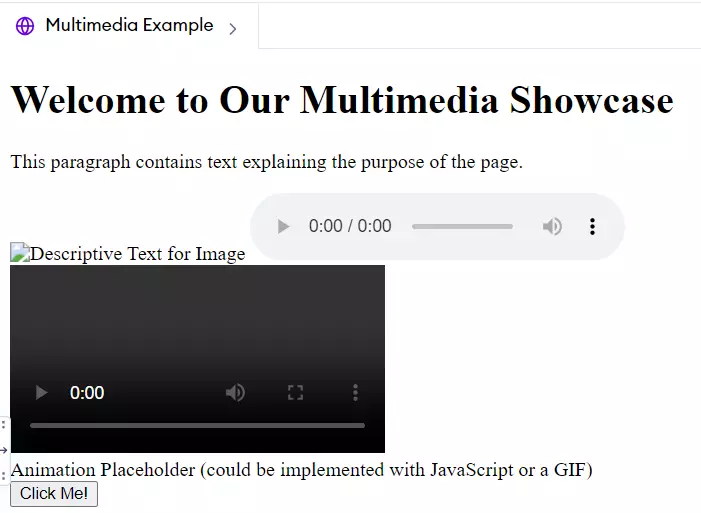
To give a practical example, let's consider a simple web page that incorporates these multimedia components:
<p>This paragraph contains text explaining the purpose of the page.</p>
<img src="example_image.jpg" alt="Descriptive Text for Image">
<audio controls> <source src="example_audio.mp3" type="audio/mpeg"> Your browser does not support the audio element. </audio>
<video controls> <source src="example_video.mp4" type="video/mp4"> Your browser does not support the video tag. </video>
<div id="animation">Animation Placeholder (could be implemented with JavaScript or a GIF)</div>
<button onclick="alert('You interacted with the content!')">Click Me!</button>
</body> </html>
Output
This HTML snippet demonstrates how text, images, audio, video, animation (placeholder in this case), and interactivity (via a button) can be combined to create a multimedia web page. Each component plays a role in delivering content that is more engaging and informative than any single element could achieve on its own.
Frequently Asked Questions
Can multimedia improve learning outcomes?
Yes, when used effectively, multimedia can enhance learning by catering to different learning styles, making complex concepts more understandable, and increasing engagement and retention.
Is multimedia only important for the entertainment industry?
While multimedia plays a significant role in entertainment, its applications extend far beyond, including education, marketing, communication, and more, making it a versatile tool in various fields.
How can I start creating multimedia content?
Begin with understanding the basic components of multimedia—text, images, audio, video, animation, and interactivity. Tools like video editing software, audio recording equipment, and web development platforms can help you start crafting multimedia content.
Conclusion
This article walked through the definition of multimedia, its aspects, categories, application, and elements. Arguably, multimedia, ranging from linear to nonlinear formats and usage, including education, entertainment, and marketing, has become an essential tool in storytelling and passing information to the masses. Essentially, by incorporating text, images, audio, video, animation, and interactivity very sync, people can produce content that may inform or entertain their audiences or users at the same time.








 7+ registered

