Do you think IIT Guwahati certified course can help you in your career?
Introduction
R is a graphics programming language and is utilized for statistical computing. R Studio is an Integrated Development Environment (IDE) that provides a one-stop solution for all statistical computation and graphics. An IDE is a graphical user interface (GUI) where you may write your quotes, view the results, and examine the variables formed during the programming process.
The R Studio is a more advanced version of R that includes a multi-pane window configuration that allows access to all primary objects on a single screen (for example, source, console, environment & history, files, photographs, graphs, and so on). In this article, we will centralize our learning on R Studio and how to install it on our computers.
What is R Programming Language?
R is a statistical computing and graphics programming language and software environment developed by the R Foundation for Statistical Computing. R is a software package that includes tools for data processing, calculation, and graphical display. It has an efficient data handling and storage facility and a set of operators for doing calculations on arrays, specifically matrices. Packages allow R to be readily extended. Several packages are included with the R distribution, and many more are available via the CRAN family of Internet sites, covering a wide spectrum of modern statistics.
The R Programming Language is majorly used by data miners and statisticians to create statistical tools and do data analysis. R was founded at the University of Auckland in New Zealand by Ross Ihaka and Robert Gentleman, and the R Development Core Team is presently developing it. The R software environment's source code is generally written in C, Fortran, and R. R is freely available under the GNU General Public Licence, and pre-compiled binary versions for various operating systems are available.
What is R Studio?
R Studio is an Integrated Development Environment (IDE) for the R programming language. It features a console and syntax-highlighting editor with direct code execution, charting, history, debugging, and workspace management capabilities. R Studio is available in both open-source and commercial editions. It may be used on the desktop (Windows, Mac, and Linux) or in a browser linked to R Studio Server. R Studio is a free, open-source, integrated development environment (IDE) for R, a statistical computing and graphics programming language.
R Studio was founded by JJ Allaire, the developer of the computer language ColdFusion. Hadley Wickham is R Studio's Chief Scientist. R Studio is available in two editions. R Studio Desktop, which runs the program locally as a conventional desktop application. The second one is R Studio Server, which allows access to R Studio while operating on a remote Linux server via a web browser. R Studio Desktop prepackaged distributions are available for Windows, OS X, and Linux. R Studio is written in C++ and has a graphical user interface built with the Qt framework.
How R Studio is Important or Required for R
There are various reasons why we should use R Studio. Some of them are listed below:
It is a text editor that allows you to have colored syntax for various elements (code, brackets, brackets, and so on). It automatically matches brackets, detects syntax, and more.
The tool is so advanced that it can automatically detect the components of the function/file/dataset at which you're looking.
The Environment tab provides access to all objects (variables, datasets, and so on) created for the session.
With R Studio, you may easily access all of your computer's files and directories using a dropdown menu and then set the working directory.
Why R Studio Needs to be Downloaded for R?
R Studio is frequently downloaded and used along with R for the following reasons:
Users can build visually appealing and customizable plots, charts, and graphs using R Studio's interactive data visualization capabilities. It facilitates data exploration and presentation.
The collaboration tools in R Studio make it easy to share code, projects, and analysis findings with coworkers, encouraging cooperation and knowledge sharing.
It has the ability to complete codes. This gives us various options for how to finish the code, enabling us to do so.
Users can customize the IDE's appearance and workflow using R Studio's layout and theme choices, which boosts individual comfort and productivity.
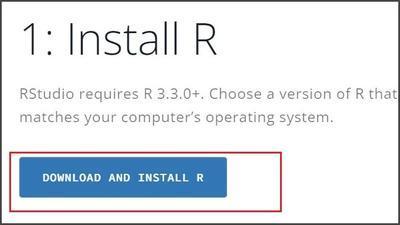
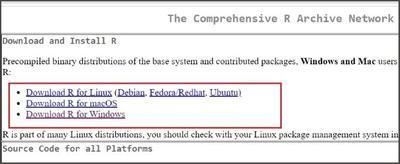
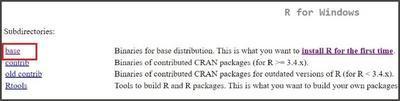
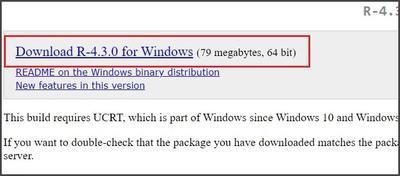
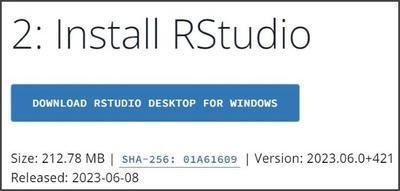
Click the download R Studio for Windows link. In case you are using any other operating system, then the link will be shown by your particular operating system name.
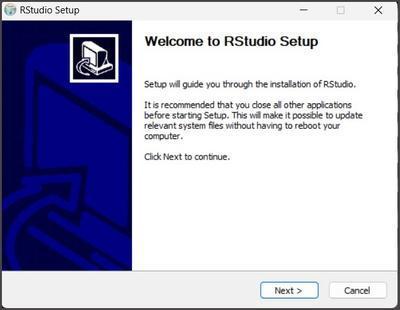
Once the download is complete, double-click the setup file and follow the on-screen directions to install RStudio.
Click the Next button in the RStudio setup box that displays, as shown below.
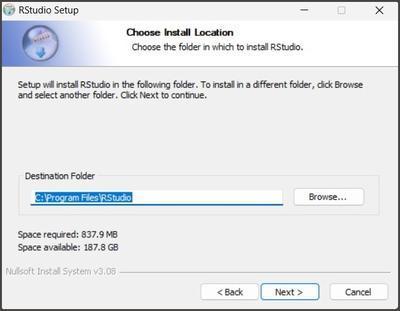
You can navigate to the location where you wish the setup to be installed. Maintaining a default one that the system selects is a better option. Press the Next button. Then click the Install Button.
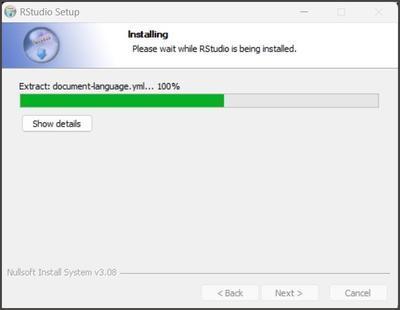
The installation will begin as shown below.
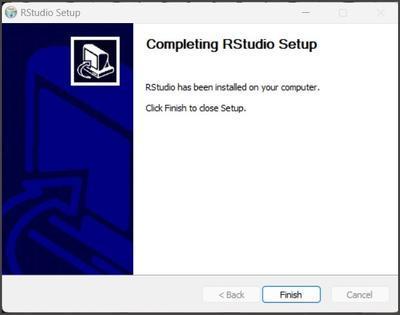
Finally, once the installation is complete, click the Finish option.
Some Important Points on R Studio
A code editor with syntax highlighting, auto-completion, and intelligent indentation is available in R Studio. You can work on numerous R scripts at once because it supports multiple documents.
You can interact directly with the R programming language through R Studio's built-in terminal. You can run R commands, see the results, and troubleshoot your code.
A data viewer that is a part of R Studio makes it simple to inspect and work with datasets. You can execute simple data-cleaning operations, preview data, sort columns, and filter rows.
Due to R Studio's high degree of extensibility, you can adapt the IDE to your needs. To improve your workflow, you can develop themes and personalized shortcuts.
A data frame in R is a table-like data structure that may hold a lot of variables with different types of data in one row. This two-dimensional data structure makes it easier to process and analyze data.
Q. What are regular expressions in R?
Regular expressions, sometimes referred to as regex, are a group of characters and symbols that are used to search for patterns in text and match them. The grep() function in R is frequently used to search for specific patterns inside a character vector using regular expressions.
Q. What is time series analysis in R?
A time series analysis is a statistical tool for analyzing and modeling data patterns and trends across time. This is commonly used to anticipate future values using historical data.
Q. What is clustering in R?
The process of clustering entails grouping data points according to how similar or far apart they are from one another. This makes it possible for us to see patterns and connections in the data and appreciate the basic organization of the dataset.
Conclusion
The R programming environment is significantly improved by the robust and user-friendly IDE known as R Studio. It offers key tools and capabilities for effective project management, code creation, and debugging. This article gives a basic idea of R Studio, its importance, and the necessary steps to install it on our computer.







 1+ registered

