

Table of contents
1.
Introduction
2.
What is the Switch Statement?
2.1.
Benefits of the Switch Statement
2.2.
Flowchart of the Switch Statement
3.
Switch-Case()
3.1.
Based on Index
3.1.1.
Syntax
3.1.2.
Example
3.2.
Based on the Matching Value
3.2.1.
Syntax
3.2.2.
Example
4.
Comparison With If-else Statements
5.
Frequently Asked Questions
5.1.
How does the switch case statement work?
5.2.
Can we use multiple expressions in the switch case statement?
5.3.
Does the switch case statement have a default case?
5.4.
How is the switch case statement different from the if-else statement?
5.5.
Are there any limitations to using the switch statement in R?
6.
Conclusion
Last Updated: Mar 27, 2024
Easy

What is the Switch Case statement in R?

Career growth poll
Do you think IIT Guwahati certified course can help you in your career?

Introduction

In this blog, we will dive deep into a switch case statement where we learn how to deal with cases. Conditional statements play a vital role in the programming world. A switch case statement is available in many programming languages, but R provides a different approach.
What is the Switch Case Statement in R?

In this blog post, we will learn how to achieve switch-case-like logic in R. So, learners, let's look into this topic in-depth.

What is the Switch Statement?

A switch statement is a common feature in programming languages. The switch statement is used in place of long if statements that compare a variable with several other values. We can say it is a selection control mechanism. 

The switch statement is used for multiple conditional check statements with a list of values or cases. Below are the rules to understand more about the switch statement.

  • You can take any number of cases within a switch statement.
     
  • If the expression value is not a character string, then this expression is coerced to an integer.
     
  • The first match element will be used if there are multiple match cases.
     
  • There is no default case available.
     
  • An unnamed case is used if there is no matched case.

Benefits of the Switch Statement

Below are some benefits of using the switch statement in R.

  • Concise code: The switch statement provides a simple way to handle multiple cases. Instead of using multiple if-else statements, you can use the switch to make your code simple.
     
  • Readability: With the help of a switch statement, you can improve your code readability.
     
  • Efficiency: Switch statements are more efficient than if-else statements because the switch directly jumps to the relevant case.
     
  • Easy to add new cases: In switch statements, you can easily add new cases without having to modify existing code.

Flowchart of the Switch Statement

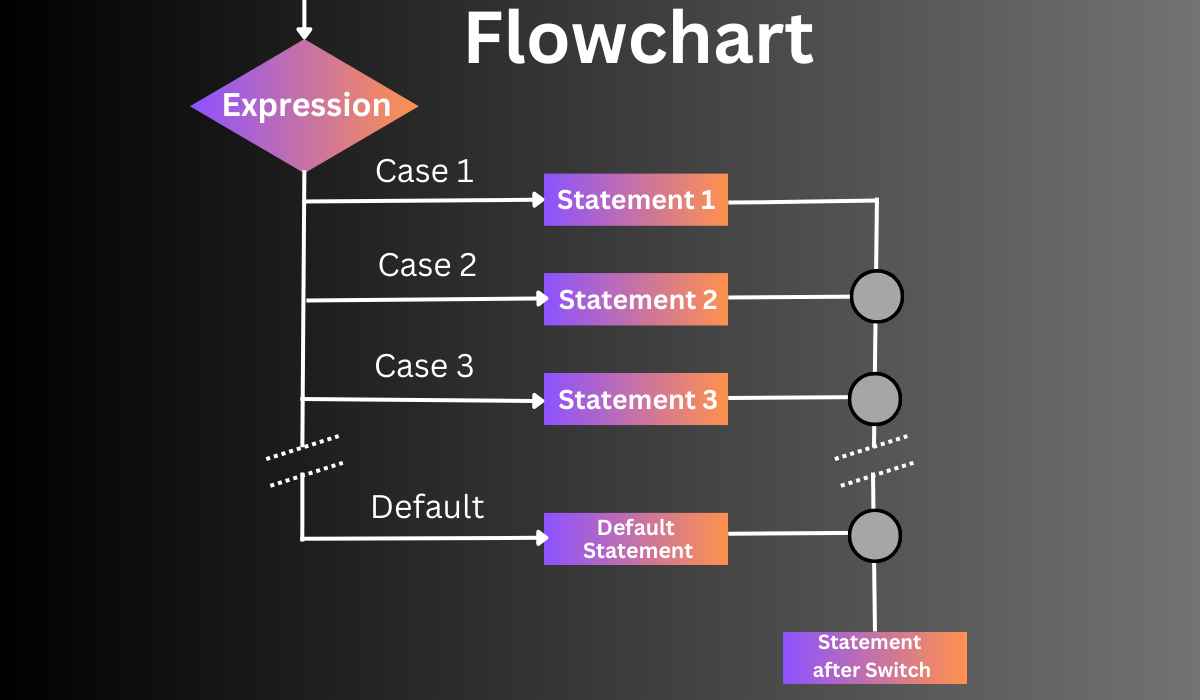
Below is the flowchart of the switch statement in R.
Flowchart of switch statement

The flowchart of the switch case statement in R is explained in the below points.

  • The flowchart begins with an input expression that needs to be evaluated.
     
  • The switch statement checks the expression value with the cases.
     
  • If a case matches the expression value, the flow moves to that case statement, which gets executed.
     
  • After executing the case statement, flow exits the switch statement.
     
  • If none of the cases matches the expression value, the flow moves to the default case, and the flow exits the switch statement.
Switch-Case()

The switch case statement compares the expression value with the values in the list and returns the output. The primary purpose of the switch function is to provide a way to handle multiple conditions.

A switch function mainly provides two ways of selecting cases based on an expression.

Based on Index

This method matches the expression with the cases based on their numeric positions. If the expression is matched, the corresponding code block will be executed.

Syntax

switch(expression, value1, value2, value3, …)


Example

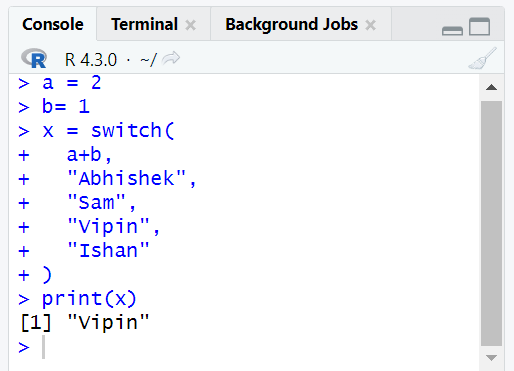
Below is an example of a switch statement that will show you the use of a switch statement based on an index.

Code

a = 2
b= 1
x = switch(
	a+b,  
	"Abhishek",
	"Sam",
	"Vipin",
	"Ishan"
)
print(x)


Output

output

Explanation

In the above example, you can see that the output is "Vipin". We have to variable a and b with values 2 and 1, respectively. Now in the expression, we are passing a+b, which is 2+1 equal to 3. So, in the available cases, it will return the code block of 3rd index, which is "Vipin."

Based on the Matching Value

In this method, the switch function matches the expression with the cases based on the matching value.

Syntax

switch(expression, case1= value1, case2= value2, …)


Example

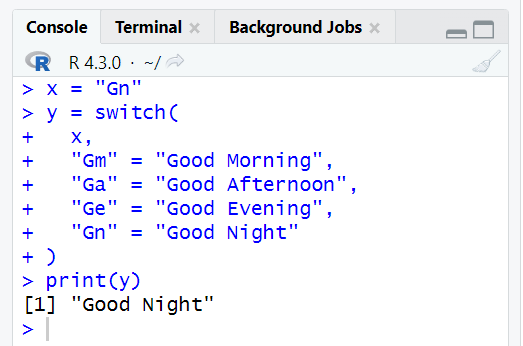
Below is an example of a switch statement giving an output by matching the expression value with the cases.

Code

x = "Gn"
y = switch(  
	x,  
	"Gm" = "Good Morning",
	"Ga" = "Good Afternoon",
	"Ge" = "Good Evening",
	"Gn" = "Good Night"
)
print(y) 


Output

output

Explanation

In the above example, we assigned the value "Gn" to the x variable. Then we use the switch cases to find the matching value of x. In the fourth case, you can see that the x value is matched with the case. So, it will stop searching and return the "Good Night" output.

Comparison With If-else Statements

Let’s see the comparison between the switch and the if-else statement with the help of some points.

  • Switch statements make concise code for multiple cases. While if-else statements provide flexibility to handle complex and nested conditions.
     
  • Switch statements improved the code readability for a large number of cases. The if-else statement has the ability to evaluate logical expressions and able to perform a wider range of operations.
     
  • Switch statements execute faster by directly moving to the relevant statement, while If else is suitable for complex comparison cases.
     
  • The switch is best suited for discrete variables. While if else can handle continuous variables with relational operations.
     
  • In Switch, you can easily add new cases without modifying the existing code. In the if-else statement, it is hard to add new cases because you have to check the existing code, and maybe modification occurs.

Frequently Asked Questions

How does the switch case statement work?

Switch case evaluates an expression and matches it with the multiple cases to execute the corresponding code block.

Can we use multiple expressions in the switch case statement?

No, the switch case statement in R does not allow multiple expressions. The switch statement in R evaluates a single expression to determine the matching case.

Does the switch case statement have a default case?

The switch case statement does not have a built-in default case.

How is the switch case statement different from the if-else statement?

The switch statement is helpful when you have multiple conditions to evaluate against a single expression. On the other hand, the if-else statement is more useful when there are few conditions or require logical expressions.

Are there any limitations to using the switch statement in R?

Yes, switch case statements do not support pattern matching. It matches the expression from top to bottom. Once a matching case is found, it executes the corresponding code block.

Conclusion

In this blog, we discussed the switch case statement in R with the help of examples. We hope this blog helped you to enhance your learning on switch case statements. Check the below articles to know more.

And many more on our platform Coding Ninjas Studio.

If you are a beginner and want to test your coding ability, check out the mock test series.

But you have just started your learning process and are looking for questions from tech giants like Amazon, Microsoft, Uber, etc. Take a look at the problemsinterview experiences, and interview bundles for placement preparations.

However, consider our paid courses to give your career an edge over others!

Happy Learning!

Live masterclass


