Do you think IIT Guwahati certified course can help you in your career?
Introduction
The Wireless Application Protocol (WAP) is a technology that allows mobile devices to access and interact with the internet. It was designed to provide a standard way to browse the web on mobile phones and other wireless devices. WAP enables users to access web content and services over wireless networks, even with limited bandwidth and screen size.
In this article, we'll explore the architecture of WAP, how it works, and its key features. We’ll also cover some practical examples to help you understand how WAP is implemented. Additionally, we'll look into the advantages and disadvantages of WAP to provide a comprehensive overview.
Overview of WAP Architecture
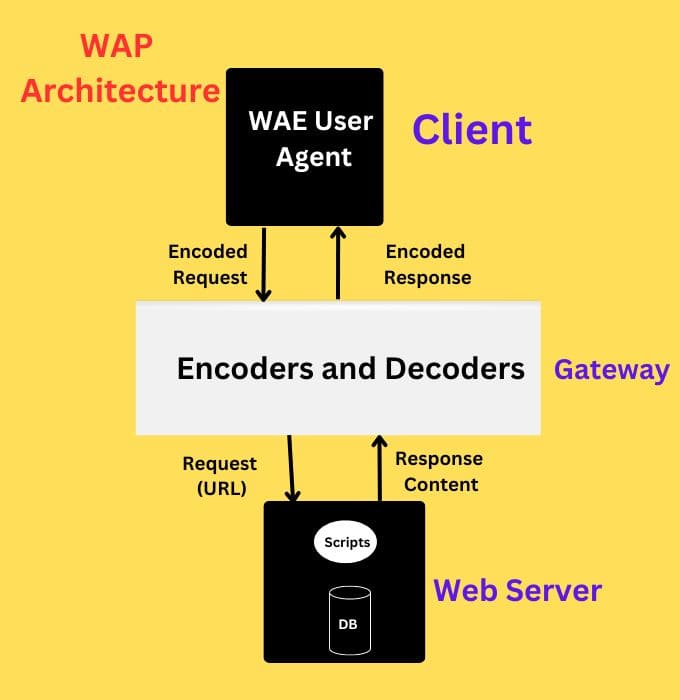
WAP architecture is made up of several components that work together to deliver web content to mobile devices. Here’s a brief overview of these components:
WAP Gateway: Acts as a bridge between the mobile device and the internet. It translates requests from the mobile device into standard HTTP requests that can be understood by web servers. It also converts the responses from web servers into a format suitable for the mobile device.
WAP Client: This is the application on the mobile device that interacts with the WAP Gateway. It is responsible for sending requests and displaying the content received from the gateway.
WAP Server: Hosts WAP-enabled content and services. It is similar to a web server but is specifically designed to serve content to WAP clients.
Content Provider: Supplies the content that is accessed through WAP. This could be a website, a service, or an application designed for mobile users.
WAP Protocol Stack
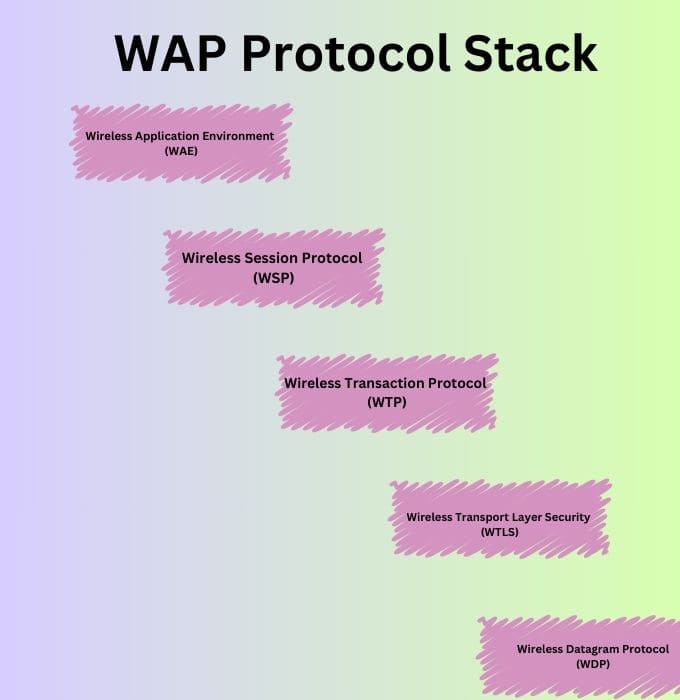
The WAP protocol stack consists of several layers, each with its specific function. Understanding these layers helps to grasp how WAP delivers content to mobile devices.
Wireless Application Environment (WAE): This layer is responsible for defining the application environment and user interface for WAP. It includes:
Wireless Markup Language (WML): A language similar to HTML but designed for mobile devices. It allows the creation of pages that can be easily viewed on small screens.
WMLScript: A scripting language used to create dynamic content and interactive applications within WML pages.
Wireless Session Protocol (WSP): Manages the session between the mobile device and the WAP Gateway. It ensures that data is transmitted correctly and efficiently.
Wireless Transaction Protocol (WTP): Provides transaction support for WAP. It handles the reliability and ordering of messages between the mobile device and the WAP server.
Wireless Transport Layer Security (WTLS): Ensures secure communication between the mobile device and the WAP server by providing encryption and authentication.
Wireless Datagram Protocol (WDP): Handles the transport of data over the wireless network. It is similar to the Internet Protocol (IP) used in traditional web communications.
Example
To illustrate how WAP works, let’s look at some basic examples of WML and WMLScript.
Example 1: Basic WML Page
Here’s a simple WML page that displays a welcome message:
The <?xml version="1.0" encoding="UTF-8"?> line declares the XML version and encoding.
The <!DOCTYPE wml ...> line specifies the WML Document Type Definition (DTD).
The <wml> element is the root element of the WML document.
The <card> element represents a single screen of content, and <p> contains the text to be displayed.
Example 2: Simple WMLScript
Here’s a basic WMLScript example that performs a simple calculation:
<?xml version="1.0"?>
<WMLScript>
    <script>
        function addNumbers(a, b) {
            return a + b;
        }
      var result = addNumbers(5, 7);
        alert("The result is: " + result);
    </script>
</WMLScript>
Explanation
The function addNumbers(a, b) defines a function that adds two numbers.
var result = addNumbers(5, 7); calls the function with 5 and 7 as arguments.
alert("The result is: " + result); displays the result in an alert dialog.
Key Features of WAP
Compatibility: WAP was designed to work on a variety of mobile devices, including those with different screen sizes and processing capabilities.
Efficiency: By using WML and WMLScript, WAP minimizes the amount of data that needs to be transferred, making it suitable for low-bandwidth connections.
Security: WTLS provides encryption and secure communication, ensuring that sensitive information is protected.
Scalability: WAP allows for the development of applications that can scale to support a large number of users.
Advantages of WAP
Optimized for Mobile Devices: WAP was specifically designed for mobile devices, taking into account their limitations in terms of screen size and bandwidth. This optimization ensures a better user experience on mobile platforms.
Efficient Data Transfer: WAP protocols are optimized to minimize data usage, which is crucial for devices with limited data plans or slow connections. This efficiency reduces loading times and improves performance.
Wide Compatibility: WAP supports a range of mobile devices, making it a versatile solution for delivering web content to various devices. This wide compatibility was essential during its peak usage.
Enhanced Security: With the inclusion of WTLS, WAP provides a secure environment for transmitting data, protecting user information from potential threats.
Standardization: WAP introduced a standardized approach to mobile web access, facilitating the development of applications and services that could work across different devices and networks.
Disadvantages of WAP
Limited Functionality: WAP’s capabilities were limited compared to modern web technologies. The constrained environment meant that complex applications and rich multimedia content were difficult to support.
Outdated Technology: As technology evolved, WAP became outdated. Modern smartphones and mobile networks now use advanced technologies like HTML5 and responsive design, which offer richer experiences and better performance.
Fragmentation Issues: Different versions of WAP and variations in implementation led to compatibility issues and fragmentation across devices and networks. This fragmentation made it challenging for developers to create consistent user experiences.
User Experience: The early implementations of WAP were often criticized for having a poor user experience. Limited graphics, small screens, and slow connections contributed to a less satisfying browsing experience.
Decline in Use: With the advent of smartphones and high-speed mobile internet, WAP usage declined significantly. Most users now access mobile content through modern web technologies and applications.
Frequently Asked Questions
What is the primary purpose of WAP?
The primary purpose of WAP is to enable mobile devices to access web content and services over wireless networks.
How does a WAP gateway work?
A WAP gateway translates requests from the mobile device into standard web requests and converts the responses back into a format suitable for the mobile device.
How does WAP ensure secure communication?
WAP uses Wireless Transport Layer Security (WTLS) to provide encryption and authentication, ensuring that data transmitted between the mobile device and server is secure.
Can WAP be used with modern smartphones?
While WAP was crucial for early mobile internet access, modern smartphones and technologies have largely replaced it with more advanced protocols like HTML5 and mobile-friendly websites.
Conclusion
The Wireless Application Protocol (WAP) architecture played a significant role in enabling mobile devices to access web content. By understanding its components, protocol stack, and key features, you can appreciate how WAP laid the foundation for mobile web technologies. Despite being largely replaced by more modern technologies, WAP was an essential step in the evolution of mobile communications.
You can also check out our other blogs on Code360.







 1+ registered

