Do you think IIT Guwahati certified course can help you in your career?
Introduction
Automatically interpreting and analysing the meaning of words and pre-processing textual input can be complex in Natural Language Processing (NLP). We frequently employ lexicons to help with this. A lexicon, word-hoard, wordbook, or word-stock is a person's, language's, or branch of knowledge's vocabulary. We frequently link the text in our data to the lexicon, which aids us in comprehending the relationships between those terms.
WordNet is a fantastic lexical resource. Its unique semantic network aids in the discovery of word relationships, synonyms, grammar, and other topics. This aids NLP tasks like sentiment analysis, automatic language translation, and text similarity.
This article demonstrates some of WordNet's features and explores how you can learn more about your language data.
Word Sense
Word sense refers to the different meanings or interpretations that a word can have in different contexts or situations. For example, the word "bank" can refer to a financial institution, the side of a river, or a slope.
Semantic Relations
Semantic relations describe the relationships between words or concepts in a language. Common semantic relations include:
Synonymy: Words with similar meanings, such as "big" and "large."
Antonymy: Words with opposite meanings, such as "hot" and "cold."
Hyponymy/Hypernymy: Hierarchical relationships where one word (hyponym) is a subtype of another word (hypernym), such as "rose" (hyponym) being a type of "flower" (hypernym).
Meronymy/Holonymy: Part-whole relationships where one word (meronym) denotes a part of another word (holonym), such as "wheel" (meronym) being a part of "car" (holonym).
Homonymy: Words with the same spelling or pronunciation but different meanings, such as "bat" (flying mammal) and "bat" (sports equipment).
What is Wordnet?
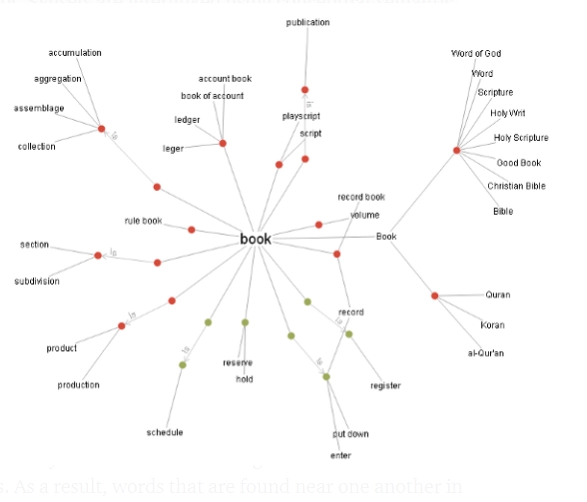
WordNet is a massive lexicon of English words. Nouns, verbs, adjectives, and adverbs are arranged into synsets,' which are collections of cognitive synonyms that communicate a separate concept. Conceptual-semantic and linguistic links like hyponymy and antonymy are used to connect synsets.
WordNet is similar to a thesaurus in that it groups words according to their meanings. There are, nevertheless, some key distinctions.
For starters, WordNet connects not just word forms — strings of letters — but also word senses. As a result, terms in the network that are close to one another are semantically disambiguated.
For starters, WordNet connects not just word forms — strings of letters — but also word senses. As a result, terms in the network that are close to one another are semantically disambiguate.
Structure of WordNet
WordNet is a lexical database of the English language that organizes words into synsets (sets of synonymous words) and describes their semantic relationships. Here's a simplified diagram illustrating the structure of WordNet:
WordNet: The top-level entity represents the entire WordNet database.
Synsets: Synsets are sets of synonymous words grouped together based on shared meanings or concepts.
Synset: Each synset contains a group of words (lemmas) that are semantically related and represent the same concept or meaning.
Word: Individual words (lemmas) are linked to synsets, indicating their membership in a particular synset.
In WordNet, synsets are interconnected through various semantic relations such as synonymy, antonymy, hypernymy, and meronymy, forming a rich network of lexical information. This structure allows WordNet to be used for tasks like word sense disambiguation, semantic similarity calculation, and natural language processing.
How to use WordNet
The Natural Language Toolkit (NLTK) is a Python module for natural language processing. It has many corpora, toy grammars, trained models, and, most importantly, WordNet, which is of importance to this site. The English WordNet module in the NLTK module has 155,287 words and 117,659 synonym sets.
Synset is a type of basic interface used in NLTK that allows you to look up words in WordNet. Synset instances are a collection of synonyms that communicate the same idea. Some words have only one Synset, while others have multiple.
Understanding Synset
from nltk.corpus import wordnet
syn = wordnet.synsets('hello')[0]

print ("Name of Synset : ", syn.name())

# Word Definition
print ("Meaning of Synset : ", syn.definition())

# a collection of phrases in which the word is used in context
print ("Synset's example : ", syn.examples())
Output:
Name of Synset : hello.n.01
Meaning of Synset : an expression of greeting
Synset's example : ['every morning they exchanged polite hellos']
To acquire a list of Synsets, use wordnet.synsets(word). This can be empty list (if no such word exists) or contain only a few items.
Hypernyms and Hyponyms
Hypernyms are more esoteric terms.
More specific terms are referred to as hyponyms.
Synsets are grouped in a structure similar to that of an inheritance tree, therefore both spring to mind. A root hypernym can be found at the top of this tree. Hypernyms are a means of classifying and grouping words based on their resemblance.
Code:
from nltk.corpus import wordnet
synset = wordnet.synsets('hello')[0]
print ("Synset's name : ", synset.name())
print ("Synset abstract term : ", synset.hypernyms())
print ("Specific term of Synset : ", synset.hypernyms()[0].hyponyms())
synset.root_hypernyms()
print ("\nSynset root hypernerm : ", synset.root_hypernyms())
Output:
Synset's name : hello.n.01
Synset abstract term : [Synset('greeting.n.01')]
Specific Term of Synset : [Synset('calling_card.n.02'), Synset('good_afternoon.n.01'),
Synset('good_morning.n.01'), Synset('hail.n.03'), Synset('hello.n.01'),
Synset('pax.n.01'), Synset('reception.n.01'), Synset('regard.n.03'),
Synset('salute.n.02'), Synset('salute.n.03'), Synset('welcome.n.02'),
Synset('well-wishing.n.01')]
Synset root hypernerm : [Synset('entity.n.01')]
To create a class to look up words in WordNet, you can utilize a library like NLTK (Natural Language Toolkit) in Python. Here's a basic explanation:
Import NLTK: Import the NLTK library in your Python script.
Initialize WordNet: Initialize the WordNet corpus using nltk.download('wordnet').
Create Lookup Class: Define a class to encapsulate the functionality for looking up words in WordNet.
Implement Lookup Method: Implement a method in the class to look up words in WordNet and retrieve relevant information such as synsets, definitions, and semantic relations.
Handle Exceptions: Handle exceptions that may occur during the lookup process, such as words not found in WordNet or invalid input.
Using a Simple WordNetTagger()
The SimpleWordNetTagger() in NLTK is a class that assigns part-of-speech (POS) tags to words based on their definitions in WordNet. Here's how you can use it:
Import NLTK: Import the NLTK library in your Python script.
Initialize WordNet: Ensure that WordNet corpus is initialized using nltk.download('wordnet').
Create Tagger Instance: Create an instance of the SimpleWordNetTagger() class.
Tag Words: Use the tag() method of the tagger instance to tag words with POS based on WordNet definitions.
Handle Errors: Handle any errors that may occur during tagging, such as words not found in WordNet or invalid input.
WordNetTagger class at the end of an NgramTagger backoff chain
In NLTK, the WordNetTagger class can be used as part of an NgramTagger backoff chain to improve tagging accuracy. Here's how it works:
Initialize NgramTagger: Create an instance of the NgramTagger class, which is a statistical POS tagger.
Set WordNetTagger as Backoff: Set the WordNetTagger class as the backoff tagger for the NgramTagger. This means that if the statistical tagger fails to tag a word, the WordNetTagger will be used as a fallback.
Tag Words: Use the tag() method of the NgramTagger instance to tag words with POS. If the statistical tagger fails for any word, the WordNetTagger will attempt to tag it based on WordNet definitions.
Handle Errors: Handle any errors or inconsistencies in tagging, ensuring that the tagging process is robust and accurate.
Finding Similarity Using WordNet
WordNet provides a measure of similarity between words based on their semantic relations. Here's how to find similarity using WordNet:
Import NLTK: Import the NLTK library in your Python script.
Initialize WordNet: Ensure that WordNet corpus is initialized using nltk.download('wordnet').
Calculate Similarity: Use WordNet's wup_similarity() method to calculate the Wu-Palmer similarity between two synsets. This method computes the similarity based on the depth of the two synsets in the WordNet hierarchy.
Handle Errors: Handle any errors that may occur during similarity calculation, such as invalid input or words not found in WordNet.
Frequently Asked Questions
Is WordNet a lexicon?
WordNet is a big English lexical database. Cognitive synonyms (synsets) are groups of nouns, verbs, adjectives, and adverbs that each communicate a distinct concept.
Is WordNet a corpus?
Princeton built WordNet, a lexical database for the English language that is part of the NLTK corpus. You can use WordNet in conjunction with the NLTK module to look up word definitions, synonyms, and antonyms, among other things.
Is WordNet a thesaurus?
Except that words are arranged by concept and semantic/lexical relations, WordNet can be used as a thesaurus. WordNet has proven to be a valuable tool for word sense disambiguation in NLP. When a word has numerous meanings, WordNet can assist in determining which one is correct.
Does WordNet provide the frequency of words?
In WordNet, every Lemma has a frequency count that is returned by the method lemma. count() , and which is stored in the file nltk_data/corpora/wordnet/cntlist.
Why is WordNet useful?
WordNet is useful for natural language processing tasks as it provides a structured lexical database, offering synonymy, semantic relations, and hierarchical organization, facilitating language understanding and analysis.
Conclusion
So, in a nutshell, Wordnet is an important utility for NLP and behaves like a dictionary to find out various words and meanings for NLP applications.
Hey Ninjas! Don't stop here; check out Coding Ninjas for Machine Learning, more unique courses, and guided paths. Also, try Coding Ninjas Studio for more exciting articles, interview experiences, and fantastic Data Structures and Algorithms problems.







 7+ registered

