Do you think IIT Guwahati certified course can help you in your career?
Introduction
Chef is an open-source cloud deployment and configuration management tool. Anyone can use it to organize servers, whether they are in a departmental data center or the cloud.
Chef's integrated testing framework is called Test Kitchen. It makes it possible to create test recipes executed on the VMs after they have been created and converged using the cookbook. The test recipes are run on that VM to confirm that everything functions. ChefSpec is a tool that merely mimics a Chef run.
Let’s dive into the article to know more about it.
kitchen.yml
Make use of Test Kitchen to automatically test data from cookbooks using any set of platforms and test suites:
It is defined in a kitchen.yml file.
The driver plugin architecture is used.
supports cookbook testing across a variety of cloud providers and virtualization technologies
Supports all widely used testing frameworks in the Ruby community
Utilizes an extensive collection of basic pictures supplied by Bento
Syntax
A kitchen.yml file's basic structure is as follows:
The platform instances utilized for cookbook testing will be created using a driver named driver_name. Unless a platform or suite specifies a driver to override the default driver for that platform or suite, all platforms and suites use this driver by default; a driver defined for a suite will override a driver set for a platform.
The method for simulating the Chef Infra Client during testing is determined by provisioner_name. The most popular provisioners used for testing cookbooks are chef-zero and chef-solo.
When performing tests, verifier_name indicates the program to use, such as inspec.
When sending commands to the test instance remotely, choosing a transport to use is specified by transport_name. On Windows, winrm is the standard transport. All other operating systems, by default, use ssh transport.
The platform on which Test Kitchen will conduct cookbook testing is called platform_version.
platforms may specify Chef Infra Server characteristics shared by a group of test suites.
Each suite_name grouping in the test suite collection suites defines a specific cookbook feature that must be tested. A run list must be specified for each suite_name.
The properties of each suite_name grouping may be specified as a hash: {foo: "bar"}
A suite_name grouping may employ excludes and includes to exclude or include one (or more) platforms.
Provisioner Settings
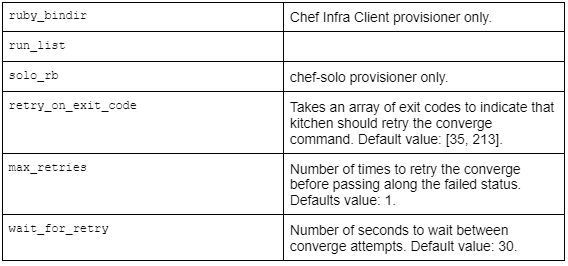
The following Chef-specific options are programmable in Test Kitchen for the chef-zero provisioner:
The provisioner area in the kitchen.yml file may include these settings when chef-zero or chef-solo is the provisioner.
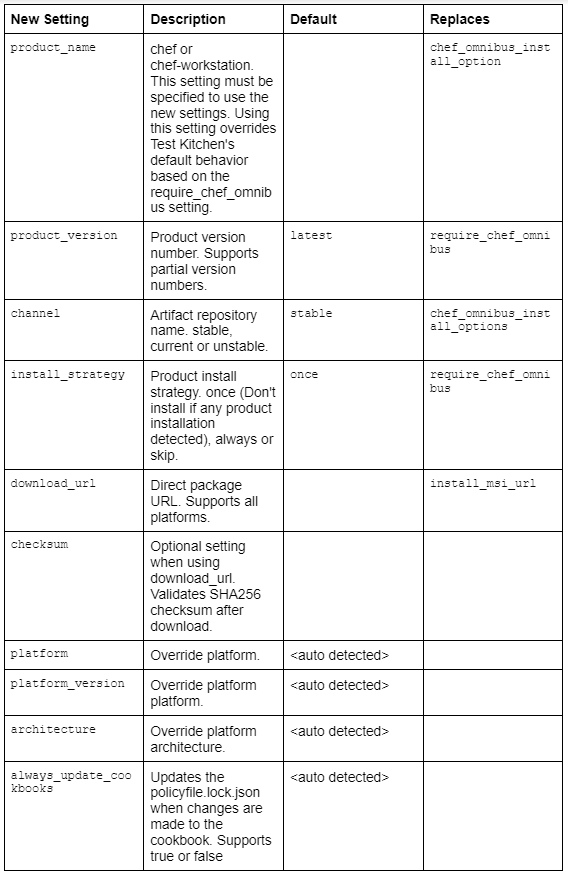
New Provisioner Settings
Transport Settings
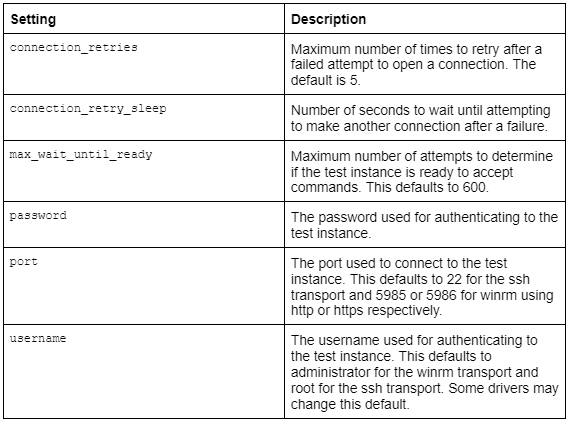
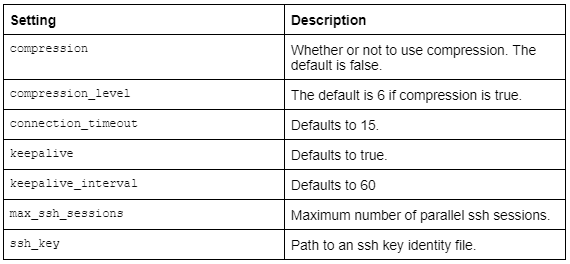
The following configuration options for ssh or winrm transports are available in Kitchen:
The kitchen's transport section might get these settings added while using SSH as the transport:
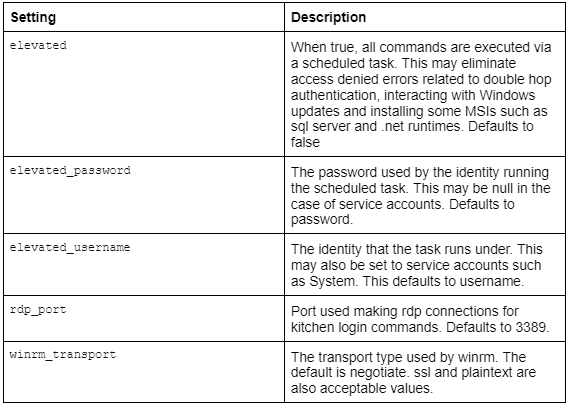
The kitchen's transport section might get these settings added .yml file when using WinRM as the transport:
Work with Proxies
Test Kitchen recognizes proxies using the environment variables http_proxy, https_proxy, and ftp_proxy. To find the proxy configuration settings, the client.rb file is read. Depending on these (and related) parameters, Chef Infra Client will configure the ENV variable if http_proxy, https_proxy, and ftp_proxy are supplied in the client.rb file. For example:
In the kitchen.yml file, Test Kitchen additionally supports http_proxy and https_proxy. You can manually set them or have your local environment variables read them:
driver:
  name: vagrant

provisioner:
  name: chef_zero
  # Set proxy settings manually, or
  http_proxy: 'http://user:password@server:port'
  https_proxy: 'http://user:password@server:port'

  # Read from local environment variables
  http_proxy: <%= ENV['http_proxy'] %>
  https_proxy: <%= ENV['https_proxy'] %>
This will not set the environment variables for proxies used by programs other than Chef. Applications running within the VM can have their proxy environment variables set using the Vagrant plugin vagrant-proxyconf.
Chef Infra Client Settings
Chef Infra Client-specific options may be defined in a kitchen.yml file, such as whether to override the client.rb file settings or require the Chef installer or the URL from which the Chef Infra Client is downloaded.
Bento is a Chef Software project that creates base test environments for VirtualBox, Parallels, and VMware for various operating systems to be used with Test Kitchen. Test Kitchen, by default, uses the foundation pictures supplied by Bento, while users can alternatively create their images using HashiCorp Packer.
Drivers
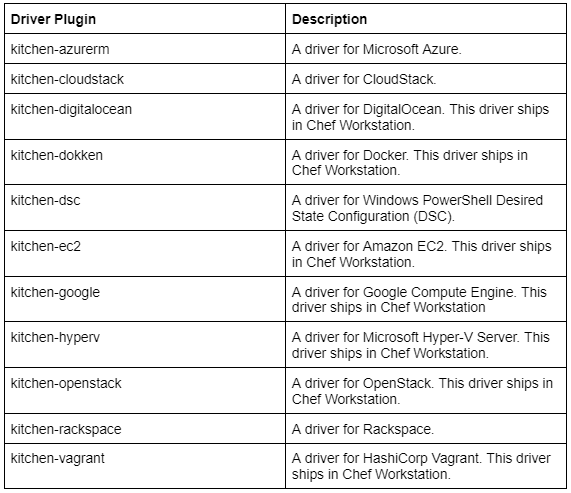
Thanks to a driver plugin design, Test Kitchen can test instances on cloud providers like Amazon EC2, Google Compute Engine, and Microsoft Azure.
Most drivers include driver-specific configuration options and must be added to the kitchen. Before Test Kitchen can use that platform for cookbook testing, it must first create a yml file. Please consult the driver-specific documentation for details regarding these settings.
Popular drivers include:
Kitchen-vagrant
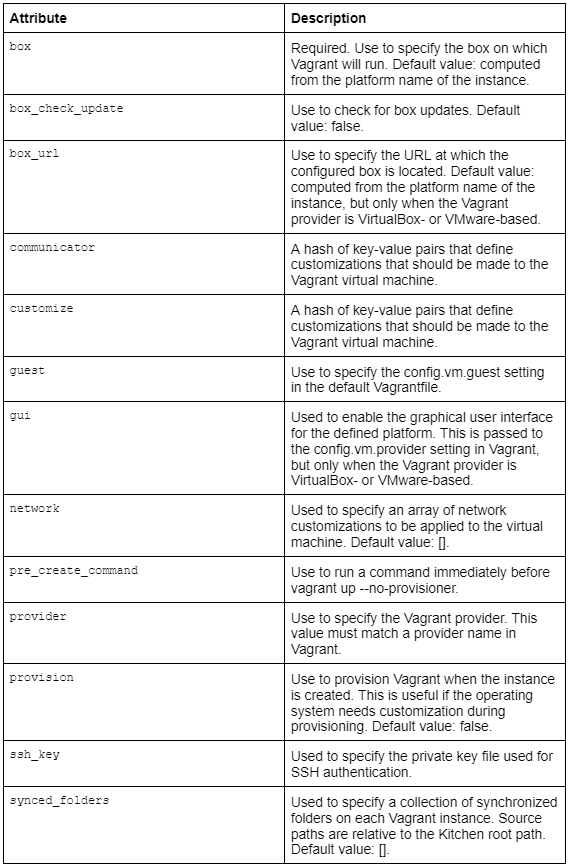
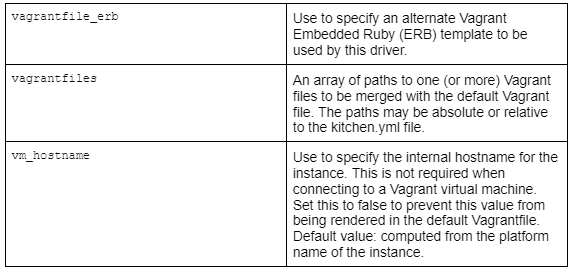
Each instance of Kitchen in a sandboxed directory receives a single Vagrantfile thanks to the kitchen-vagrant driver. Test Kitchen uses the kitchen-vagrant driver by default, which is compatible with VirtualBox and VMware Fusion and necessitates Vagrant 1.1.0 or higher.
When setting up a kitchen-vagrant for Chef, the following attributes are used:
Examples
Actual kitchen.yml files used in Chef-maintained cookbooks are displayed in the examples below.
Chef, Chef Workstation
The example below demonstrates the provisioner settings required to start up the Chef Workstation and then converge the node using the built-in version of Chef.
You can set up Chef Workstation's most recent version by:
Reboots can be managed by Test-Kitchen by adjusting the provisioner's wait for retry, max retries, and retry on exit code parameters (when started through the Chef Infra Client) in the following kitchen.yml file:
When a name starts with "win," Windows is the default operating system. Windows operating systems, by default, use winrm transport. Here, elevated is true, which simulates a local user by running Windows commands through a scheduled job.
Chef Infra Client Cookbook
Chef Infra Client's configuration is ensured by the following kitchen.yml file, a component of the chef-client cookbook.
The following kitchen.yml file configures the Chef Infra Server in a straightforward tiered setup, with two front-end servers, one back-end server, and two add-ons (Chef Push Jobs and Chef management console). All three test suites employ Chef Infra Server attributes, which are defined in the platforms block's attributes section:
By specifying the provisioner's retry on exit_code, max_retries, and wait_for_retry properties, Test-Kitchen may manage reboots (when started using the Chef Infra Client) in the following kitchen.yml file:
provisioner:
   name: chef_zero
   retry_on_exit_code:
     - 35 # 35 is the exit code signaling that the node is rebooting
     - 1
   max_retries: 1
   client_rb:
     exit_status: :enabled # Opt-in to the standardized exit codes
     client_fork: false  # Forked instances don't return the real exit code
Note on Linux Node: When the timeout period has passed, Chef Infra Client and the node race to see who can exit/shutdown first, so you may or may not get the exit code out of Linux instances. This is because the shutdown command blocks (as opposed to the Windows variant, which registers the reboot and returns immediately). If so, you can include 1 in the retry_on_exit code array, which should cover both scenarios.
Frequently Asked Questions
What is Kitchen Yml?
Chef offers a testing framework called Kitchen. Its goal is to provide several kitchen setup possibilities.
What is the location of Kitchen Yml?
A path to a kitchen can be established using several environment variables in Test Kitchen. yml or a file located in $HOME/. kitchen/config.
How is the test kitchen operated?
A test kitchen is a kitchen where test cooks and chefs research, test, and produce recipes for home cooks. It is typically furnished with many cooking stations. Recipes are frequently tested several times and reviewed by many people.
Conclusion
In this article, we have extensively discussed the kitchen.yml file. We have also explained the syntax, provisioner settings, transport settings, driver settings, chef infra client settings, various examples, and more.








 1+ registered

