Do you think IIT Guwahati certified course can help you in your career?
Introduction
In this article, you will learn about Ajax in JSF. A server-side component-based UI framework called JSF is used. It is utilized for creating web apps. It offers a clearly defined programming model, a powerful API, and a robust tag library.
Ajax Tag
It stands for Asynchronous Javascript and XML. Ajax uses a technique of sending and receiving data asynchronously from servers using JavaScript's HTTPXMLObject. JavaScript code updates portions of the website without reloading it by exchanging data with the server using the Ajax approach.
In JSF, ajax is supported using the f:ajax tag. Below is the typical ajax tag.
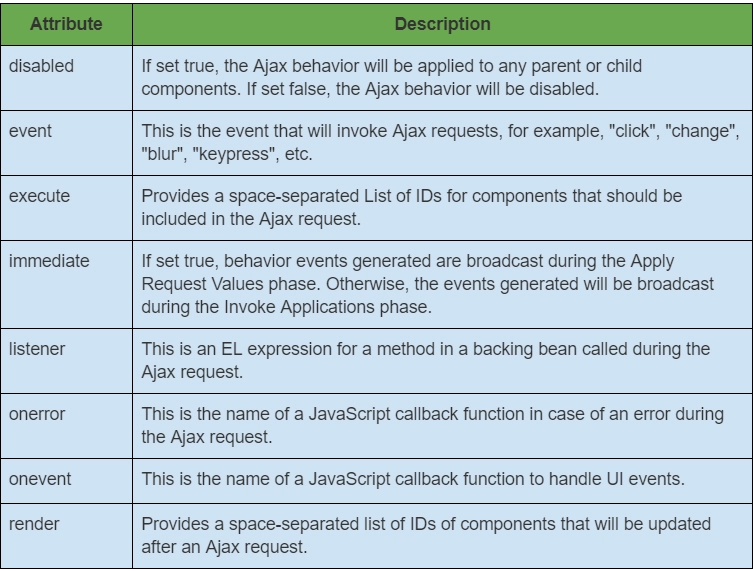
JSF provides several attributes in its ajax tag. All the ajax tag's attributes are given in the table below.
Example on JSF Link Tag
In this section, we will discuss a simple example on Ajax to understand the theory we have studied above. Here, we will create a JSF program with a java class named "UserInfo" which is used to set and get the values. We also create an ajaxDemo.xhtml file to create our Ajax webpage.
UserInfo.java
package com.tutorialspoint.test;

import java.io.Serializable;

import javax.faces.bean.ManagedBean;
import javax.faces.bean.SessionScoped;

@ManagedBean(name = "userInfo", eager = true)
@SessionScoped
public class UserInfo implements Serializable {
   private static final long serialVersionUID = 1L;
   private String nme;

   public String getName() {
      return nme;
   }

   public void setName(String name) {
      this.nme = name;
   }

   public String getWelcomeMessage() {
      return "Welcome To " + nme;
   }
}
ajaxDemo.xhtml
<?xml version = "1.0" encoding = "UTF-8"?>
<!DOCTYPE html PUBLIC "-//W3C//DTD XHTML 1.0 Transitional//EN"
"http://www.w3.org/TR/xhtml1/DTD/xhtml1-transitional.dtd">


<html xmlns = "http://www.w3.org/1999/xhtml"
   xmlns:f = "http://java.sun.com/jsf/core"
   xmlns:h = "http://java.sun.com/jsf/html"
   xmlns:tp = "http://java.sun.com/jsf/composite/tutorialspoint">

   <h:head>
      <title>JSF Ajax Demo</title>
   </h:head>

   <h:body>
      <h2>Ajax Demo</h2>

      <h:form>
         <h:inputText id = "inputName" value = "#{userInfo.nme}"></h:inputText>
         <h:commandButton value = "Show">
            <f:ajax execute = "inputName" render = "outputMessage" />
         </h:commandButton>
         <h2><h:outputText id = "outputMessage"
            value = "#{userInfo.welcomeMessage != null ?
            userInfo.welcomeMessage : ''}"
         /></h2>
      </h:form>
   </h:body>
</html>
Output:
After Pressing the "Show" button, the string below will get updated without refreshing the webpage.
Frequently Asked Questions
Why should we use JSF?
It establishes a clear and noticeable distinction between the behavior and display of the online application. The design of business logic and user interfaces can be separated.
Does Ajax work with other programming languages also?
Absolutely. The best platform for AJAX is Java! You can create AJAX user sites, serve incoming AJAX requests, manage server-aspect nations for AJAX users, and connect AJAX users to your company resources using Java Enterprise Edition servers.
What is polling in Ajax?
AJAX polling is regularly obtaining near-live data by requesting it from a server.
When to use synchronous and asynchronous requests?
I don't see many use cases where an asynchronous request is preferable because it might prevent processing a web page's data.
How is synchronous request work in Ajax?
The synchronous request, which is essential in a quick response mechanism, waits for the server's answer before requesting to continue with the next section of the script execution. To keep the service incredibly responsive, this should be avoided regularly. The synchronous request technique should be applied wherever it is necessary or inevitable.
Conclusion
In this article, we have extensively discussed Ajax in JSF. We discussed the functionality and attributes of the ajax tag and tried out an example.







 7+ registered

