Do you think IIT Guwahati certified course can help you in your career?
Introduction🤔
Ruby is an interpreted general-purpose programming language. Ruby is an object-oriented programming language in and of itself. Ruby, like Python and PERL, is a server-side programming language. Ruby metaprogramming frequently requires the dynamic definition of methods. The dynamic changing of procedures is also prevalent.
This article will discuss a technique for modifying methods called Alias Chaining.
What is Alias Chaining❓
Alias chaining is a technique for modifying methods. It operates as follows:
Create an alias for the method to be updated first. This alias is used to identify the method's unaltered version.
Then, create a new version of the method. This new version should use the alias to call the original version, but it can include whatever functionality is required before and after that.
Using Ruby Alias Keyword💻
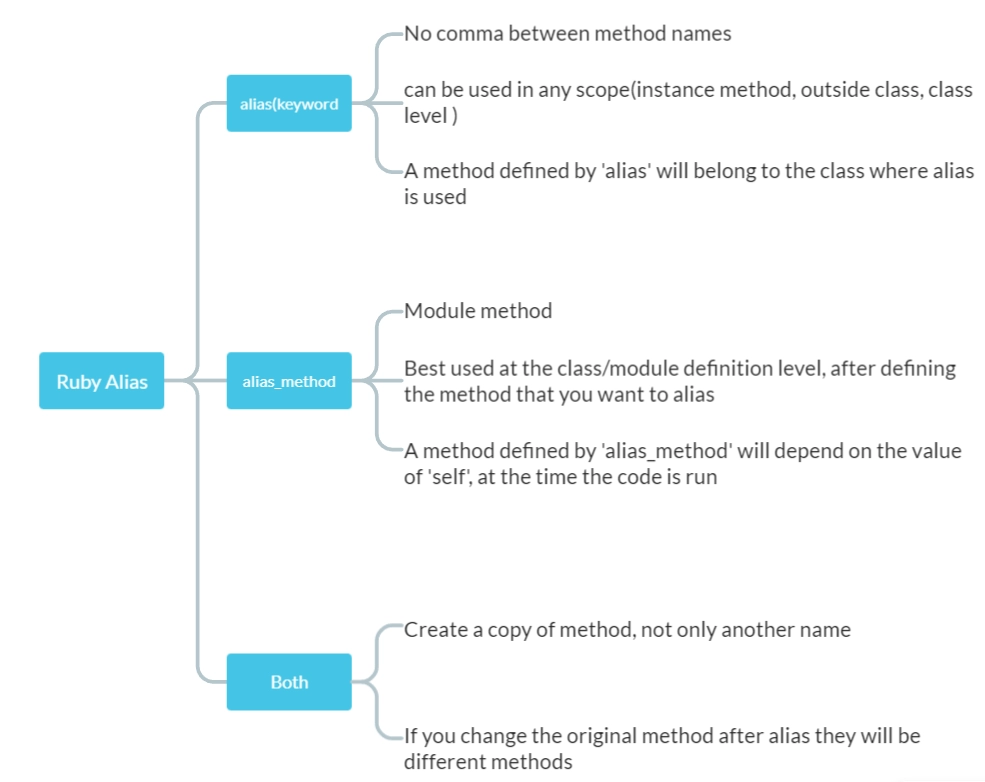
There are two ways to give a Ruby method a different name:
alias (keyword)
alias_method
Tracing Files Loaded and Classes Defined🧐
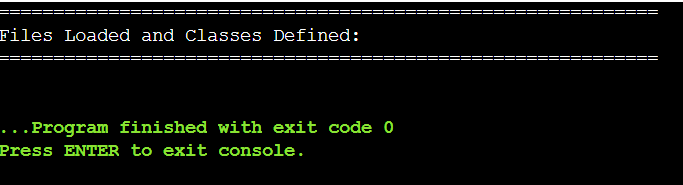
Using Alias Chaining, we can keep track of all files loaded, and classes declared in a program. When the application finishes, it generates a report. This code may "instrument" an existing program to better understand what it is doing.
Inserting the following line at the beginning of the program is one approach to using alias chaining:
require 'classtrace'
However, using the -r option on your Ruby interpreter provides a simpler solution:
Before starting the program, the -r option loads the chosen library.
For example:
Code
# We define this module to hold the global state we require so that
# we don 't alter the global namespace any more than necessary.

module ClassTrace

# This array contains our list of files loaded and classes defined.
# Each element is a subarray holding the class defined or the
# file loaded and the stack frame where it was described or loaded.

T = [] # Array to hold the files loaded

# Now define the constant OUT to specify where tracing output goes.
# This defaults to STDERR, but can also come from command - line arguments

if x = ARGV.index("--traceout") # If argument exists
OUT = File.open(ARGV[x + 1], "w") # Open the specified file
ARGV[x, 2] = nil # And remove the arguments
else
  OUT = STDERR # Otherwise
default to STDERR
end
end

# Alias chaining step 1: define aliases

for the original methods
alias original_require require
alias original_load load

# Alias chaining step 2: define new versions of the methods

def require(file)
ClassTrace::T << [file, caller[0]] # Remember what was loaded where
original_require(file) # Invoke the original method
end

def load( * args)
ClassTrace::T << [args[0], caller[0]] # Remember what was loaded where
original_load( * args) # Invoke the original method
end

# This hook method is invoked each time a new class is defined

def Object.inherited(c)
ClassTrace::T << [c, caller[0]] # Remember what was defined where
end

# Kernel.at_exit registers a block to be run when the program exits
# We use it to report the file and class data we collected

at_exit {
  o = ClassTrace::OUT
  o.puts "=" * 60
  o.puts "Files Loaded and Classes Defined:"
  o.puts "=" * 60

  ClassTrace::T.each do |what, where |
    if what.is_a ? Class # Report class(with hierarchy) defined
  o.puts "Defined: #{what.ancestors.join('<-')} at #{where}"
  else # Report file loaded
  o.puts "Loaded: #{what} at #{where}"
  end
  end

}
You can also try this code with Online Ruby Compiler
The above example uses static alias chaining to track all calls to the Kernel.require and Kernel.load functions.
Chaining Methods for Thread Safety🧐
Our method Module handles the alias chaining.synchronize method, which employs a helper method Module.create_alias is used to define a suitable alias for each given method.
For example:
Code
# Define a Module.synchronize_method that alias chains instance methods
# so they synchronize on the instance before running.

class Module

# This is a helper
function
for alias chaining.

# Given a method name(as a string or symbol) and a prefix, create
# a unique alias

for the method, and
return the name of the alias

# as a symbol.Any punctuation characters in the original method name
# will be converted to numbers so that operators can be aliased.

def create_alias(original, prefix = "alias")

# Stick the prefix on the original name and convert punctuation

aka = "#{prefix}_#{original}"
aka.gsub!(/([\=\|\&\+\-\*\/\^\!\?\~\%\<\>\[\]])/) {
  num = $1[0] # Ruby 1.8 character - > ordinal
  num = num.ord
  if num.is_a ? String # Ruby 1.9 character - > ordinal '_' + num.to_s
}

# Keep appending underscores until we get a name that is not in use

aka += "_"
while method_defined ? aka or private_method_defined ? aka
aka = aka.to_sym # Convert the alias name to a symbol
alias_method aka, original # Actually create the alias
aka # Return the alias name
end

# Alias chain the named method to add synchronization

def synchronize_method(m)

# First, make an alias

for the unsynchronized version of the method.
aka = create_alias(m, "unsync")

# Now redefine the original to invoke the alias in a synchronized block.
# We want the defined method to be able to accept blocks, so we
# can't use define_method, and must instead evaluate a string with
# class_eval.Note that everything between % Q {
#  and the matching }
# is a double-quoted string, not a block.

class_eval % Q {
  def # {
    m
  }( * args, & block)
  synchronized(self) {
    # {
      aka
    }( * args, & block)
  }
  end
}
end
end

# This global synchronized method can now be used in three different ways.

def synchronized( * args)

# Case 1: with one argument and a block, synchronize on the object
# and execute the block

if args.size == 1 && block_given ?
  args[0].mutex.synchronize {
    yield
  }

# Case two: with one argument that is not a symbol and no block

return a SynchronizedObject wrapper
elsif args.size == 1 and not args[0].is_a ? Symbol and not block_given ?
  SynchronizedObject.new(args[0])

# Case three: when invoked on a module with no block, alias chain the
# named methods to add synchronization.Or,

  if there are no arguments,

# then alias chain the next method defined.

elsif self.is_a ? Module and not block_given ?

  if (args.size > 0) # Synchronize the named methods

args.each {
  | m | self.synchronize_method(m)
}
else

  # If no methods are specified, synchronize the following method defined

eigenclass = class << self;
self;
end
eigenclass.class_eval do # Use eigenclass to define class methods

  # Define method_added

for notification when next method is defined
define_method: method_added do |name |

    # First remove this hook method

  eigenclass.class_eval {
    remove_method: method_added
  }

# Next, synchronize the method that was just added

self.synchronize_method name
end
end
end

# Case 4: any other invocation is an error

else
  raise ArgumentError, "Invalid arguments to synchronize()"
end
end
You can also try this code with Online Ruby Compiler
The synchronised method is redefined again in the above example. When the method is called within a class or module, it calls synchronize method on each of the symbols provided to it. It can, however, be called without any arguments, which adds synchronisation to whichever instance method is defined next.
Chaining Methods for Tracing🧐
Tracing of named methods of an object is supported through alias chaining. It defines an Object using delegation and method missing. Trace function that returns a traced wrapper object.
Code
# Define trace!And untraced!Instance methodsfor all objects.
# trace!"chains"the named methods by defining singleton methods
# that add tracing functionality and then use super to call the original.
# untrace!deletes the singleton methods to remove tracing.

class Object

# Trace the specified methods, sending output to STDERR.

def trace!( * methods)
@_traced = @_traced || [] # Remember the set of traced methods
# If no methods were specified, use all public methods defined
# directly(not inherited) by the class of this object

methods = public_methods(false) if methods.size == 0
methods.map!{
  | m | m.to_sym


}

# Convert any strings to symbols

methods -= @_traced # Remove methods that are already traced
return
  if methods.empty ? # Return early
if there is nothing to do
  @_traced |= methods # Add methods to set of traced methods

# Trace the fact that we 're starting to trace these methods

STDERR << "Tracing #{methods.join(', ')} on #{object_id}\n"

# Singleton methods are defined in the eigenclass

eigenclass = class << self;
self;
end
methods.each do |m | # For each method m

# Define a traced singleton version of the method m.
# Output tracing information and use super to invoke the
# instance method that it is tracing.
# We want the defined methods to be able to accept blocks, so we
# can 't use define_method, and must instead evaluate a string.
# Note that everything between % Q {
#and the matching }
#is a
# double - quoted string, not a block.Also note that there are
# two levels of string interpolations here.# {}

is interpolated

# when the singleton method is defined.And\ # {}

is interpolated

# when the singleton method is invoked.

eigenclass.class_eval % Q {
  def # {
    m
  }( * args, & block)
  begin
  STDERR << "Entering: #{m}(\#{args.join(', ')})\n"
  result = super
  STDERR << "Exiting: #{m} with \#{result}\n"
  result
  rescue
  STDERR << "Aborting: #{m}: \#{$!.class}: \#{$!.message}"
  raise
  end
  end
}
end
end

# Untrace the specified methods or all traced methods

def untrace!( * methods)
if methods.size == 0 # If no methods specified untrace
methods = @_traced # all currently traced methods
STDERR << "Untracing all methods on #{object_id}\n"
else # Otherwise, untrace
methods.map!{
  | m | m.to_sym
}

# Convert string to symbols

methods &= @_traced # all specified methods that are traced
STDERR << "Untracing #{methods.join(', ')} on #{object_id}\n"
end
@_traced -= methods # Remove them from our set of traced methods

# Remove the traced singleton methods from the eigenclass
# Note that we class_eval a block here, not a string

 (class << self; self; end).class_eval do
    methods.each do |m |
      remove_method m # undef_method would not work correctly
    end
  end

# If no methods are traced anymore, remove our instance var

if @_traced.empty ?
  remove_instance_variable : @_traced
end
end
end
You can also try this code with Online Ruby Compiler
The intriguing part about this example is that it defines singleton methods on the object and utilizes super within the singleton to chain to the original instance method declaration. There are no method aliases generated.
We hope that you have understood everything about alias chaining in Ruby.🤗 Check out this problem - Longest String Chain
Frequently Asked Questions
What is Alias Chaining?
Ruby metaprogramming frequently requires the dynamic definition of methods. The dynamic changing of procedures is also prevalent. Alias chaining is a technique for modifying methods.
How do I use an alias in Ruby?
In Ruby, aliasing a method or variable name means giving the method or variable a new name. Aliasing may provide the programmer with more expressive alternatives when utilizing the class, or it can be used to help override methods and change the behaviour of the class or object.
What is Alias_method_chain?
You may construct a method deliver with switchable SMTP! in which you perform your custom things and then call deliver without switchable SMTP! after you're done by calling alias method chain!
What does prepend do in Ruby?
The module is inserted before the class in the ancestor chain using prepend. This implies that Ruby will examine the module first to determine if an instance method is specified before inspecting the class. This is helpful if you want to add logic to your methods.
How do I use a module in Ruby?
The method definitions are also similar: Module methods are defined similarly to class methods. Like a class method, a module method is called by preceding its name with the module's name and a period, while the module name and two colons reference a constant.
Conclusion
In this article, we have extensively discussed the Alias Chaining in Ruby. After giving a quick overview of the Alias Chaining in Ruby, we spoke about how to put it into practice.









 7+ registered

