Do you think IIT Guwahati certified course can help you in your career?
Introduction🥷
Have you ever wondered how to automate various things like creating and collaborating on software development projects on AWS? Amazon's EC2 Image Builder is a service that makes it easier by automating tasks for us. This blog will learn about Amazon EC2 Image Builder, its features, working, and user permissions. So, let's get started with our writing.
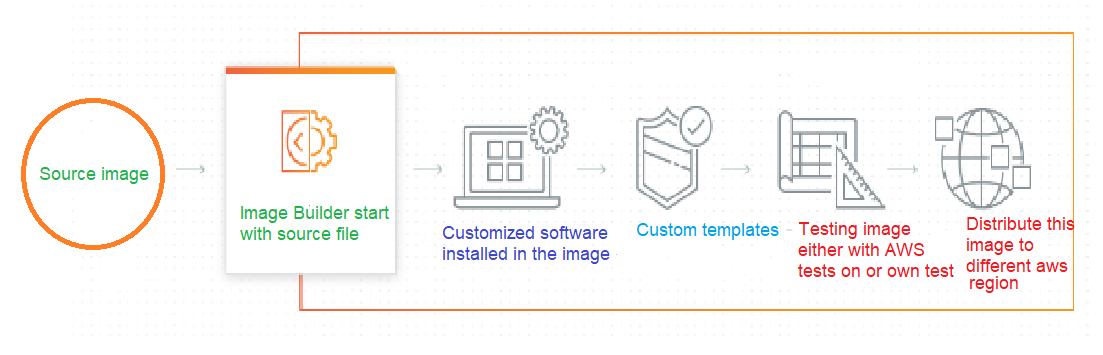
EC2 Image Builder is an AWS tool that automates creating, administering, and deploying customized, secure, and up-to-date server images that come pre-installed and pre-configured with software and settings to match certain IT standards. We will discuss all Amazon EC2 Image Builder in detail further.
EC2 Image Builder
EC2 Image Builder is an AWS tool that automates creating, administering, and deploying customized, secure, and up-to-date server images that come pre-installed and pre-configured with software and settings to match certain IT standards.
Features of EC2 Image Builder🎯
So now, let's discuss some of the features of EC2 Image Builder. It offers a complete computation, query processing, and storage solution for various applications. Amazon Virtual Private Cloud uses Secure Amazon EC2 to provide secure and reliable network access resources.
Automated pipelines to keep images secure and up-to-date
Without building and maintaining automation, EC2 Image Builder dramatically minimizes the effort necessary to create and manage golden pictures. Customers use a simple wizard in the AWS dashboard to construct an automated workflow. When software updates are available, Image Builder creates a new image without forcing users to manually initiate image builds.
Validate and deploy high-quality images into production
With AWS-provided tests and your tests, EC2 Image Builder makes it simple to check the functionality and security of your images before using them in production. In addition, Image Builder prevents photos flaws typically caused by insufficient testing. AWS tests can be used to quickly verify functionality, such as whether images boot, whether required drivers are deployed, and whether images are hardened to CIS standards.
Simplified sharing of images across AWS accounts
AWS Resource Access Manager and AWS Organizations are integrated with EC2 Image Builder to allow AMI sharing between AWS accounts using existing protocols. Image Builder can change AMI launch permissions to limit AWS accounts other than the owner are permitted to use the AMI to deploy EC2 instances.
Setup and working of EC2 Image Builder🚀
The following steps are guided by a console wizard when you create a custom image using the EC2 Image Builder pipeline console.
Specify pipeline details: Enter details about your pipeline, including a name, description, tags, and a build schedule. If you like, you can select manual builds.
Choose recipe: Build an AMI or a container image, depending on your needs. You give your recipe a name and a version, choose a base picture and add components for producing and testing for both sorts of output images. You can also select automatic versioning, ensuring that your base image always runs on the most recent operating system version (OS) version. Container recipes include providing Dockerfiles and the Amazon ECR repository to which your output Docker container image should be uploaded.
Define infrastructure configuration: Image Builder creates EC2 instances in your account to edit images and execute validation tests. The Infrastructure configuration options define the infrastructure for the cases that will operate during the construction process in your AWS account.
Define distribution settings: Define distribution settings: After the build is complete and all tests have been passed, select the AWS Regions to which your image will be distributed. You can add image distribution for additional Regions to the pipeline, which will automatically distribute your photo to the Region where it executes the build. So now let's see all service integrations we can get with Image builder.
Image Builder service integrations🧑💻
To help you track your activity and handle image build difficulties, EC2 Image Builder interfaces with the following AWS services to provide extensive event analytics, logging, and monitoring.
Amazon EventBridge
Amazon EventBridge is a serverless event bus solution for connecting your Image Builder application to data from other AWS services. A rule in EventBridge matches incoming events and sends them to processing targets. A single rule can transmit an event to numerous targets at the same time.
AWS CloudTrail
This service works with AWS CloudTrail, a service that records AWS calls for your account and sends log files to an Amazon S3 bucket. You can use the data generated by CloudTrail to figure out what AWS services requests were successful, who made them, when they were made, and so on. See Logging EC2 Image Builder API calls with AWS CloudTrail for additional information on CloudTrail's connection with Image Builder.
Amazon CloudWatch Logs
Support for CloudWatch Logs is turned on by default. During the build process, logs are kept on the instance and sent to CloudWatch Logs. Before the image is created, the instance logs are purged from the instance.
Semantic versioning💯
Image Builder uses semantic versioning for organizing resources and ensuring that they have all unique IDs. The semantic version has four nodes:
<major>.<minor>.<patch>/<build>
You can assign values for the first three and can filter on the rest of them.
Each object's Amazon Resource Name (ARN) includes semantic versioning at the level that relates to that object, as follows:
In any of the nodes, Versionless ARNs and Name ARNs do not include specific values. The nodes are either not given at all or are specified as wildcards, such as x.x.x.
Only the first three nodes are present in version ARNs: <major>.<minor>.<patch>
All four nodes in a build version ARN point to a specific build for a specific version of an object.
OS Supported by Image Builder support🦾
EC2 Image Builder support various operating system types some of which are listed below:
Amazon Linux 2
Windows Server 2012, 2016, and 2019
Ubuntu Server 16 and 18
Red Hat Enterprise Linux (RHEL) 7 and 8
Cent OS 7 and 8
SUSE Linux Enterprise Server (SLES) 15
Security in EC2 Image Builder🔐
Cloud security is a significant priority at AWS. You have access to a data centre and network architecture intended to meet the needs of the most security-conscious enterprises as an AWS customer.
Data Protection
In EC2 Image Builder, the AWS shared responsibility paradigm applies to data protection. As seen in the architecture, AWS is in charge of safeguarding the global infrastructure that sometimes underpins the whole AWS Cloud. You are in charge of keeping your material hosted on this entire infrastructure under your control. The security configuration and management activities for the AWS services you use are covered in this material.
Infrastructure security
As detailed in the Amazon Web Services: Overview of Security Processes whitepaper, the AWS global network security processes secure EC2 Image Builder as a managed service.
To access Image Builder via the network, you use AWS published API calls. Transport Layer Security (TLS) 1.0 or later must be supported by clients. TLS 1.2 or later is recommended. Clients must also implement cipher suites that provide perfect forward secrecy (PFS), such as Ephemeral Diffie-Hellman (DHE) or Elliptic Curve Ephemeral Diffie-Hellman (EC-DHE) (ECDHE). These modes are supported by most current systems, including Java 7 and beyond.
Pricing💸
Using EC2 Image Builder to create custom AMI or container images is free. Other services employed in the process, however, are subject to ordinary price. Depending on your configuration, the following list contains the use of several AWS services that may incur expenses when you develop, produce, store, and distribute your custom AMI or container images.
Creating an Amazon EC2 instance
Using Amazon S3 to store logs
Using Amazon Inspector to validate images
Amazon EBS (Amazon Elastic Block Store) Snapshots for your AMIs storage
Using Amazon ECR (Amazon Elastic Container Registry) to store container pictures
Frequently Asked Questions❓
What is the EC2 image builder used for?
Before using your images in production, you can simply evaluate them for functionality, compatibility, and security compliance with AWS-provided tests and your own tests using EC2 Image Builder. As a result, the number of faults in photographs due to insufficient testing is reduced.
What is the difference between AMI and EC2 image builders?
One of the sorts of images you may produce with Image Builder is an Amazon Machine Image (AMI), which is the basic unit of deployment on Amazon EC2. An AMI is a pre-configured virtual machine image that includes the operating system (OS) and software needed to deploy EC2 instances.
What is important of image building in an organization?
One of an organization's most valuable assets is its corporate image. Customers are comforted by it and know they are making the best purchases because of it. Additionally, it affects the attitudes of not only customers but also staff members, the media, analysts, and influencers.
What is the output of Image Builder?
Image Builder creates AMI-format server images. These AMIs can be exported to VHDX, VMDK, or OVF for on-premises use via VMIE.
How is Image Builder priced?
Apart from the expense of the underlying AWS resources used to produce, store, and share the photos, Image Builder is free.
Conclusion
In this article, we have extensively discussed EC2 Image Builder. We saw its main features and learned about its working pricing and security. After reading about the Amazon EC2 Image Builder, are you not feeling excited to read/explore more articles on the topic of AWS? Don't worry; Coding Ninjas has you covered. To learn, seeImportant AWS Interview Questions, AWS EC2 Auto Scaling, AWS CloudHSM, AWS License Manager, and AWS DeepRacer Part-1. Until then, All the best for your future endeavors, and Keep Coding.
Live masterclass
Top 5 GenAI Projects to Crack 25 LPA+ Roles in 2026
by Shantanu Shubham
11 May, 2026
03:00 PM
Zero to Data Analyst: Amazon Analyst Roadmap for 30L+ CTC
by Abhishek Soni
10 May, 2026
06:30 AM
Google SDE Roadmap to land 30L+ CTC
by Saurav Prateek
10 May, 2026
08:30 AM
PowerBI + AI for Data Analytics: Secure 30L+ CTC at Netflix
by Ashwin Goyal
11 May, 2026
01:30 PM
Top 5 GenAI Projects to Crack 25 LPA+ Roles in 2026
by Shantanu Shubham
11 May, 2026
03:00 PM
Zero to Data Analyst: Amazon Analyst Roadmap for 30L+ CTC







 16+ registered

