


Table of contents
1.
Introduction
2.
debug - Print statements during execution
2.1.
Options
2.2.
Example
3.
Debugger
3.1.
On a Task
3.2.
On a play
4.
Frequently Asked Questions
4.1.
How to debug with Ansible?
4.2.
How do I run Ansible in verbose mode?
4.3.
How do I see Ansible hosts?
5.
Conclusion
Last Updated: Aug 13, 2025

Ansible - Debug

Author Nagendra
0 upvote
Career growth poll
Do you think IIT Guwahati certified course can help you in your career?

Introduction

Ansible offers thousands of modules, which are reusable standalone scripts that Ansible runs on your behalf. The Ansible debug module prints statements when playbooks are being executed. It can also be used to debug variables and expressions without affecting how the playbook is executed.

The blog explains the details of Ansible - Debug along with its example and details of the debugger.

debug - Print statements during execution

The Ansible debug module can be used to print a message from the Ansible playbook as well as the value of a variable. It's simple to utilise the Ansible debug module.

Let's have a look at the options available.

Options

The following table consist of the options in debug:
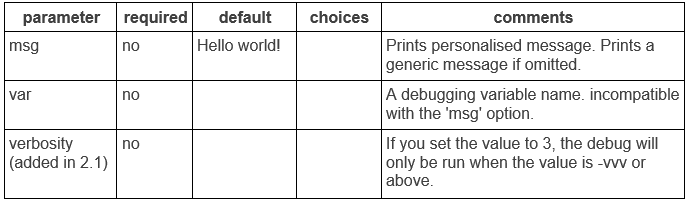
Options Table

To help you comprehend, let's look at an example.

Example

The debug module in Ansible's most fundamental use is to display straightforward statements to stdout (Standard Output). Think of a playbook with the following information in it.

Code:

---
- name: Ansible debug module in action
  hosts: all
  tasks:
          - name: Print a simple statement
            debug:
              msg: "Hey Ninja !! Happy Coding !!"


"Hey Ninja !! Happy Coding !!" is printed when the playbook is executed.

Let's look at the details of debugger.

Debugger

A debugger is included in the strategy plugins for Ansible. You can use this debugger to run debugging tasks. In the context of the job, you have access to all the debugger's features. To fix the issue, you can edit the module arguments, check or change the value of variables, and rerun the job using the updated arguments and variables.

Any block with a name attribute, such as a role, block, task, or play, can utilise the debugger keyword.

The debugger keyword will accept a variety of values, including:

  • Always: Regardless of the result, always call the debugger.
     
  • Never: Under no circumstances use the debugger.
     
  • On_failed: Only when a task is unsuccessful does On_failed call the debugger.
     
  • On_unreachable: When the host was inaccessible, the debugger was only called by the On_unreachable function.
     
  • On_skipped: The debugger is only called by On_skipped if the task is skipped.

On a Task

Code:

- name: Execute a command  
  command: false  
  debugger: on_failed  

On a play

Code:

- name: Play  
  hosts: all  
  debugger: on_skipped  
  tasks:  
    - name: Execute a command  
      command: true  
      when: False  

Frequently Asked Questions

How to debug with Ansible?

Using an environment variable or a parameter in ansible.cfg, you can turn on the task debugger globally.

How do I run Ansible in verbose mode?

The simplest method is to add -vvv to the execution line and run ansible or ansible-playbook with greater verbosity.

How do I see Ansible hosts?

The —list-hosts option displays all of the host IPs from your inventory file.

Conclusion

In this article, we have extensively discussed the details of Ansible - Debug along with its example and details of debugger.

We hope that this blog has helped you enhance your knowledge regarding Ansible - Debug, and if you would like to learn more, check out our articles on Ansible. You can refer to our guided paths on the Coding Ninjas Studio platform to learn more about DSADBMSCompetitive ProgrammingPythonJavaJavaScript, etc. To practice and improve yourself in the interview, you can also check out Top 100 SQL problemsInterview experienceCoding interview questions, and the Ultimate guide path for interviews. Do upvote our blog to help other ninjas grow. Happy Coding!!

Thank You image
Live masterclass

