Do you think IIT Guwahati certified course can help you in your career?
Introduction
Are you looking to expand your mobile testing capabilities and leverage the power of the cloud?
If so, the App Center Integration in Katalon may be just what you need. App Center is a cloud-based testing platform provided by Microsoft that allows users to test their apps on a wide range of devices and configurations. With the App Center Integration in Katalon, you can easily execute your Katalon test scripts on these devices and take advantage of the powerful features and capabilities provided by App Center. In this article, we will introduce you to the App Center Integration in Katalon and show you how to set it up and get started.
Let's dive into the article to know more about App Center Integration in Katalon.
App Center Integration
Sideload is an important feature of Katalon Studio that was created for running Katalon Studio tests on App Center Test. Katalon customers cannot immediately run their tests on App Center Test since App Center Test only enables running tests using supported frameworks, such as Appium tests written in Java with JUnit.
Using sideload to package Katalon applications in JUnit format, you can run your Katalon test scripts on devices made available by App Center Test.
Integrate with App Center
The following are the requirements for the integration of the App Center:
You must have an active Katalon Runtime Engine license.
You must have Katalon Studio's latest version.
You must have a key for Katalon API.
You must have Apache Maven version 3.3.9 or later.
You must have NodeJSversion 6.3 or later.
You must have an App Center CLI.
Configure your Katalon Project
When you are working on the integration of the App center, you must first configure your project. Before running the test, you must manually create an instance of the Appium Driver. After that, set the instance as the currently used instance. Now, follow the below steps to configure the project properly:
Start by opening your project in Katalon Studio.
Next, enter the following code snippet at the start of the test script or in the listener, known as "Before Test Case".
You can change the desired capabilities as per your app. As you have created the Appium driver manually, you will have to remove all the Mobile.startApplication(...) or Mobile.startExistingApplication(...) in the test cases.
Now, you can compress your Katalon project and put it into a zip file.
Update sideload
The following steps will help you when you are working with sideload:
The first point is you must have sideloads. You can download or clone them from the Katalon Studio sideload repository.
Next, put the zip file into the directory "src/test/resources" in the sideload.
Now you can configure the sideload. You can update the sideload file in the following two ways.
You can configure the bat file, i.e., "upload.sh/upload.bat". You will need to open the upload.bat file and change the variables as needed.
<app_name>: This is the App's Name on App Center.
<path_to_app_file>: This is the path of the App that you will upload to the App Center.
<device_id/device_name>: This is the Device Name or Device ID on the App Center. If you want to find your Device Name or Device ID on App Center, click on Test, then Device sets.
<katalon_version>: This is the version of the Katalon Studio.
<katalon_project_path>: This is the relative path of the Katalon project's folder in the zip package.
<katalon_project_package_file>: This is the package file.
<katalon_execute_args>: These are the arguments of the Katalon run command.
You must set the argument browserType as "Chome".
You must exclude the argument projectPath from this parameter.
You can configure the bat file, i.e., "src/test/java/com/katalon/sideload/SideloadTest.java". You will have to open the file and look for the SideloadTest section. Now, you can change the variables as per the need.
API_KEY: This is the API key that you will use.
KATALON_VERSION: This is the version of the Katalon Studio.
KATALONPROJECTPATH: This is the path of the project in the package file.
KATALONPROJECTPACKAGE_FILE: This is the package file.
KATALONEXECUTEARGS: These are the arguments of the Katalon run command.
You must set the argument browserType as "Chome".
You must exclude the argument projectPath from this parameter.
Now, you can pack the sideload project by running the package.sh/package.bat file.
Finally, you can upload and execute your sideload project on the App Center by running the upload.bat/upload.sh file.
public class SideloadTest {
/**
 * This will be the Katalon API Key you will use.
 */
private static final String TEST_API_KEY = "this-will-be-your-api-key";
/**
 * This is the Katalon version that you will use to execute the test.
 */
private static final String TEST_KATALON_VERSION = ""; // You can leave this blank to use the latest version of katalon studio.
private static final String TEST_KATALON_PROJECT_PACKAGE_FILE = "KatalonTestProject.zip";
private static final String TEST_KATALON_PROJECT_PATH = "";
private static final String TEST_KATALON_EXECUTE_ARGS = String.format("-retry=0 -testSuitePath=\"Test Suites/Regression Tests\" -executionProfile=default -browserType=Chrome -apiKey=\"%s\"", TEST_API_KEY);
You can also try this code with Online Java Compiler
Now, let's see how you can upload a project packaged in JUnit using sideload and execute a test run on the App Center test.
You can first download or clone sideload from the Katalon Studio sideload repository.
After that, you can go to the path of the workspace by going to the path: "src/test/resources/KatalonDemoProject.zip" You can create and start a new test on the App Center.
Now, you can pack the sideload project by running the package.sh/package.bat file.
Finally, you can upload the sideload:
You should do the configuration in the upload.bat/upload.sh file before you upload the project.
You can run the upload.bat/upload.sh file to upload and execute the sideload project on App Center.
Supported integrations in the Katalon Platform
In this section, we will provide an overview of the supported integrations in the Katalon Platform, including their supported versions and the features and capabilities they provide.
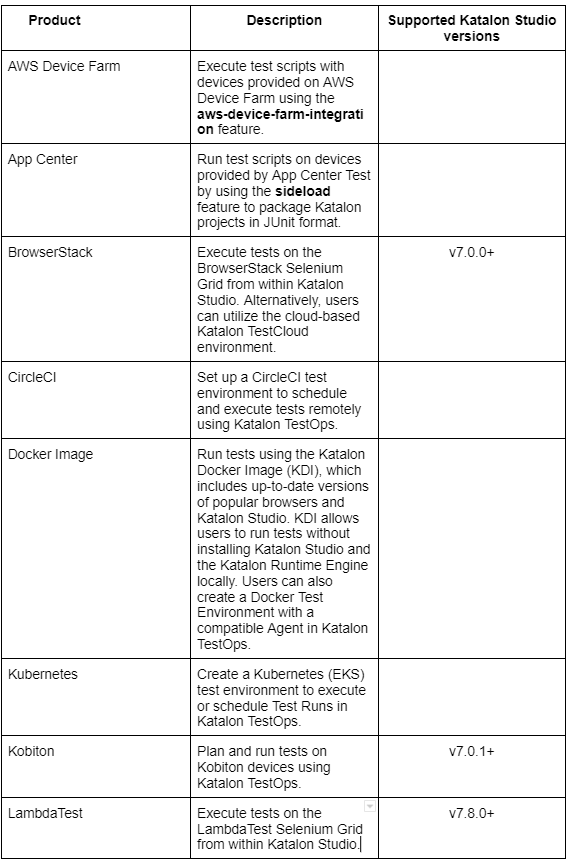
Cloud device integration
Katalon Studio is a comprehensive tool for automated testing that allows users to execute test scripts on various platforms and environments. The following table outlines the various integration options available for executing tests with Katalon Studio and the supported versions:
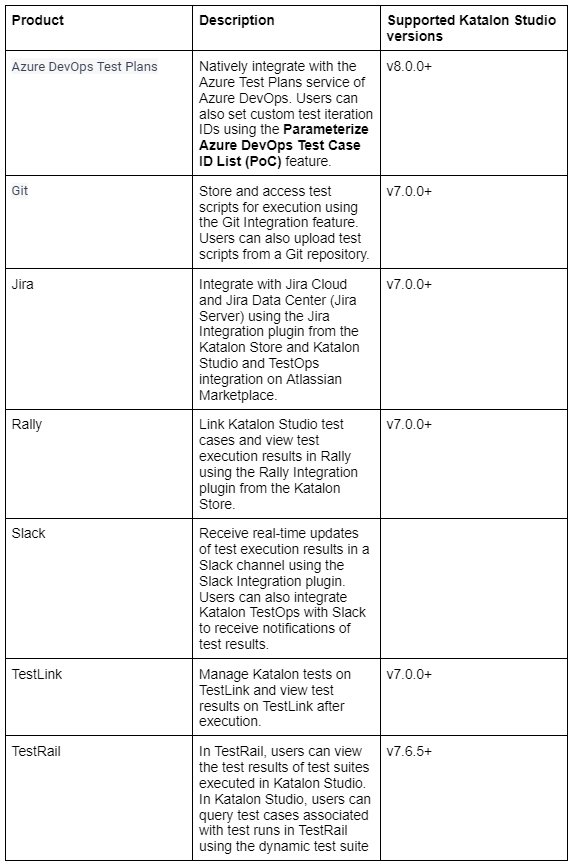
ALM integration
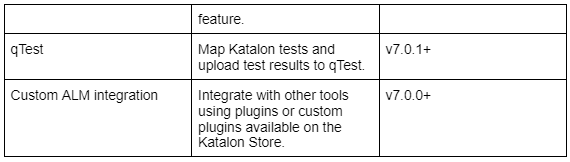
Katalon Studio offers a range of integration options for managing and tracking test cases and execution results within various tools. The following table outlines these integration options and the supported versions of Katalon Studio:
CI/CD integration
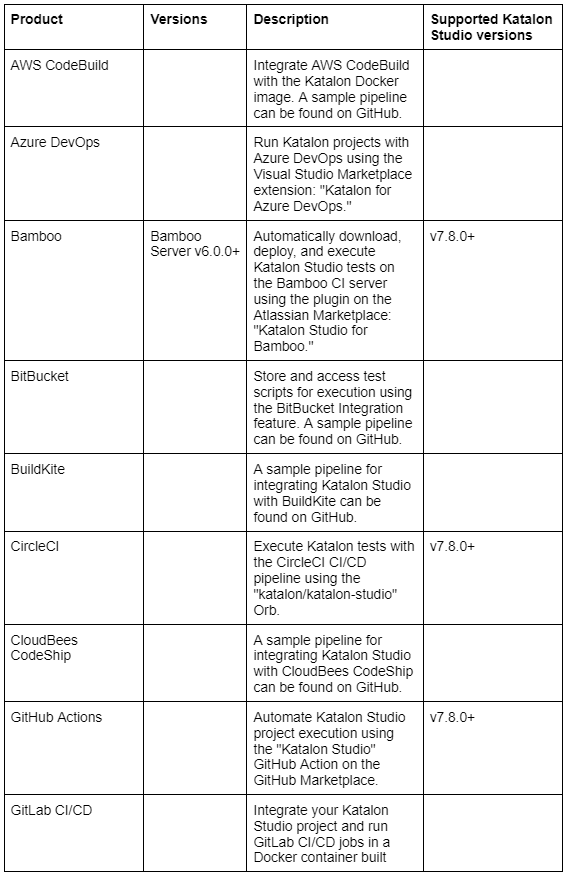
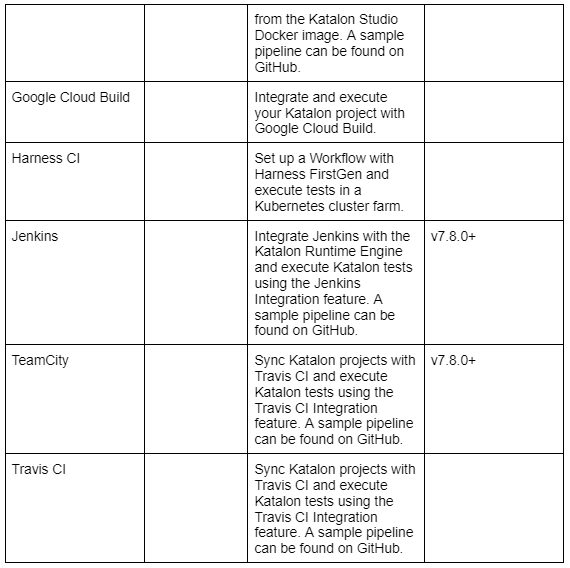
Katalon Studio offers a range of integration options for executing tests within various continuous integration (CI) and continuous delivery (CD) platforms. The following table outlines these integration options and the supported versions of each platform and Katalon Studio:
Migration from other tools
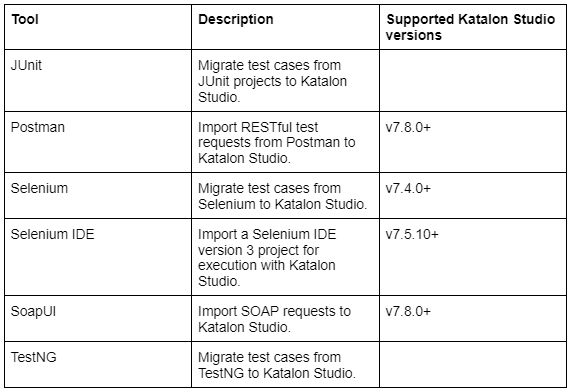
Katalon Studio provides a range of tools and features for importing and migrating test cases from other platforms. The following table outlines these tools and their supported versions of Katalon Studio:
These tools and features can be used to bring existing test cases into Katalon Studio and integrate them with the platform's features and functionality.
Framework integration
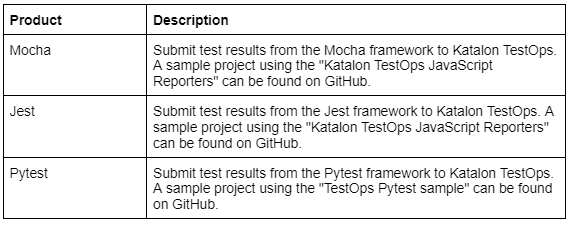
Katalon TestOps provides integration options for submitting test results from various testing frameworks. The following table outlines these integration options:
These integration options allow users to track and manage test results within the Katalon TestOps platform, regardless of the testing framework being used.
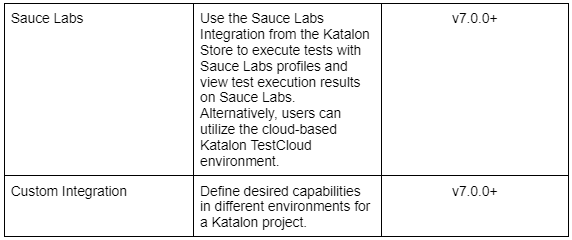
Other integration
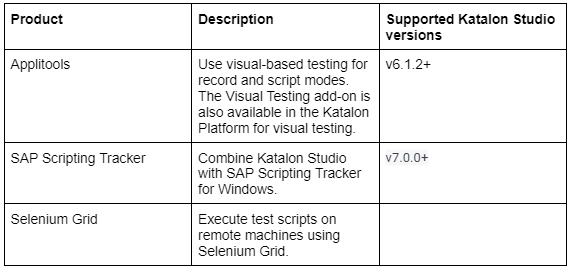
Katalon Studio offers a range of products and features for executing and managing tests on remote machines and platforms. The following table outlines these products and their supported versions of Katalon Studio:
These products and features allow users to expand the reach of their testing efforts and utilize a variety of remote execution options.
Integration Katalon Studio - Standalone Edition with other Katalon Platform tools
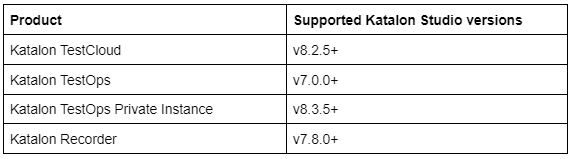
Katalon offers a range of products for testing and test management, each with its own supported versions of Katalon Studio. The following table outlines these products and their supported versions:
Katalon TestCloud is a cloud-based test environment for executing and managing tests. Katalon TestOps is a test management platform that offers a range of features for scheduling, executing, and tracking tests. Katalon TestOps Private Instance is a self-hosted version of the Katalon TestOps platform. Finally, Katalon Recorder is a tool for creating and editing test scripts in Katalon Studio.
Frequently Asked Questions
What is App Center?
App Center is a cloud-based mobile testing platform that allows users to test their apps on a wide range of devices and configurations. It is provided by Microsoft and is part of the Azure DevOps suite of tools.
Does Katalon Studio support continuous integration (CI) and continuous delivery (CD)?
Yes, Katalon Studio offers a range of integrations with popular CI/CD tools such as Jenkins, TeamCity, and CircleCI, allowing users to automate the execution and management of their test cases as part of their CI/CD pipeline.
What is Katalon Studio used for?
Katalon is used to create and reuse automated test scripts for UI without coding. It allows running automated tests of UI elements. It can be launched on Microsoft Windows, macOS, and Linux.
Is Katalon Studio still free?
The free plan of Katalan Studio is suitable for individuals and small teams. The Premium plan is best for large groups or SMBs who need different test results and have production-grade testing workloads.
What language does Katalon use?
Katalon Studio uses Groovy, a language built on top of Java. It has to load many libraries for parsing test data, test objects, and logging.
Conclusion
In this article, we have discussed App Center Integration in Katalon Studio. We have also explained app center integration, integration with app center and supported integrations in Katalon platform.









 1+ registered

