Do you think IIT Guwahati certified course can help you in your career?
Introduction
In this article, we will understand how to configure testrail integration in katalon studio. It is difficult to manage tests manually, especially when the number is large. That’s why we need solutions like TestRail to manage tests.
To Configure TestRail Integration in Katalon Studio, let’s briefly cover about TestRail first. It is a web-based test management solution used to manage, track, and organize software testing activities by testers, developers, and others. It adheres to a centralized test management paradigm, which facilitates simple communication and allows for the quick creation of tasks across the QA team and other stakeholders.
About Katalon
Katalon Studio, or simply Katalon, is an automated testing software tool. It is suitable for testing web, API, mobile, and desktop applications. It displays test data and execution outcomes in charts, graphs, and reports. Some key components of Katalon studio are test management, test planning, and test execution.
Now, back to how to configure TestRail Integration in Katalon Studio.
Configure TestRail Integration in Katalon Studio
The TestRail Integration plugin connects Katalon Studio with TestRail to provide the following enhanced capabilities:
You may examine the test results of Katalon Studio test suites in TestRail.
You may query test cases connected with TestRail test runs in the dynamic test suite in Katalon Studio.
Some prerequisites to configure TestRail Integration in Katalon Studio:
A Katalon Studio Enterprise license is currently active.
The TestRail Integration plugin was successfully installed. The plugin may be found here: TestRail Integration plugin.
Enable TestRail integration in Katalon Studio
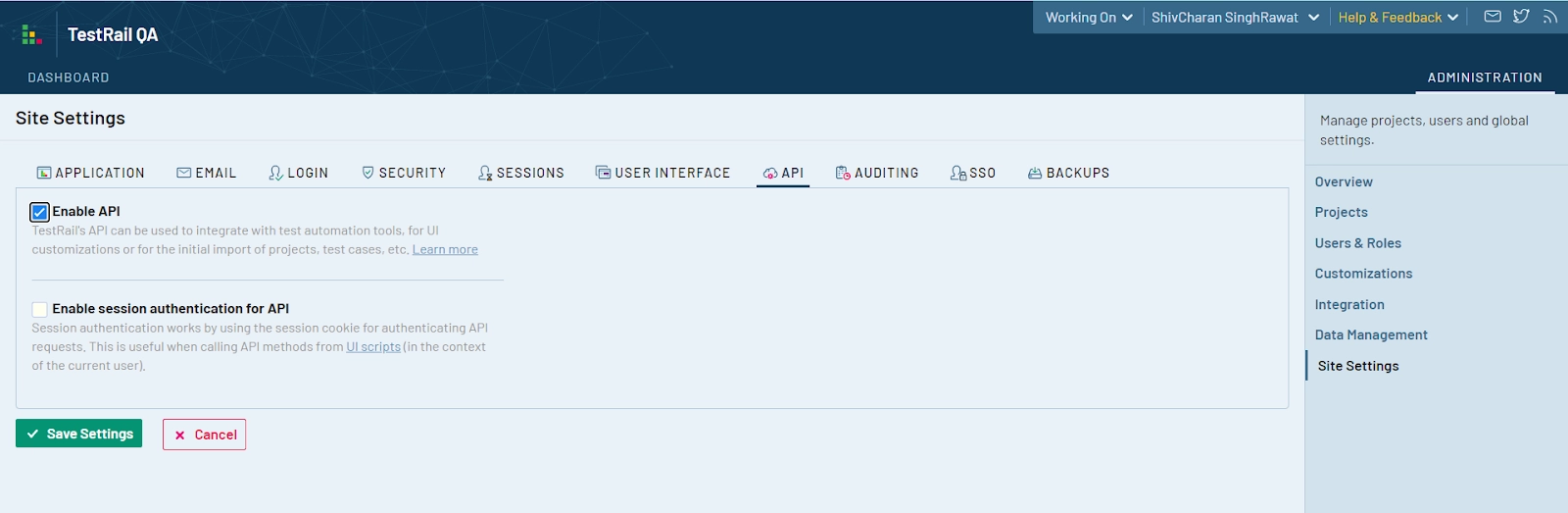
1. Go to your TestRail dashboard and turn on the TestRail API. Log in to your account, then navigate to Administration > Site Settings > API and choose Enable API. Then click the Save Settings button.
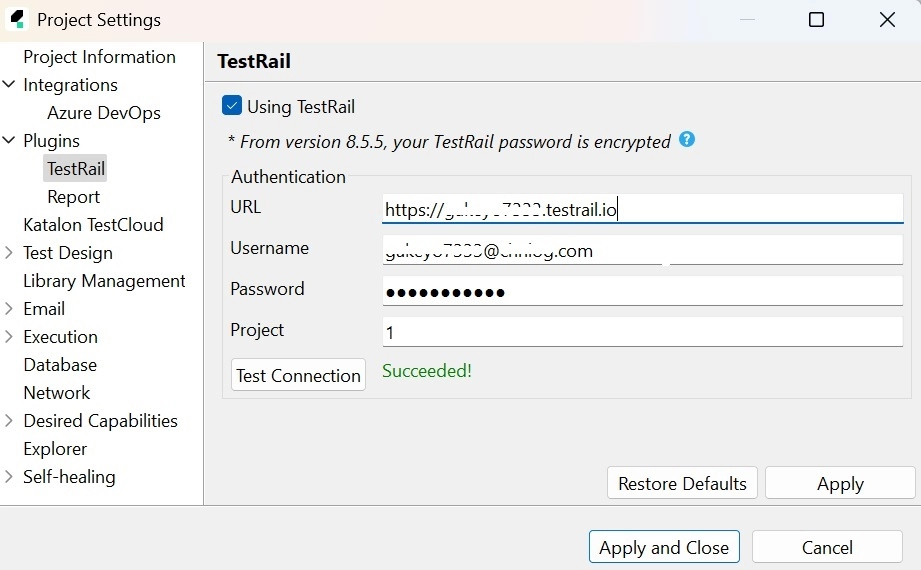
2. Install and activate the TestRail Integration plugin. Now go to Project > Settings > Plugins > TestRail in the main menu and tick the Using TestRail option. Enter the following credentials for authentication:
URL: https://<something123>.testrail.io is the URL to your TestRail instance.
Username: Your TestRail username is your username.
Password: Your TestRail password is required.
Project: The name of your TestRail project (an integer). In the browser, navigate to your TestRail project and look for the ID at the end of the URL to retrieve the project ID. For instance, here is a project URL: https://<something123>.testrail.io/index.php?/projects/overview/1. The project ID is 1 in this case.
3. To test the connection, click Test Connection.
4. Press the Apply and Close buttons.
Congratulations, You have enabled TestRail integration in Katalon Studio successfully.
Map test cases between Katalon Studio and TestRail
You must obtain the TestRail test case ID before mapping a test case between Katalon Studio and TestRail. Do the following:
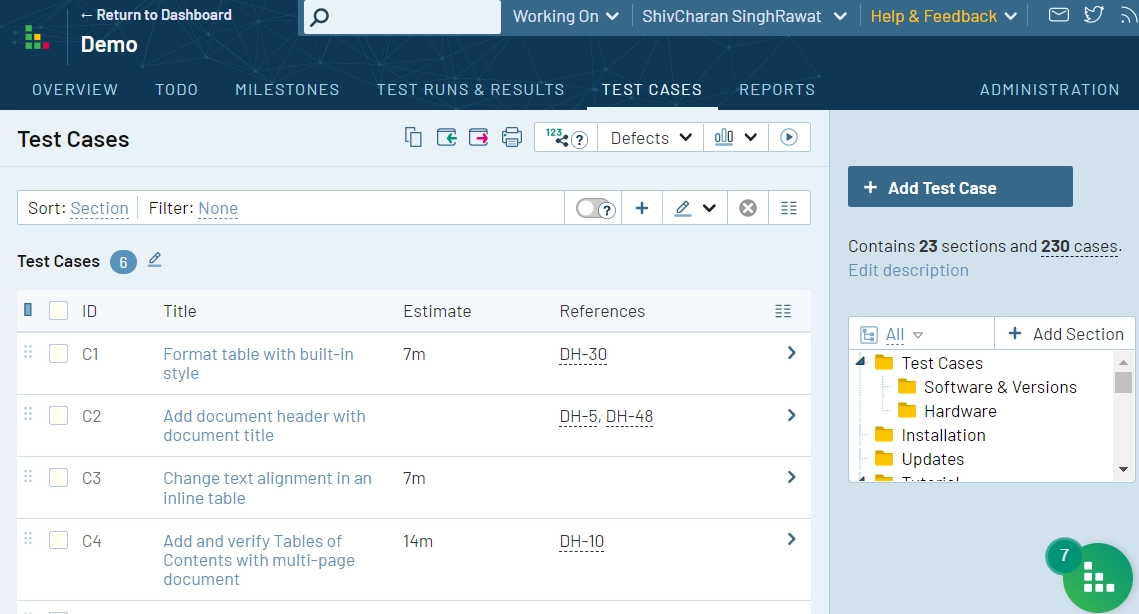
1. Open your project in TestRail and navigate to the Test Cases page to obtain the TestRail test case ID. The list of test cases and their IDs may be found here.
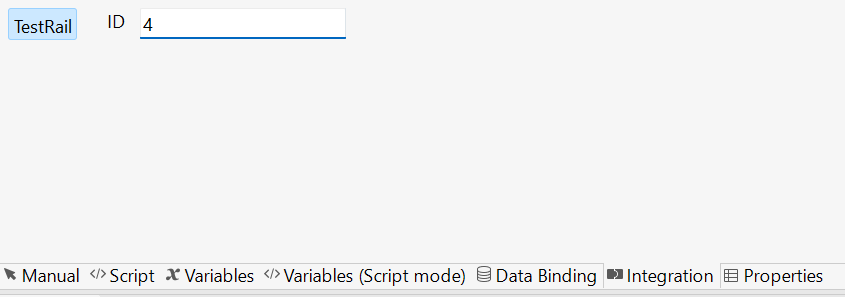
2. Open the test case you wish to map, go to the Integration tab, and enter the corresponding test case ID in TestRail (only the integer part).
3. The Katalon Studio test cases should be saved.
Now you've successfully linked Katalon Studio and TestRail test cases.
Query test cases linked to TestRail in a dynamic test suite
When the TestRail Integration plugin is activated, the dynamic test suite's Query Provider is modified using the TestRail query syntax standard. This allows you to search the dynamic test suite for test cases connected with TestRail test runs.
Take the following steps:
1. Launch Katalon Studio and create a dynamic test suite.
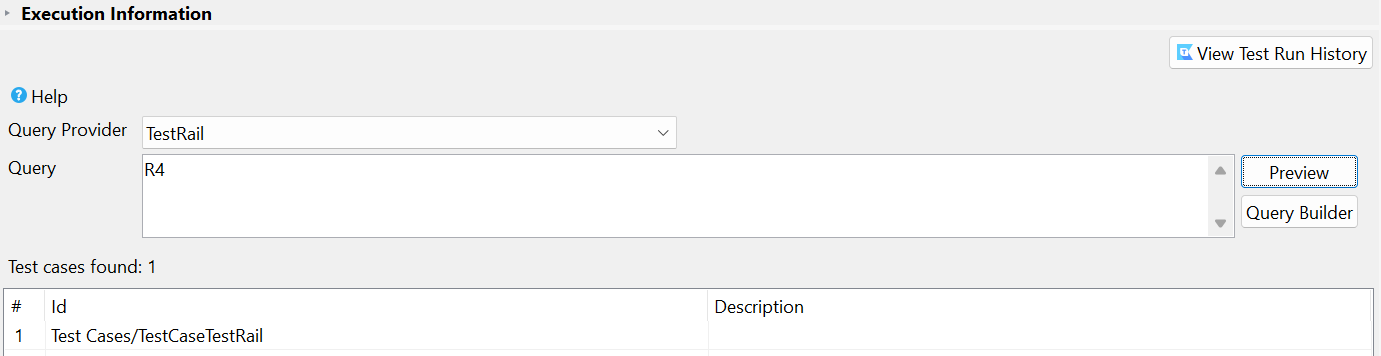
2. Enter the ID of a TestRail test run in the Query text box, then click the Preview button. We wish to query the test cases connected with the test run R4, so we type R4 in the Query text field.
The test cases related to the TestRail test run are shown. You may now run the dynamic test suite that is connected to TestRail and inspect the results in TestRail.
Frequently Asked Questions
What is Testrail?
Testrail is a tool to monitor, track, and organize software tests. Testers, developers, and team leads use it to optimize the development process.
What are automated software testing tools?
Automated software testing tools assist teams and organizations in automating their software testing needs, decreasing the need for human intervention and attaining improved speed, reliability, and efficiency.
What language does Katalon use?
Katalon Studio uses Groovy, which is a Java-based language.
Conclusion
In this article, we will understand how to configure TestRail integration in Katalon Studio.
If you want to explore more, here are some related articles -








 1+ registered

