Do you think IIT Guwahati certified course can help you in your career?
Introduction
Have you ever worked with any automated testing software tools?
This article is focused on one of these automated testing software tools, i.e., Katalon Studio. Katalon Studio is built on the open-source Selenium and Appium automation frameworks. It has a specialized IDE interface for API, mobile, web, and desktop application testing.
Let's dive into the article to learn more about Katalon Studio.
Test Artifacts sharing
You can import and export test artifacts with the help of Test artifacts sharing across Katalon Studio projects. These test artifacts include profiles, test objects, test cases, and custom keywords.
Export test artifacts
Follow the following steps to export your artifacts:-
Tools > Utility > Export Test Artifact from the main menu.
The Export Test Artifacts window will open. In this window:
Add the test objects, test cases, profiles, and custom keywords according to your requirement.
Select the destination folder under Export Location for the exported file(s).
Click on OK to export all the selected test artifacts.
Import test artifacts
Only test artifacts exported from Katalon Studio can be imported. The exported file name format is isshared-[timestamp].zip. Follow the following steps to import your artifacts:-
Tools > Utility > Import Test Artifact from the main menu.
Select your desired file to import, test object import location, and test case import location in the Import Test Artifacts window.
Click on OK. Right-clicking > Refresh to refresh the Tests Explorer. It will allow you to view them in the specified locations.
Set a new default JRE
Katalon Studio uses Java Runtime Environment (JRE) v8. It uses JRE by default to run a Katakon studio instance and compile test projects. You can set the desired JRE package from Katalon version 7.9.0 onwards as the default one. It will be for compiling and running test projects. You can also change the default configuration with the help of the environment variable in the console mode.
The following steps are taken:-
Set a new default JRE for instance of Katalon Studio
Your first step is to select your desired JRE. Set it as the default JRE in the Katalon Preferences. In the following example, we will set JRE 11 as the default. Now, follow the next steps:-
Open the Preferences > Java > Installed JREs.
Click on the button Add...
Select Standard VM in the Add JRE dialog box displayed on the screen.
Select the Home folder of the JRE that you want to add. Give a name to the folder. Here we will name the folder JRE 11. Click on the Finish.
Check the newly added JRE in the installed JRE interface to set it default. Click on Apply and close.
How to use the newly added JRE in a test project?
When you want to run a test project with the newly added JRE:
Download the jaxb-api-2.3.1.jar library. This library can be downloaded from the Maven Repository website.
Add this library to your test project.
Run tests using another JRE in the command line
The environment variable KATALON_JAVA_HOME= <JRE_location> must be added and used before Katalon commands. It should be done to run a test suite with another JRE in console mode. It can also be for a test suite collection.
Value Types
Users need to configure data while designing automation tests. It is used for certain test steps:
Pass input parameters into a test step.
Get the output value from a test step.
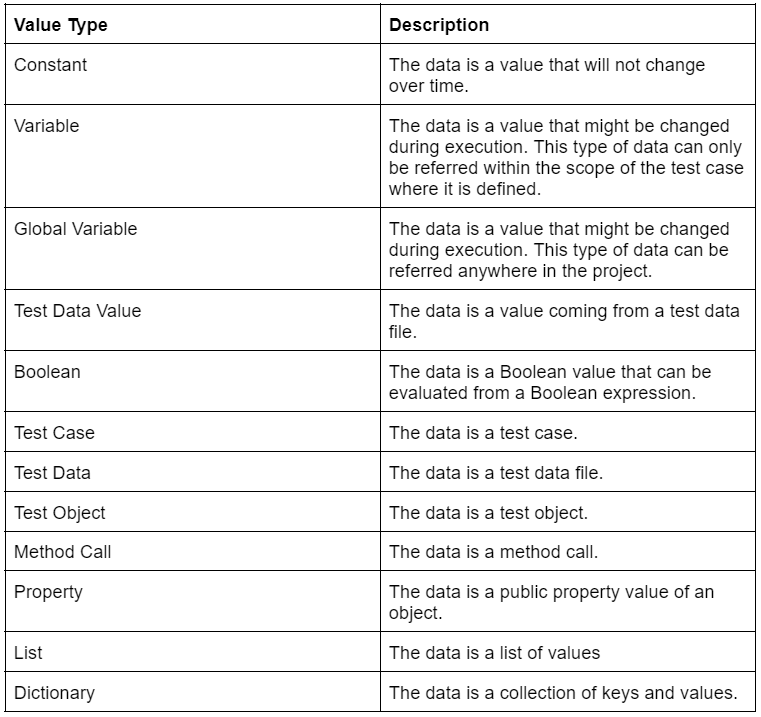
A wide range of value types is supported by Katalon studio. They are shown below:
Frequently Asked Questions
What is Katalon Studio used for?
Katalon is used to create and reuse automated test scripts for UI without coding. It allows running automated tests of UI elements. It can be launched on Microsoft Windows, macOS, and Linux.
Is Katalon Studio better than Selenium?
Selenium is faster than Katalon studio. The reason behind it is the scripting language. Katalon uses Groovy, which is built on Java. So it has to load more libraries, test objects, etc. The difference in performance and speed will be noticeable if the test is very long.
Is Katalon Studio still free?
The free plan of Katalan Studio is suitable for individuals and small teams. The Premium plan is best for large teams or SMBs who need different test results and have production-grade testing workloads.
What language does Katalon use?
Katalon Studio uses Groovy, a language built on top of Java. It has to load many libraries for parsing test data, test objects, and logging.
Is Katalon suitable for automation?
Katalon is a good tool for test automation, both for APIs and Web Pages.
Conclusion
In this article, we have discussed Artifact sharing in Katalon Studio. We have also explained test artifact sharing, how to change the JRE default setting for test projects, value types, and more are also discussed in detail.







 1+ registered

