Do you think IIT Guwahati certified course can help you in your career?
Introduction
In this blog, we will learn about AWS wavelength and we will also learn about different terminologies related to it. AWS Wavelength enables developers to create applications with ultra-low latencies for mobile devices and end-users. Wavelength brings standard AWS to compute and storage services for telecommunications carriers. An Amazon Virtual Private Cloud (VPC) can be extended to one or more Wavelength Zones. The applications requiring ultra-low latency and a connection to AWS services in the Region can then be run using AWS resources such as Amazon Elastic Compute Cloud (Amazon EC2) instances.
Concepts of wavelength
The key concepts for Wavelengths are as follows:
Wavelength: It is a new AWS infrastructure designed to run workloads that require ultra-low latency over mobile networks.
Wavelength Zone (WZ) — A zone within the carrier location where Wavelength infrastructure is deployed. AWS Regions are linked to Wavelength Zones. The control plane in the Region manages a Wavelength Zone, which is a logical extension.
VPC — A virtual private cloud (VPC) that spans Local Zones, Availability Zones, and Wavelength Zones. It has deployed resources such as Amazon EC2 instances in the zone-associated subnets.
Subnet — A subnet created within a Wavelength Zone. You can also create one or more subnets to run and manage AWS services such as Amazon EC2 instances.
Carrier gateway: A carrier gateway has two functions. It allows inbound traffic from a specific carrier network and outbound traffic to the carrier network and the internet.
A Network Border Group (NBG) is a distinct collection of Availability Zones, Local Zones, or Wavelength Zones from which AWS advertises IP addresses.
A Wavelength application runs on an AWS resource in a Wavelength Zone.
Working of AWS Wavelength
The working of the AWS wavelength is discussed below.
Create a subnet in a Wavelength Zone associated with the VPC after creating a VPC in a Region. You can also create resources in all VPC's Availability Zones and Local Zones.
You have complete control over the VPC networking components, including IP address assignment, subnets, and route table creation.
VPCs with a Wavelength Zone subnet can connect to a carrier gateway. You can connect to the following resources using a carrier gateway:
There are 4G/LTE and 5G devices on the telecommunications carrier network.
Outbound traffic to publicly accessible internet resources
Subnets
In a Wavelength Zone, any subnet you create inherits the main VPC route table, including the local route. The local route allows connectivity between the VPC's subnets, including those in the Wavelength Zone.
AWS recommends configuring custom route tables for your Wavelength Zones subnets. The destinations are the same as in an Availability Zone or Local Zone, but with the addition of a carrier gateway.
Gateways for carriers
A carrier gateway has two functions. It permits inbound traffic from a carrier network present in a specific location and outbound traffic to and from the carrier network and the internet. There is no configuration for an inbound connection from the internet to a Wavelength Zone via the carrier gateway.
IPv4 traffic is supported by a carrier gateway.
The IP address of the carrier
A Carrier IP address is the address assigned to a network interface part of a Wavelength Zone subnet (for example, an EC2 instance). The carrier gateway uses the address to route traffic from the interface to the internet or mobile devices. The carrier gateway generally uses NAT to translate the address before forwarding it to the destination. The carrier gateway routes traffic from the telecommunications carrier network.
VPCs with subnets in a Wavelength Zone
Wavelength Zone Subnets
Create a custom route table for the Wavelength Zones' subnets. The default route leads to the carrier gateway, sending all traffic to the internet and telecommunications carrier networks.
DNS
EC2 DNS is used by DNS EC2 instances to resolve domain names to IP addresses. DNS features such as DNS routing and domain registration are supported by Route 53. Wavelength Zones, both public and privately hosted, are supported for routing traffic to specific domains. The Region hosts Route 53 resolvers.
You can also resolve domain names using your DNS services.
Configuration
The following resources must be configured:
A VPC in your area
A gateway for carriers
You can create the carrier gateway and the subnet when you create the carrier gateway. AWS creates the routing table, routes, and subnet association automatically.
A public subnet in your Region's Availability Zone
A node on the public subnet
An instance with a Carrier IP address in the Wavelength Zone subnet.
Step 1: Enroll in Wavelength Zones:- In the Amazon EC2 console, go to Account attributes, Zones and enable the Wavelength Zones. Now you can update your zone group.
Step 2: Configure your network:- Create a VPC, a public subnet, and a carrier gateway in the Availability Zone after opting into the Wavelength Zone.
You can by following the steps given below:
Create a Virtual Private Cloud (VPC).
Assign a carrier gateway and a subnet to the Wavelength Zone.
Create a public subnet in a Region Availability Zone.
Step 3: Start an instance in the public subnet of your Availability Zone:-
Launch an EC2 instance in the Availability Zone subnet that you created. This instance will be used to test the connectivity from the Region to the Wavelength Zone.
In the public subnet that you created, you can launch EC2 instances.
Step 4: Run your Wavelength application instance.
After you've finished configuring the networking, start an instance and assign it a Carrier IP address.
Step 5: Check for connectivity.
Check the connectivity between the instance in the Region and the instance in the Wavelength Zone. Connect to the Carrier IP address of your Region instance using ssh or rdp, depending on your operating system. A secure bastion host can be used.
Configure the VPC security group to allow ICMP traffic before running these tests.
AWS Resilience
Wavelength AWS recommends designing edge applications in a hub-and-spoke model. The Region provides the most scalable, resilient, and cost-effective options for less latency-sensitive components that must be shared across Zones or have states that must persist. Then, over 5G mobile networks use Wavelength Zones for application components that require ultra-low latency, higher bandwidth, or improved quality of service.
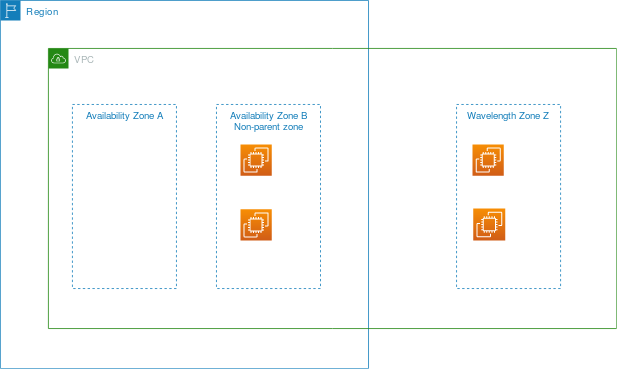
To replicate your data or applications in a Wavelength Zone, AWS recommends using an Availability Zone in a different Region as the failover zone. In the following example, the describe-availability-zones command is used to obtain information about Wavelength Zone Z.
Availability Zone A is the parent, Availability Zone. In this case, your resources are replicated in Availability Zone B.
At AWS, security is of the utmost importance. As an AWS customer, you have access to a data center and network architecture designed to meet the needs of security-conscious organizations.
AWS and you share responsibility for security. This is referred to as cloud security and cloud security in the shared responsibility model:
Security of cloud
AWS is in charge of protecting the infrastructure that runs AWS services in the AWS Cloud. AWS also provides you with services that are safe to use. As part of the AWS Compliance Programs, third-party auditors test and verify the effectiveness of our security on a regular basis.
Security in the cloud
The AWS service that you use determines your responsibility. Other factors to consider include the sensitivity of your data, your company's requirements, and applicable laws and regulations.
Frequently Asked Questions
What is "Wavelength"?
Wavelength combines 5G networks' high bandwidth and single-digit millisecond latency with AWS compute and storage services to enable developers to innovate and build entirely new classes of applications.
What are some AWS Wavelength workload examples?
Game streaming, live video and event streaming, and machine learning (ML) video inference are examples of emerging interactive applications. To ensure ultra-low latency for end-users and devices connecting via mobile networks, these workloads necessitate computing and storage close to the edge. Furthermore, use cases such as industrial automation, smart cities, IoT, and autonomous vehicles necessitate data processing and retrieval close to the edge in order to meet application performance requirements. AWS Wavelength and Wavelength Zones can help with all of these use cases.
Can I reserve Amazon EC2 capacity in a Wavelength Zone?
You can reserve capacity for your Amazon EC2 instances in a Wavelength Zone using On-Demand Capacity Reservations.
Can I deliver applications to 4G/LTE devices using Wavelength Zones?
Yes. Applications running on 4G/LTE mobile phones and devices connected to 4G/LTE networks can connect to Wavelength Zones' application servers. These applications also gain access to computing infrastructure that is co-located within the mobile network.
Conclusion
In this article, we have discussed the concepts of AWS wavelength. We started by introducing AWS wavelength concepts and working on AWS wavelength, VPCs with subnets in a Wavelength Zone, AWS Wavelength Security, then concluded with the configuration of AWS wavelength.
We hope that this blog has helped you enhance your knowledge regarding AWS outposts and if you would like to learn more, check out our article on AWS.
For peeps out there who want to learn more about Data Structures and Algorithms, Java, Python, or any other upskilling, please refer to guided paths on Coding Ninjas Studio. Enroll in our courses, go for mock tests and solve problems available and interview puzzles. Also, you can put your attention towards interview stuff- interview experiences and an interview bundle for placement preparations. Do upvote our blog to help other ninjas grow.
Do upvote our blog to help other ninjas grow.
Happy Coding!
Live masterclass
Zero to GenAI Developer: Amazon SDE Roadmap for 30L+ CTC
by Sumit Shukla
07 Jun, 2026
08:30 AM
Zero to Data Analyst: Google Analyst Roadmap for 30L+ CTC
by Prashant
08 Jun, 2026
01:30 PM
Google SDE Roadmap to land 30L+ CTC
by Saurav Prateek
08 Jun, 2026
03:00 PM
PowerBI + AI for Data Analytics: Secure 30L+ CTC at Netflix
by Ashwin Goyal
07 Jun, 2026
06:30 AM
Zero to GenAI Developer: Amazon SDE Roadmap for 30L+ CTC
by Sumit Shukla
07 Jun, 2026
08:30 AM
Zero to Data Analyst: Google Analyst Roadmap for 30L+ CTC






 32+ registered

