Do you think IIT Guwahati certified course can help you in your career?
Introduction
Azure Cognitive Services are a set of AI/ML services that Microsoft provides to develop smart applications without the need of having any level of expertise in AI and ML. The set of services they provide are based on Vision, Speech, Language, Decision making, and Search. In this video, we will learn more about Azure Cognitive Services.
Azure Cognitive Services
Azure Cognitive Services is a cloud-based artificial intelligence (AI) service that helps us build cognitive intelligence in our applications. It is available as client library SDKs, REST APIs, and user interfaces. We can add cognitive features to our applications without having AI or data science skills. Cognitive Services enable us to build cognitive solutions that can see, hear, speak, understand, and even make decisions.
Categories of Cognitive Service
There are four main pillars of cognitive services:
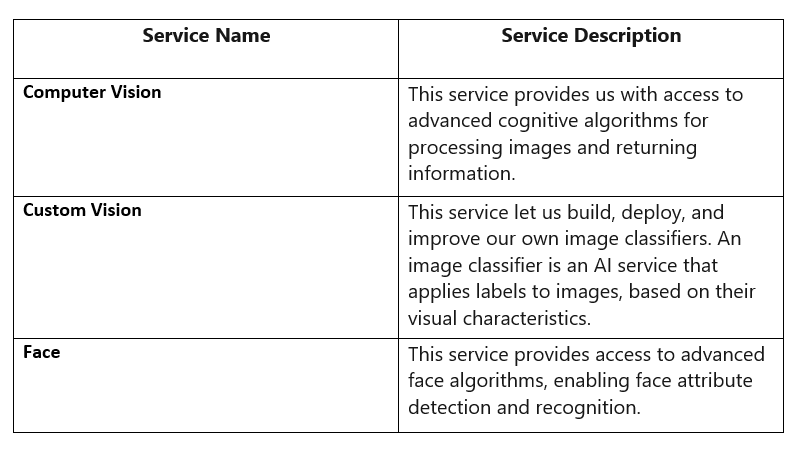
Vision
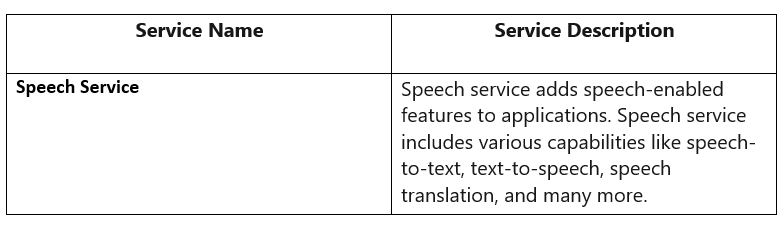
Speech
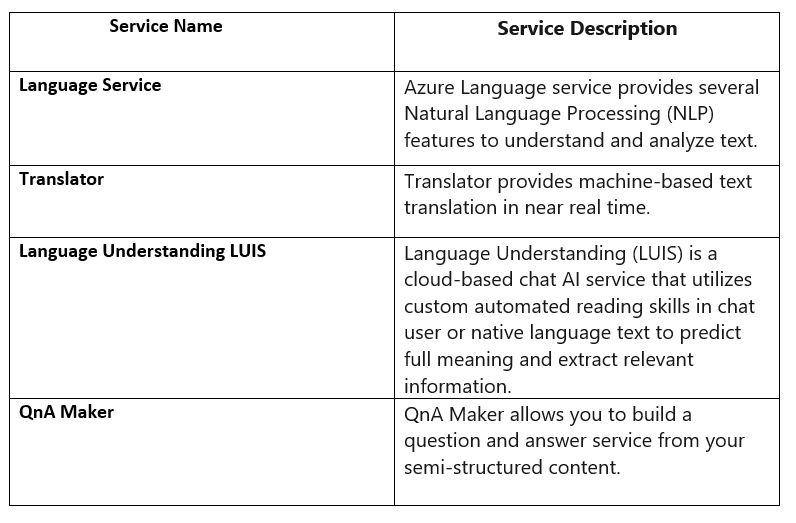
Language
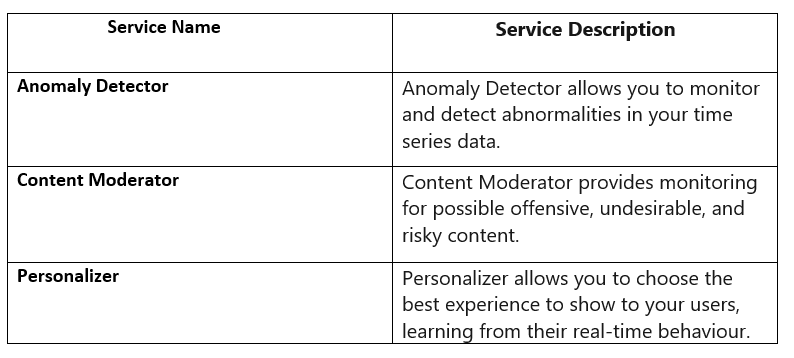
Decision
Vision APIs
Speech APIs
Decision APIs
Language APIs
Types of Cognitive Services resource
Azure Cognitive Services can be accessed through two different resources.
Multi-service resource:
It accesses various Azure Cognitive Services with a single key and endpoint.
It consolidates billing from the services we use.
Single-service resource:
It accesses a single Azure Cognitive Service with a unique key and endpoint for each service created.
It uses the free tier to try out the service.
Create a Cognitive Services resource
We can create a Cognitive Services resource with hands-on quickstarts using any of the following methods:
Azure portal
Azure CLI
Azure SDK client libraries
Azure Resource Manager (ARM template)
In this article, we are going to discuss the Azure Portal method.
Create a Cognitive Services resource using the Azure portal
Prerequisites
A valid Azure subscription
Our Azure account must have a Cognitive Services Contributor role assigned for us to agree to create a resource and the responsible AI terms and create a resource. To get this role assigned to our account, we need to follow the steps in the Assign roles documentation or need a contact administrator.
Create a new Azure Cognitive Services resource
Multi-Service
It is named cognitive services in the portal.It enables access to the following Cognitive Services:
Decision - Content Moderator
We can select one of these links to create a Decision resource:
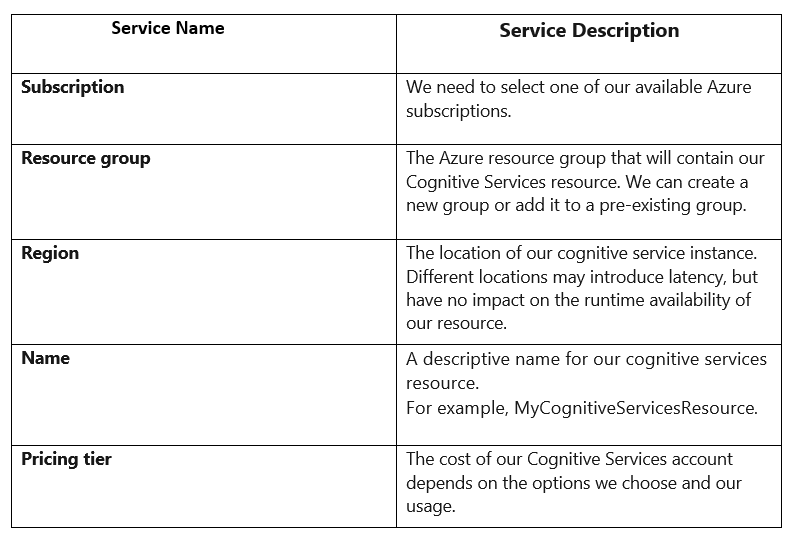
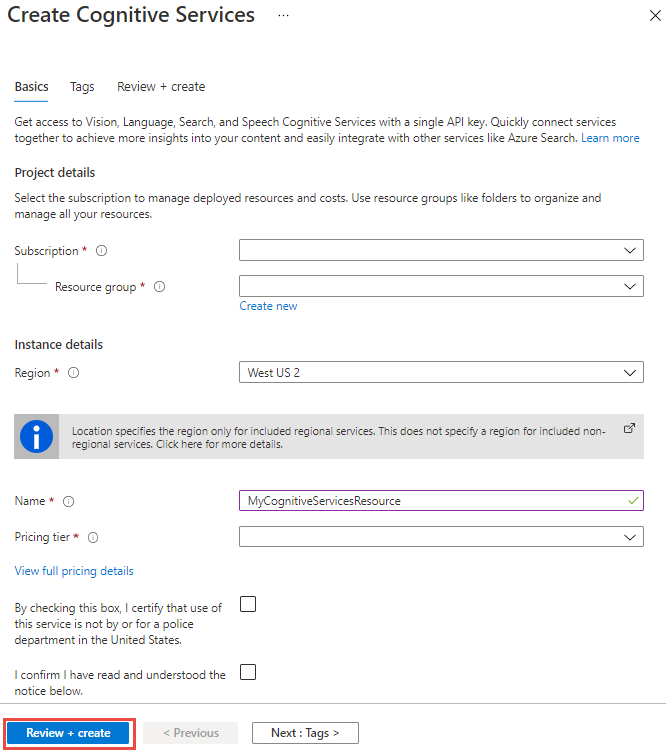
Now Configure additional settings for your resource as needed, read and accept the conditions (as applicable), and then select Review + create.
Get the keys to our resource
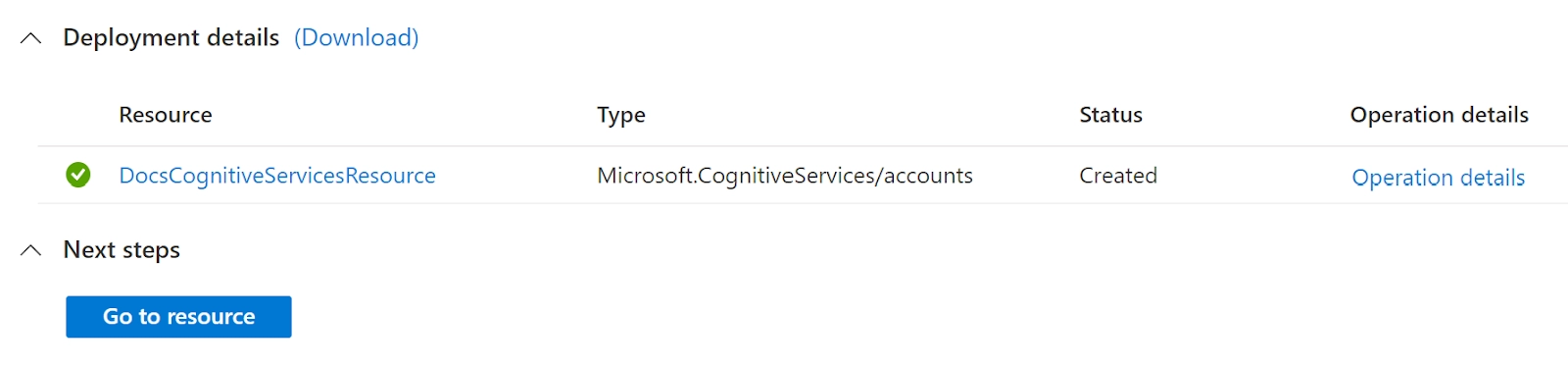
After our resource is successfully deployed, select Next Steps > Go to the resource.
2. We can manage keys and access the resource endpoint from the quickstart pane that opens.
Configure an environment variable for authentication
Authentication is required by the applications to access the Cognitive Services they use. To authenticate, it is recommended to create an environment variable to store the keys for our Azure Resources.
After we have our key, write it to a new environment variable on the application's local machine. To set the environment variable, we need to open a console window and follow the instructions for our operating system. Now we need to replace the key with one of the keys for our resource.
Windows
setx COGNITIVE_SERVICE_KEY "your-key"
After adding the environment variable, we may need to restart any programs that read the environment variable, including the console window. For example, if we are using Visual Studio as our editor, restart Visual Studio before running the example.
Linux
export COGNITIVE_SERVICE_KEY=your-key
After we add the environment variable, run source ~/.bashrc from our console window to make the changes effective.
macOS
Edit our .bash_profile, and add the environment variable:
export COGNITIVE_SERVICE_KEY=your-key
After we add the environment variable, run source ~/.bash_profile from our console window to make the changes effective.
Clean up resources
If we want to clean up and remove a Cognitive Services subscription, we can also delete the resource and the resource group. If we delete the resource group, then it also deletes any other resources contained in the group.
Expand the menu on the left side to open the menu of services in the Azure portal, and then choose Resource Groups to display the list of resource groups.
Locate the resource group that contains the resource that needs to be deleted.
If we want to delete the entire resource group, we need to select the resource group name. On the next page, we need to select the delete resource group and confirm.
If we want to delete only the Cognitive Service resource, we need to select the resource group to see all the resources within it. On the next page, we need to select the resource that we want to delete, click the ellipsis menu for that row, and select Delete.
Use Cognitive Services in different development environments
With Azure and Cognitive Services, we have access to several development options, such as:
Automation and integration tools like Power Automate and Logic Apps.
Deployment options such as App Service and the Azure Functions.
Cognitive Services Docker containers for secure access.
Tools like Apache Spark, Azure Synapse Analytics, Azure Databricks, and Azure Kubernetes Service for Big Data scenarios.
Containers for Cognitive Services
Azure Cognitive Services also provides a few Docker containers that allow you to use the same APIs available on Azure on-premises. These containers allow us to bring Cognitive Services closer to our data for compliance, security, or other performance reasons.
Language support
Cognitive Services supports multilingual languages at the service level. We can find language availability for each API in the list of supported languages.
Security
Azure Cognitive Services provides a layered security model, including Azure Active Directory data verification, valid resource key, and Azure visual networks.
Frequently Asked Questions
Can I use more than one conversational language understanding project together?
Yes, you can use more than one conversational language understanding project together using orchestration workflow.
Can I label the same word as 2 different entities?
Unlike LUIS, you cannot label the same text as 2 different entities. Learned components across different entities are mutually exclusive, and only one learned span is predicted for each set of characters.
Is there any SDK support?
Yes, only for predictions, and samples are available for Python and C#. There is currently no authoring support for the SDK.
Conclusion
This article discusses Azure Cognitive Services, its categories, types of cognitive services, and methods to create a cognitive service.
If you think you are ready for the tech giants company, check out the mock test series on code studio.
You can also refer to our Guided Path on Coding Ninjas Studio to upskill yourself in domains like Data Structures and Algorithms, Competitive Programming, Aptitude, and many more!. You can also prepare for tech giants companies like Amazon, Microsoft, Uber, etc., by looking for the questions asked by them in recent interviews. If you want to prepare for placements, refer to the interview bundle. If you are nervous about your interviews, you can see interview experiences to get the ideas about questions that have been asked by these companies.








 1+ registered

