Do you think IIT Guwahati certified course can help you in your career?
Introduction
Azure IoT Edge Brings the Azure IoT Cloud closer to your devices by providing messaging and computes capabilities similar to Azure on your edge appliance. This allows for flexibility, scalability, and better resiliency for IoT workloads, especially those that need reliable, low-latency responses from the cloud. In this video, we'll look at how to set up an IoT Edge and use it with a device.
Azure IoT Edge
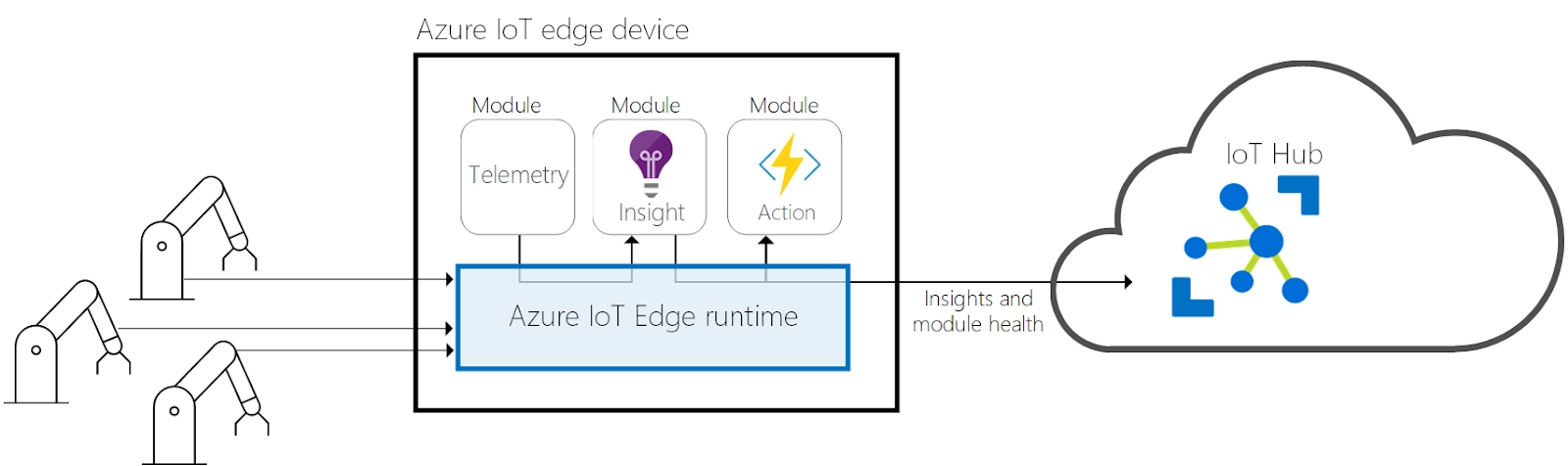
Azure IoT Edge pushes cloud analytics and custom business logic to your device, allowing your organization to focus on business insights rather than data management. You can extend your IoT solution by packing your business logic into standard containers and deploying those containers to any device to monitor everything from the cloud.
Analytics drive the business value of IoT solutions, but not all analytics need to be in the cloud. You can run anomaly detection workloads on edge if you want to respond to emergencies as quickly as possible. If you want to cut bandwidth costs and avoid terabytes of raw data transfer, you can clean up and aggregate your data locally and send only insights to the cloud for analysis.
Azure IoT Edge consists of three components:
The IoT Edge module is a container that runs Azure services, third-party services, or your code. Modules are deployed on IoT Edge devices and run locally on those devices.
The IoT Edge runtime runs on each IoT Edge device and manages the modules deployed on each device.
Cloud-based interface allows remote monitoring and management of IoT Edge devices
IoT Edge modules
The IoT Edge module is an execution unit implemented as a Docker-compatible container that executes business logic at the edge. You can configure multiple modules to communicate with each other to create a data processing pipeline. You can develop custom modules or package-specific Azure services into modules that provide offline and edge insights.
Artificial intelligence at the edge
With Azure IoT Edge, you can deploy complex event handling, machine learning, image recognition, and other high-quality AI without having to create it in-house. Azure services such as Azure Functions, Azure Stream Analytics, and Azure Machine Learning can run on-premises through Azure IoT Edge. However, it is not limited to Azure services. Anyone can create an AI module and make it available to the community through the Azure Marketplace.
Bring your code
If you deploy your code to your device, Azure IoT Edge also supports it. Azure IoT Edge follows the same programming model as other Azure IoT services. We can run the same code on your device or in the cloud. Azure IoT Edge supports both Linux and Windows so that you can program on the platform of your choice. With support for Java, .NET Core 2.0, Node.js, C, and Python, developers can code in languages they already know and use their existing business logic.
IoT Edge runtime
The Azure IoT Edge runtime enables custom logic and cloud logic on IoT Edge devices. The runtime resides on the IoT Edge device and performs management and communication operations. The runtime performs several functions.
Install and update workloads on your device.
Maintains Azure IoT Edge security defaults on devices.
Make sure the IoTEdge module is always running.
Report module status to the cloud for remote monitoring.
Manages communication between downstream leaf devices and IoT Edge devices, modules on IoT Edge devices, and between IoT Edge devices and the cloud.
It's entirely up to you to use the Azure IoT Edge device. The runtime is typically used to deploy AI to gateway devices that aggregate and process data from other on-premises devices, but this deployment model is just one option. The Azure IoT Edge runtime runs on many IoT devices and can be used in various ways. If you don't want to handle large amounts of data, use devices more minor than the Raspberry Pi 3 or use industrial servers to run resource-intensive workloads.
IoT Edge cloud interface
It is often challenging to manage the software lifecycle of millions of IoT devices of different brands and models or geographically dispersed. Workloads are created and configured for specific device types, deployed to all devices, and monitored to detect malfunctioning devices. These activities cannot be performed on a device-by-device basis and must be performed on a large scale.
Azure IoT Edge integrates seamlessly with Azure IoT Central to provide a control plane to meet your solution needs. With cloud services, you can:
Create and configure a workload that runs on a particular device type.
Azure IoT Edge for Linux on Windows (EFLOW) allows you to run containerized Linux workloads with Windows applications in your Windows deployment. Companies that rely on Windows to enhance their edge devices and solutions can now take advantage of the cloud-native analytics solutions built into Linux.
Azure IoT Edge for Linux on Windows works by running a Linux virtual machine on a Windows device. The Azure IoT Edge runtime is pre-installed on the Linux VM. All Azure IoT Edge modules deployed on the device run inside the virtual machine. On the other hand, a Windows application running on a Windows host device can communicate with a module running on a Linux virtual machine.
Components
Azure IoT Edge for Linux on Windows uses the following components to run Linux and Windows workloads in parallel, enabling seamless communication.
Linux VMs running Azure IoT Edge: Linux VMs running on Microsoft's first-party CBL-Mariner-based systems are built with the Azure IoT Edge runtime and validated as a Tier 1 support environment for Azure IoT Edge workloads.
Microsoft Update: Integration with Microsoft Update keeps Windows Runtime components, CBL-Mariner Linux VMs, and Azure IoT Edge up to date. For more information on IoT Edge for Linux on Windows Update, see Updating IoT Edge for Linux on Windows.
Windows devices with the following minimum requirements:
System requirements
Windows 101/11 (Pro, Enterprise, IoT Enterprise)
Windows Server 20191/2022
1 Windows 10 and Windows Server 2019 are at least build 17763 with all the latest cumulative updates
Hardware requirements
Minimum free memory: 1 GB
Minimum free disk space: 10 GB
Quickstart: Deploy your first IoT Edge module to a virtual Linux device
In this quickstart, you will deploy containerized code to a Linux IoT Edge virtual device to test Azure IoT Edge. With IoT Edge, you can remotely manage the code on your device so you can send more workload to Edge. For this quickstart, we recommend using Azure virtual machines for your IoT Edge devices. This allows you to quickly create and then delete a test machine.
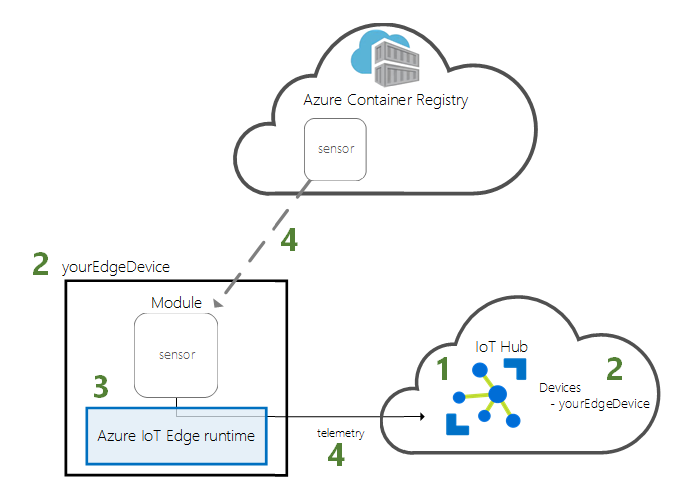
In this quick start, you will learn how to:
Create an IoT Hub.
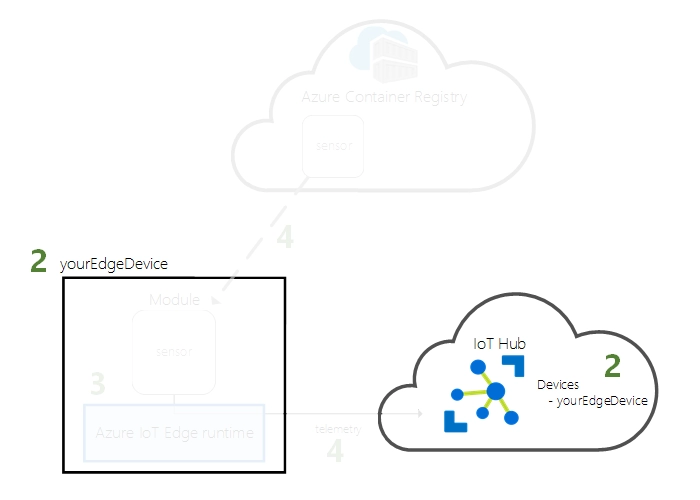
Register the IoT Edge device with the IoT hub.
Install and start the IoT Edge runtime on your virtual device.
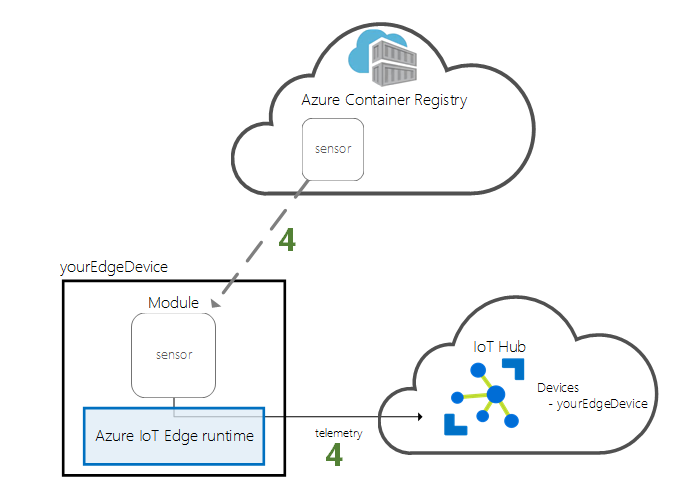
Deploy the module remotely to your IoT Edge device.
This quickstart describes creating a Linux VM configured as an IoT Edge device. Then deploy the module from the Azure portal to your device. The module used in this quickstart is a simulated sensor that produces temperature, humidity, and pressure data. Other Azure IoT Edge tutorials are built on your work by providing additional modules that analyze simulated data for business insights.
Install the Azure CLI, if you prefer to run CLI reference commands locally, and consider running Azure CLI in a Docker container, if you're running on Windows or macOS. To know about it in detail, visit How to run the Azure CLI in a Docker container.
Sign in to the Azure CLI by using the az login command, if you're using a local installation. We need to follow the steps displayed in the terminal to finish the authentication process.
When you're prompted, install the Azure CLI extension on first use. For more information about extensions, see Use extensions with the Azure CLI.
Run to find the version and dependent libraries that are installed. To upgrade to the latest version, run
To find the version and dependent libraries that are installed, we need to run az version and to for the latest version upgrade we need to use az upgrade.
Cloud Resources
In this quickstart, we need a resource group to manage all the resources. We use the example resource group name IoTEdgeResources throughout this quickstart and the following tutorials.
az group create --name IoTEdgeResources --location westus2
Create an IoT hub
Get started with a quick start by creating an IoT Hub using the Azure CLI.
The free tier of IoT Hub is perfect for this quickstart. If you have used an IoT Hub in the past and have already created one, you can use this IoT Hub.
The code below creates a free F1 hub in the IoTEdgeResources resource group. Replace the {hub_name} with a unique name for IoT Hub. It may take a few minutes to create the IoT Hub.
az iot hub create --resource-group IoTEdgeResources --name {hub_name} --sku F1 --partition-count 2
If you get an error because your subscription already has one free hub, change the SKU to S1. Each subscription can have only one free IoT Hub. If you get an error stating that the IoT Hub name is unavailable, someone else already has a hub with that name. Try a new name.
Register an IoT Edge device
Register the IoT Edge device to the newly created IoT Hub.
Create device IDs for IoT Edge devices that can communicate with IoT Hub. The device ID resides in the cloud and uses the device's unique connection string to associate a physical device with the device ID.
Since, IoT Edge devices can operate and manage differently than regular IoT devices, use the --edge-enabled flag to declare this identity for IoT Edge devices.
Create a device named myEdgeDevice on the hub by entering the following command in Azure Cloud Shell:
az iot hub device-identity create --device-id myEdgeDevice --edge-enabled --hub-name {hub_name}
If you're getting errors related to the iothubowner policy key, make sure you have the latest version of the azure-iot extension installed in Cloud Shell.
2. View the device's connection string that associates a physical device with an IoT Hub ID. This includes the name of the IoT Hub, the name of the device, and a pre-shared key that authenticates the connection between them. Refer back to this connection string in the next section when configuring your IoT Edge device.
The IoT Edge runtime is deployed to all IoT Edge devices. There are three components. The IoT Edge security daemon runs whenever an IoT Edge device boots and starts the IoT Edge agent to boot the device. The IoT Edge agent makes it easy to deploy and monitor modules on IoT Edge devices, including IoT Edge hubs. IoT Edge Hub manages communication between pods on IoT Edge devices and between devices and IoT Hub.
We need to specify the device connection string during runtime configuration. String received from Azure CLI. This string associates a physical device with an Azure IoT Edge device ID.
Deploy the IoT Edge device
In this section, you will use an Azure Resource Manager template to create a new virtual machine and install the IoT Edge runtime on it. If you prefer to use your own Linux device instead, you can follow the setup steps in Manually Prepare a Single Linux IoT Edge Device and then return to this quickstart.
Use the following CLI command to create an IoT Edge device based on the previously created iotedge-vm-deploy template.
Once the deployment is complete, you should receive JSON-formatted output in the CLI that contains the SSH information to connect to the virtual machine. Copy the value of the public SSH entry of the outputs section:
One of the key features of Azure IoT Edge is the ability to deploy code to IoT Edge devices in the cloud. IoT Edge modules are executable packages implemented as containers. In this section, you deploy prebuilt modules from the IoT Edge Modules section of Azure Marketplace directly from Azure IoT Hub.
The module deployed in this section simulates a sensor and sends the generated data. This module is a useful piece of code to get started with IoT Edge as you can use simulated data for development and testing. If you want to know exactly what this module does, you can look at the source code of the simulated temperature sensor.
Follow these steps to run the plugin installation wizard and deploy your first plugin from Azure Marketplace.
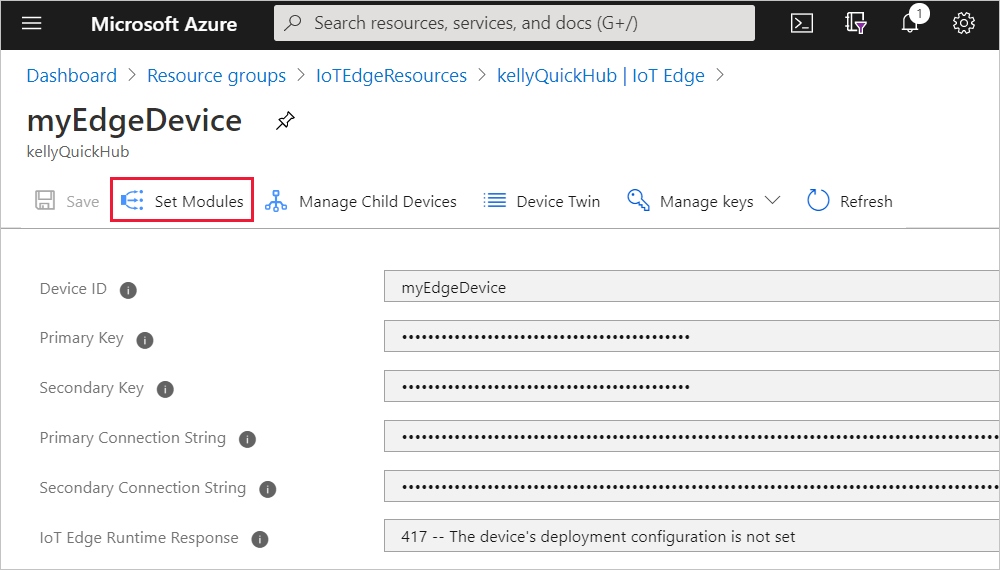
Sign in to the Azure portal and go to your IoT hub.
From the menu on the left, under Device Management, select IoT Edge.
Select the device ID of the target device from the list of devices.
When you create a new IoT Edge device, it will display the status code 417 -- The device's deployment configuration is not set in the Azure portal. This status is normal and means that the device is ready to receive a module deployment.
In this quickstart, you created a new IoT Edge device and installed the IoT Edge runtime on it. Then, you used the Azure portal to deploy an IoT Edge module to run on the device without having to make changes to the device itself.
In this case, the module that you pushed generates sample environment data that you can use for testing later. The simulated sensor is monitoring both a machine and the environment around the machine. For example, this sensor might be in a server room, on a factory floor, or on a wind turbine. The message includes ambient temperature and humidity, machine temperature and pressure, and a timestamp. The IoT Edge tutorials use the data created by this module as test data for analytics.
Open the command prompt on your IoT Edge device again, or use the SSH connection from Azure CLI. Confirm that the module deployed from the cloud is running on your IoT Edge device:
sudo iotedge list
View the messages being sent from the temperature sensor module:
sudo iotedge logs SimulatedTemperatureSensor -f
You can also watch the messages arrive at your IoT hub by using theAzure IoT Hub extension for Visual Studio Code.
Clean up resources
If you want to continue with the IoT Edge tutorial, you can use the devices you registered and set up in this quickstart. Otherwise, you can delete the Azure resource you created so that you are not charged.
If you created a virtual machine and IoT Hub in a new resource group, you can delete all resources associated with this group. Check the contents of the resource group again
to make sure you don't want to keep anything. If you don't want to delete the entire group, you can delete individual resources instead.
Delete the IoTEdgeResources group. It may take a few minutes to delete the resource group.
az group delete --name IoTEdgeResources --yes
You can confirm the resource group is removed by viewing the list of resource groups.
az group list
Frequently Asked Questions
How does Azure IoT edge work?
Azure IoT Edge is an Internet of Things (IoT) service that builds on top of the IoT Hub and enables users to carry out edge computing. Edge computing is when data is analyzed on devices, that is, at the edge of the network, rather than in the cloud itself.
What is the Azure IoT Edge module?
Azure IoT Edge lets you deploy and manage business logic on the edge in the form of modules. Azure IoT Edge modules are the smallest computation units managed by IoT Edge and can contain Microsoft services (such as Azure Stream Analytics), third-party services, or your own solution-specific code.
Is Azure IoT edge PaaS?
IoT Central preassembles, scales, and manages many of the Azure platform-as-a-service (PaaS) services this article describes. IoT Central provides an out-of-box, ready-to-use UX and API surface area, complete with the capabilities you need to connect, manage, and operate fleets of devices at scale.
Conclusion
In this article, we discussed Azure IoT Edge, What Azure IoT Edge for Linux on Windows is and we also deployed our first IoT Edge module to a virtual Linux device.
If you think you are ready for the tech giants company, check out the mock test series on code studio.
You can also refer to our Guided Path on Coding Ninjas Studio to upskill yourself in domains like Data Structures and Algorithms, Competitive Programming, Aptitude, and many more!. You can also prepare for tech giants companies like Amazon, Microsoft, Uber, etc., by looking for the questions asked by them in recent interviews. If you want to prepare for placements, refer to the interview bundle. If you are nervous about your interviews, you can see interview experiences to get ideas about questions that have been asked by these companies.
Do upvote if you find this blog helpful!
Please share it as much as possible and help others as well
Be a Ninja
Happy Coding!
Live masterclass
Ace Data Analyst Interviews with Amazon SQL Case Studies
by Prerita Agarwal
23 Oct, 2026
11:30 AM
One Prompt, Three AI Agents: Build a Portfolio Project for 25L+ GenAI Roles
by Saurav Prateek
19 Oct, 2026
11:30 AM
AI vs You: Crack a Data Analyst Interview Case with Claude + Excel
by Abhishek Soni
21 Oct, 2026
11:30 AM
Build Your Own Perplexity-Style App: Stand Out in GenAI Job Interviews
by Sumit Shukla
22 Oct, 2026
11:30 AM
Ace Data Analyst Interviews with Amazon SQL Case Studies
by Prerita Agarwal
23 Oct, 2026
11:30 AM
One Prompt, Three AI Agents: Build a Portfolio Project for 25L+ GenAI Roles





 Source: Microsoft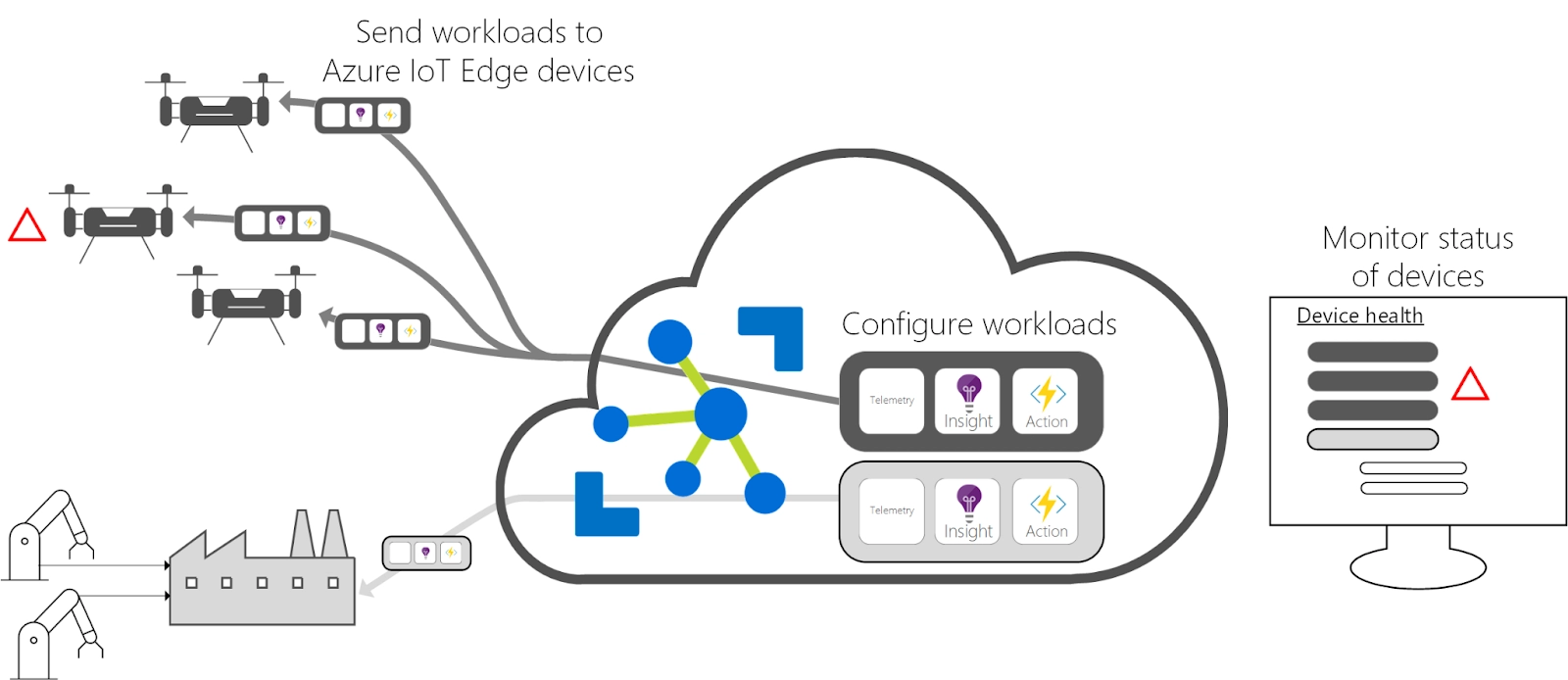








 1+ registered

