Do you think IIT Guwahati certified course can help you in your career?
Introduction
Azure DevOps offers various Developer services to help teams organise their tasks, work together on coding projects, and create and deliver applications. One of the key components of Azure DevOps is Azure Pipelines, which describes the Continuous Deployment and Continuous Integration process with support for containers and Kubernetes. This blog discusses Azure Pipelines, including its features, benefits, and procedures for deploying an ARM project via a pipeline.
Without further ado, let's get started.
What is Azure Pipeline?
An automated collection of procedures called Azure Pipeline aids developers in the compilation, building, and deployment of programs on different computing platforms. Similar to open source Jenkins or CodeShip, it is a continuous delivery tool. This pipeline's main objective is to have all updates carried out automatically in the project without the need for manual intervention. When a process is handled by humans, there is a chance for human error as they perform the same tedious, repetitive duties, but with automation, it works without a hitch once it is configured.
Typically, a pipeline falls into one of the following groups:
Build Tools for Source Control
packaging design
Monitoring
Configuration management
Numerous application kinds, including Java, Go, Python, JavaScript, Node.js,.Net, C++, and XCode, can be utilised with this Pipeline. Source control is required to attach with it in order to use it. Additionally, it supports a number of source control systems, including Subversion, GitHub, Azure Repos, and Bitbucket.
To test, develop, and deploy your code to any destination, Azure Pipelines integrates Continuous Integration (CI) and Continuous Delivery (CD).
Continuous Integration (CI)
The automated merging and testing of code are known as continuous integration (CI), which is a technique used by development teams. Implementing CI enables the early detection of bugs, which lowers the cost of their correction. To verify quality, automated tests run as part of the CI process. To support frequent deployments, artifacts from CI systems are generated and fed into release procedures. You may set up and manage CI for your applications with the aid of the Build service in Azure DevOps Server.
Continuous Delivery (CD)
Code is built, tested, and released to one or more test and production environments using a method known as continuous delivery (CD). Quality is improved by deploying and testing in various settings. Infrastructure and applications are examples of deployable products produced by CI systems. These artifacts are used by automated release processes that distribute updated versions and fixes for already installed systems. Systems for monitoring and alerting are continuously in operation to increase visibility into the entire CD process.
Let's look at the various advantages of Azure Pipeline.
Advantages of Azure Pipeline
Azure pipeline consists of several different components, and when combined with Azure DevOps CI/CD, it offers the customer a number of advantages. The following are a few of them:
Version Control Systems To start an Azure CI/CD pipeline, you must first enter your code into a version control system. You can manage your source code using GitHub, Github Enterprise, Subversion, Bitbucket Cloud, and other Git repositories. Additionally, developers are known to use it to assist Team Foundation Version Control (TFVC).
Programming Languages and types of Application You can use the Azure DevOps pipeline with the majority of application types and different programming languages, such as Javascript, Python, Java, Ruby, PHP, C, C++, and others. It works with all operating systems, including Linux, Windows, and macOS.
Deployment Targets Azure CI/CD pipelines with apps can be deployed on environments with numerous targets, such as any on-premises or cloud platform, container registries, Azure services, virtual machines, containers, etc.
Pricing The Azure DevOps pipeline is free to use if you are working on a public project, while private projects require a subscription before you may use the pipeline for up to 1800 minutes each month without paying anything.
Progressive Deployment The Azure DevOps pipeline enables you to create as many quality-controlling steps as you need before you must proceed to the following stage during the development and testing phase. This assists you in precisely locating the bugs and comprehending the issues, as well as their locations and potential solutions. You can give intentional CI/CD solutions to the customer thanks to the totally tailored deployment controls of the Azure DevOps pipeline, which also lets you maintain control over your project.
Let's look at the various components involved in Azure Pipeline.
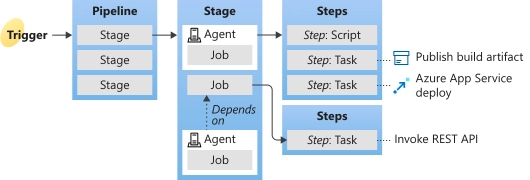
There are one or more phases in a pipeline. To one or more environments, a pipeline can deploy.
In a pipeline, jobs are organised into stages, each of which may include one or more jobs.
There is just one agent per job. An assignment may also be agentless.
A job with one or more steps is run by each agent.
The smallest unit of a pipeline is a step, which might be either a task or a script.
An action is carried out by a pre-packaged script known as a task, such as calling a REST API or publishing a build artifact.
A run may publish a set of files or packages known as an artifact.
Let's go into more details about each one of them.
Agent
One or more jobs are started by the system when your build or deployment completes. An agent is a piece of computing infrastructure with agent software installed on it that executes one job at a time. For instance, your work might function on an Ubuntu agent hosted by Microsoft.
Approvals
A deployment must pass a number of validations, which are defined by approvals. To regulate deployments to production environments, manual approval is a frequent check. When checks are set up for an environment, pipelines won't begin a stage that deploys to the environment until all checks have been successfully performed.
Artifact
The group of files or packages that a run publishes is known as an artifact. For actions like distribution or deployment, artifacts are made available.
Continuous delivery
Code is built, tested, and deployed to one or more test and production stages using a continuous delivery (CD) method. Multiple deployments and testing phases aid in enhancing quality. Deployable artifacts are created by continuous integration systems and contain infrastructure and applications. These artifacts are consumed by automated release pipelines to release updated versions and fixes for current systems. Systems for monitoring and alerting are continuously in operation to increase visibility into the entire CD process. Errors are detected frequently using this method.
Continuous integration
Development teams utilise the continuous integration (CI) technique to make it easier to test and write code. CI assists in identifying faults or issues early in the development cycle, making it simpler and quicker to fix them. The CI process includes running automated builds and tests. When new code is pushed, on a predetermined timetable, or both, the procedure can run. CI systems generate objects referred to as artifacts. The continuous delivery release pipelines employ them to power automatic deployments.
Deployment
A deployment for Classic pipelines is the execution of the tasks for one stage, which may involve deploying build artifacts, running automated tests, and performing any other tasks that are specified for that stage. A deployment for YAML pipelines often refers to a deployment job. A deployment job is a sequence of operations performed against an environment. For deployment jobs, you can employ techniques like run once, roll, and canary.
Deployment group
A group of agents-equipped deployment targets is referred to as a deployment group. Similar to an agent pool, a deployment group is only another collection of agents. A deployment group can be used to set the deployment targets for a job in a pipeline.
Environment
An environment is a set of resources where your application is deployed. It may include one or more virtual machines, containers, web applications, or any other hosting service that is utilised to house the developing application. After the build is finished and the tests have been run, a pipeline may deploy the app to one or more environments.
Job
One or more jobs can be found on a stage. An agent executes each job. An execution boundary of a series of steps is represented by a task. On the same agent, each step is executed simultaneously. When you wish to execute a sequence of actions in several environments, jobs are most helpful. For instance, you could want to create the x86 and x64 variants. You have one stage and two jobs in this situation. Both jobs would be for x64 and x86, respectively.
Pipeline
The continuous integration and deployment procedure for your app is described by a pipeline. There are one or more steps to it. It may be viewed as a pipeline that specifies how your testing, building, and deploying processes are carried out.
Release
A release is a versioned collection of artifacts described in a pipeline for Classic pipelines. The release contains a snapshot of every piece of data needed to complete every task and action in the release pipeline, including stages, tasks, policies like triggers and approvers, and deployment options. A release can be made manually, automatically, or using the REST API.
Run
A pipeline execution is represented by a run. It gathers the logs related to executing the steps and the outcomes of doing tests. After processing the pipeline during a run, Azure Pipelines will deliver the run to one or more agents. Each agent will do the tasks.
Script
A script uses the command line, PowerShell, or Bash to execute code as a phase in your pipeline. For Windows, Linux, and macOS, you can create cross-platform scripts. A script is a specialised code that is exclusive to your pipeline, unlike a task.
Stage
In the pipeline, a stage serves as a logical separation. It can be applied to indicate the division of concerns (for example, Build, QA, and production). One or more occupations can be found in each step. By default, when many stages are defined in a pipeline, they execute one after the other. The circumstances under which a stage executes can be specified.
Step
The smallest component of a pipeline is a step. A pipeline might include build and test processes, for instance. A task or a script might both be considered steps. A task is nothing more than a pre-written script that is provided for your convenience.
Task
The fundamental unit of a pipeline's automation definition is a task. An organised script or method that has been abstracted with a number of inputs is called a task.
Trigger
Something that is programmed to inform the pipeline when to execute is known as a trigger. You can set up a pipeline to execute once a build is finished, at set intervals, or after a push to a repository. Triggers are the term for all of these behaviors.
Library
Secure files and flexible groups are included in the library. Files can be stored and shared securely between pipelines. At the DevOps level, you might need to store a file that you'll later utilise for a build or deployment. If so, you can store the file in your Library and access it whenever you need to. Secrets and values that you might want to send into a YAML pipeline or make accessible across many pipelines are stored in variable groups.
Let's get into the details of YAML syntax in Pipeline.
Pipelines using YAML syntax
Code versioning affects the pipeline because similar codes will have similar branching structures. When any pull request is accepted, the process can be scheduled to begin on a trigger. You can start the build procedure and find problems with integration with your current codebase.
Your pipeline can be included in a YAML file using azure-pipelines.yml
The top-level actions are as follows:
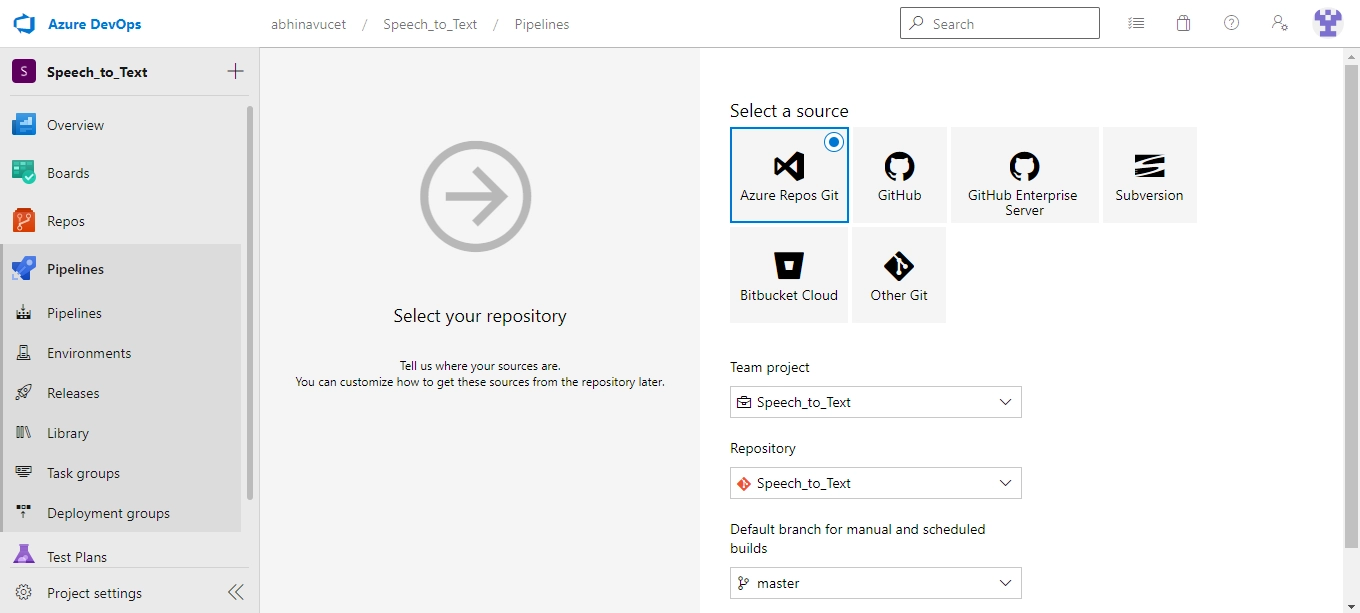
Set up your repository so that Azure Pipeline may use it.
To specify your build, edit the YAML file.
To start the process, push your code into a certain branch.
Let's dive into the classical interface of the pipeline.
Pipelines using Classic Interface
The Azure DevOps portal's traditional editor allows users to define the pipeline. They can also specify a "Build Pipeline" for tasks like developing and testing your code before publishing artifacts. To use these artifacts and deploy them in targets, they can additionally define the "Release Pipeline."
The top-level actions are as follows:
Set up your repository so that Azure DevOps Pipeline may use it.
Utilize the Azure DevOps web portal to specify build and release workflows.
To start the procedure, push your code to a certain branch.
Let's discuss the procedures for deploying an ARM project via a pipeline.
Publish ARM deployment project into DevOps Repos and deploy using pipeline
Follow the following steps to Publish the ARM deployment project into DevOps Repo and deploy using the pipeline:
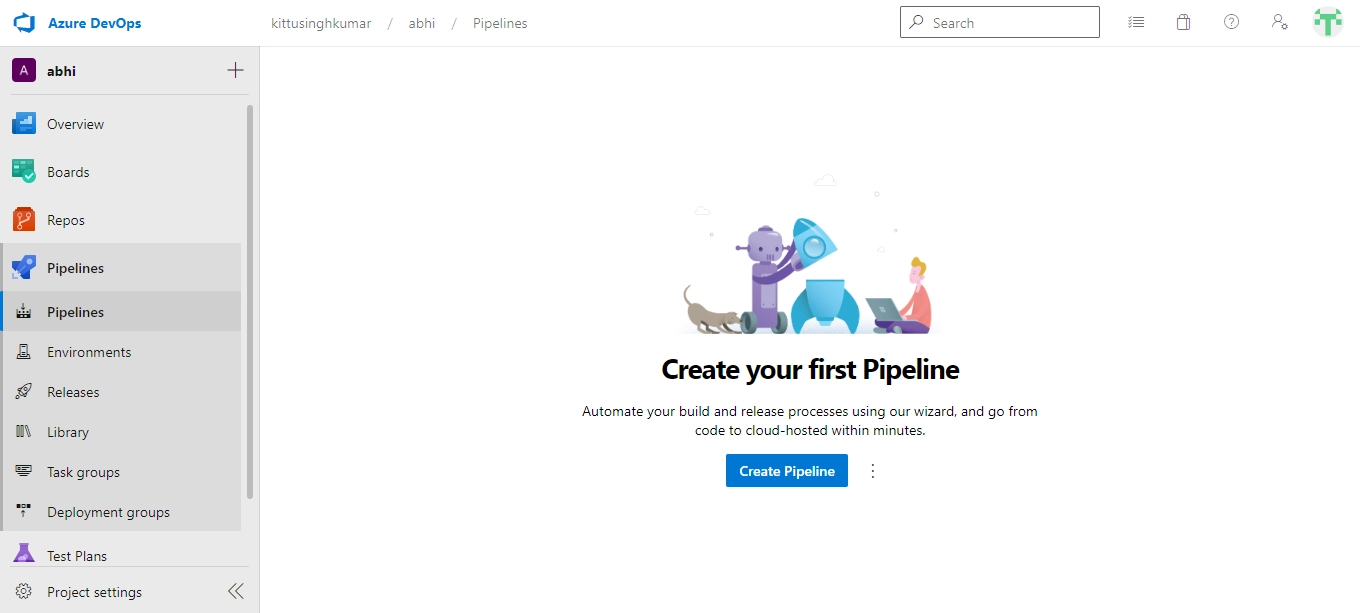
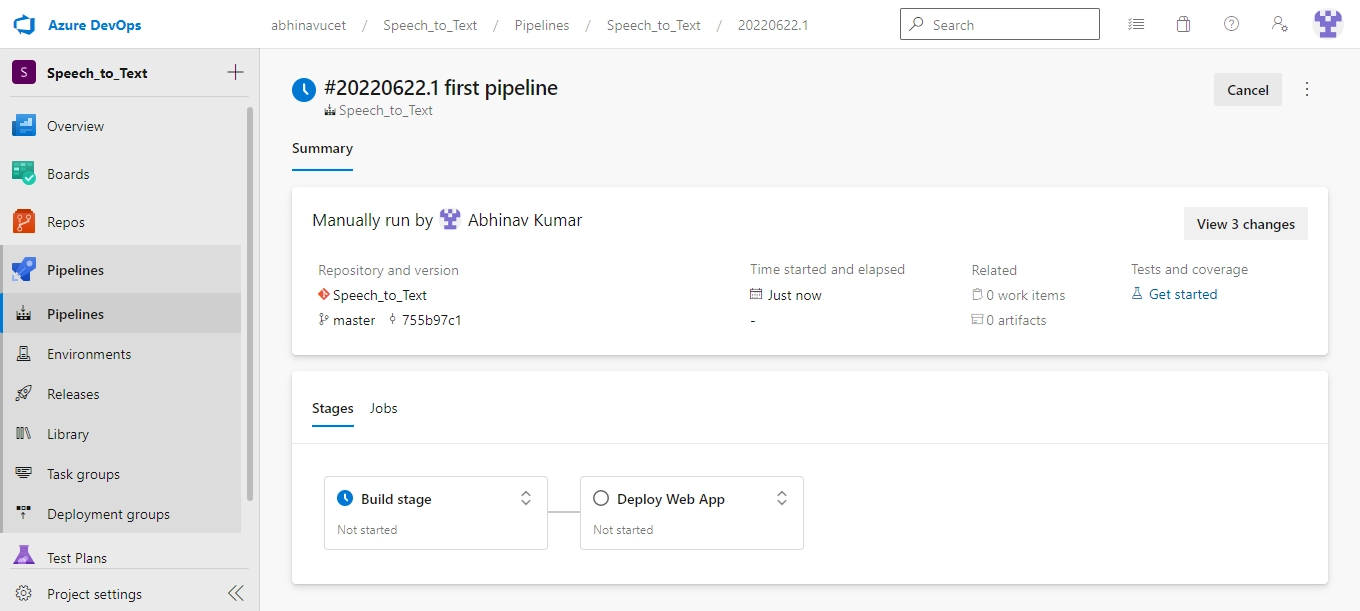
Click on pipelines in the Azure DevOps project. Click the Create pipeline button after that.
At this point, you must add a task to the activity. Enter "resource group" after clicking the add button on Agent Job 1. The Azure Resource group deployment add button should then be clicked.
At this point, you must decide which Azure subscription, which resource group, and which JSON data you want to deploy in order to deploy your infrastructure.
YAML is a potent language that may be used to save application state, send messages across apps, and create configuration files.
What is the role of API in DevOps?
APIs facilitate application consumption and reuse, which benefits DevOps teams' CI and CD duties.
What is the multi-stage YAML pipeline?
A multi-stage YAML pipeline represents the complete pipeline as a YAML code file, from continuous integration (CI) to deployments to each environment. What the Builds and Releases do is effectively replaced by the YAML file. This was created using the same platform as the builds and releases for the Classic UI.
Conclusion
In this article, we have extensively discussed the details of Azure Pipelines along with their advantages, components, and procedure for deploying an ARM project using the pipeline.














 1+ registered

