Resources covered by Azure Policy
Azure Policy assesses all Azure resources that are subscription-level or lower, including Arc-enabled resources. There is a more profound connection for managing settings and objects for particular resource providers, such as guest configuration, Azure Kubernetes Service, and Azure Key Vault.
Azure Policy Assignment
An assignment is a policy definition tasked with a particular scope. This scope might encompass everything from a management team to a single resource. All the resources, resource groups, subscriptions, or management groups to which the definition is attached collectively are referred to as the "scope." All child resources inherit assignments.
Create a policy assignment
-
Sign in to the Azure portal. You can create an account on Azure for free by clicking here.
-
Search for and pick Policy from the All services blade, then click Definitions beneath the Authoring section. Take a look at the list of built-in policy definitions.
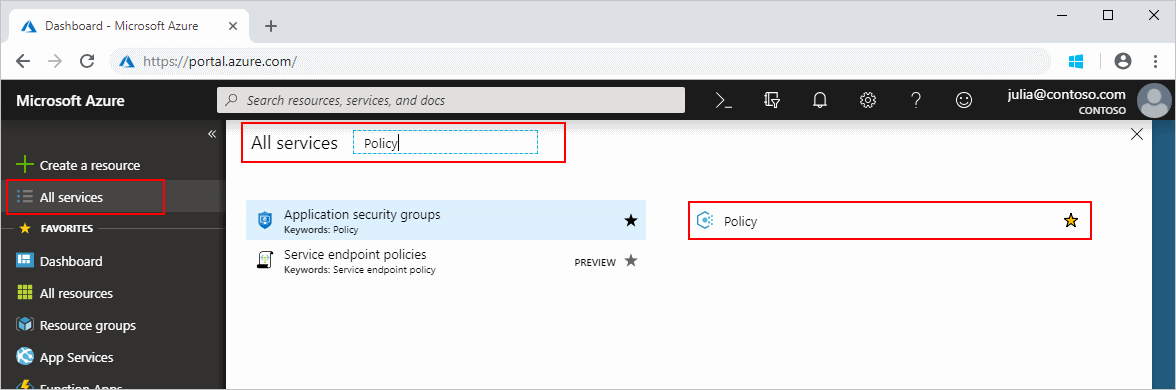
- You can select a set of virtual machine SKUs your company can deploy using the Allowed virtual machine size SKUs definition.
-
Return to the Policy page and choose Assignments from the Authoring section. An assignment is a policy designated to occur within a specified scope.
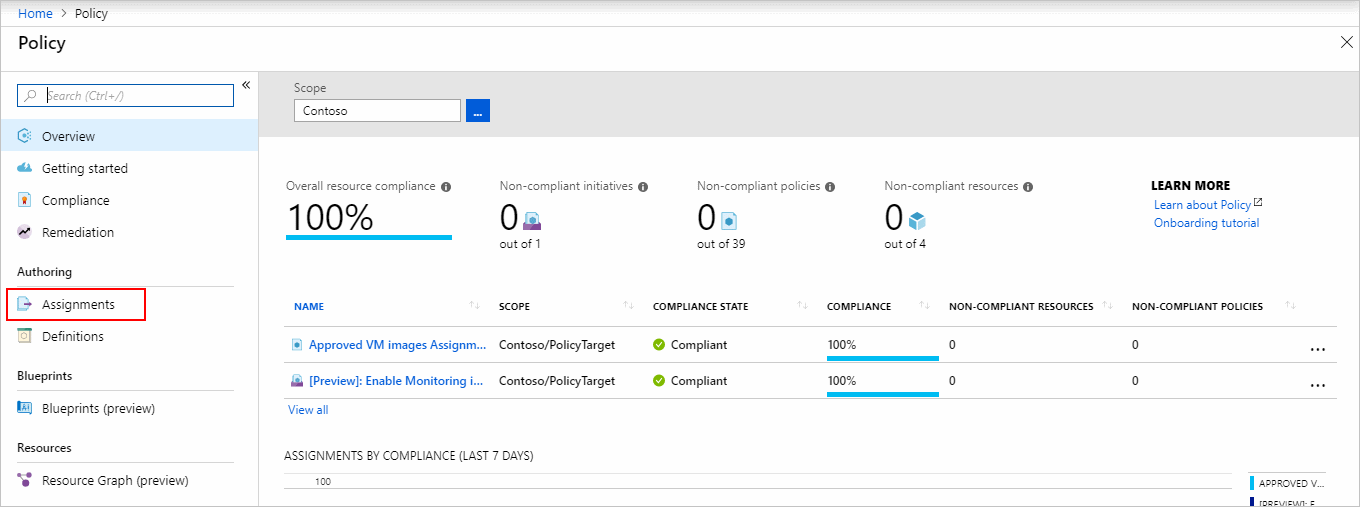
-
click on Assign Policy at the top of the Policy Assignments page.
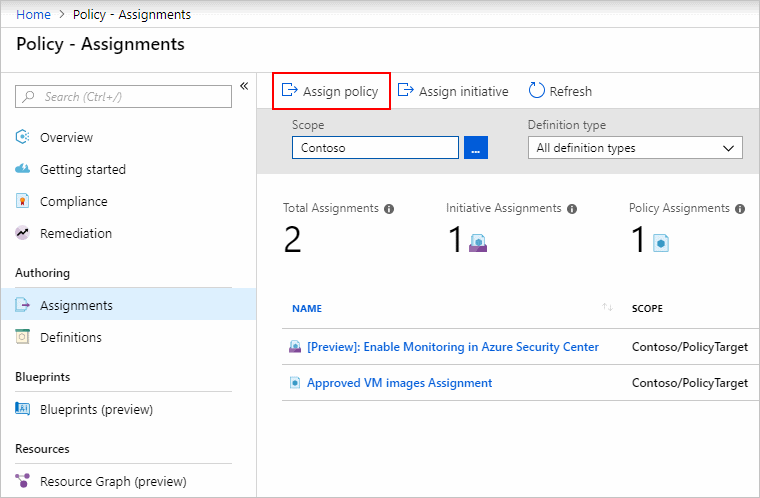
- Set the scope on the Assign Policy page by clicking the ellipsis and selecting a management group or subscription. Choose a resource group if desired. A scope specifies which resources or groups of resources are subject to the policy assignment. Click the 'Select' button on the Scope page.
-
To view the list of definitions available, click the ellipsis next to the Policy definition. You may utilize the built-in policy definitions that come with Azure Policy. Many are offered, including:
Enforce tag and its value.
Apply tag and its value.
Inherit a tag from the resource group if missing.
- The Assignment name is pre-populated with your chosen policy name, but you can modify it. You may also include a description, which is optional. The description of a policy assignment provides the details of the policy assignment. Assigned by will be filled automatically depending on who is logged in. This field is optional so that you may input your values.
- To go to the next section of the assignment wizard, click Next at the bottom of the page or the Parameters tab at the top of the page.
- Configure the parameters on this tab.
- To go to the next section of the assignment wizard, select Next at the bottom of the page or the Remediation tab at the top of the page.
- On this tab, check or leave the Create Managed Identity box. However, this box must be checked when the policy includes a policy with either the deployIfNotExists or modify effect.
- To go to the next section of the assignment wizard, click Next at the bottom of the page or the Non-compliance notifications tab at the top of the page.
- The Non-compliance notice should be set according to your needs. For example, if you want that your Virtual machines should utilize a managed disc, select this option.
- To go to the next section of the assignment wizard, click Next at the bottom of the page or the Review + Create option at the top of the page.
- Examine the settings you've chosen, then click the Create button at the bottom of the page.
Frequently Asked Questions
What exactly are Azure resources?
An Azure resource is any entity that is handled by Azure. Here are some examples of Azure resources: Accounts for storage, virtual networks, virtual computers, and so forth.
What is meant by SKU in Azure?
SKU stands for 'Stock-keeping-Unit.' In layman's terms, it simply stands for a for-sale object. In Microsoft Azure cloud, they represent a purchasable SKU under a product.
What are Azure subscription policies?
Azure subscription policies govern how Azure subscriptions are moved from and into directories.
What is meant by managed identity in Azure?
Azure managed identities offer Azure services with an automatically managed identity in Azure Active Directory. This identity may be used to authenticate to any service that supports Azure AD authentication without requiring credentials in your code.
What are parameters in Azure policy?
Using parameters, a policy definition may be made dynamic to decrease the number of policy definitions required. During policy assignment, the parameter is defined. Parameters are specified by a collection of predefined attributes that explain the parameter and how it is utilized.
Conclusion
In this blog, we learned about the Azure policy and how we can assign an Azure policy.
Refer to our Guided Path on Coding Ninjas Studio to upskill yourself in Data Structures and Algorithms, Competitive Programming, JavaScript, System Design, Machine learning, and many more! If you want to test your competency in coding, you may check out the mock test series and participate in the contests hosted on Coding Ninjas Studio! But if you have just started your learning process and are looking for questions asked by tech giants like Amazon, Microsoft, Uber, etc. You must look at the problems, interview experiences, and interview bundle for placement preparations.
Nevertheless, you may consider our paid courses to give your career an edge over others!
Do upvote our blogs if you find them helpful and engaging!






 404+ registered