Do you think IIT Guwahati certified course can help you in your career?
Introduction
PowerShell is a framework or interface created by the Azure team that allows users to automate and control Windows Azure services. It is a command-line tool that uses scripts or cmdlets to handle operations like creating and maintaining storage accounts or Virtual Machines, which can be done quickly with the predefined commands.
What is Azure PowerShell?
Azure PowerShell is a collection of cmdlets that allow you to manage Azure resources directly from PowerShell. While offering comprehensive tools for automation, Azure PowerShell is designed to be simple to learn and use.
The Az PowerShell module
This module is built on the.NET Standard and works on all platforms, including Windows, macOS, and Linux, with PowerShell 7.0.6 LTS and PowerShell 7.1.3 or above. It also works with Windows PowerShell 5.1. On Windows, macOS, and Linux, you may install the Az PowerShell module locally. It may also be accessed from a browser using Azure Cloud Shell or from within a Docker container.
Authentication
Azure PowerShell accepts a variety of authentication methods. See Sign in with Azure PowerShell for more information on how to authenticate to Azure via the Az PowerShell module.
Module Design
The Az PowerShell module is a wrapper module for Azure service-related PowerShell modules, such as Az.Network for Azure networking services and Az.AKS for Azure Kubernetes Service.
The Az PowerShell module's cmdlets make REST requests to the Azure API. Changes to the Az PowerShell module are only made twice a year. Many breaking API updates are handled within cmdlets to avoid the perception of a breaking change.
In Azure, the Az PowerShell module offers cmdlets for both control plane and data plane activities. The control plane is used to manage subscription resources. You use the data plane to access capabilities offered by your resource type instance.
Output Objects
The Az PowerShell module cmdlets generate.NET objects. The cmdlets of the Az PowerShell module, like any other PowerShell command that creates output, may be piped to the Get-Member cmdlet to ascertain what sort of object is generated and a list of accessible attributes and methods.
Other modules
The Az PowerShell module does not include the AzureAD and MSOnline PowerShell modules. See the Azure Active Directory PowerShell for Graph documentation for more information on those modules.
Legacy Azure PowerShell modules
The AzureRM PowerShell module
The Az PowerShell module does not include the AzureAD and MSOnline PowerShell modules. See the Azure Active Directory PowerShell for Graph documentation for more information on those modules.
The Azure PowerShell module
Some cmdlets in the Azure PowerShell module have been deprecated for new customers, while others have been retired for current users, as mentioned on their related reference documentation pages.
Azure Az PowerShell module
The Az PowerShell module is a collection of cmdlets that allow you to manage Azure resources directly from PowerShell. PowerShell has extensive automation tools that may be used to manage your Azure resources, such as in the context of a CI/CD pipeline.
The Az PowerShell module replaces AzureRM and is the preferred version for communicating with Azure.
You may use the Az PowerShell module in one of the ways:
Install the Az PowerShell module using PowerShellGet (recommended option).
Az PowerShell module installation through MSI.
Employ Azure Cloud Shell.
Make use of the Az PowerShell Docker container.
Features
The Az PowerShell module provides the following advantages:
Stability and security
Encrypting the token cache
Preventing man-in-the-middle attacks
ADFS 2019 authentication support
PowerShell 7 authentication using the username and password
Features such as ongoing access assessment are supported.
Support for all azure services
All commonly accessible Azure services are supported via a PowerShell module.
Since AzureRM, there have been several bug patches and API version changes.
Enhanced capabilities
Cross-platform and Cloud Shell support
Can get and use an access token to gain access to Azure resources
Cmdlet for complex REST operations with Azure resources is now available.
Upgrade your environment to Az
You should move to the Az module to keep up with the latest Azure features in PowerShell. If you are not yet ready to deploy the Az module as a substitute for AzureRM, you have two choices for experimenting with Az:
With Azure Cloud Shell, create a PowerShell environment. Azure Cloud Shell is a browser-based shell environment that includes the Az module and Enable-AzureRM compatibility aliases.
Maintain the AzureRM module in Windows PowerShell 5.1 while installing the Az module in PowerShell 7 or later. Windows PowerShell 5.1 and later use distinct libraries of modules. Install the most recent version of PowerShell, then install the Az module from PowerShell 7 or later.
To upgrade from an existing AzureRM installation, follow these steps:
Remove the Azure PowerShell AzureRM module.
Download and install the Azure PowerShell Az module.
OPTIONAL: Enabling compatibility mode allows you to create aliases for AzureRM cmdlets with Enable-AzureRMAlias as you learn the new command set.
Migrate existing scripts from AzureRM to Az
If your scripts continue to rely on the AzureRM module, Microsoft has many tools to assist you with the migration:
Az is the latest recent Azure PowerShell module. Issues and feature requests can be sent directly on the GitHub repository, or through Microsoft support if you have a support contract. The requested features will be added in the most recent version of Az. Critical flaws will be addressed in the final two versions of Az.
Microsoft will remove AzureRM PowerShell modules on February 29, 2024, because Az PowerShell modules now contain all of the functionality of AzureRM PowerShell modules and more.
Update your scripts that utilize AzureRM PowerShell modules to use Az PowerShell modules by February 29, 2024, to avoid service outages.
Data collection
By default, Azure PowerShell gathers telemetry data. Microsoft combines gathered data to discover use trends to detect frequent issues and enhance the Azure PowerShell experience. Microsoft Azure PowerShell collects no private or personal information. For example, usage data assists in identifying issues such as cmdlets with low success rates and prioritizing our efforts.
While the insights given by this data are appreciable, we recognize that not everyone wishes to share use statistics. The Disable-AzDataCollection cmdlet may be used to disable data gathering.
"Az PowerShell modules" are made up of the "Az" module and the dependent modules signed by "Microsoft Corporation." The Az PowerShell modules can be identified by their names, which begin with "Az."
The Azure SDK lifecycle policy governs the support lifecycle of Az PowerShell modules. Microsoft supports the Az PowerShell module's last two minor versions of the current major version and the last minor version of the previous major version.
AzureRM PowerShell modules
Update your scripts that use AzureRM PowerShell modules to use Az PowerShell modules by February 29, 2024, to avoid service interruptions. Follow the quickstart guide to update your scripts automatically.
Supported environments
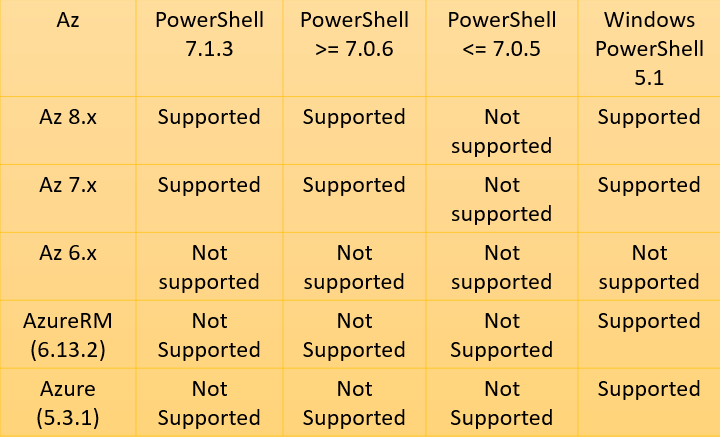
The platforms supported by the Az, AzureRM, and Azure PowerShell modules are listed in the table below.
Information about CVE-2021-26701
The vulnerability advisory CVE-2021-26701, which has been resolved in PowerShell 7.0.6 and 7.1.3, includes components used by the Az PowerShell modules. PowerShell 7.0.6 or 7.1.3 or later is necessary, starting with Az 6.0.0. If an unsupported version of PowerShell is being used, the non-blocking message "This version of Az.Accounts is only supported on Windows PowerShell 5.1 and PowerShell 7.0.6 or greater, open https://aka.ms/install-powershell to learn how to upgrade, For further information, go to https://aka.ms/azpslifecyle." is displayed when the Az.Accounts module is imported.
Install the Azure Az PowerShell module
The Azure Az PowerShell module is preconfigured in Azure Cloud Shell and Docker images.
A rollup module is the Azure Az PowerShell module. You may access the Az PowerShell modules that are commonly accessible and their cmdlets by installing it.
Requirements
When used with PowerShell 7.0.6 LTS and PowerShell 7.1.3 or later, Azure PowerShell has no extra prerequisites.
Install the most recent PowerShell version that is compatible with your operating system.
Run the following command inside a PowerShell session to check your PowerShell version:
$PSVersionTable.PSVersion
The execution policy for PowerShell scripts must be remote signed or less stringent. The current execution policy may be found using the Get-ExecutionPolicy -List command
The Az PowerShell module should be installed by using the Install-Module cmdlet. Install the Az module just for this user. This installation scope is suggested. The Windows, macOS, and Linux platforms are compatible with this technique. From a PowerShell session, execute the following command:
Install-Module -Name Az -Scope CurrentUser -Repository PSGallery -Force
Other Installation Options
Although Install-Module is the recommended installation method and PowerShell 7.0.6 LTS, PowerShell 7.1.3, or above is the recommended version of PowerShell, other installation methods are available if necessary.
Installation on Windows PowerShell
PowerShell 5.1 on Windows is also compatible with the Azure Az PowerShell module. To utilize the Azure Az PowerShell module in Windows' PowerShell 5.1:
Windows PowerShell 5.1 should be updated. You already have PowerShell 5.1 installed if you're using Windows 10 version 1607 or above.
Set up.NET Framework 4.7.2 or a newer version.
Ensure that PowerShellGet is running at the most recent version. Install-Module -Name PowerShellGet -Force should be run.
Offline Installation
The PowerShell Gallery cannot be accessed in some circumstances. In certain circumstances, one of the following techniques can be used to install the Az PowerShell module offline:
Get the MSI for Azure PowerShell. Remember that PowerShell 5.1 on Windows can only be installed via the MSI installer.
Use that place in your network as the installation source after downloading the modules there. With the help of PowerShellGet, you may deliver PowerShell modules to any unconnected systems by caching them on a single server or file share. Working with local PowerShellGet repositories teaches you how to create a local repository and install it on unconnected computers.
Using Save-Module, store the module to a file share or save it somewhere else and manually copy it to other computers.
Sign in
Sign in with your Azure credentials to begin using Azure PowerShell.
Connect-AzAccount
You can log into your Azure account after running this command since a new browser window opens.
Update the Azure PowerShell module
Any PowerShell module should be updated using the same installation procedure. To acquire the most recent version, for instance, if you initially used Install-Module, use Update-Module. You should download and install the updated MSI package if you were previously using the MSI package.
Modules installed through an MSI package cannot be updated using the PowerShellGet cmdlets. MSI packages do not update powerShellGet-installed modules. Reinstalling is preferable to upgrading if you experience any problems with PowerShellGet updates. The exact process as the installation is used for reinstalling. When reinstalling, be careful to utilize the Force argument with Install-Module.
When installing or upgrading using PowerShellGet, unlike MSI-based installs, earlier versions of the software that may already be on your system are not deleted.
Troubleshooting
Az and AzureRM coexistence
The Azure development workload, which installs the AzureRM module, may also install Azure PowerShell on older versions of Visual Studio. Azure PowerShell may be uninstalled using "Uninstall" under Apps & Features or the Visual Studio installer. You might need to manually install the Azure Az PowerShell module if you have previously installed PowerShell 7.x.
Visual Studio
As part of the Azure development workload, which installs the AzureRM module, older versions of Visual Studio may install Azure PowerShell. Both the Visual Studio installer and "Uninstall" in Apps & Features can be used to remove Azure PowerShell. You might need to manually install the Azure Az PowerShell module if PowerShell 7.x is already installed.
Proxy blocks connection
You could be behind a proxy if Install-Module reports issues stating that the PowerShell Gallery is unavailable. The prerequisites for setting a system-wide proxy vary depending on the operating system and network environment. Get in touch with your system administrator for your proxy settings and instructions on configuring them for your environment.
It's possible that PowerShell isn't set up to utilize this proxy automatically. Use the following commands to set up the PowerShell session to use a proxy with PowerShell 5.1 and later:
If your operating system credentials are configured correctly, this configuration routes PowerShell requests through the proxy. Add the commands to your PowerShell profile to have this setting persist between sessions.
Frequently Asked Questions
What's the difference between PowerShell and Azure PowerShell?
Instead of being executable, Azure PowerShell is a collection of cmdlets packaged in a PowerShell module called Az. The Az module has to be installed using Windows PowerShell or PowerShell. The default scripting shell included with most Windows operating systems is Windows PowerShell.
What is Azure PowerShell used for?
Azure PowerShell is made for command-line management and administration of Azure resources. If you wish to create automated tools that take advantage of the Azure Resource Manager concept, utilize Azure PowerShell. Install it locally or use Azure Cloud Shell to test it in your browser.
Which is better Azure CLI or Azure PowerShell?
Azure CLI can be executed in both PowerShell and CMD; however, PowerShell has additional tab-completion features. Simply put, Azure PowerShell versus Azure CLI implies that it all depends on what you want to achieve in Azure.
Conclusion
In this article, we have extensively discussed the Azure Powershell. We learned what is Azure Powershell, Azure az Powershell module, Azure PowerShell Support Lifecycle, and how to Install the Azure Az PowerShell module.








 1+ registered

