

Table of contents
1.
Introduction
2.
Azure Files Fundamentals
3.
Why is Azure Files useful?
4.
Key benefits
5.
Frequently Asked Questions
5.1.
What is the difference between Blob and file storage?
5.2.
What is the maximum size for a file share in Azure?
5.3.
What is the difference between file storage and object storage?
6.
Conclusion
Last Updated: Aug 13, 2025

Azure Files Fundamentals

Career growth poll
Do you think IIT Guwahati certified course can help you in your career?

Introduction

Azure Files is a cloud storage service for file sharing, debugging tools, and applications that count on native file systems. Using the Azure CLI or PowerShell, you can create and manage your file shares using the built-in UI. You can use azure files to replace traditional on-premises file servers or NAS devices. Azure file shares can be directly mounted by popular operating systems such as Windows, macOS, and Linux. In this blog, we will learn about Azure files fundamentals. Let us dive deeper into the topic. 

Azure Files Fundamentals

As we read in the previous paragraph, Azure Files are cloud storage services that offer entirely managed file shares in the cloud accessible through the industry-standard SMB protocol or NFS protocol. Azure Files file shares can be mounted concurrently by cloud or on-premises deployments. SMB Azure file shares are accessible from Windows, Linux, and macOS clients. NFS Azure Files shares are accessible from Linux or macOS clients. Additionally, you can cache SMB Azure file shares on Windows Servers with Azure File Sync for fast access.

Azure Files can be used in the following situations:

  • File shares are used by many on-premises applications. Azure Files makes migrating those applications that share data to Azure easier. If the Azure file share is mounted to the same drive letter that the on-premises application uses, the part of your application accessing the file share can work with minimal changes.
  • For storing configuration files on a file share and accessing them from multiple VMs. You can store tools and utilities used by various developers in a group on a file share, ensuring that everybody can find and use the same version.
  • For writing data to a file share and analysing it later. For example, you might want to do this with diagnostic logs, metrics, and crash dumps. 
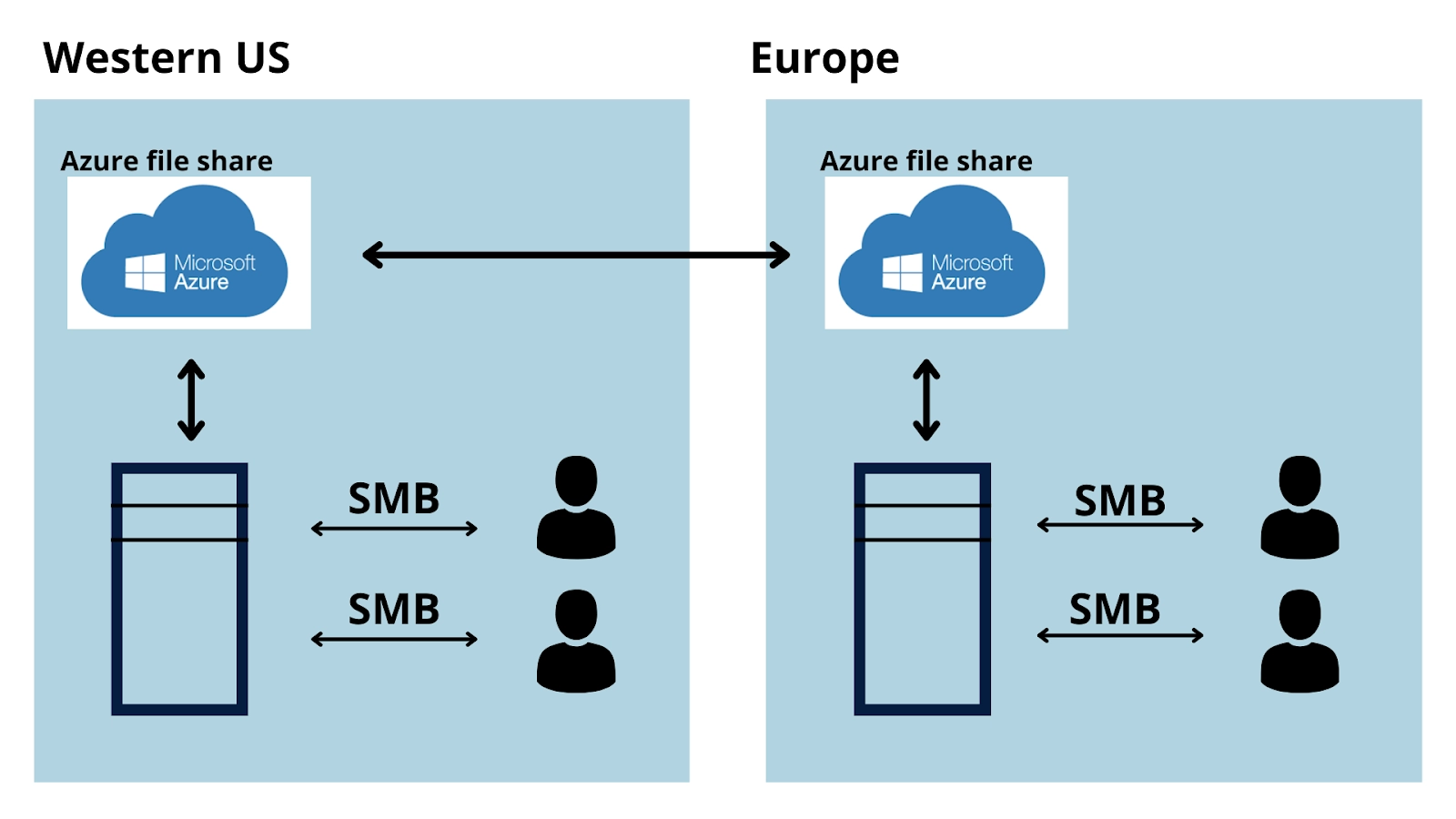
The above image illustrates Azure Files sharing data from one geographical location to another. Azure Files ensures the data is encrypted at rest, and the SMB protocol ensures the data is encrypted in transit. 

Why is Azure Files useful?

You can use Azure file shares to:

  • Replace or supplement on-premises file servers: File shares are used by many on-premises applications. Azure Files makes migrating those applications that share data to Azure easier. If the Azure file share is mounted to the same drive letter that the on-premises application uses, the part of your application accessing the file share can work with minimal changes.
     
  • "Lift and shift" applications: Azure Files provide a "lift and shift" facility for applications that need a file share to store applications or user data. The classic "lift and shift" scenario is when both the application and its data are moved to Azure. The hybrid "lift and shift" scenario is when the application data is transferred to Azure Files, and the application continues to run on-premises.
     
  • Simplify cloud development: You can also use Azure Files in numerous ways to simplify new cloud development projects. For example:
  1. Shared application settings: A typical pattern for distributed applications is to have configuration files in a centralized location where you can access them from numerous application instances. 
     
  2. Diagnostic share: An Azure file share allows cloud applications to write their logs, metrics, and crash dumps. The application instances can write logs through the File REST API and can be accessed by developers by mounting the file share on their local machine, which enables great flexibility, as developers can embrace cloud development without abandoning any existing tooling they know and love.
     
  3. Dev/Test/Debug: When developers or administrators work on VMs in the cloud, they often need tools or utilities. Copying those utilities and tools to each VM would be time-consuming. Developers and administrators can fast access their tools and utilities by mounting an Azure file share locally on the VMs.
     
  • Containerization:  You can use Azure file shares as steady volumes for stateful containers. The containers provide a "build once, run anywhere" ability that enables accelerates developers' innovation. For the containers accessing raw data, a shared file system is needed to permit them to access the file system no matter which instance they run on.

Key benefits

  • Shared access. You can replace your on-premises file shares with Azure file shares seamlessly without worrying about compatibility as it supports SMB and NFS protocols. Sharing a file system across multiple machines, applications/instances is a significant advantage with Azure Files for applications that need shareability.
     
  • Fully managed. There is no need to manage hardware or an operating system when creating Azure file shares. Consequently, you don't have to patch the server OS with critical security updates or replace faulty hard drives.
     
  • Scripting and tooling. As part of Azure application administration, PowerShell cmdlets and Azure CLI can create, mount, and manage Azure file shares. The Azure portal and Azure Storage Explorer can be used to create and manage Azure file shares.
     
  • Resiliency. Our goal with Azure Files was to build a system that would always be available. By replacing on-premises file shares with Azure Files, you no longer have to worry about power outages or network problems.
     
  • Familiar programmability. Data in the share can be accessed by applications running in Azure via file system I/O APIs. It is, therefore, possible for developers to migrate existing applications using their current code and skills. You can also use the Azure Storage Client Libraries or the Azure Storage REST API as an alternative to the System IO APIs.

Frequently Asked Questions

What is the difference between Blob and file storage?

The Azure Blob Storage service is an object storage used to store unstructured data, while Azure File Storage is a managed distributed file system based on the SMB protocol.

What is the maximum size for a file share in Azure?

5 TB

What is the difference between file storage and object storage?

The file storage organizes documents and files in a hierarchy of folders. Data is organized into links that are linked to metadata in object storage. 

Conclusion

In this article, we have extensively discussed what are Azure Files, Azure Files Fundamentals, why these are useful and their key benefits. Having gone through this article, I am sure you must be excited to read similar blogs. Coding Ninjas has got you covered. Here are some similar blogs to redirect: How to Prepare for a Microsoft Azure Certification Exam?Microsoft AzureAWS Vs Azure Vs Google Cloud?Microsoft Azure Certification. We hope that this blog has helped you enhance your knowledge, and if you wish to learn more, check out our Coding Ninjas Blog site and visit our Library. Here are some courses provided by Coding Ninjas: Basics of C++ with DSACompetitive Programming and MERN Stack Web Development. Do upvote our blog to help other ninjas grow.

Happy Learning! 

Live masterclass


