Do you think IIT Guwahati certified course can help you in your career?
Introduction
The most comprehensive SQL Server database engine compatibility with all the advantages of a fully managed and evergreen platform as a service are combined in Azure SQL Managed Instance, an intelligent, scalable cloud Database service. With a native virtual network (VNet) implementation that addresses common security concerns and a business model that is friendly to existing SQL Server customers, SQL Managed Instance offers nearly 100% compatibility with the most recent version of the SQL Server (Enterprise Edition) database engine. Existing SQL Server users may move their on-premises applications to the cloud with minimal application and database changes thanks to SQL Managed Instance. In addition, SQL Managed Instance keeps all of the PaaS features (automatic patching and version upgrades, automated backups, high availability) that significantly lower administrative costs and overhead. In this article, we will learn about Azure SQL manage instances in detail. Here, in Azure SQL managed instance, work is done using SQL language. Because it is intended in SQL, you must have prerequisites for programming in the SQL language.
Key features
Azure SQL Managed Instance is made for customers who want to move a lot of programs to a fully managed PaaS cloud environment with the least effort feasible from an on-premises or IaaS, self-built, or ISV provided environment. Customers can transfer their current SQL Server instance to SQL Managed Instance, which supports native VNet and is compatible with SQL Server, using the fully automated Azure Data Migration Service. SQL Managed Instance enables complete customer instance isolation. See Migration overview: SQL Server to Azure SQL Managed Instance for additional details on migration choices and tools.
With Software Assurance, you can use the Azure Hybrid Benefit for SQL Server to trade your current licenses for lower prices on SQL Managed Instance. SQL Managed Instance is the optimal migration destination in the cloud for SQL Server instances that demand strong security and a comprehensive programmability surface.
Key characteristics and capabilities
The top capabilities of Azure SQL Database and the SQL Server database engine are combined in SQL Managed Instance.
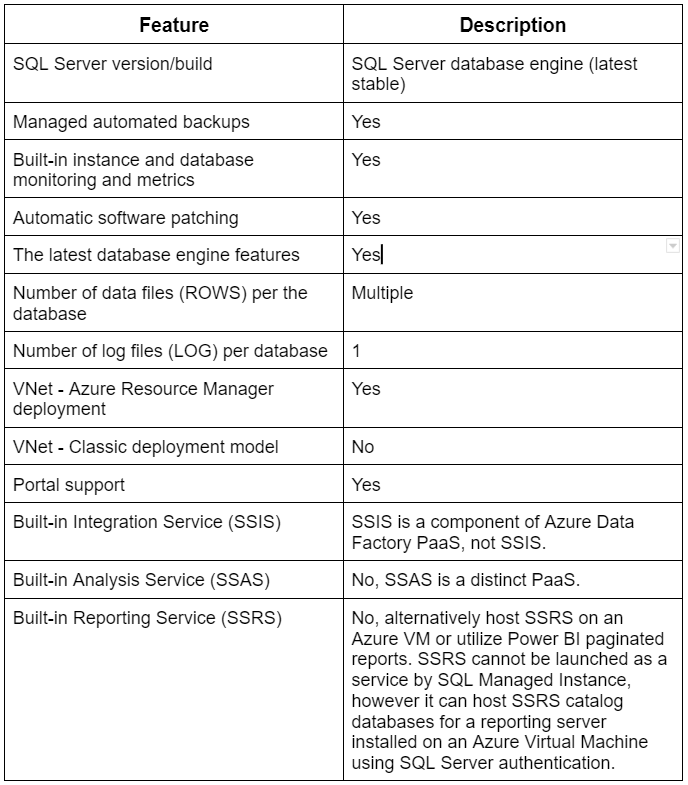
The following table displays the salient characteristics of a SQL Managed Instance:
vCore-based purchasing model
You have flexibility, control, transparency, and an easy method to move on-premises workload requirements to the cloud with the vCore-based SQL Managed Instance buying model. With this paradigm, you may alter computing, memory, and storage according to your workload demands. With the Azure Hybrid Benefit for SQL Server, the vCore model is also qualified for savings of up to 55 percent.
You have the following hardware configuration options with the vCore model:
Standard Series (Gen5) logical CPUs have computation sizes between 4 and 80 cores, 5.1 GB of RAM per CPU vCore, fast NVMe SSDs, and are based on Intel® E5-2673 v4 (Broadwell), Intel® SP-8160 (Skylake), and Intel® 8272CL (Cascade Lake) 2.5 GHz processors.
Hyper-threaded logical cores, fast NVMe SSDs, and compute sizes ranging from 4 to 80 cores are all Premium Series logical CPUs, which are based on Intel® 8370C (Ice Lake) 2.8 GHz processors.
Hyper-threaded logical cores, 13.6 GB of RAM per CPU vCore, a fast NVMe SSD, and compute sizes ranging from 4 to 64 cores are all features of the Premium Series Memory-Optimized logical CPUs, which are based on Intel® 8370C (Ice Lake) 2.8 GHz processors.
Service tiers
There are two service tiers for SQL Managed Instances:
General-purpose: Designed for applications with common performance and I/O latency needs, general-purpose.
Business-critical: Created for applications with low I/O latency needs and no workload impact from underlying maintenance activities.
You can individually choose storage space and compute capacity with both service tiers, which provide 99.99 percent availability.
General Purpose service tier
The General Purpose service tier's salient features are enumerated in the list below:
Designed to meet the performance needs of the majority of business applications
Azure Blob storage with high performance (16 TB)
A built-in high availability is possible on solid Azure Blob storage and Azure Service Fabric.
Business Critical service tier
Applications with high I/O requirements are designed for the Business Critical service tier. Using numerous separate replicas provides maximum resilience to failures.
The Business Critical service tier's salient features are outlined in the list below:
They are designed with the highest performance and HA requirements for corporate applications.
Offers up to 4 TB of lightning-fast local SSD storage on the Standard Series (Gen5), 5.5 TB on the Premium Series, and 16 TB on the Premium Series Memory-Optimized.
Built-in high availability via Azure Service Fabric and Always On availability groups
an additional read-only database replica that is integrated and can be used for reporting and other read-only tasks.
High-performance workloads that can be handled by in-memory OLTP
Management operations
You can automatically deploy new managed instances, alter instance properties, and delete cases when they are no longer required using management procedures offered by Azure SQL Managed Instance. A thorough explanation of management operations can be found on the managed instance management operations overview page.
Advanced security and compliance
The SQL Server database engine and the Azure platform offer cutting-edge security features with the SQL Managed Instance.
Security isolation
SQL Managed Instance offers additional security isolation from other Azure tenants. Isolating security includes:
Using Azure ExpressRoute or VPN Gateway, you may construct a native virtual network and connect it to your on-premises environment.
The SQL endpoint is only accessible through a private IP address in a default configuration, enabling secure connectivity from private Azure or hybrid networks.
The dedicated underlying infrastructure for a single tenant (compute, storage).
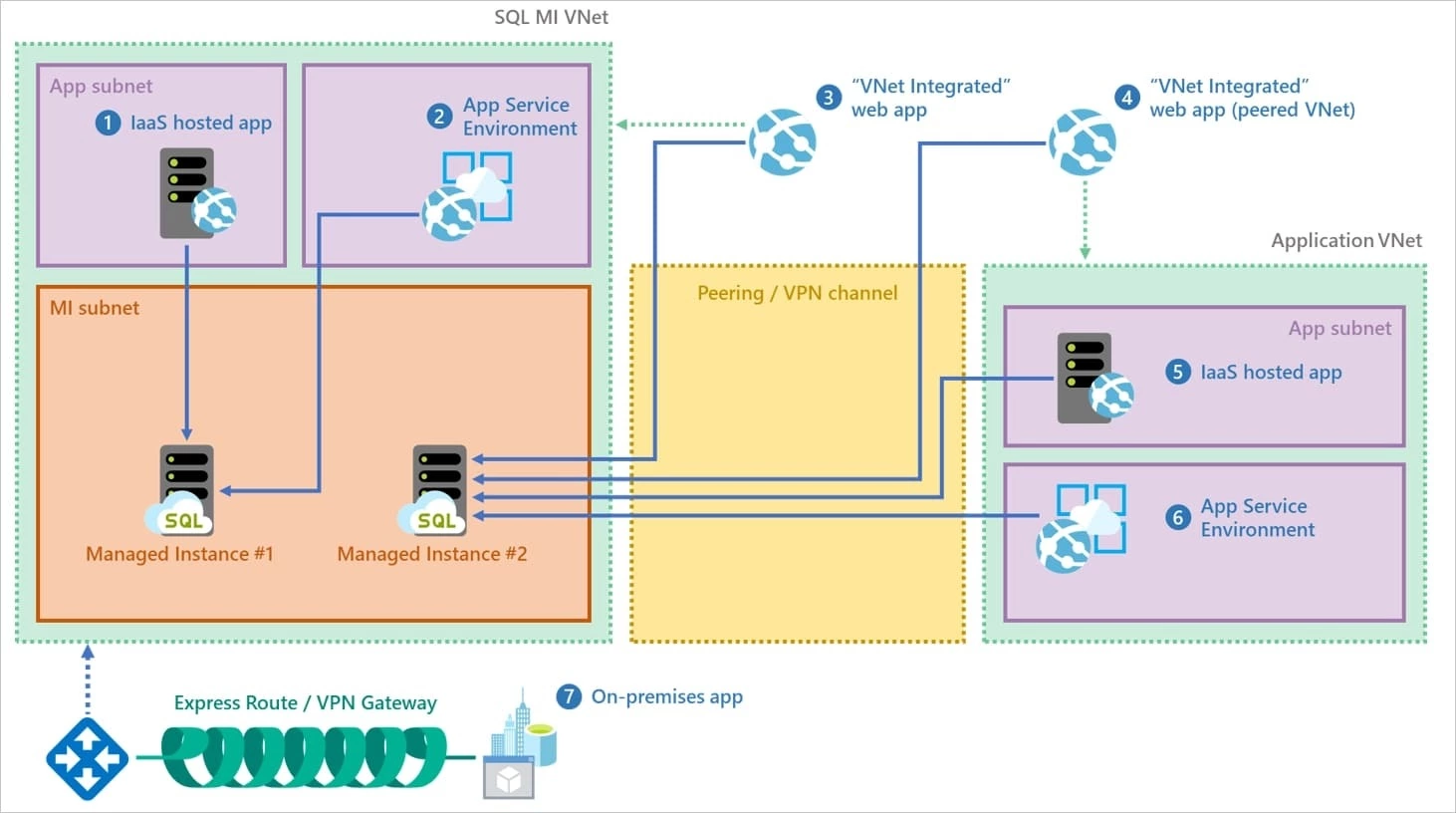
Various connecting possibilities for your applications are shown in the picture below:
Azure SQL Managed Instance offers several cutting-edge security capabilities to safeguard your data.
Database events are recorded by SQL Managed Instance auditing and written to an audit log file stored in your Azure storage account. Maintaining regulatory compliance, understanding database activity, and gaining insight into inconsistencies and abnormalities that may suggest business concerns or security violations are all made possible with the aid of auditing.
Data encryption in motion - SQL Managed Instance protects your data using Transport Layer Security-based data encryption. In addition to Transport Layer Security, SQL Managed Instance provides Always Encrypted for the security of sensitive data while it is in transit, at rest, and being processed by queries. Data security against breaches involving the theft of critical data is provided by Always Encrypted. For example, when using Always Encrypted, for instance, credit card numbers are always stored encrypted in the database, even while queries are being processed. This enables decryption at the point of use by authorized personnel or apps that need to process the data.
Auditing is complemented by Advanced Threat Protection, a built-in security intelligence service that identifies odd and potentially hazardous attempts to access or exploit databases. You are informed of questionable actions, possible security holes, SQL injection threats, and unusual database access patterns. Microsoft Defender for Cloud allows users to view Advanced Threat Protection notifications. They give information about the suspicious activities and suggest how to investigate and lessen the hazard.
By hiding sensitive data from non-privileged users, dynamic data masking reduces the exposure of that data. By letting you choose how much of the sensitive data to reveal with little influence on the application layer, dynamic data masking prevents unwanted access to sensitive data. It is a policy-based security feature that conceals sensitive material while maintaining the integrity of the data in the database in the result set of a query over specified database fields.
You can restrict access to rows in a database table using row-level security (RLS), depending on the user's traits doing a query (such as by group membership or execution context). RLS makes it easier to code and design security into your application. You can impose limitations on data row access using RLS, for instance, ensuring that employees can only view the rows of data that apply to their department or limiting data access to only the essential data.
Transparent data encryption (TDE), also called encrypting data at rest, encrypts the SQL Managed Instance data files. The data and log files are encrypted and decrypted in real-time I/O by TDE. A database encryption key (DEK) is used for encryption and is kept in the database boot record for recovery purposes. Transparent data encryption can be used to secure every database in a managed instance. Many compliance standards call for SQL Server's TDE, a tried-and-true encryption-at-rest technique, to defend against storage media theft.
The Azure Database Migration Service or native restore is available for moving an encrypted database to a SQL Managed Instance. The old TDE certificate must be moved from the SQL Server instance to the SQL Managed Instance if you intend to migrate an encrypted database using native restore.
Azure Active Directory integration
SQL Managed Instance supports traditional SQL Server database engine logins and logins connected to Azure AD. The Azure cloud version of the on-premises database logins you use in your on-premises environment is called Azure AD server principals (logins) (public preview). You can identify users and groups from your Azure AD tenant as true instance-scoped principals with Azure AD server principals (logins), allowing them to execute any instance-level activity, including cross-database queries inside the same managed instance.
A new syntax is introduced to construct Azure AD server principals (logins): FROM EXTERNAL PROVIDER. See CREATE LOGIN and the article Provision an Azure Active Directory administrator for SQL Managed Instance for further details on the syntax.
Azure Active Directory integration and multi-factor authentication
With Azure Active Directory integration, SQL Managed Instance allows you to centrally manage the identities of database users and other Microsoft services. This feature improves security while streamlining permission management. Azure Active Directory enables multi-factor authentication to strengthen data and application security while maintaining a single sign-on procedure.
Authentication
When users connect to the database, they must authenticate themselves using SQL Managed Instances. Three forms of authentication are supported by SQL Managed Instance:
SQL Authentication: A username and password are required for this authentication type.
Azure Active Directory Authentication: Supported for managed and integrated domains, this authentication technique uses identities maintained by Azure Active Directory. When possible, use integrated security with Active Directory authentication.
Windows Authentication for Azure AD Principals (Preview): Windows Authentication for Azure SQL Managed Instance is made possible via Kerberos authentication for Azure AD Principals (Preview). Customers may relocate current services to the cloud while preserving a smooth user experience thanks to Windows Authentication for managed instances, which also serves as the foundation for infrastructure modernization.
Authorization
The database role memberships and object-level rights of your user account govern authorization, which refers to what a user can do inside a database in an Azure SQL Managed Instance. The authorization features of SQL Server 2017 are also available in SQL Managed Instance.
Database migration
SQL Managed Instance targets user scenarios with large database migration from on-premises or IaaS database deployments. The migration guidelines cover several database migration options supported by SQL Managed Instance. For further information, see Migration overview: SQL Server to Azure SQL Managed Instance.
Backup and restore
The migration strategy makes use of Azure Blob storage for SQL backups. The T-SQL RESTORE command enables direct restoration of backups kept in an Azure storage blob into a managed instance.
See Restore a backup file to a managed instance for a quick start on how to restore the Wide World Importers - Standard database backup file. This quickstart demonstrates how to secure a backup file using a shared access signature (SAS) key before uploading it to Azure Blob storage.
Note: Only another managed instance can be restored from a managed instance's backup. They cannot be converted to an Azure SQL Database or a SQL Server instance.
Database Migration Service
The completely managed Azure Database Migration Service enables quick, smooth migrations from various database sources to Azure data platforms. With the help of this service, switching existing SQL Server databases and third-party databases to Azure SQL Database, Azure SQL Managed Instance, and SQL Server on Azure VM is simplified.
SQL features supported
Through a staggered release strategy, SQL Managed Instance seeks to provide surface area compatibility with the most recent SQL Server version, which is nearly 100%. See SQL Managed Instance feature comparison for a list of features, and see SQL Managed Instance T-SQL differences from SQL Server for a list of features and differences between the two.
Backward compatibility with SQL Server 2008 databases is supported via SQL Managed Instance. The compatibility level for migrated SQL Server 2005 databases is updated to SQL Server 2008, and direct migration from SQL Server 2005 database servers is supported.
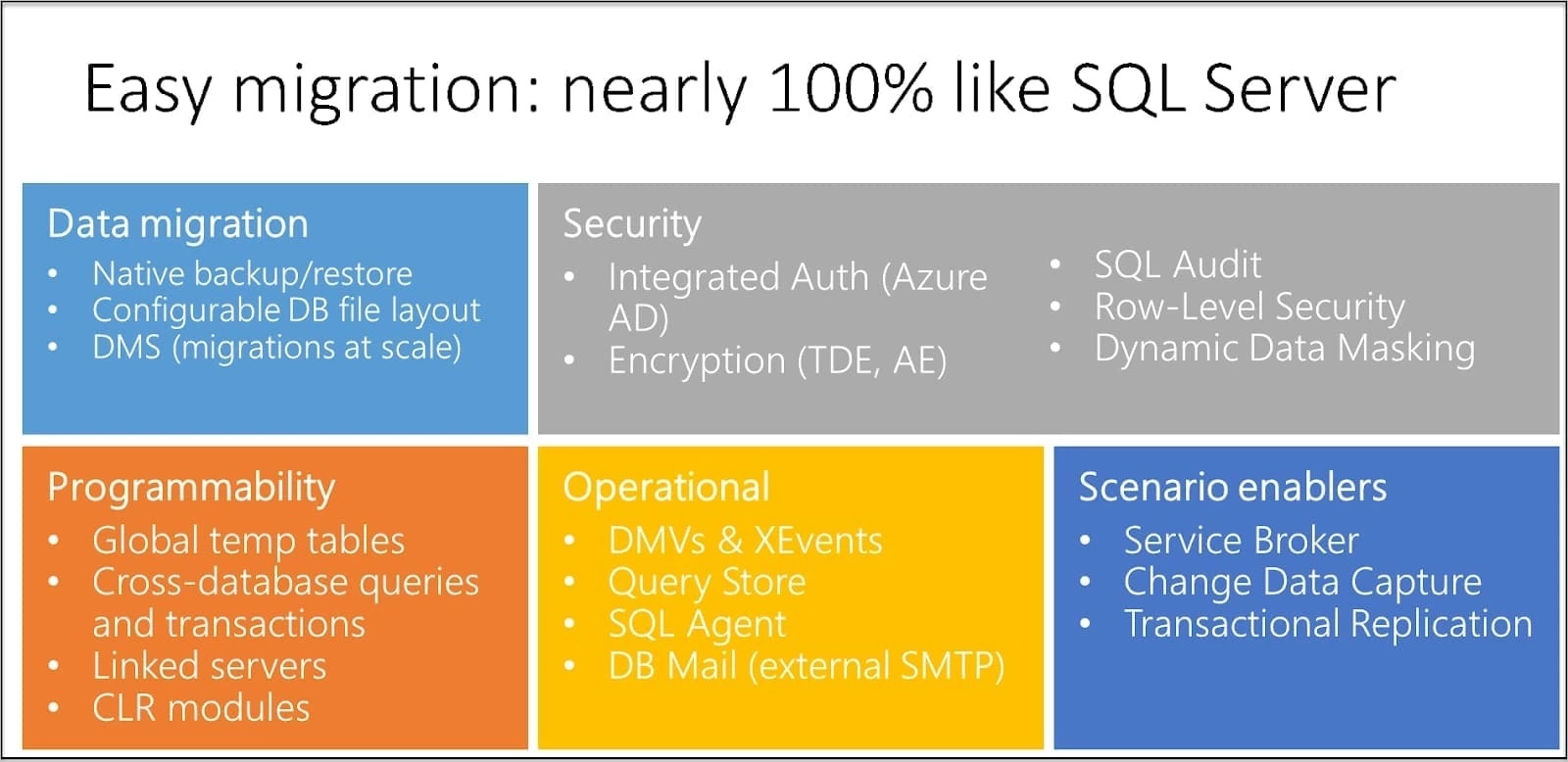
Surface area compatibility in a SQL Managed Instance is shown in the following diagram:
Important distinctions between SQL Managed Instance and SQL Server on-premises
Since SQL Managed Instance is always up to date in the cloud, some SQL Server functionality might be no longer in use, be phased out, or have substitutes. In some circumstances, tools must understand that a particular feature operates slightly differently or that a service is being used in a setting you do not fully control.
Some notable variations
Utilizing technology comparable to Always On availability groups, high availability is pre-configured and built-in.
Only automated backups and point-in-time restoration are available. Customers can start copy-only backups that don't disrupt the chain of automatic backups.
All comparable circumstances must be treated differently because specifying entire physical pathways is not available: Physical routes are not allowed for CREATE DB, BULK INSERT only works with Azure blobs, RESTORE DB does not accept WITH MOVE, etc.
Microsoft Windows Authentication for Azure Active Directory principals is supported by SQL Managed Instance (Preview).
For databases containing In-Memory OLTP objects, SQL Managed Instance automatically handles XTP filegroups and files.
SSIS packages are processed on a managed Azure-SSIS Integration Runtime (IR) in Azure Data Factory, even though SQL Managed Instance supports SQL Server Integration Services (SSIS) and can host an SSIS catalog (SSISDB) that stores SSIS packages. In Data Factory, see Create Azure-SSIS IR. See Compare SQL Database to SQL Managed Instance to compare the SSIS functionalities.
Only the TCP protocol is supported for connectivity by SQL Managed Instance. It does not support named pipe connections.
Administration features
System administrators can save time using SQL Managed Instance because the service handles administrative duties for you or makes them significantly simpler. Installation and patching of the OS and RDBMS, dynamic instance sizing and setup, backups, database replication (including of system databases), high availability, and data streams for health and performance monitoring are a few examples.
Programmatically identify a managed instance.
The following table lists some attributes that can be retrieved using Transact-SQL and which you can use to identify whether your application utilizes a SQL Managed Instance.
What recently changed with Azure SQL Managed Instance?
The newest updates to Azure SQL Managed Instance's documentation that correspond to new features and enhancements are summarized in this article. View the overview to learn more about Azure SQL Managed Instance.
Preview
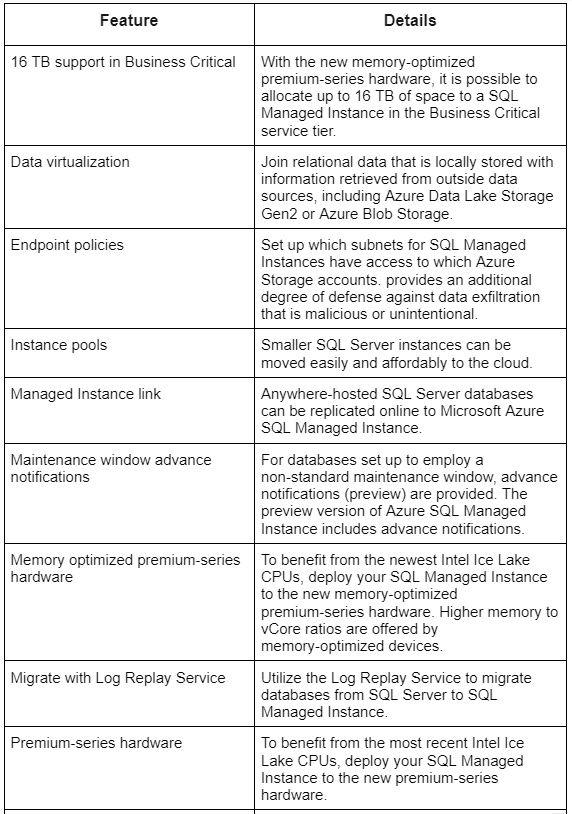
The attributes of Azure SQL Managed Instance that are presently under preview are listed in the following table:
General availability (GA)
The features of Azure SQL Managed Instance that went from preview to general availability (GA) in the previous 12 months are listed in the following table:
Documentation changes
Learn about substantial updates to the documentation for Azure SQL Managed Instance.
May 2022
March 2022
2021
2020
In 2020, in the documentation for SQL Managed Instance, the following modifications were made:
Frequently Asked Questions
What is a managed Azure SQL instance?
The most comprehensive SQL Server database engine compatibility with all the advantages of a fully managed and evergreen platform as a service are combined in Azure SQL Managed Instance, an intelligent, scalable cloud database service.
What distinguishes managed instances from Azure SQL?
With the aid of SQL Managed Instance, existing applications may be easily migrated, and resources can be shared between databases. In contrast, SQL Server on Azure VMs offers DBAs and experience comparable to the on-premises system they are accustomed to.
How well managed is Azure SQL?
An always-updated, fully managed relational database service designed for the cloud; Azure SQL Database is a member of the Azure SQL family.
Azure SQL Server is it a PaaS or IaaS?
IaaS, or infrastructure as a service, refers to SQL Server running on an Azure virtual machine. Platform as a Service, or PaaS, sort of services are what we are moving toward as we go toward Azure SQL Database and Azure SQL Managed Instance.
Conclusion
In this article, we have extensively discussed the Azure SQL Managed Instance. In detail, we have also discussed various service tiers, database migration, and SQL-supported features.








 1+ registered

