Table of contents
1.
Introduction
2.
SAP HANA Database Backup
3.
SAP HANA Database Restore
4.
Manage SAP HANA Database
4.1.
Monitor manual backup jobs
4.2.
View backup alerts
5.
Frequently Asked Questions
5.1.
Does SAP HANA run on Azure?
5.2.
How do I backup my SAP HANA database?
5.3.
What are the types of backup in the SAP HANA Database?
5.4.
How do I restore my HANA database?
5.5.
Where can you monitor jobs and alerts for SAP HANA backup?
6.
Conclusion
Last Updated: Mar 27, 2024

SAP HANA Database Backup in Azure

Career growth poll
Do you think IIT Guwahati certified course can help you in your career?

Introduction

SAP HANA Database is a database as a service (DBaaS) for modern applications and analytics across all enterprise data. SAP HANA databases are mission-critical workloads that require a low recovery point objective (RPO) and a fast recovery time objective (RTO). The Azure backup is certified by SAP to provide backup support using native APIs. This backup doesn’t require deploying or managing the backup infrastructure. We can easily backup, restore the data, and run them on the Azure VMs.

SAP HANA Database Backup

The SAP HANA backup needs a connection to the Azure Backup service, Storage, and Active Directory to perform any operations on the database. The connection can be established by using the private endpoints or by allowing access to the required public IP addresses. Let’s explore the databases and create a backup in Azure.

  1. Open the Azure portal and log in with your credentials. If you don’t have an account, you can create one according to your preferred subscription and click on backup.
backup center

Source

2. Select the SAP HANA in Azure VM as the Datasource type, select a Recovery Services vault to use for backup(here, we selected the contosovault), and then click on continue.

configure backup

Source

3. Fill in the details in the Backup goal and click on start discovery. After you click it, a list of VMs will appear; if the VMs aren't listed as expected, check if it’s already backed up in a vault or select the link to download scripts from the Select Virtual Machines list.
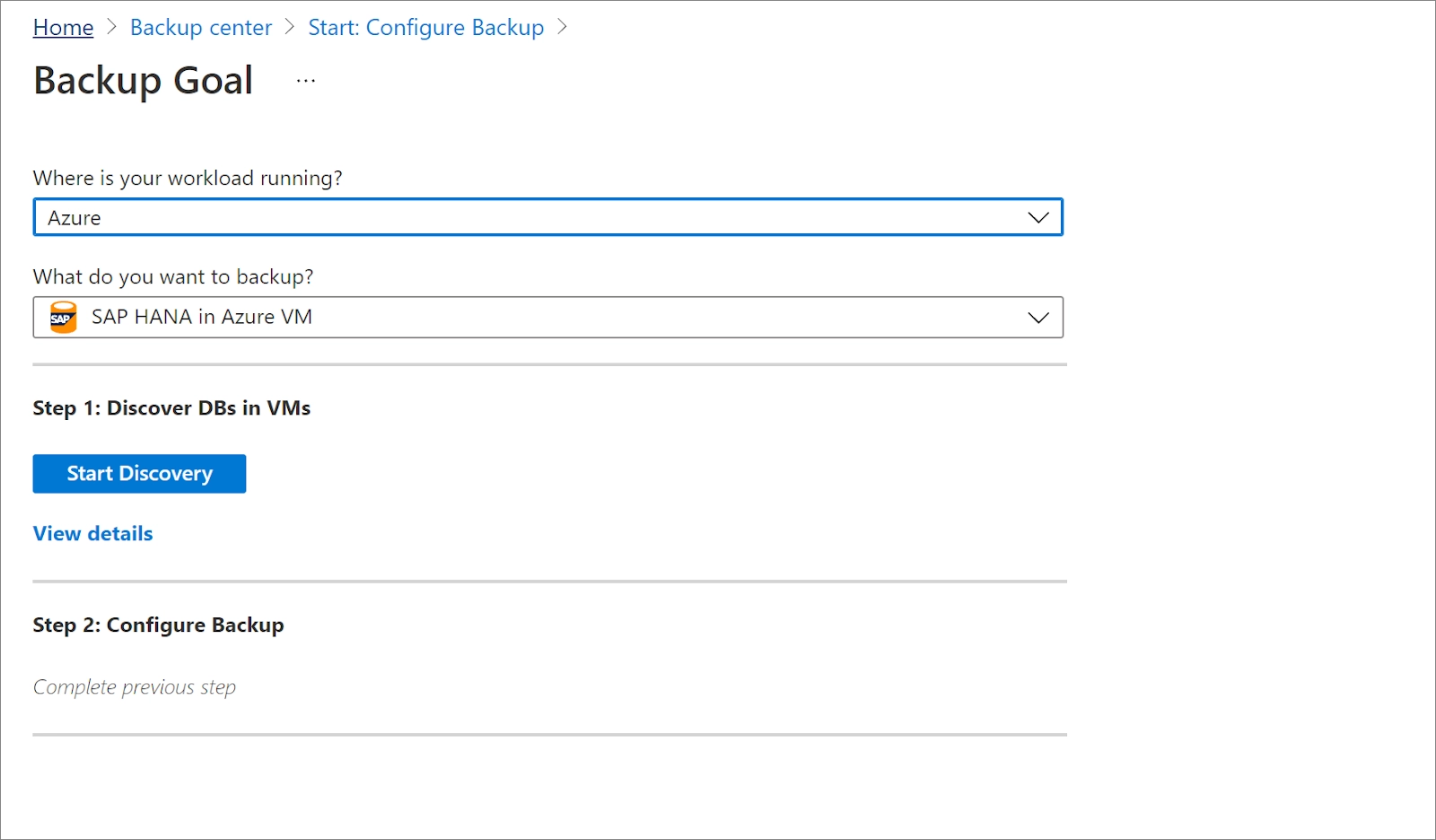
backup goal

Source

4. Now click on configure backup and select the items to backup along with databases you want to protect.

backup goal

Source

5. Choose a backup policy and create one for the databases according to the instructions.

6. Now click on enable backup after creating the policy.

enable backup

Source

SAP HANA Database Restore

We can restore the databases in SAP HANA Database with the following permissions.

  • Backup Operator permissions in the vault.
  • Contributor access to the source VM that's backed up.
  • Contributor access to the target VM.


Let’s learn how to restore the backed-up databases on Azure.

  1. In the Azure portal, click on restore beside the Backup option.
  2. Select SAP HANA in Azure VM as the data source type, select the workload type and backup instance, and then click on Continue.
restore

Source

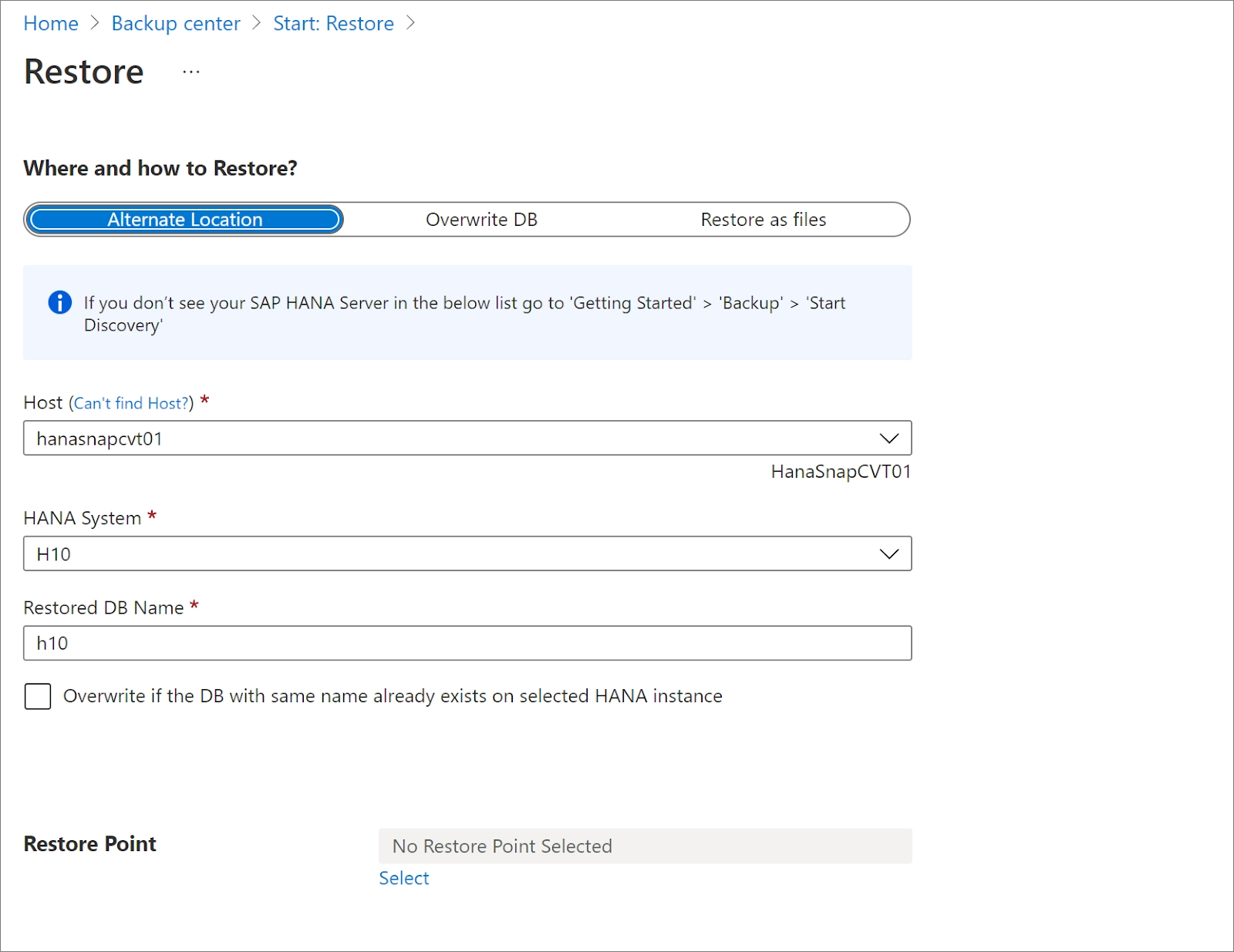
3. Under the restore tab, specify the details about where and how to restore the data, and then click on a restore point.

restore

Source

Manage SAP HANA Database

We can monitor and manage the tasks and SAP HANA Databases that are backed up or restored in the Azure VMs. Let’s learn how to manage databases, job alerts, triggers, etc.

Monitor manual backup jobs

The manual jobs can be monitored in the backup jobs section in the backup center.

backup jobs

Source

View backup alerts

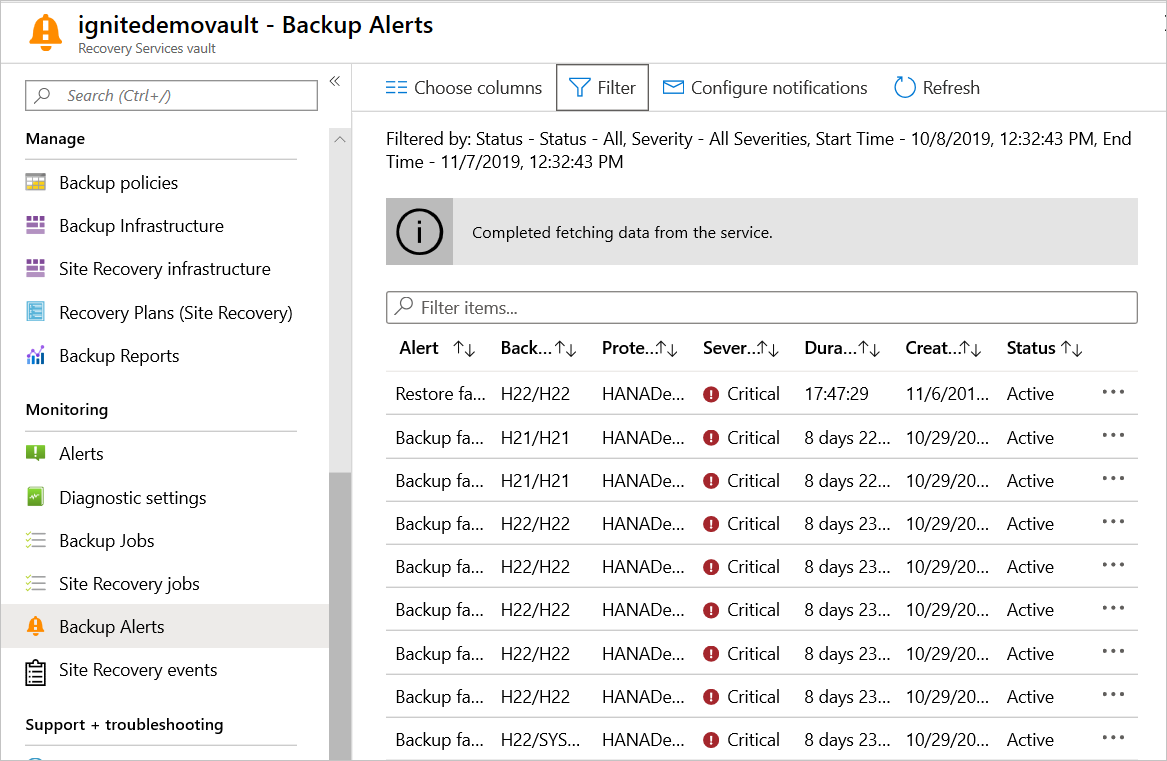
Alerts help us monitor the jobs when there are multiple jobs. We can view the alerts in the Backup Alerts section in the vault dashboard.

backup alerts

 Source

Frequently Asked Questions

Does SAP HANA run on Azure?

The Virtual machines in Azure provide the support to run SAP HANA on Azure. The large instance machines on Azure are certified to run SAP S/4HANA to backup, restore and manage data.

How do I backup my SAP HANA database?

The SAP HANA database should be connected to Azure by establishing a connection. Click on the backup option in the backup center and configure your backup by following the steps mentioned in this article.

What are the types of backup in the SAP HANA Database?

The types of backups available in the SAP HANA Database are file system, Backint, and snapshot. We can also mix these backup methods to create incremental or differential backups.

How do I restore my HANA database?

You can restore your SAP HANA database on Azure by clicking on the restore option if you have the following permissions.

  • Backup Operator permissions in the vault.
  • Contributor access to the source VM that's backed up.
  • Contributor access to the target VM.

Where can you monitor jobs and alerts for SAP HANA backup?

You can monitor the job and backup alerts of the SAP HANA database when the data is backed up or restored in the backup alerts in the vault dashboard or backup jobs section in the backup center.

Conclusion

We have discussed the concept of SAP HANA Database Backup in Azure in this article. You can now backup, restore and manage your data by logging into the portal. 

Hey Ninjas! We hope this blog helped you better to understand the SAP HANA Database Backup in Azure concept. Please check out Coding Ninjas for more unique courses and guided paths. Also, try Coding Ninjas Studio for more exciting articles, interview experiences, and fantastic Data Structures and Algorithms problems. Please upvote our blog to help the other ninjas grow.

Happy Coding!

Thank you by coding ninjas

Live masterclass