Do you think IIT Guwahati certified course can help you in your career?
Introduction
So, are you wondering what the query API in PuppetDB is? And how does it work, and what is the difference between different versions of the query API in PuppetDB? Then we’ve got you covered!
Puppet Enterprise is used to manage and configure many servers. This helps to automate the infrastructure of an organization. PuppetDB is a database tool of Puppet enterprise. It is a data warehouse of Puppet. In this article, we will discuss all that you need to know about query APIs in PuppetDB and how to get started with it.
Let’s go through some Important concepts first,
The word API stands for Application Programming Interface and it acts as a messenger that runs back and forth between databases, applications, and devices to deliver data and create the connectivity that puts the world at our fingertips.
Query in the English dictionary means requesting information. In programming, a query means a request for data from a database. There are mainly two types of query: Select query - retrieves data from the database. Action query - requests for additional operation on data. A query language like SQL or MySQL is required to make these requests from the database
To sum it up, API delivers a request for data; the server fetches the data using the query.
In order to make its Query API even more stable and better, PuppetDB continuously amends its platform with API changes.
PuppetDB implements changes to improve its performance. It continuously focuses on making it easy for users to manage their organization's infrastructure. A lot of Query API in PuppetDB changes have been made in the new version4. These changes were marked “experimental” in the previous versions. Users need to be aware of these changes to keep their code compliant with the new versions.
Thus it is very important to go through the changes in endpoints and new endpoints as well as operators.
Query structure in PuppetDB
We all know what a GET request looks like; a lot of queries look the same. For example:
A query URL parameter, whose value is a query string.
Other URL parameters, to configure paging or other behaviour.
The API version usually comes after the ‘/pdb/query/’, in this example, notice the “v4.”
After the version, comes the endpoints which have the entity to be queried. After that, the URL parameter begins with a question mark (?). Each parameter is formatted as <PARAMETER>=<VALUE>, and additional parameters are separated by ‘&’. All parameter values must be URL-encoded.
Don't get yourself confused by these words. We will be learning about these in detail further.
Elements in query API version4 in PuppetDB
As discussed above, a query is made up of an API URL in such a way that it contains endpoints, paging parameters, and entities which are all written in the English language.
To make it easier and faster for the database to understand what we are requesting, there are query languages made which are codeless. They use specific English words that are used for specific purposes.
Query language
After the organization's database is designed, the role of query languages emerges. They help in giving instructions to store, receive and modify data in nodes(servers). The query language is the language that the user uses to request the database for some data or information. We have all heard about SQL, which is the structured query language. There are other languages like AQL, and data log.
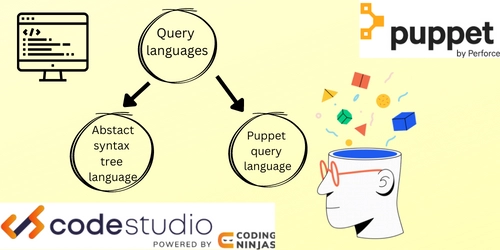
Just like that, Query API in PuppetDB supports two query languages:
1. AST(abstract syntax tree) query language. It is an URL encoded string with an operator and arguments simultaneously.
2. Puppet Query Language (PQL) It is based on AST query language. It is a string-based query language designed with PuppetDB and Puppet data in mind. All you need to do is learn the operator syntax in order to use this language to Query API in PuppetDB.
Entities and Endpoints
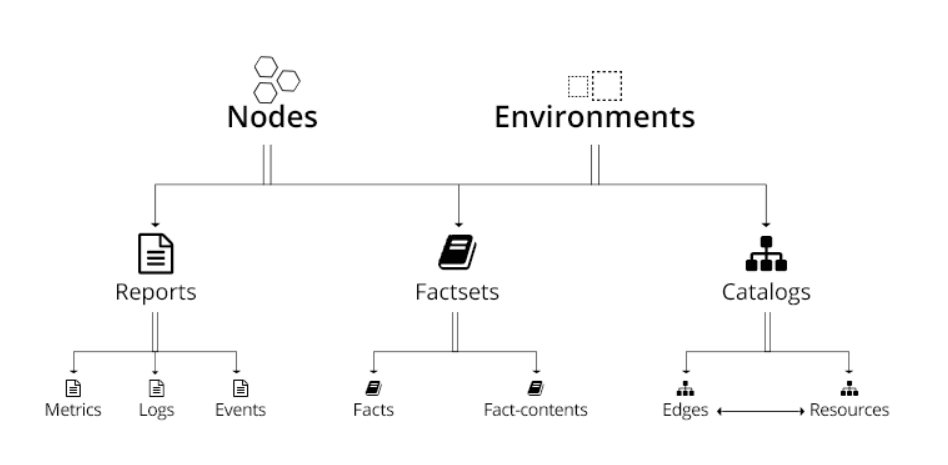
The entity is the implementation of database tables. The PuppetDB API provides access to a series of data entities from the Puppet ecosystem.
Credit: Puppet platform.
The entity name is utilized within queries and operators themselves. For example:
There are 18 different kinds of endpoints, all of which query an entity by making an HTTP request to the /entity endpoint. For example:
Root query endpoint can be used to retrieve any known entities from a single endpoint using URL format as shown below:
This will return an array containing catalog for the node mentioned. If a query parameter is not provided, all results will be returned. There are several other endpoints that use URL parameters to help us access data entities.
Root endpoints
Root endpoints are used to query an entity.
What do we mean by query endpoints? Query endpoints can be used to retrieve any known entities from databases.
The root endpoint looks like: /pdb/query/v4 - returns any known entity. The entity must be supplied using a query with the operator.
Response format - The response will be in application/JSON format and will contain a list of JSON object results based on the entity.
URL parameters -
query: This is essential. Either a PQL query string or an AST JSON array containing the query in prefix notation as shown below:
ast_only: It is a Boolean value and is optional. When true, the query response will be the supplied query in AST, either exactly as supplied from PQL. False is set by default.
Origin: This is optional. This is a string describing the source of the query. It can be anything and will be reported in the log when PuppetDB is configured to log queries.
explain: This is optional. The string value is analyzed. This is used to tell PuppetDB to return the execution plan of a statement instead of the query results.
Query endpoints are also very useful for paging via the Query API in PuppetDB.
Paging
Paging is the management of data stored and retrieved from secondary storage to primary storage of servers. For paging, a set of HTTP URL parameters supported by PuppetDB's query endpoints can be used. The platform also supports paging via Query operators.
Some of the URL parameters are discussed below:
URL parameters
Order_by
This is used to ask PuppetDB to return results in ascending or descending order. The value must be a JSON array of maps. Each map represents how to sort a field and the sort order is determined by the order in which the maps are specified. For example:
In the above example, under the field of descending, we have set descending order (desc) of certificate names of nodes(certname). Followed by ascending order of names of nodes(name) under the field of ascending.
2. Limit This value is an integer. It sets a maximum number of results to restrict the result. For example:
'limit’= <int value>
number=(number.limit)
Once you have set the value of limit. You can then call it out by using a “.” dot + limit as shown above. The number variable will be paged till the limit value.
3. Include_total This requests a count of how many records would have been returned. This is a safety option if the limit parameter dows not work to show what has been navigated by the user.The value should be Boolean. False is set as default. For example:
If the limit parameter fails to complete it’s function then include_total will return all the details of user actions during paging if set to true.
4. Offset This parameter works like a label does in programming languages where the program coded by the offset will be executed. The value should be an integer. This parameter must always be used along with order_by. For example:
Paging will be done till limit value along the offset value. This means that if limit is set 5 and offset is set initially to 0 then to 5, this will execute paging from page size 0 to 5.
Now it’s time to discuss some frequently asked questions
Frequently Asked Questions
What is Puppet forge?
Puppet forge is a collection of modules. All these modules are pre-made by puppet and stored in forge.
Is Ansible better or Puppet?
Ansible is better as it pushes the configuration to the node instantaneously. Thus it is more scalable than Puppet. Puppet is built on Ruby whereas Ansible is built on Python.
How to set up PuppetDB?
The steps to set up puppetDB are:
Install PuppetDB.
Install and configure PostgreSQL.
Configure PuppetDB to use PostgreSQL.
Start PuppetDB and open the firewall.
Configure the Puppet master
Use PuppetDB.
Is there a free version of Puppet?
Open-source puppet is free to use.
Conclusion
In this article, we discussed query language and structure. We also learned about various elements of query API version4 in puppetDB including entities, endpoints, and paging.








 1+ registered

