Do you think IIT Guwahati certified course can help you in your career?
Introduction
Almost all the websites you use today are designed to automatically change according to the operations performed by users on them. When you fill out a sign-up form on any website, the site will change according to your entered information. This is nothing but seeing the change and rendering accordingly. Ever wondered how these changes are detected?
No need to worry; we will see how these changes are detected. In this blog, we will learn more about change detection in Vue2.
What is Vue?
Vue.js is a progressive JavaScript framework for building user interfaces. It was created by Evan You in 2014 and has since become one of the most popular JavaScript frameworks for building web applications.
Vue is designed to be a lightweight and easy-to-learn framework, making it a great choice for developers new to JavaScript or wanting to build simple applications quickly. At the same time, it also provides advanced features for building complex, large-scale applications, making it a versatile choice for many projects.
How changes are detected in Vue?
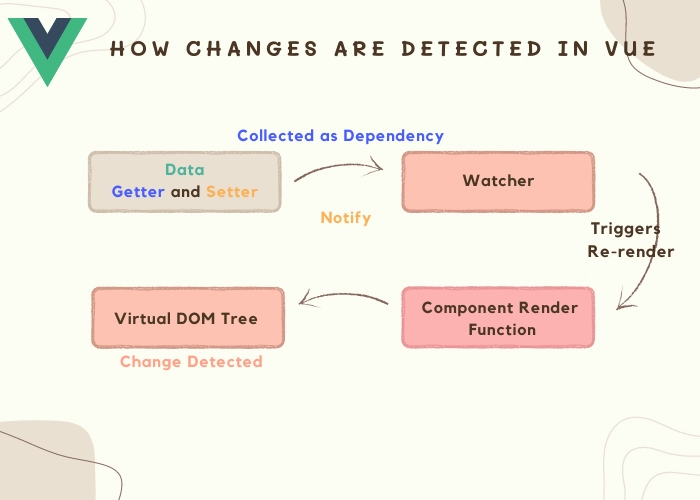
In Vue, changes to the data or state of a component can be detected using a mechanism called "reactivity". Vue uses a reactive system to track changes in the component's data and update the view accordingly.
When a component is created, Vue sets up getters and setters for each property in the component's data object. These getters and setters allow Vue to track when the property is read or modified. When a property is modified, Vue is notified and triggers a re-render of the component and its children.
Changes Vue cannot detect
Vue 2, a popular JavaScript framework for building user interfaces, provides several powerful features for detecting changes in data. This "reactivity" feature allows developers to build dynamic and responsive web applications. However, there are also some caveats to be aware of when using Vue 2's change detection system. In this blog post, we'll discuss the basics of change detection in Vue 2 and some of the common pitfalls developers should be aware of.
There are certain limitations in javascript. Because of that, there are certain cases that vue cannot detect. But there are specific ways to prevent this, and here we will discuss them.
For Arrays
Vue 2 uses a reactivity system to detect changes in an array and update the view accordingly. However, there are some changes to an array that Vue cannot detect automatically, and that can cause the view to not update correctly. Some of these changes include:
1. Direct modification in an array
let arr = [5, 6, 7];
arr.push(8); // Vue won't detect this change
You can also try this code with Online Javascript Compiler
Vue 2 uses a set of observation mechanisms, such as getters and setters, to detect changes in an object and trigger updates to the DOM. However, there are certain changes to an object that Vue 2 cannot detect by default.
Here are some examples of changes that cannot be detected by Vue 2 in an object:
1. Adding new properties to an object: If you add a new property to an object after it has been declared reactive, Vue 2 will not be able to detect this change. To make the new property reactive, you will need to use the Vue.set or this.$set method.
this.person.age = 25
// This change will not be reactive

Vue.set(this.person, 'age', 25)
// This change will be reactive
You can also try this code with Online Javascript Compiler
2. Modifying properties of an object that was created with Object.create(null): If an object is created using Object.create(null), it does not have the standard object prototype and, therefore, cannot be observed by Vue 2's observation mechanisms. To make these objects reactive, you must convert them to a plain object using Object.assign or {...} syntax.
3. Array mutations that don't trigger a re-indexing of the array: Some array mutations, such as splice or sort, can trigger a re-indexing of the array, which Vue 2 can detect. However, other mutations, such as reverse or shift, cannot trigger a re-indexing and will not be detected by Vue 2. You should use the splice method instead to ensure these mutations are detected.
this.numbers.reverse()
// This change will not be reactive

this.numbers.splice(0, this.numbers.length, ...this.numbers.reverse())
// This change will be reactive
You can also try this code with Online Javascript Compiler
Many of you are still confused about how vue performs DOM updates, whether synchronously or asynchronously.
Vue performs DOM updates asynchronously. When the state of a Vue component changes, Vue updates the virtual DOM, but it doesn't immediately update the actual DOM. Instead, it waits until the end of the current update cycle (the update cycle in Vue refers to updating the component's data and re-rendering the template in response to changes in the data) before applying the changes to the actual DOM. This ensures that multiple updates to the state of a component are batched together into a single DOM update.
The asynchronous nature of Vue's DOM updates has several benefits:
Improved Performance: By batching multiple updates together, Vue reduces the number of DOM operations, which results in faster and smoother updates.
Predictable Behavior: Vue's asynchronous updates make it easier to reason about the application's state because changes are applied to the DOM simultaneously, rather than incrementally.
Better User Experience: By updating the DOM asynchronously, Vue ensures that the user interface remains responsive and smooth, even when multiple updates happen simultaneously.
It's worth noting that there are cases where you may want to perform a DOM update synchronously. For example, you may want to update the DOM immediately after an API call completes. In these cases, you can synchronize Vue.nextTick to perform a DOM update.
this.count++
Vue.nextTick(() => {
  // DOM has been updated
})
You can also try this code with Online Javascript Compiler
Overall, Vue performs DOM updates asynchronously by default, which provides a balance between performance and predictability. However, you can use Vue.nextTick to synchronize a DOM update.
Declaring Reactive Properties
In Vue 2, reactive properties can be declared in a component's data option. The data option should be a function that returns an object representing the component's initial state.
Here's an example of declaring reactive properties in a Vue component:
In this example, the component has two reactive properties: message and count. The initial values of these properties are defined in the data option. Any changes to these properties will trigger an update to the component's template.
Reactive properties can be accessed in the component's template using double curly braces ({{ }}). This example displays the message and count properties in the component's template.
It's important to note that reactive properties should only be declared in the component's data option. If you want to add additional reactive properties to a component after it has been created, you should use the Vue.set or this.$set method.
FAQs
Why is Vue.js called a progressive framework?
Because it is being developed and changed continuously.
What is the benefit of change detection in vue 2?
It helps users have a responsive website according to their needs and operations.
State some advantages of using Vue.
Easy to understand and use, flexible in nature, virtual DOM, etc.
How vue performs DOM updates?
Vue performs Dom Updates asynchronously.
What is a Vue component?
A Vue component is a self-contained unit of code that defines a specific part of a user interface. Components are reusable and composable and can have their own data, methods, and lifecycle hooks.
Key Takeaways
In this blog, we have learned about change detection in Vue 2, how it cannot find some of the changes and their solutions, reactive properties, and the async update queue and some of its functions.








 7+ registered

