Do you think IIT Guwahati certified course can help you in your career?
Introduction
A prefabricated set of code and libraries called a CinderBlock implements a feature or exposes a library in Cinder. This contains standalone implementations of features like TUIO support and bridges to libraries like OpenCV and FMOD. QuickTime and the LocationManager are built-in CinderBlocks that are included with Cinder by default. A CinderBlock may contain the source code, header files, libraries, and other materials it needs.
TinderBox
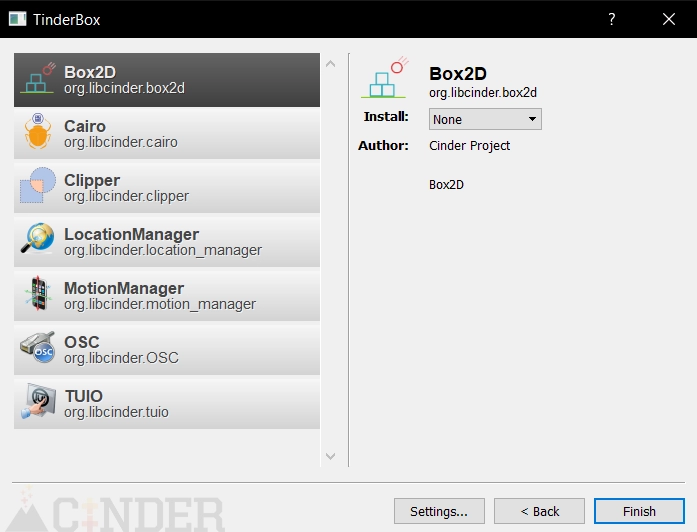
The easiest way to use CinderBlocks is with TinderBox (Cinder's application-creation tool), though this is not strictly required; an expert C++ user can manually add a CinderBlock to a project. TinderBox analyses a Cinder installation's blocks directory and gives the user a graphical interface that looks like this:
Specification
A file called cinderblock.xml must be present in the root of every CinderBlock. Using XML of the following format, this file lists the files and dependencies of the CinderBlock:
<cinder>
    <block>
    ...
    <block>
<cinder>
The following attributes are supported by the <block> tag:
name (string)
The block's name in human-readable form. Like "FMOD"
id(string)
The block's distinctive identification is represented in reverse DNS. Such as "org.libcinder.fmod".
git(string)
The repository's URL for CinderBlock. An example would be "git:/github.com/cinder/Cinder-OpenCV.git."
author(string)
The CinderBlock author or writers. Consider the "Cinder Project."
summary(string)
A detailed explanation of the block's function in a paragraph. A library for the production and playback of interactive audio is the FMOD API, for instance.
license(string)
the library's associated software license. Such as "GPL, Commercial."
version(string)
The underlying library's version, if relevant. Ex: "4.44.06".
URL(string)
The address of a webpage dedicated to CinderBlock.
library(string)
The website where a CinderBlock may wrap a library, for example, "http://www.fmod.org/."
A block tag may contain a variety of elements. The structure for standard files like headers, source files, assets, etc.
<tag>path to the file relative cinderblock.xml</tag>
Example:
<header>include/example.h</header>
The output copies this path, so a file located at include/example.h will be used.
Source: source code, usually in the form of an a.cpp or .mm file
Header: A header file, commonly a.h file
Resource: A file with resources added to the Resources group and built phase in Xcode and Resources.rc on Windows.
name(string): Resources.rc on Windows and the Resources group and build phase in Xcode contain a file with resources.
type(string): The resource's type, such as IMAGE, only applies to MSW.
id(int): The resource's integer ID only applies to MSW. TinderBox automatically generates a special ID for the type if it is omitted
Asset: It is added to the project's assets directory as an asset file. Notably, regardless of the user's chosen CinderBlock install type, assets are copied to the project's assets folder.
Framework: an OS X/iOS framework (exclusive to OS X/iOS). It can also be used with a dynamic library specific to a System or SDK, like libiconv.dylib.
BuildCopy: A file, typically a DLL or dylib, copied into the folder containing the building product as part of the build process.
Destination(executables| frameworks| plugins): The executables destination type, which corresponds to the Contents/MacOS folder, is the default for the Xcode destination type. The <source>, <header>, <resource>, <asset>, <framework>, and <buildCopy> tags all share these attributes.
replaceContents(boolean): When set to true, the project name is substituted for the string TBOX_PREFIX throughout the entire file.
replaceName(boolean): When true, the output file's name is changed to include the string TBOX_PREFIX.
absolute(boolean): If true, the file path will be treated as absolute and not relative to the output.
SDK(boolean): When true (OS X/iOS-only), the file path is considered relative to the OS X/iOS system SDK.
cinder(boolean): The file path is regarded as being relative to the Cinder installation when this is true
buildExclude(boolean): When this is the case, the file is added to the project but not to a build step.
virtualPath(string): Sets a different location for the file than the one that is, by default, displayed in the IDE's folder hierarchy.
More Block Elements
IncludePath: adds a directory to the output so that #include statements can be found there.
system(boolean): When a system header is specified by true, as when #include <some.h> is used instead of #include "some.h,"
frameworkPath: Adds a directory to the output that will only be searched for OS X/iOS frameworks.
libraryPath: Adds a directory to the output so that static libraries can be searched
staticLibrary: Adds a Windows.lib static library or an OS X/iOS.a static library to the project.
dynamicLibrary: dynamic library for Windows, OS X, or iOS is added to the project.
headerPattern: All files that fit the pattern, including wildcards (*), are added as <headerPattern>include/*.h</headerPattern>.
sourcePattern: All files that fit the pattern, including wildcards (*), are added as <sourcePattern>src/*.cpp</sourcePattern>.
setting: enables changing an Xcode setting (OS X-only). The element's value determines the setting's value.
name(string): The setting's name within the.pbxproj file
outputExtension: specifies the built product's file extension, such as ".scr" for Windows screensavers.
High-level Block Tags
Platform: the OS, compiler, build settings, or iOS SDK is specified. Further explained below.
os(msw| macosx| ios): specifies the operating system
compiler(xcode| vs2012| vs2013): specifies the compiler
config(debug| release): specifies the build configuration
SDK(device| simulator): specifies the ios SDK
Supports: When a block has a non-zero number of "supports" tags, those tags specify the supported operating systems; one configuration per tag
os(msw| maxosx| ios): specifies the supported operating system.
compiler (xcode| vs2012| vs2013): specifies the supported compiler.
Requires: specifies a CinderBlock, identified by its reverse-DNS ID, that a project template or CinderBlock requires.
Creating template Projects
One or more project templates intended to be used as a jumping-off point for using the CinderBlock may be provided as an optional addition to a CinderBlock. For instance, the OpenCV CinderBlock comes with a project template that loads an image and applies some fundamental image processing to it.
After the <block> tag, the < Cinder> tag allows for defining one or more project templates.
<cinder>
  <block>
    // some script
  <block />
  <template>pathto/template.xml<\template>
    // some script
  <template>pathto/another/template.xml<\template>
</cinder>
The structure of a template.xml file and a cinderblock.xml file are highly similar. The majority of the tags are identical. This file serves as the foundation for a new project and is typically (though not always) based on one of the core App templates included with Cinder and found in the blocks/ AppTemplates folder. For one of these to be used as the basis for a CinderBlock's template, the parent's special ID must be stated in the parent attribute:
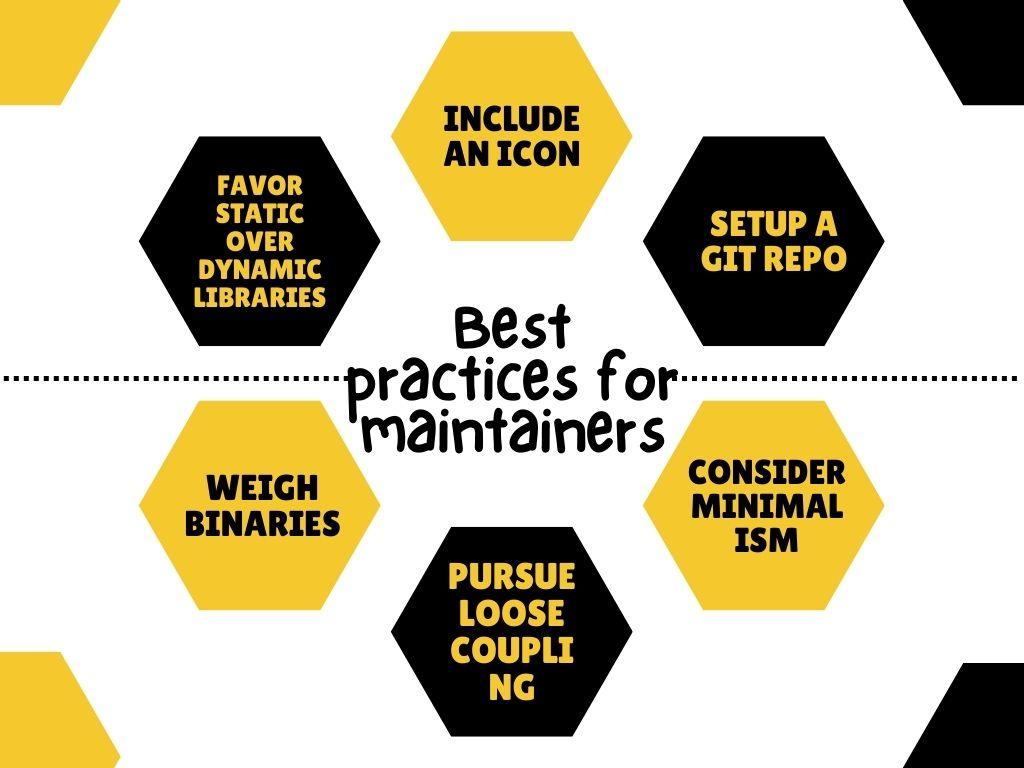
Include an icon: If a cinderblock.png is present, TinderBox will find and display it. This needs to be a 72x72 px PNG with an alpha channel, at the very least.
Setup a git repo: Your library must have its git repository to permit users to include it as a git submodule.
Consider minimalism: A basic CinderBlock-specific API is frequently preferred. One illustration is the Cinder OpenCV block, which more closely resembles a shim than a standalone interface. It might be the best design choice, especially if the library is already object-oriented. Instead of learning an "API to an API," it requires less maintenance and lets a user familiar with the library use that familiarity.
Pursue Loose coupling: This may entail splitting the rendering logic into different classes or functions for visually-focused CinderBlocks, especially in not assuming an application is utilizing OpenGL.
Weigh Binaries: In many cases, simply providing a library's source files is sufficient and eliminates the need for a static library. This makes maintenance easier and allows you to utilize the library on systems that you might need access to immediately. For Box2D, the CinderBlock serves as an illustration of this method. Other libraries must be static libraries, such as OpenCV. It makes sense to base your decision on whether the library needs a build system like CMake.
Favor static over dynamic libraries: Apps are created to be independent when possible.
Os X and iOS
The armv7 and arm64 architectures on iOS and the i386 and x86 64 architectures on OS X should both be supported by universal binaries for libraries.
When necessary, libc++ should be used as the C++ stdlib and C++11 as the C++ dialect.
Windows
Ensure the C Runtime is Multithreaded Debug (/Mtd) for debugging and release.
Advanced: Custom App Templates
Advanced users might desire to develop other sorts of App templates. You can find yourself constantly developing the same application, or a corporation might have a style they'd prefer all applications to follow. You may find these templates under Cinder/blocks/ AppTemplates. Each preset application type has its directory inside, and you may also add your own.
The Xcode and Visual C++ project files that TinderBox generates may need to have lower-level parameters modified by very experienced users. You can change the files in Cinder/blocks/ AppTemplates/ Foundation if you are familiar with the internal workings of your compiler's project files. The string _TBOX CINDER PATH_ will be substituted with the absolute file path to Cinder in these files, which is a crucial feature.
A prefabricated set of code and libraries called a CinderBlock implements a feature or exposes a library in Cinder. This contains standalone implementations of features like TUIO support and bridges to libraries like OpenCV and FMOD. QuickTime and the LocationManager are built-in CinderBlocks that are included with Cinder by default. A CinderBlock may consist of the source code, header files, libraries, and other materials it needs.
What is Cinder?
An open-source library called Cinder was created to enhance the C++ language's capability for advanced visualization. It can be seen in many ways as a C++-based substitute for tools like the Java-based Processing library, Microsoft Silverlight, or Adobe Flash.
What is TinderBox?
The easiest way to utilize CinderBlocks is with TinderBox (Cinder's application-creation tool), though this is not necessarily required; an expert C++ user can manually add a CinderBlock to a project.
What is sourcepattern element used for?
All files that fit the pattern, including wildcards (*), are added as sources with the syntax src/*.cpp.
What is meant by pursue loose coupling?
In this article, we discussed the cinder blocks, which is collection of programs and libraries that give Cinder access to a library or implement a feature.








 1+ registered

