Do you think IIT Guwahati certified course can help you in your career?
Introduction
Ruby's implementation of the Domain Specific Language Sinatra is used to create web applications. Sinatra, which Blake Mizerany developed, is Rack-based. Therefore it can be integrated with any Rack-based application stack, including Rails. Companies like Apple, BBC, GitHub, LinkedIn, and others use it.
Sinatra is just a set of pre-written methods that we can integrate into our applications to make them Ruby web applications.
Sinatra is made to be portable and adaptable. Sinatra is meant to give you the fundamental necessities and abstractions for creating straightforward and dynamic Ruby web applications.
In addition to being an excellent tool for certain tasks, Sinatra is a terrific method to start developing web applications with Ruby. It will help you be ready to master other more complex frameworks, like Rails.
Now that you know what Sinatra is, let's look into Command Line working in Sinatra in detail.
Command Line working in Sinatra
A user interface browsed by typing commands at prompts rather than using a mouse is known as the command line, the Windows command line, command screen, or text interface. For instance, "C: Windows>" is the command line for the Windows folder (as shown in the picture). Depending on the shell, it might be "%" or ">" in Linux or Unix. A command line operating system does not employ a mouse for navigation; instead, commands are entered using the keyboard, unlike a GUI (graphical user interface) operating system.
-s # specify rack server/handler (default is thin)
-q # turn on quiet mode for the server (default is off)
-x # turn on the mutex lock (default is off).
Start a Sinatra application.
Sinatra is a web application development library. If you're using the Rackup tool, you can run a Sinatra application directly as a Ruby script or via the dedicated Rack run/debug configuration.
Use a Ruby script to run an application.
To open the Run Anything dialogue, press Ctrl twice.
In the popup, type the following command and press Enter.
ruby app.rb
If necessary, you can specify the imperative command-line parameters and script arguments. Use the following command, for instance, to run the programme with the Puma server:
ruby app.rb -s Puma
The -s Puma command part will be passed as Script arguments to the newly created Ruby configuration in this case.
Wait for RubyMine to launch the application. The output of the application is displayed in the Run tool window.
Set up the running
The Ruby run/debug configuration is generated by RubyMine automatically. After you run an application as a Ruby script. You can modify it to pass additional parameters.
Select Run/Edit Configurations From the main menu.
In the Run/Debug Configurations dialogue box that appears, select the newly created Ruby app.rb configuration in the Ruby group and enter the necessary running options in the Script arguments area. To utilise the Puma server in this setup, for example, enter the following value:
-s Puma
To save the configuration, click OK.
Use config.ru to Run the application.
Follow these steps to run the Sinatra application that uses the config.ru file:
Alt+1 to open the Project view.
Right-click the config.ru file. Then there is option Run appear, select Run 'config.ru'.
Wait until RubyMine launches the application. The Run tool window displays the application's output.
The Output dialogue will appear in a few seconds.
Manually create the Rack configuration
From the main menu, select Run | Edit Configurations.
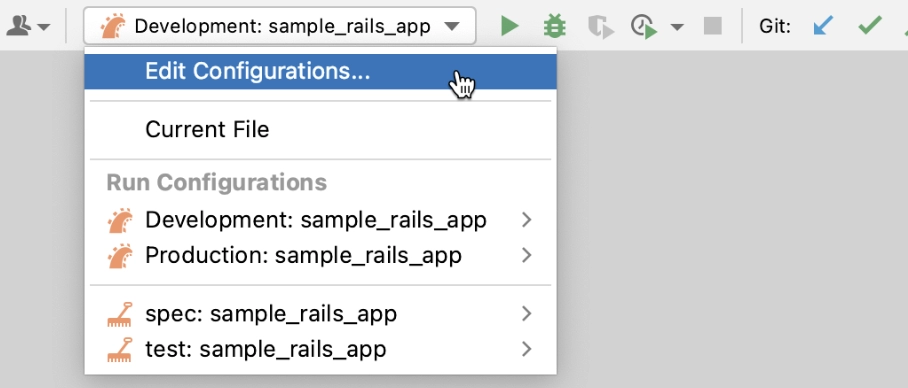
Edit Configurations can be selected from the run/debug configuration selector while the Navigation bar is visible (View | Appearance | Navigation Bar).
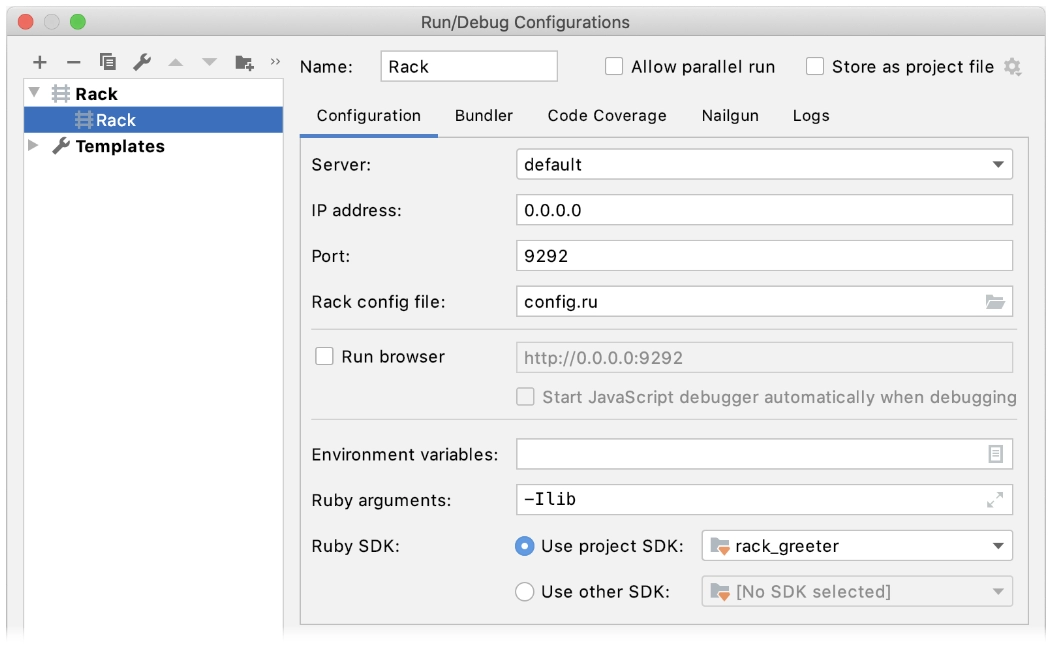
Select Rack by clicking Add N in the top left corner of the Run/Debug Configuration screen.
Set the following parameters.
To save the created configuration, click OK.
Frequently Asked Questions
Why is the command line used by users?
Almost all of the tasks that can be done with a GUI can be done using the command line. However, automation and remote work may complete many activities more quickly and efficiently.
Why should Sinatra always be chosen over Rails?
Sinatra performs fewer functions out of the box and is significantly more lightweight, resource-efficient, and demanding. Rails, on the other hand, is crammed with features and comes with a tonne of code, and if you know how to use it, it makes it very simple to construct complex web applications quickly.
How does Sinatra function?
The web server responds to a series of queries that Sinatra sends and receives. These requests are contained in a controller file, which is part of your program and communicates with the internet. A controller is a component of the MVC architectural design pattern (Models-Views-Controllers).
What exactly is Rack middleware?
Rack middleware is a small component that aids in the completion of a task. Consider different middleware performing different tasks such as logging and caching. It can modify or halt requests before they reach the final middleware (The object we assigned to run the method). rn Also known as MVC (Models-Views-Controllers).
What exactly are Rails and Sinatra?
While Rails is a framework for creating model-driven web applications, Sinatra is a library for handling HTTP on the server side. Sinatra is an excellent tool for handling HTTP requests and responses. Rails are the way to go if you need full integration and as little boilerplate as possible. Rollers).
Conclusion
In this blog, we have discussed the Sinatra and Command line working in Sinatra. We have seen how to run the sample Sinatra application directly in RubyMine as a Ruby script, how to use the Rackup tool to run the application, and how to configure additional running options using run/debug configurations.
If you face any doubt, please comment, and we will love to answer your questions.
Want expertise in Ruby on rails for your next web development project? Check out our course.
Nevertheless, you may consider our paid courses to give your career an edge over others!
Do upvote our blogs if you find them helpful and engaging!









 7+ registered

