




Introduction
Did you know that you often need to switch between data types when programming?
Yes, and this ability to switch between multiple data types gives you great flexibility while working with information. There are built-in ways for conversion or typecasting in Python.
Refer to this article to know more about type conversions and typecasting in Python. Visit this article to know more about data types in Python.
This article will focus on converting a string to an integer in Python.
Strings are the sequence of characters used to convey information in texts. To know more about strings in Python, you can refer to this article Understanding strings in Python.
Integers are zero, positive or negative whole numbers without a fractional part, and they have unlimited precision. Now lets start learning how to convert string to int in Python.
You can also read about the Multilevel Inheritance in Python, Swapcase in Python
Convert String To Int In Python
In Python language, we have built-in functions to convert strings into an integer. The int() function convert string to int in Python. The functions take the string as the parameter and return the integer value equivalent to the value you have passed to the function.
Note: To convert string to float, we can use the float() method.
Now let's understand the syntax of int() method to convert string to int in Python and how we can use it.
Syntax
| int(string) |
Where string is passed as a parameter and its return type will be an integer.
Example
Let’s take an example to understand how int() method is used to convert string to int in Python and its implementation.
# a string named str1
str1="123"
#printing the string
print(str1)

#printing the type of string
print(type(str1))

#converting string to int
print(int(str1))

#printing the data type of int(str1)
print(type(int(str1)))
Output
123 <class 'str'> 123 <class 'int'> |
The above example shows how to convert string to int in Python.
Note: We can check the data type of the input or any other data using the type() method.
Whenever we take an input, it's always in string format, so if we try to perform any mathematical operation from that input, it will show errors in string format.
Let’s take an example to understand this:
# taking 2 inputs in val_a and val_b variables
val_a= input()
val_b= input()

# performing mathematical operations
res= val_a*val_b

print("The product of val_a and val_b is ",res)Input
120 3 |
Output
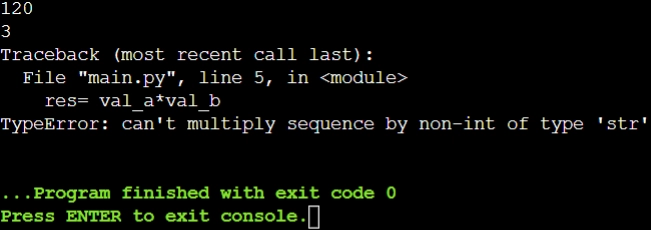
To overcome this issue, we can use the int() method to convert that input string into an integer then we can perform all types of mathematical operations using them.
Code:
# taking 2 inputs in val_a and val_b variables
val_a= input()
val_b= input()

# performing mathematical operations
res= int(val_a) * int(val_b)

print("The product of val_a and val_b is ",res)Or we can also write as:
# taking 2 inputs in val_a and val_b variables
val_a= int(input())
val_b= int(input())

# performing mathematical operations
res= val_a*val_b

print("The product of val_a and val_b is ",res)Input
120 3 |
Output
| The product of val_a and val_b is 360 |
You can practice by yourself with the help of online python compiler.
The above example explains how to convert string to int in Python. Now let's move on to FAQs.

 7+ registered

