




Introduction
Have you ever noticed how signing up for a website once allows you to stay signed up even after closing your browser? 🤔 Or did you add something to your shopping cart without ever signing in?🧐 So, the answer is Cookies 😲. Cookies hold some data packages even after you close the program.

This article will tell you about Cookies and Webhooks in Ready API.
Cookies

Cookies are files that are produced by websites you visit. By saving browsing info, they refine your online experience. With the help of cookies, websites can keep you logged in, save your preferences, and serve you with content that fits your spot.
In Ready API, a cookie is a name-value pair represented as plain text. Web browsers use it to store the data and reuse the info in the next visit to the same web server.
Working of Cookies

A web service includes the Set-Cookie header in the response when it needs to save data for later use. A cookie's name and value are stored in the header's value.
The Set-Cookie header sends a cookie from the server to the user agent. So the user agent can send it back to the server later. Multiple Set-Cookie headers should be sent in the same response to send multiple cookies.
The syntax of sending cookies is as follows:
<cookie-name>=<cookie-value>
A client should save the cookie after it receives this header in one of the responses. After this, the Cookie header specifying saved cookies will be included in all client requests to the same server. The client stores cookies until they are lost, or the HTTP connection is closed. These are some examples of the sent cookies:
Cookie: sessionid=001q2w3; cart=df86se2Cookies in Functional Tests
This section will teach how to use cookies in functional tests. Let's start.
Adds Cookies Manually
We can add cookies manually by following these simple steps.
⭐ Add a new header.
⭐ Now, specify the Cookie header.
⭐ Enter the cookie in name value format.

You can add more than one cookie at a time, separating by a semicolon.
Store Received Cookies
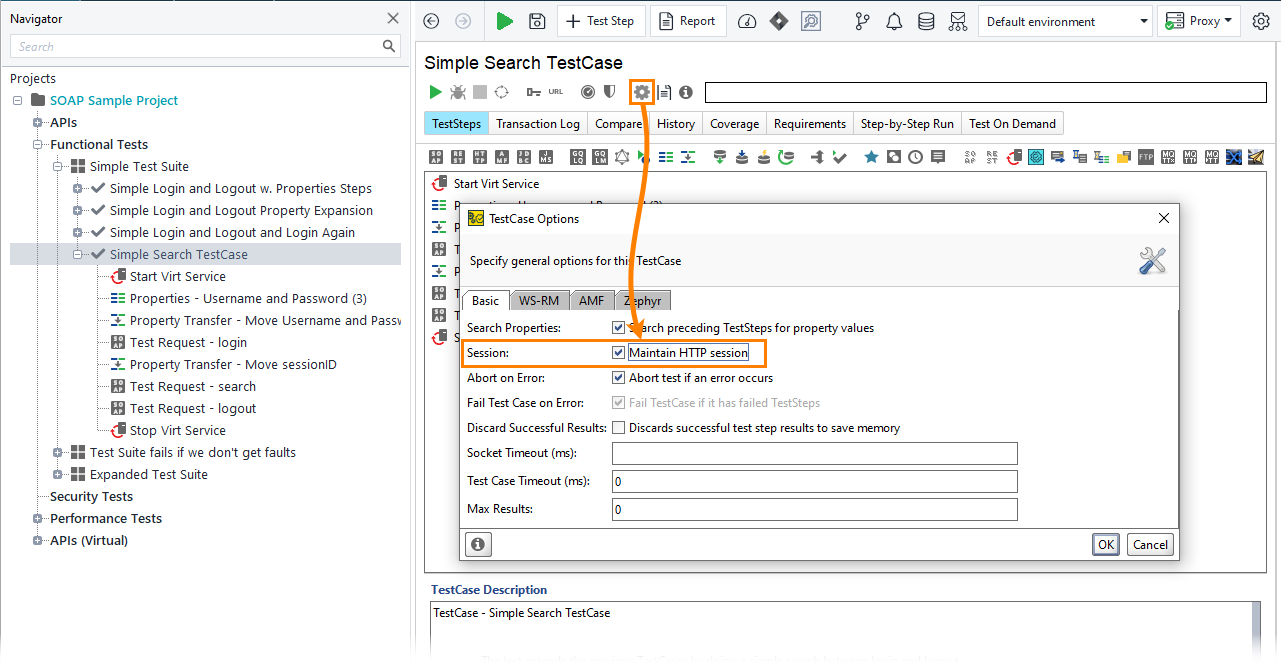
Ready API does not save or store any cookie by default. But you can change this by enabling the session test case option. Follow the two steps below.
Step 1: Go to Setting in the toolbar.
Step 2: Manually tick the checkbox of the Session option.
Cookies in Performance Tests

To ensure your APIs can handle a huge volume of visitors, you can use Ready API to create and run load or performance tests. You can distribute load generation across some computers. This includes cloud machines or performing load tests locally. Ready API stores cookies received during the sessions if the Session test case option is enabled.





 8+ registered

