Do you think IIT Guwahati certified course can help you in your career?
Introduction
Hello Ninja, I hope you are doing great. Do you know about Custom Jumble Word Game? If not, don't worry. We are here to enrich your knowledge and clear all your doubts. The Custom Jumble Word Game is a word puzzle in which the player guesses the original word from the given scrambled word. We will cover the implementation of this game in this article.
This article will discuss the implementation details of the Custom Jumble Word Game in C++ and Python, the essential functions used, and their respective outputs.
Problem Statement
You are given an integer ‘Q’, showing the number of turns. In each turn you will be given a jumbled string. Your task is to guess the original words from the given jumbled strings.
Input
3
chria
ncescie
Chrismsat
output
chair
scienc
christmas
2
Here you can see the user guesses the two words correctly, so the user’s score is 2.
Pseudocode for the Custom Jumble Word Game
Irrespective of the coding language, let us understand the pseudocode for the game.
1. Let the game begin by taking a random number from the user and showing the number of turns the user wants.
2. In each turn, show a jumbled word to a user, which they have to guess.
3. If a user guesses the correct word, increment the user’s score; otherwise, give the user the same word at the next chance.
Make certain functions that perform the below actions.
1. Choose a random number from the range zero to the given number.
2. Choose a random word from the list of words.
3. Shuffle a given word by continuously swapping the characters corresponding to two random indexes.
C++ Implementation for Custom Jumble Word Game
Code
#include <bits/stdc++.h>
using namespace std;


vector <string> words = {"mouse", "keyboard", "notebook", "ipad", "macbook", "javascript", "swift", "rust", "java", "laptop", "computer", "perfume", "wallet"};


/* function to generate random numbers from 0 to mod - 1 */
int randomNumber(int mod) {
   /* generate a seed for random number generation based on the current time */
   auto seed = chrono::high_resolution_clock::now().time_since_epoch().count();
   /* providing seed value to the mt19937 constructor to ensure that the random number generator will produce a deterministic sequence of random numbers */
   std::mt19937 mt(seed);
   return mt()%mod;
}


string shuffler(string temp) {
   int sizeOfString = temp.size();
   int counter = 100;
   /* swapping random indices 100 times */
   while(counter --) {
       /* take two random indices and swap their corresponding characters */
       int index1 = randomNumber(sizeOfString);
       int index2 = randomNumber(sizeOfString);
       swap(temp[index1], temp[index2]);
   }
   return temp;
}


pair <string, string> getWord() {
   /* choosing a random index */
   int ChooseIndex = randomNumber(13);
   /* take a word corresponding to that index */
   string original = words[ChooseIndex];
   /* shuffle the word */
   string shuffled = shuffler(original);
   return {shuffled, original};
}


int main() {


   cout << '\n';
   cout << "^^^^^ Start the Jumble Word Game ^^^^^\n\n";
   cout << "Your initial score is : 0\n\n";
   cout << "How many times you wanna guess the words?\n\n";


   int numberOfTurns; cin >> numberOfTurns;
   cout << '\n';
   int score = 0;
   bool takenew = true;
   pair <string, string> previous = {"", ""};


   for(int turn = 0; turn < numberOfTurns; ++ turn) {
       pair <string, string> current = {"", ""};
       /* we don't have any previous pending word */
       if(takenew) {
           current = getWord();
           cout << "Guess the word : " << current.first << '\n';
       }
       /* we have previous pending word */
       else {
           current = previous;
           cout << "guess the previous word : ";
       }
       string inputWord; cin >> inputWord;
       if(current.second == inputWord) {
           cout << "wooh, you guessed it right!\n";
           cout << "The correct word is : " << inputWord << "\n\n";
           takenew = true;
           ++ score;
       }
       else {
           cout << "oops, you guessed a wrong word!\n";
           cout << "Try again!\n\n";
           previous = current;
           takenew = false;
       }
   }


   cout << "Your final score is : " << score << '\n';
}
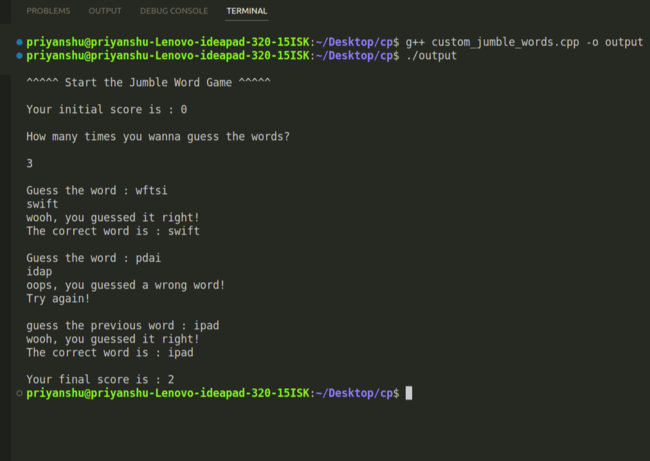
Output
Explanation
Here, the ‘randomNumber()’ function returns a random number from a range 0 to the number passed in this function. The ‘shuffler()’ function shuffles a string passed in this function by swapping the characters corresponding to the randomly chosen indexes. The ‘getWord()’ function returns a pair of the original and shuffled strings. The ‘main()’ function is for interacting with the user and calculating the user’s score.
Python Implementation for Custom Jumble Word Game
Code
import random


# create a list of words that we'll use in our game
words = ["apple", "cake", "algorithms", "development", "mesmerizing", "childhood", "perfume", "charger", "mouse", "communication", "signals"]


# function to shuffle the characters of a word
def ShuffleTheWord(originalString):
   current = list(originalString)
   counter = 120
   stringsize = len(originalString)
   while counter != 0:
       # choosing two random indices
       index1 = random.randint(0, stringsize - 1)
       index2 = random.randint(0, stringsize - 1)
       # swap the characters
       current[index1], current[index2] = current[index2], current[index1]
       counter = counter - 1
   mystring = ''.join(current)
   return mystring


# choose the random word from the list
def ChooseWord():
   index = random.randint(0, len(words) - 1)
   originalWord = words[index]
   shuffledWord = ShuffleTheWord(originalWord)
   return [originalWord, shuffledWord]


# main logic starts
print()
print("---- Start The Custom Jumble Word Game ----")
print()
print("Your initial score is : 0")
print()
chances = int(input("How many times you wanna guess the words : "))
print()
previousPending = 0
finalscore = 0
previous_list = []
while chances != 0:
   current_list = []
   userstring = ""
   if previousPending == 0:
       current_list = ChooseWord()
       print("Guess the word : ", current_list[1])
       userstring = input()
   else:
       current_list = previous_list
       print("Guess the previous word : ")
       userstring = input()
   if current_list[0] == userstring:
       print("wooh you guessed the right word")
       print()
       previousPending = 0
       finalscore = finalscore + 1
   else:
       print("oops you guessed the wrong word")
       print()
       previousPending = 1
       previous_list = current_list
   chances = chances - 1
print("Your final score is : ", finalscore)
Output
Explanation
Here, we are choosing the random number from the inbuilt function of the random module. The ‘ShuffleTheWord()’ function shuffles a string passed in it by swapping the characters corresponding to the chosen random numbers. The ‘ChooseWord()’ function randomly selects a string and returns a list of the original and shuffled strings. In the main code, we interact with the user by giving the jumbled word and calculating the user’s score.
It is a word puzzle in which players are given scrambled words and have to rearrange the words to guess the original words. At last, they get the final score indicating their correct guesses.
Why don't we use the ‘rand()’ function to get the random number in C++?
We don’t use the ‘rand()’ function because the numbers generated by this function are deterministic and repeat at some point of time. To overcome this problem we use the ‘mt19937’ object which takes a different seed whenever we run our program.
What are the different ways to shuffle the characters of a string in python?
We can shuffle the characters of a string in python by converting it into a list and then shuffle the characters of the list by using a ‘random.shuffle()’ function or by continuously swapping the randomly chosen characters.
Conclusion
In this article you’ve learned how to implement the Custom Jumble Word Game in C++ and Python with their respective outputs and functions. We have also discussed how we can choose random numbers in C++ and the shuffling strategy for characters. We hope you enjoyed the article and gained insight into this topic. You can refer to Scramble String, Word Search-I, and Word Search-II to know more about this topic. Head over to our practice platform Coding Ninjas Studio to practice top problems, attempt mock tests, read interview experiences and interview bundles, follow guided paths for placement preparations, and much more!! Happy Learning Ninja!
Live masterclass
Amazon Data Analyst Roadmap – From Resume to Interview
by Abhishek Soni
08 Jul, 2026
12:30 PM
Zero to GenAI Developer: Amazon SDE Roadmap for 30L+ CTC
by Sumit Shukla
07 Jul, 2026
12:30 PM
Interview-Ready RAG Project Walkthrough by Google SWE3
by Saurav Prateek
09 Jul, 2026
11:30 AM
Amazon-Ready Excel & AI Skills: Ace 20L+ Data Analyst Roles
by Prerita Agarwal
06 Jul, 2026
11:30 AM
Amazon Data Analyst Roadmap – From Resume to Interview
by Abhishek Soni
08 Jul, 2026
12:30 PM
Zero to GenAI Developer: Amazon SDE Roadmap for 30L+ CTC







 18+ registered

