Do you think IIT Guwahati certified course can help you in your career?
Introduction
Express is a fast web framework for Node.js upholding minimalism. It is a web application server framework used by developers to develop single, multi, or hybrid web applications. It is considered a standard server framework for node.js by many developers.
Database integration in Express refers to the ability of Express to connect easily with databases like MySQL, MongoDB, Cassandra, etc. It is pretty easy to do database integration in Express as we only have to load the appropriate Node.js drivers of the database in our application.
A note on npm
Npm is a package manager for the JavaScript(JS) programming language. This blog shows that installing drivers for database integration in Express is achieved using the npm package manager.
To check if you have npm on your computer, you can run the following command.
npm -v
If it's not present, you will receive an error like this:
Error
It is better that you use a Node version manager like nvm to install Node.js and npm. It is not recommended to use a Node installer since the Node installation process installs npm in a directory with local permissions and can cause permissions errors when you run npm packages globally.
You can update your npm by running the following command:
npm install -g npm
Check out this blog on npm to learn more about it.
Database integration in Express.js
Let us look at how we can integrate a database in a server working upon the Express.js framework. The steps can be divided as creating the application, running the server and finally integrating the database.
Step 1: Create an Express Application
Here we will create an Express application because all of our work will be going to execute inside Express.
Running the following command in your terminal gets you to start a node app and install Express.
npm init
npm install express
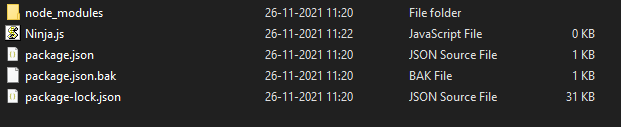
Now create an empty .js file (let’s name it Ninja.js).
This is how your folder would look like now.
Folder structure
Now let's write Express code in our Ninja.js file.
Code:
// Importing the express module
const express = require('express');
const app = express();
const port = 3000;
app.listen(port, (error) =>{
if(!error)
console.log("Server is Running "
+ "| App listening on port: "+ port)
else
console.log("Error occurred, cannot start the server", error);
}
);
You can also try this code with Online Javascript Compiler
Now run the server by giving the following command in your terminal.
Command:
node Ninja.js
Output
Step 3: Integrating with database
There are a lot of databases available to integrate with Express. The choice depends on the requirements of the project you are working on. For now, let us choose MySQL and see how we can integrate it with Express.
Integrating with a database can be divided into 3 steps.
Step 1: Downloading MySQL driver for the Express application
Run the following command to download the driver.
npm install mysql
Step 2: Installing MySQL locally
To use MySQL, you should have it downloaded locally. You can visit their official website to download them.
Step 3: Integrating with Express
For this, edit the Ninja.js file and insert the following code.
Code:
// Importing the express module
const express = require('express');
const app = express();
const port = 3000;

// Create a connection to the database
const mysql = require('mysql');
const PORT = 4000;
const connection = mysql.createConnection({
host: 'localhost',
user: 'root',
password: '',
database: "test"
});
// Open the MySQL connection
connection.connect(error => {
if (error){
console.log("A error has been occurred "
+ "while connecting to database.");
throw error;
}
// If Everything goes correct, Then start Express Server
app.listen(PORT, ()=>{
console.log("Database connection is Ready and "
+ "Server is Listening on Port ", PORT);
})
});
You can also try this code with Online Javascript Compiler
Save the file. Start your web server and once again run the following command.
node Ninja.js
If there are no errors present, then you should get the following output..
Output
Integrating with popular databases
Database integration in Express refers to connecting Express with databases like MySQL, MongoDB, Cassandra etc. It is quite easy to do database integration in Express as we only have to load the appropriate Node.js drivers of the database in our application. Let us see how we can install drivers of various databases to do database integration in Express and example codes for the same.
MongoDB
MongoDB is a source-available cross-platform document-oriented database program. It uses JSON-like documents.
Installation:
$ npm install mongodb
Example:
const MongoClient = require('mongodb').MongoClient
const url = 'mongodb://127.0.0.1:27017'
const dbName = 'CodingNinjas'

const db

MongoClient.connect(url, { useNewUrlParser: true }, (err, client) => {
 if (err) return console.log(err)

 // Storing a reference to the database so you can use it later
 db = client.db(dbName)
 console.log(`Connected MongoDB: ${url}`)
 console.log(`Database: ${dbName}`)
})
You can also try this code with Online Javascript Compiler
PostgreSQL is a free and open-source relational database management system focusing on extensibility and SQL compliance.
Installation:
$ npm install pg-promise
Example:
var pg = require('pg');
var conString = "postgres://YourUserName:YourPassword@localhost:5432/YourDatabase";
var client = new pg.Client(conString);
client.connect();
You can also try this code with Online Javascript Compiler
Apache Cassandra is a free and open-source, NoSQL database management system designed to handle very large amounts of data.
Installation:
$ npm install cassandra-driver
Example:
var cassandraDB = require('cassandra-driver')
var client = new cassandraDB.Client({ contactPoints: ['localhost'] })
client.execute('select key from system.local', function (err, result) {
 if (err) throw err
 console.log(result.rows[0])
})
You can also try this code with Online Javascript Compiler
Microsoft SQL Server is a relational database management system made by Microsoft.
Installation:
$ npm install tedious
Example:
var Connection = require('tedious').Connection
var Request = require('tedious').Request
var config = {
 server: 'localhost',
 authentication: {
   type: 'default',
   options: {
     userName: 'username', // Update this value
     password: 'pwd' // Update this value
   }
 }
}
var connection = new Connection(config)
You can also try this code with Online Javascript Compiler
Redis is an in-memory database that persists on a disk.
Installation:
$ npm install redis
Example:
var redis = require('redis')
var client = redis.createClient()
client.on('error', function (err) {
 console.log('Error ' + err)
})
// Enter your code here

// Close connection after use
client.quit()
You can also try this code with Online Javascript Compiler
Neo4j is a graph database management system. It was developed by Neo4j, Inc.
Installation:
$ npm install neo4j-driver
Example:
var neo4j = require('neo4j-driver')
var driver = neo4j.driver('neo4j://localhost:7687', neo4j.auth.basic('neo4j', 'letmein'))
var session = driver.session()
You can also try this code with Online Javascript Compiler
It is easy to do database integration in Express. You only have to load the appropriate Node.js drivers of the database in your application.
2. Can I use some other package managers other than npm to install the drivers?
Yes, you can use other package managers. Yarn is one popular choice after npm.
Key Takeaways
We have looked into Database integration in Express and understood that it refers to connecting Express with databases like MySQL, MongoDB, Cassandra, etc. We also saw that It is quite easy to do database integration in Express as we only have to load the appropriate Node.js drivers of the database in our application.
If you enjoyed reading this article about Database integration in Express, check out Free JavaScript Tutorial By Coding Ninjas and 10 Best JavaScript Certifications In 2021.
Live masterclass
Ace 6-Figure GenAI Roles with AI-Engineering tool-kit
by Shantanu Shubham
29 Oct, 2026
11:30 AM
Build Your Own AI Data Analyst Using SQL + GenAI for 20L+ CTC
by Sumit Shukla
26 Oct, 2026
11:30 AM
Beyond Chatbots: Build an AI Support Agent & Prepare for AI Engineer Interviews
by Yogesh
27 Oct, 2026
11:30 AM
Prompt-to-Dashboard: Build Power BI Reports Faster with GenAI
by Abhishek Soni
28 Oct, 2026
11:30 AM
Ace 6-Figure GenAI Roles with AI-Engineering tool-kit
by Shantanu Shubham
29 Oct, 2026
11:30 AM
Build Your Own AI Data Analyst Using SQL + GenAI for 20L+ CTC










 7+ registered

