Debugging Steps
Dart program to demonstrate Debugging step by step procedure is given below.
Adding Breakpoint
Consider the following line of code in (index.dart file) editor.
class myTestDemoClass {
 void displayFunc() {
      print("Hello there");
   }
}
void main() {
   myTestDemoClass x = new myTestDemoClass();
   x.displayFunc();
}
To add a breakpoint in WebStorm, simply click on a line number in the left bar (left-margin). Line number 2, for example, has a breakpoint in the diagram below.
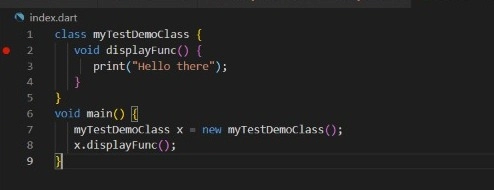
Simply run the program in debug mode after attaching the breakpoints. Whenever we run our program in debug mode, the Debugger window appears, where you can further specify how the breakpoint works. Additionally, you can display the current context's variable values. Using the watches window, you can add watchers for specific variables and listen to their values change.
Stepping Through Code
The Debugger window appears at the bottom of our editor once the program is in debug mode.
Stepping actions are available at the top of the Debug tool window in WebStorm and are activated when a breakpoint is reached/hit.
Some crucial debugging features are mentioned below.
Step Into (F7): This will run the code in this or another file line by line. However, if the current statement includes a function call, execution will go to the definition of the function and then stop at the first line.
Step over (F8): This will run the code in the current file line by line.
Step Out (Shift-F8): This will complete the current function's execution and then go to the next statement and stops thereafter the call.
Frequently Asked Questions
In Visual Studio Code, how can you debug a Flutter application?
If you launch your Flutter project from VS Code with F5 / Debug -> Start Debugging, then normal debugging functionality (such as breakpoints, stepping, etc.) should just work (as hot-reload will be automatically fired on-save).
What is the difference between Dart and Flutter?
Flutter is a Google-developed open-source user interface SDK. It supports the creation of iOS/Android apps and uses the Dart programming language.
Dart is a client-side programming language that is open-source. It's simple to learn, reliable, and capable of producing high-performance applications.
Is Dart the way of the future?
No doubt, Dart has a great future ahead of it. The Dart team has spent the last year working to make it the best language available for client-side web programming using the AngularDart framework and cross-platform development with the Flutter framework. On both GitHub and Stack Overflow, it has outperformed react native.
Conclusion
In this article, we learned about Dart Debugging and its working implementation by showcasing a working example.
However, learning never stops, and there is more to learn. So head over to our Android Development Course on the Coding Ninjas Website to dive deep into Android Development and build future applications.
We hope this article has helped you enhance your knowledge as a Dart beginner. If you want to learn more, check out our article on environment setup and Competitive Programming articles. Do upvote this article to help other ninjas grow.





 1+ registered

