Docker Objects
Docker objects refer to fundamental components within the Docker ecosystem, each serving a specific purpose in the containerization process. These objects encapsulate various aspects of Docker's functionality and structure.
-
Images: Docker images are the blueprints or templates that define how a container should run. They encapsulate the application code, libraries, dependencies, and configurations needed to run an application.
-
Containers: Containers are instances of Docker images. They provide a lightweight, isolated environment for running applications. Containers are portable and can run consistently across different environments.
-
Services: Docker services allow you to scale applications across multiple containers. They enable the deployment and management of multiple instances of a containerized application, ensuring high availability and load balancing.
-
Swarm: Docker Swarm is Docker's native clustering and orchestration solution. It allows you to create and manage a swarm of Docker nodes, enabling the deployment and scaling of services across a cluster of machines.
-
Nodes: Nodes are the individual machines (physical or virtual) that form a Docker Swarm. Each node in the swarm executes containers and communicates with other nodes to orchestrate services.
-
Stacks: Docker stacks define and manage multi-container applications. They allow you to define the services, networks, and volumes in a single file, simplifying the deployment and scaling of complex applications.
Types of Docker Storage
Docker storage refers to the mechanisms and options available within Docker to manage and handle data persistently in containerized environments. There are several types of Docker storage:
- Volume: They are dedicated storage locations outside the container. They persist even if the container is removed, providing a way to share and retain data between different containers and container instances.
- Bind Mount: Bind mounts link a directory on the host machine to a directory in the container. Changes in either location are reflected in the other, enabling data sharing between the host and the container.
- tmpfs Mount: They create a temporary, in-memory filesystem inside the container. This is useful for storing temporary or sensitive data that doesn't need to persist after the container stops.
Docker Architecture in Action
To gain a deeper understanding of Docker's architecture, let's visualize its operation within a practical scenario—deploying a web application.
-
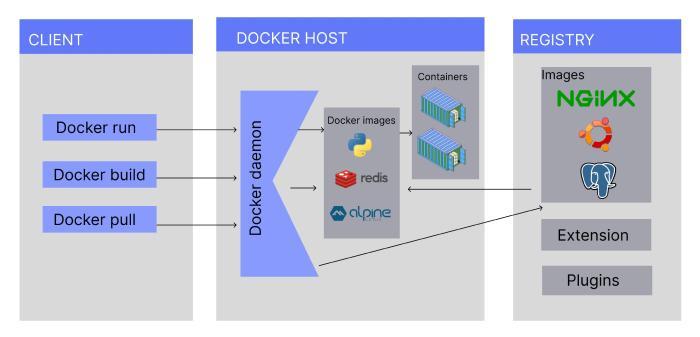
The Docker client initiates a command, prompting the Docker daemon to instantiate a container based on a specified image.
-
Should the required image be absent locally, the daemon fetches it from the Docker registry, facilitating seamless deployment.
-
The Docker daemon orchestrates the creation of an isolated container, complete with its own file system, networking, and isolated processes.
-
Within the container, the application operates autonomously, interacting with other containers and the host system via isolated network namespaces.
- By employing tools like Docker Compose or Kubernetes, developers can orchestrate intricate applications composed of multiple containers, catering to complex deployment needs.
Docker Networking
Docker Networking enables communication between isolated packages, ensuring a smooth flow of data within the Docker environment. Docker Networking is the magic that keeps containers connected and talking to each other. With an array of network drivers at your disposal, you can tailor your network settings to match your application's needs. Whether it's building bridges, sharing a host's network, or creating complete network silence, Docker's network drivers make sure your containers are always connected in collaboration.
Docker offers diverse network drivers:
-
Bridge: The default driver for containers, ideal for multiple containers communicating within the same Docker host.
-
Host: For scenarios where network isolation isn't required between the container and its host.
-
None: Disables all networking, ensuring total network silence.
-
Overlay: Enables Swarm services to communicate seamlessly, allowing containers to operate across different Docker hosts.
- Macvlan: Assigns unique MAC addresses to containers for distinct identity.
Docker Storage
Docker Storage is a way to keep information inside your containers safe and accessible. Docker provides various methods for managing storage:
-
Data Volumes: These are like special storage compartments for your containers. They allow you to create long-lasting storage that won't disappear when the container goes away.
-
Directory Mounts: This is a handy approach for managing storage in Docker. It's like opening a door between your computer and a container. By doing this, you let the container access and use files from your computer directly. It's a great way to share data.
- Storage Plugins: Imagine being able to plug in an extra memory card to your phone for more space. Docker can do something similar with storage. It can connect to storage systems outside of itself.
Frequently Asked Questions
What is the architecture of Docker?
Docker follows a client-server architecture. The Docker client communicates with the Docker daemon, which manages building, running, and distributing Docker containers.
Does Docker depend on architecture?
Docker is platform-independent and supports various architectures, including x86, ARM, and more, making it versatile and compatible across different systems.
What is the difference between Docker image and container?
A Docker image is a blueprint, while a container is an instance of that image running as a process. Images define the application, and containers execute instances of that definition.
What are different Docker components?
The key Docker components include Docker images, containers, services, swarm, nodes, and stacks. These components collectively enable the creation, deployment, and management of containerized applications.
Conclusion
Docker's architecture serves as the bedrock of its containerization prowess. Through a comprehensive grasp of its intricate components—the Docker client, daemon, images, containers, and registry—developers can confidently navigate the container landscape.
Now that you know about Docker Architecture, you can refer to similar articles.
You may refer to our Guided Path on Code Studios to enhance your skill set on DSA, Competitive Programming, System Design, etc. Check out essential interview questions, practice our available mock tests, look at the interview bundle for interview preparations, and so much more!
Happy Learning!







 1+ registered

