Configuration
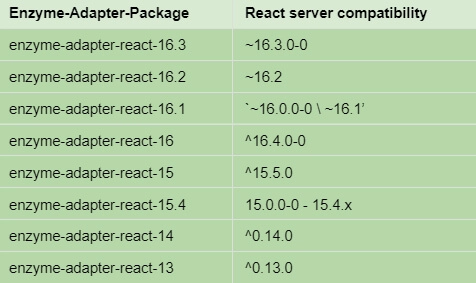
In the test setup code, you'll need to configure Enzyme to use the Preact adapter:
import { configure } from 'enzyme';
import Adapter from 'enzyme-adapter-react-16';

configure({ adapter: new Adapter() });

You can also try this code with Online Javascript Compiler
Working of Enzyme
Enzyme uses the adapter library it is configured to render a component and its children. Then the adapter converts the output to standardized internal representation (which is a "React Standard Tree"). Enzyme then wraps this with an object with methods to query the output and trigger the updates. The wrapper object's API uses CSS-like selectors to locate the parts of the output.
Running the Enzyme Tests
Enzyme is open-minded regarding which test runner or assertion library to use, and it should be compatible with all the major test runners and assertion libraries.
While using Enzyme with custom assertions and convenience functions for testing the React components, we can also use:
- should-enzyme for should.js.
- jasmine-enzyme with Jasmine.
- expect-enzyme for expect.
- chai-enzyme with Mocha/Chai.
- jest-enzyme with Jest.
Usage
Enzyme has three rendering "modes":
-
Mount: The mount function renders the component and all of its descendants in the same way they would be rendered in the browser.
-
Shallow: The shallow function renders only DOM nodes that get output directly by the component. Any child component is replaced with the placeholders that just output their children.
The advantage of shallow mode is that we can write the tests for components without even depending on the details of the child components and needing to construct all their dependencies.
This mode works differently internally with the Preact adapter compared to React.
- Render: The render function renders a component to the HTML string. Render is helpful for testing the output of rendering on the server or rendering a component without triggering any of its effects.
1.) Shallow Rendering
Shallow rendering is useful to constrain yourself to test a component as a unit and to ensure that your tests aren't indirectly asserting the behavior of child components.
shallow(node[,options]) => ShallowWrapper
Arguments: 1. node (ReactElement): The node to render
2. options (Object [optional])
Returns: ShallowWrapper, which is the wrapper instance around the rendered output.
Program:
import { shallow } from 'enzyme';  // importing shallow from enzyme library for shallow rendering
import sinon from 'sinon';
import Foo from './Foo';


describe('<MyComponent />', () => {
  it('renders three <Foo /> components', () => {
    const wrapper = shallow(<MyComponent />);    // wrapper is the rendered output of shallow function
    expect(wrapper.find(Foo)).to.have.lengthOf(3); // asserting with the output and the expected value
  });

  it('renders an `.icon-star`', () => {
    const wrapper = shallow(<MyComponent />);  // wrapper is the rendered output of shallow function
    expect(wrapper.find('.icon-star')).to.have.lengthOf(1); // asserting with the output and the expected value
  });

  it('renders children when passed in', () => {
    const wrapper = shallow((
      <MyComponent>
        <div className="unique" />
      </MyComponent>
    ));     // wrapper is the rendered output of shallow function
    expect(wrapper.contains(<div className="unique" />)).to.equal(true); // asserting with the output and the expected value
  });

  it('simulates click events', () => {
    const onButtonClick = sinon.spy();
    const wrapper = shallow(<Foo onButtonClick={onButtonClick} />);
    wrapper.find('button').simulate('click');
    expect(onButtonClick).to.have.property('callCount', 1);
  });

});
You can also try this code with Online Javascript Compiler
2.) Full DOM Rendering
Full DOM rendering is mainly used where the components may interact with DOM APIs or, we need to test the components which are wrapped in higher-order components. Opposite to shallow or static rendering, full rendering mounts the component in the DOM actually, which means that tests may affect each other if they all are using the same DOM. While writing the tests, if it is necessary, then use .unmount() or something else similar as cleanup.
mount(node[,options]) => ReactWrapper
Arguments: 1. node (ReactElement): The node to render
2. options (Object [optional])
Returns: ReactWrapper, which is the wrapper instance around the rendered output.
Program:
import { mount } from 'enzyme';  // importing mount from enzyme library for Full DOM rendering
import sinon from 'sinon';
import Foo from './Foo';


describe('<Foo />', () => {
  it('calls componentDidMount', () => {
    sinon.spy(Foo.prototype, 'componentDidMount');
    const wrapper = mount(<Foo />);  // wrapper is the rendered output of mount function
    expect(Foo.prototype.componentDidMount).to.have.property('callCount', 1); // asserting with the output and the expected value
  });

  it('allows us to set props', () => {
    const wrapper = mount(<Foo bar="baz" />);  // wrapper is the rendered output of mount function
    expect(wrapper.props().bar).to.equal('baz');  // asserting with the output and the expected value
    wrapper.setProps({ bar: 'foo' });   // re-render via changing props
    expect(wrapper.props().bar).to.equal('foo'); // asserting with the output and the expected value after changing props
  });

  it('simulates click events', () => {
    const onButtonClick = sinon.spy();
    const wrapper = mount((
      <Foo onButtonClick={onButtonClick} />
    ));
    wrapper.find('button').simulate('click');
    expect(onButtonClick).to.have.property('callCount', 1);
  });

});
You can also try this code with Online Javascript Compiler
3.) Static Rendering
Static rendering is used to generate HTML from React tree and analyze the resulting HTML structure.
render returns a wrapper that is similar to the other renderers in Enzyme, mount and shallow. However, render uses a third-party HTML parsing and traversal library Cheerio.
Program:
import React from 'react';
import { render } from 'enzyme';   // importing render from enzyme library for static rendering
import PropTypes from 'prop-types';


describe('<Foo />', () => {
  it('renders three `.foo-bar`s', () => {
    const wrapper = render(<Foo />); // wrapper is the rendered output of render function
    expect(wrapper.find('.foo-bar')).to.have.lengthOf(3);
  });

  it('rendered the title', () => {
    const wrapper = render(<Foo title="unique" />); // wrapper is the rendered output of renderfunction
    expect(wrapper.text()).to.contain('unique'); // asserting with the output and the expected value after
  });

  it('renders a div', () => {
    const wrapper = render(<div className="myClass" />); // wrapper is the rendered output of render function
    expect(wrapper.html()).to.contain('div'); // asserting with the output and the expected value after
  });

  it('can pass in context', () => {
    function SimpleComponent(props, context) {
      const { name } = context;
      return <div>{name}</div>;
    }
    SimpleComponent.contextTypes = {
      name: PropTypes.string,
    };
    const context = { name: 'foo' };
    const wrapper = render(<SimpleComponent />, { context });
    expect(wrapper.text()).to.equal('foo');
  });

});
You can also try this code with Online Javascript Compiler
FAQs
1. What is the difference between the Enzyme and React Testing library?
Ans: Enzyme allows to access the internal workings of the components. We can read and set the state, and we can mock children to make tests run faster. On the other hand, the react-testing-library doesn't give us any access to the implementation details.
2. What is an Enzyme adapter?
Ans: The adapter abstracts away anything that changes based on the React version so the core enzyme code can stay the same. Detailed version. mount and shallow are both exported from enzyme.
3. Can we use Jest without Enzyme?
Ans: Jest can be used without Enzyme to render components and test with snapshots. The Enzyme adds additional functionality. Enzyme can be used without Jest also. However, Enzyme should be paired with another test runner if Jest is not used.
4. Does Enzyme support hooks?
Ans: Enzyme does not support effect hooks by default while shallow mounting components. You just need to add jest-react-hooks-shallow to ensure that the hooks run.
Key Takeaways
In this blog, we have discussed about Enzyme testing utility. We discussed the installation and configuration of Enzyme. Then we discussed the working of Enzyme and running Enzyme tests. In the end, we discussed the basic usage of Enzyme with three modes of rendering (Shallow, Full DOM, and Static rendering).
You may want to know about React Test Utilities. To find an interesting article on React Test Utilities, please click here to learn more.
We hope that this blog helped you enhance your knowledge regarding Enzyme. Learning never stops, and to learn more and become more skilled, head over to our practice platform Coding Ninjas Studio, to practice top problems attempt Mock Tests, read informative blogs and interview experiences. Do upvote our blog to help other ninjas grow.
Happy Learning!







 7+ registered

