Do you think IIT Guwahati certified course can help you in your career?
Introduction
Mongooseis a library for MongoDB and Node.js. In simple terms, it establishes the connection between our Node.js backend code to the MongoDB database. It makes the life of the developer easier as it exposes lots of functions that are helpful in performing any type of CRUD(Create Read Update Delete) operations to the database directly from our backend code. One of the functions is findByIdAndUpdate() which is really helpful in performing update operations in a database. Of course, there are lots of update functions available in a Mongoose library for updating data in a database but findByIdAndUpdate() is mostly used because of its simplicity and flexibility.
We know in Mongodbevery document has its own unique auto-generated _id field. This id is passed inside the findByIdAndUpdate() function and then it simply grabs the document matching that particular id. After getting the document with that matching id, it simply updates the data inside the document. What needs to be updated inside the document is specified in the function as an argument.
Mongoose is an elegant MongoDB object modeling tool for Node.js, providing a schema-based solution to model your application data. Here's a step-by-step guide to installing Mongoose in your Node.js project:
Create a project directory and initialize it with npm init -y.
Install Mongoose using npm install mongoose.
Verify Mongoose installation in package.json.
Use Mongoose in your JavaScript file to connect to MongoDB, define schemas, and create models.
Working with findByIdAndUpdate()
After installing, check the package.json file, it will be present there with its version.
package.json file:
{
"dependencies": {
"mongoose": "^6.0.13"
}
}
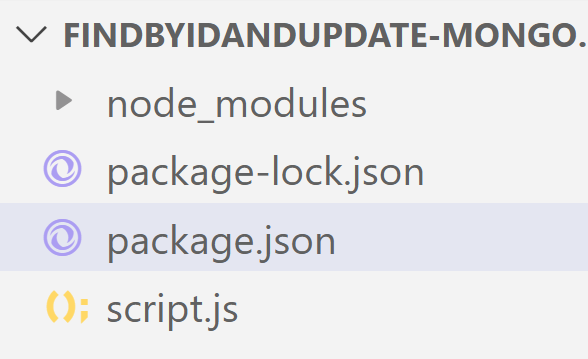
Now, make a script.js file where we work on the database using the mongoose library. Your file structure will look like this,
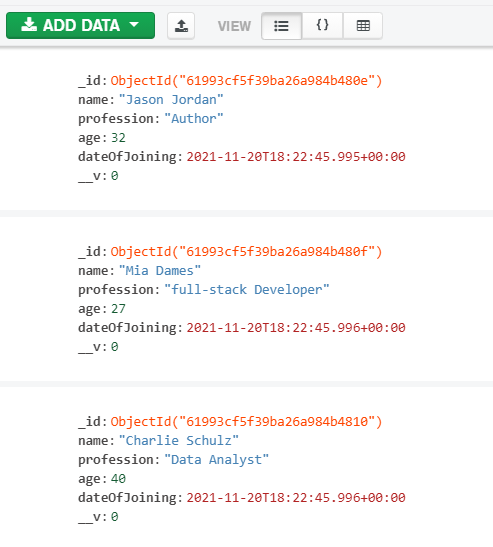
Now our project is set but before working on the database we have to create the database. I’m using MongoDB Compass to create a database. I’m creating the ‘blog’ database with the ‘users’ collection and this collection has 3 documents. After creating the database, it will look like this,
Now, let’s connect this database to our backend code and update the data using the findByIdAndUpdate() function. We want to update the user “Mia Dames” profession from “Frontend Developer” to “Backend Developer”. For that, we have to pass her id and update the parameter to the function. Remember these two arguments are compulsory.
Analyzing the code above, we first established the connection to our “blog” database then we defined and modelled the schema for our “users” collection in the blog database. We then defined an asynchronous function updateDcoument using async/await which takes the id of the user to perform an update operation. We made this asynchronous because update operation takes time to complete and we don’t want to block the rest of the code because of this.
Inside updateDocument function, we used findByIdAndUpdate() function and passed-in the id and the update parameter to perform update operation. We’ve put these inside a try/catch block so that if this operation is failed then an error will be caught.
Now, run the script.js file inside the terminal by typing this command,
The output shows everything unchanged. We performed an update operation but it is not reflected in the output when we console.log() the result. Well, it is because the findByIdAndUpdate() function returns the matching document first and then performs the update operation. It is not reflected in the output but when we look at the database in the MongoDB Compass, you’ll see the changes in the document there.
See below, there is a change in the profession of the user. Previously it was “Frontend Developer” now it changed to “Backend Developer”.
To make the changes to reflect in the console also, pass the third argument inside findByIdAndUpdate() function as an object and set,
new:true
Now, let’s say this time we want to change the profession from “Backend Developer” to “full-stack Developer”.
What if we pass the wrong id to findByIdAndUpdate() function? Well, nothing happens as it won’t find any matching document. But there is an option by using which we can utilize this situation to our advantage.
Suppose, we want to add a new document if the value of the _id field does not match. We can use the upsert option. The upsert option will add a new document and this new document will contain the content of the update that was passed to the findByIdAndUpdate() function.
For using this functionality, just set upsert:true
For what purpose findByIdAndUpdate() function is used for?
This function is used for performing the update operation to our database by making use of the id of the particular document. This function mainly takes 2 compulsory arguments, the first one is the id and the second one is the actual update data.
What do you mean by upserting data when using the findByIdAndUpdate() function?
When the findByIdAndUpdate() function doesn't find the matching document based on the id passed inside of it, then it simply adds or creates a new document based on that id inside the database. For this thing to happen, we have to pass the third argument an object and set upsert: true.
What is the difference between findOneAndUpdate and update in Mongoose?
Mongoose's update() function is designed to make "bulk" changes without worrying about the final document's content. While Mongoose's findOneAndUpdate() function is designed to update a single document and return the modified version of the document as a result.
Conclusion
So, finally, we've reached the end. As mentioned earlier, there are many functions for updating data in MongoDB, but findByIdAndUpdate() is mostly used. The value of the _id field is always unique in a collection, and there is no margin of error when we use the findByIdAndUpdate() method.
You can learn about the practical implementation of MongoDB from hereMy first express app. And if you want to learn about mongoDb commands which are frequently used then you can learn here the 25 Most Common Commands for MongoDB Beginners.









 7+ registered

