Getting started with Flask
If you don’t have flask already installed on your system, then use the following to install flask.
pip install Flask
To check if flask is installed on your system, navigate to a suitable directory and create a python file with the following code.
# an object of WSGI application
from flask import Flask
app = Flask(__name__)   # Flask constructor

@app.route('/')
def hello():
    return 'HELLO'

if __name__=='__main__':
   app.run()

You can also try this code with Online Python Compiler
Note: For development purposes, we can run the program in debug mode in which if we make any changes to our code, then we don’t have to terminate the program and run it again.
To run the app in debug mode, before app.run() write app.debug=True. Now execute python file.py in the terminal to start the server.
The hello() function is linked to the '/' URL. This function's result will be presented when the webserver's home page is viewed in the browser.
The route() decorator is used to link the URL to a function, i.e., routing is a technique for mapping a certain URL to a function that is supposed to do a specific task.
In the above code, the hello function is bound to the URL ‘/’.
@app.route('/task1')
def task1():
    return 'TASK1'
You can also try this code with Online Python Compiler
Add the above code to the existing code.
Now the URL '127.0.0.1:5000/task1' is linked to the task1() function. When someone visits this link, the task1() function renders the line ‘TASK1’.
Variables in URL
The variables in the URL can be passed on to the function bound to it. Inside the function, we can treat it just like a variable. In the below example, we print the text on the screen.
from flask import Flask
app = Flask(__name__)   # Flask constructor

@app.route('/print/<text>')
def print_text(text):
    return 'The message is: %s' % text

if __name__=='__main__':
    app.debug=True
    app.run()
You can also try this code with Online Python Compiler
Output:
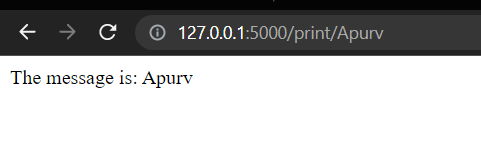
The variable part is added to the URL '/print’ as an argument in the preceding example's route() decorator parameter. As a result, if you input a URL like http://localhost:5000/print/Apurv, the argument 'Apurv’ will be provided to the print_text() method.
Dynamic URL Binding
The url_for() method is used to build a dynamic URL for a specified function. The function takes one or more keyword parameters as well as the function's name as the arguments.
from flask import Flask, url_for, redirect
app = Flask(__name__)
@app.route('/print/teacher')
def teacher():
    return "Welcome teacher"

@app.route('/print/<person>')
def student(person):
    return "Welcome %s" %person

@app.route('/user/<person>')
def hello(person):
   if person =='teacher':
      return redirect(url_for('teacher'))
   else:
      return redirect(url_for('hello_guest', person = person))

if __name__=='__main__':
    app.debug=True
    app.run()
You can also try this code with Online Python Compiler
Output:

Opening the browser and entering the above link prints Welcome teacher.

Opening the browser and entering the above link prints Welcome student: apurv.
Static Files
A static file, such as javascript or CSS, is frequently required by a web application to render the presentation of the web page in the browser. The web server is usually set up to set them, however, these files are served as static folders in your package or adjacent to the module during development.
Create a folder named templates alongside our main.py. Create a HTML file inside it with the following code.
<!DOCTYPE html>
<html lang="en">
<head>
    <meta charset="UTF-8">
    <meta http-equiv="X-UA-Compatible" content="IE=edge">
    <meta name="viewport" content="width=device-width, initial-scale=1.0">
    <title>Document</title>
</head>
<body>
    <h1>This is my webpage</h1>
    <h2>Informations</h2>
    <p>Alice</p>
    <p>Web developer</p>

</body>
</html>
The main.py code.
from pydoc import render_doc
from flask import Flask, render_template, url_for, redirect
app = Flask(__name__)

@app.route('/')
def teacher():
    return render_template('./index.html')

if __name__=='__main__':
    app.debug=True
    app.run()
You can also try this code with Online Python Compiler
The project structure.

Output:

Practice this code with the help of Online Python Compiler
Why use Flask?
- It is a light framework since it does not rely on other libraries. It allows sophisticated application web development to get off to a fast start.
- Flask allows the developer complete flexibility over the creation of apps. You may play around with the framework's architecture and libraries. Flask's built-in unit testing mechanism allows for faster debugging, more stable development, and more experimentation.
- Secure cookies are an HTTP request property that provides channel security and prevents unauthorized access to the content. Secure cookies are supported by Flask.
- Flask is more Pythonic than the Django framework. Flask is simple to learn since it doesn't have a steep learning curve.
FAQs
-
What is Flask?
Flask is a web framework and a Python module that makes it simple to create web applications. It has a simple and extensible core: it's a microframework without an ORM (Object Relational Manager) or other things similar to that.
-
Which is better Flask or Django?
Flask's minimalism and simplicity are two of its strongest features. No constraints mean the developer may do whatever they want with it, utilising a wide range of external libraries and add-ons to make it versatile and extendable. Django, on the other hand, provides significantly less freedom and control due to its built-in features and modules.
-
How to run Flask in debug mode?
Before app.run(), enter the line app.debug()=True to run Flask in debug mode.
Key Takeaways
Congratulations on making it this far.
In this blog, we understood the Flask web framework in Python. We also learned how to use Flask to create basic web pages.
If you want to become proficient with Python programming, I suggest you take the Coding Ninjas Python Course, which will teach Python basics with Data Structures and Algorithms.







 1+ registered

