Get a skill gap analysis, personalised roadmap, and AI-powered resume optimisation.
Introduction
Templates are files that include both static and dynamic data placeholders. A template is rendered with specific data to produce a final document.
The phrase 'web templating system' refers to the process of creating an HTML script in which variable data may be dynamically introduced. A template engine, a data source, and a template processor make up a web template system.
The Jinja template library is used by Flask to render templates. When a web template is rendered, placeholders for variables and expressions (in this example, Python expressions) are interspersed with HTML syntax and substituted with values when the template is generated.
Getting Started
To begin, ensure that Flask is installed on your computer. If not, use the following command to install it.
pip install flask
You can also try this code with Online Python Compiler
We can now go on to the main purpose of this post, which is to render the template. To do so, we must first build the templates; you may use any HTML template, but we will use a basic HTML template for simplicity. Make a folder called "template" in the current folder first. All of the templates will be stored in this "template" folder. Let's make a simple HTML template now named index.html:
<!DOCTYPE html>
<html lang="en">
<head>
    <meta charset="UTF-8">
    <title>Document</title>
</head>
<body>
    <h1>This is my webpage</h1>
    <h2>Informations</h2>
    <p>Alice</p>
    <p>Web developer</p>
</body>
</html>
You can also try this code with Online Python Compiler
Now we need to figure out how to connect the template to a certain route or URL. This means that a certain template should be shown or created whenever a user visits a given URL. The "main.py" will be following code:
from flask import Flask,render_template

app = Flask(__name__)

@app.route("/")
def homepage():
    return render_template("index.html")

if __name__ == "__main__":
    app.run(debug=True)
You can also try this code with Online Python Compiler
We've created a route in the above code and imported the render_template method from the Flask module.
Route
A route is a link between a URL and a function or other piece of code that will be displayed on the webserver. The function decorate @app.route() is used in the flask to indicate that the function is bound to the URL specified in the route function's argument.
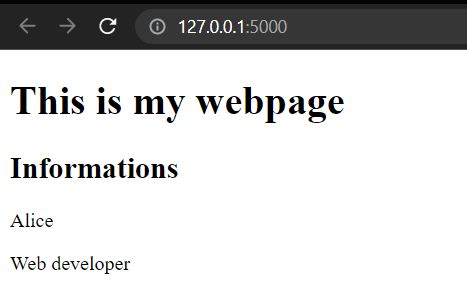
In this instance, we're using the function "homepage" to bind the URL "/," which is the server's base URL. The render_template() function is called by the function homepage, which simply returns something. The render_template looks for the file in the templates folder by default. As a result, instead of providing the whole path to the template, we just need to specify the name of the template. The homepage function creates an index.html template, which we can see in the browser.
Hence, after running main.py, we can see the following output.
Jinja Template
Now we'll build a new route to show how to use the Jinja template. Simply add one more block of code to the "main.py file" to add the route.
We're simply going to make a route called "/<city>" that will be tied to the hello function. After the "/," the "<city>" stands for anything that lies after “/”. It is taken as a parameter to the hello function, and from there, we pass it to the render_template() function. As a result, after supplying the variable name to the render_template method, we'll be able to render that variable in the template.
Now, we'll need to make a new template in the template folder named "citypage.html." The following markup should be in this file.
Now we need a means to inherit some templates rather than recycling them, which we can achieve by utilising Jinja blocks. They let us construct a template block, which we can then utilise in other templates using the block's name.
Using template inheritance, you may create a "skeleton" template that contains all of your site's common parts and specifies blocks that child templates can override.
Consider the below example.
Base Template:
Replace the below code in index.html with the following code.
<!DOCTYPE html>
<html lang="en">
<head>
    <meta charset="UTF-8">
    <title>Document</title>
</head>
<body>
    <a href="{{ url_for('homepage') }}">HomePage</a>
    <a href="{{ url_for('hello') }}">City Tour</a>
    <h1>This is my webpage</h1>
    <h2>Informations</h2>
    <p>Alice</p>
    <p>Web developer</p>
    {% block body %}
        <h1>This is a HomePage</h1>
        <p>Lorem ipsum dolor sit amet consectetur adipisicing elit. Magnam, ipsam?</p>
    {% endblock %}
</body>
</html>
You can also try this code with Online Python Compiler
In this, we can see that there is one block named body that contains some code inside it. This block can be filled in by the child template. The block tag simply tells the template engine that those elements of the template may be overridden by a child template.
Child template:
Replace the below code in citpage.html.
<!DOCTYPE html>
<html lang="en">
<head>
    <meta charset="UTF-8">
    <title>Document</title>
</head>
<body>
    {% extends 'index.html' %}
    {% block body %}
    <h1>This is citypage</h1>
    <p>Welcome to City of Lakes</p>
    {% endblock %}

</body>
</html>
You can also try this code with Online Python Compiler
The % extends percent tag is crucial in this case. It informs the template engine that this template "extends" another one. When the template system assesses this template, it looks for the parent first. The extends tag must be the template's initial tag.
Output:
Including logic in templates
We can make the templates much more dynamic by including the logic in the templates. Let us use a for loop and if condition in our template.
Following is the code for main.py file.
from flask import Flask,render_template

app = Flask(__name__)

@app.route("/<teacher>")
def homepage(teacher):
    languages = ["Python","C++",'Java','Javascript']
    return render_template("loop.html",languages=languages,person = teacher)

if __name__ == "__main__":
    app.run(debug=True)
You can also try this code with Online Python Compiler
We may utilise for loops in templates surrounded in {%%} and refer to them in a usual pythonic manner. The variable(list) that we parsed in the route function is the sites variable. We may utilise the iterator as a variable once again by enclosing it in {{}}.
What is Flask? Flask is a Python-based microweb framework. It is referred to as a microframework since it does not necessitate the usage of any specific tools or libraries. It doesn't have a database abstraction layer, form validation, or any other components that rely on third-party libraries to do typical tasks.
What is a template in Flask? Templates are files that include both static and dynamic data placeholders. A template is rendered with specific data to produce a final document.
Key Takeaways
Congratulations on making it this far.
In this blog, we learned how to use templates in Flask. We also learned how to extend templates to reuse the code in templates.
If you want to become proficient with Python programming, I suggest you take the Coding Ninjas Python Course, which will teach Python basics with Data Structures and Algorithms.
Live masterclass
Ace Data Analyst Interviews with Amazon SQL Case Studies
by Prerita Agarwal
23 Oct, 2026
11:30 AM
One Prompt, Three AI Agents: Build a Portfolio Project for 25L+ GenAI Roles
by Saurav Prateek
19 Oct, 2026
11:30 AM
AI vs You: Crack a Data Analyst Interview Case with Claude + Excel
by Abhishek Soni
21 Oct, 2026
11:30 AM
Build Your Own Perplexity-Style App: Stand Out in GenAI Job Interviews
by Sumit Shukla
22 Oct, 2026
11:30 AM
Ace Data Analyst Interviews with Amazon SQL Case Studies
by Prerita Agarwal
23 Oct, 2026
11:30 AM
One Prompt, Three AI Agents: Build a Portfolio Project for 25L+ GenAI Roles









 1+ registered

