Do you think IIT Guwahati certified course can help you in your career?
Introduction
Garbage collection,present in programming languages like C# and Java, serves as a memory reclamation function. Languages equipped with garbage collection employ specialized engines known as garbage collectors. These collectors efficiently release memory that was previously assigned to objects no longer essential for the program's operation. Garbage collection is a memory management feature provided by the .NET runtime environment. It automatically manages memory by reclaiming memory that is no longer used or referenced by a C# program. The garbage collector in C# is responsible for tracking and cleaning up objects that are no longer referenced by the program, making memory management more convenient and less error-prone for C# developers.
In this article, we will be going over how garbage collection in C# is handled by the runtime environment, its features, and some code examples illustrating the process.
Key Features of the Garbage Collector in C#
The garbage collector in C# is a crucial component of the .NET runtime environment, and it offers several key features:
Automatic Management: It automatically reclaims unused memory
Generational Collection: It categorizes objects into generations for efficient cleanup
Concurrent and Parallel: Runs alongside the program, minimizing interruptions
Low Fragmentation: Reduces memory fragmentation for efficient memory use
Finalization: Supports cleanup tasks with finalizers (destructors)
Notifications: Notifies applications of garbage collection events
Steps in a Garbage Collection
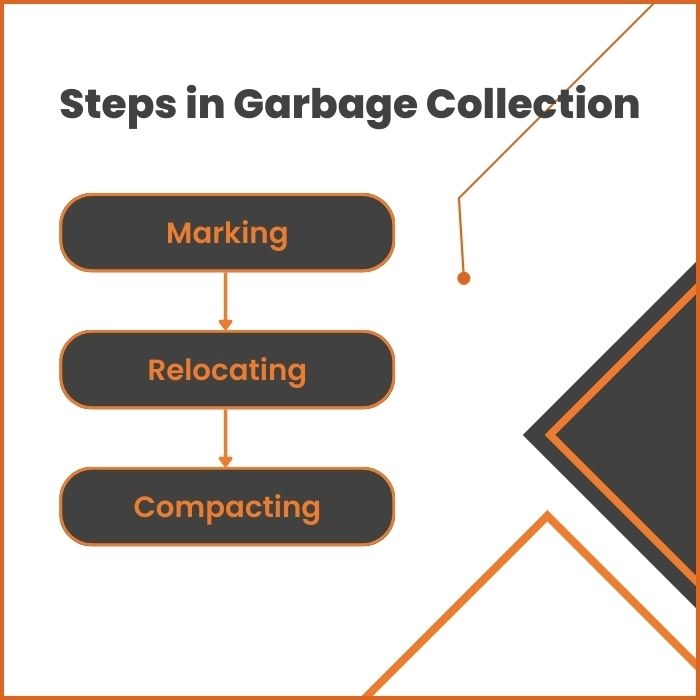
Garbage Collection is a method of automating memory management in a C# application by scanning the objects in the memory heap. It allows you to not worry about manually managing dynamically allocated objects. It is a three-phase process that can either be triggered periodically by the runtime environment or manually by the programmer using a method provided by the garbage collector class.
The three-phase garbage collection process includes the following:-
Marking
Marking is the first step of garbage collection in C#, and it involves creating a list of all the objects in the heap that are still in the scope of your C# program. The garbage collector uses the process of tracing to create this list. Objects not part of the live object list are marked for deletion.
Relocating
Once the garbage collector has created the live object list, they must be relocated to a different memory address, as the heap can suffer from fragmentation due to multiple objects being deallocated. It is a condition where the heap memory gets broken down into multiple discontinuous segments.
Compacting
Compacting is the final step of garbage collection, which involves ensuring that the objects are as close together as possible to reduce fragmentation further. Dead objects are deleted from the heap in this step.
The process of garbage collection is a massive overhead and performing it on the entire memory heap is undesirable as it can lead to reduced performance. A clever way of achieving automatic memory management is to perform garbage collection on specific sections of the heap memory. In the next section, you will get to know more about how the C# runtime optimizes the garbage collection process.
Generations in Heap
The common language runtime divides the memory heap into different generations according to the frequency of their garbage collection to achieve automatic memory management without adversely affecting the performance of your C# applications.
There are three types of heap generations in C#:-
Generation 0
This generation undergoes garbage collection most frequently. All the newly created objects are a part of this generation. Objects in this generation have the least lifespan.
Generation 1
If an object survives more than one garbage collection, it is promoted to this generation. Objects in this generation are in the heap memory longer than those in the Zeroth generation.
Generation 2
Once an object from Generation 1 survives another garbage collection, it is promoted to Generation 2. Objects in this generation require a lot of memory, and they live as long as static objects, usually during the entire duration of a process.
This generational garbage collection approach allows short-lived objects to be collected quickly without sacrificing the performance of your program.
Triggers of a Garbage Collector
You now have a general idea of how garbage collection is performed in C#. Now let us look at a few factors that triggers the garbage collector to run:-
Generational Threshold
As we know, the heap is divided into three generations in C#. When a generation reaches a particular memory threshold, garbage collection is triggered to free up memory. The threshold depends upon the total size of a generation.
Low Memory Conditions
The common language runtime triggers a garbage collection if the operating system executing your program runs out of memory.
Explicit Collection Call
You can explicitly trigger a garbage collection by calling the ‘GC.Collect()’ method. In the next section, you will learn more about the garbage collection class in C#. In general, using explicit collection calls should be avoided as it hinders the performance of your C# application.
Methods in Garbage Collector Class in C#
The GC static class in C# provides methods and properties for interacting with the garbage collector. It is present in the System namespace.
Following are some commonly used methods and properties of the Garbage Collector class:-
Collect() Method
This method explicitly triggers garbage collection. It expects one parameter which specifies the oldest generation for which you want the collection to occur.
MaxGeneration Property
This data member stores the value of the maximum generation supported by the runtime environment.
GetGeneration() Method
This method returns the generation of the object passed to it as a parameter.
GetTotalMemory() Method
This method returns the total amount of memory currently allocated in the application's managed heap. It expects a single boolean parameter that specifies whether the method should wait for garbage collection before returning the number of bytes.
CollectionCount() Method
This method returns the number of times garbage collection has occurred for the specified generation as a parameter.
The following C# program illustrates the methods and properties mentioned above:-
Code in C#
C#
C#
using System;
class Student {


    //data members
    public string Name { get; set; }
    public int RollNo { get; set; }

    //constructor
    public Student(string name, int roll) {
        Name = name;
        RollNo = roll;
    }

    //entry point of the program
    public static void Main() {
        Student stud1 = new Student("Example Name", 20);
        Console.WriteLine(GC.MaxGeneration);
        Console.WriteLine(GC.GetTotalMemory(false));//doesn't wait for garbage collection
        Console.WriteLine(GC.GetGeneration(stud1));//returns the generation of stud1
        Console.WriteLine(GC.CollectionCount(0));
        GC.Collect(0);
        Console.WriteLine(GC.CollectionCount(0));
    }
}
Automatic Memory Management: Garbage collection automatically handles memory allocation and deallocation, reducing the risk of memory leaks and manual errors.
Improved Application Stability: By reclaiming unused objects, it prevents memory-related crashes or undefined behavior caused by accessing deallocated memory.
Simplified Development: Developers can focus on logic without worrying about explicitly freeing memory, leading to cleaner and more maintainable code.
Efficient Memory Usage: The garbage collector optimizes memory usage by compacting memory and eliminating fragmentation.
Thread-Safe Management: Garbage collection in C# is designed to work in multi-threaded environments without conflicts, ensuring reliable performance.
Enhanced Productivity: Eliminates the need for manual memory management, reducing development time and debugging effort for memory-related issues.
Platform Independence: The garbage collector is part of the .NET runtime, ensuring consistent behavior across different platforms.
Frequently Asked Questions
What is garbage collected in C#?
Garbage collection in C# reclaims memory occupied by unused managed objects in the heap, such as class instances no longer referenced.
How many garbage collectors are in C#?
C# uses three garbage collectors: Workstation GC (single-threaded), Server GC (multi-threaded), and Background GC (a combination for efficient performance).
What is .NET garbage collection?
.NET garbage collection is an automated memory management system that frees unused objects, optimizes memory usage, and eliminates memory leaks in managed code.
Conclusion
Managing dynamic memory is a crucial part of creating complex applications. The garbage collector in C# automatically manages the heap memory for you without the need for explicit instructions. It works by periodically checking for unused dynamic objects in the heap memory and deallocating them.
Overall, garbage collection in C# is useful for large and complicated programs as manual memory management is prone to errors and really hard to debug.
Hope this article helped you in understanding the basics of automatic memory management and garbage collection in C# runtime environments.







 1+ registered

