Do you think IIT Guwahati certified course can help you in your career?
Introduction
One of the best things about web applications is how simple it is to distribute them to many people. When deploying web applications to a large audience, the applications frequently need to adapt and behave differently under certain conditions. Grails provides a variety of mechanisms for dealing with web application internationalization and localization.
In this article, we will discuss the basics of Grails-Internationalization. So please fasten your seat belts because we are going international.
About Grails
Grails is an open-source Java-based web application framework that uses the Apache Groovy programming language. It makes creating web applications in Java easier. It helps reduce the complexity of making a web application in Java by using existing technologies such as Hibernate and Spring.
Ironically, Grails was originally called Groovy on Rails to suggest that it was similar to Ruby on Rails. But this name was rejected due to legal issues.
Understanding Internalization
Internationalization is a method of making such an application adaptable to different languages and regions. Suppose you are developing an application and want to display messages, currencies, dates, times, and so on based on a specific region or language. In that case, internationalization is a powerful concept in Java.
Isn’t amazing?
Before starting the Grails-Internationalization, let us first understand what information differs from region to region.
There is a plethora of list of culturally dependent data:
Messages
Times
Dates
Measurements
Numbers
Currencies
Phone Numbers
Postal Addresses
Labels on GUI components etc.
Importance of Locale Class in Internationalization
An object of the Locale class represents a geographical or cultural region which is generally used to get locale-specific information such as country name, language, variant, etc.
Fields of Locale class
There are fields of Locale class:
public static final Locale UK
public static final Locale ENGLISH
public static final Locale CHINA
public static final Locale KOREA
public static final Locale JAPAN
Grails-Internationalization
Internationalization (also known as i18n) is designing an application so that various languages and regions can adapt it without engineering changes.
For example, if a web application receives a request from Spain, the application may want to display messages to the user in Spanish. In contrast, the same application may wish to render messages in English if the request comes from New York.
The application adaptations may be more complex than displaying different text versions. Based on the origin of a specific request, an application may need to impose different business rules.
Grails leverages Spring MVC internationalization support to give us out-of-the-box internationalization support. Grails allows us to customize the text that appears in a view based on the user's Locale. You can learn more about the Locale class and localization in Java here.
Before understanding scaffolding and internationalization, we must understand more about Message bundles, changing Locales, and reading messages.
Message Bundles
We have already talked about Locales. But you can only use Locales once you create a message bundle file containing the different languages you want to render.
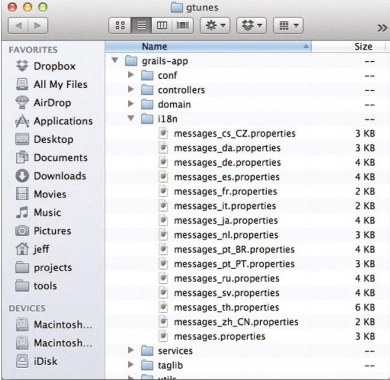
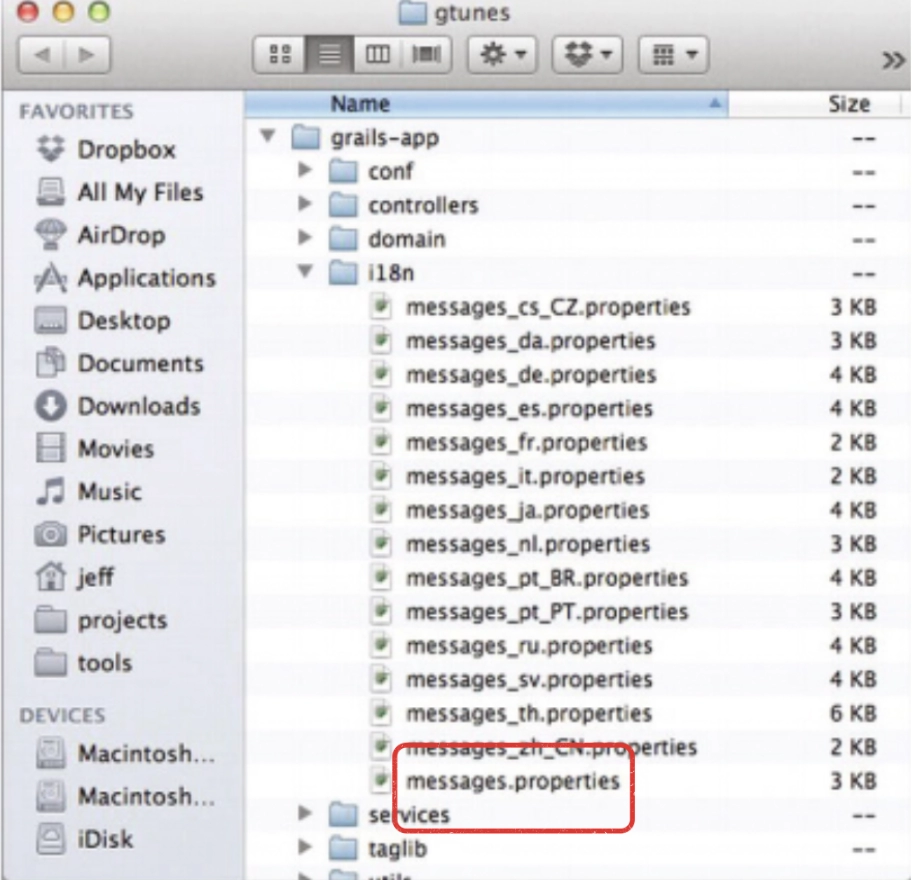
In Grails, Message bundles are simple java files located inside the grails-app/i18n directory.
Credit: springer.com
Each Bundle has a similar naming convention starting with the message and ending with the locale. Multiple message bundles with different languages are inside the aforementioned grails-app/i18n directory—for example, messages.properties and messages_da.properties.
Unless you have specified a locale, Grails looks in messages.properties for messages.
You can also create your message bundle by creating a new properties file that ends with the desired locale, for example, messages_en_HI.properties for Hinglish (Hindi and English).
Changing Locales
Now we have talked about Locales in some detail. Grails gives you the ability to change locales by simply passing the lang parameter as a request parameter like this:
/book/list?lang=en
The user locale is detected from the incoming Accept-Language header by default. But using the above parameter, Grails will automatically change the user's locale, and subsequent requests will use the new switched locale.
Grails uses the SessionLocaleResolver as the localeResolver bean.
Now, what is a SessionLocaleResolver?
Internally, SessionLocaleResolver populates a custom Locale instance in HttpSession.
As shown in the diagram, this LocaleResolver implementation also implements LocalContextResolver, which has additional methods for retrieving time zone information from a session.
You can use these arguments in your message by specifying positional parameters at the desired location like this:
my.localized.content=Hello {1}, Let’s start {0}.
Reading Messages in Grails Artifacts with MessageSource
To retrieve a message, you can inject messageSource and use the getMessage method with its arguments(message code, message arguments, default message, and locale).
You can also use the same technique in tag libraries. But you must prefix the method cll with .g if your tag library uses a custom namespace.
Scaffolding and i18n
The scaffolding templates for controllers and views in grails are completely i18n-aware. The GSPs use the message tag for buttons, labels, etc., and controller flash messages use i18n to resolve messages specific to the locale.
The scaffolding includes locale-specific labels for domain fields and domain classes.
For example, if you have a Movie domain class with a title field like this:
class Movie {
  String title
}
The scaffolding will use labels with keys like this:
Movie.label = Ninjas
Movie.title.label = The Coding Ninjas Movie
Note: The word label is only used as part of the convention used by the scaffolding. You can also come up with one of your property patterns.
Frequently Asked Questions
What are the Benefits of Using Grails?
The most common benefits of using Grails are Reusability, Low maintenance, Cost Saving, Faster time to Market, and many more.
Is Grails a spring boot?
The Grails framework utilizes Spring Boot's time-saving capabilities, such as spring-powered dependency injection, as it is built on top of it.
What are the Features of Grails?
Following are the features of the Grails Groovy Lineage, Spring Boot Foundation, Built-in Testing framework, Plugin Library, and Pragmatic Strategy.
Do grails use Maven?
The maven plugin will automatically execute the Gradle wrapper inside the grails application.
Conclusion
In this article, we learned about Grails-Internationalization. We saw what Message Bundles and Locales are, how we can change Locale, and how we can read messages. We also learned Scaffolding and i18n.













 5+ registered

