Do you think IIT Guwahati certified course can help you in your career?
Introduction
Have you ever used Grails for making REST applications? Do you know that features of Grails can easily make RESTful APIs? Do you know how REQUESTS are sent by the client and Received by the Server to give RESPONSE?
In this article, we will discuss Grails and how we can use it in making REST applications. We will also make a demo application using Grails. Moving Forward, let’s understand a few useful topics. Let’s discuss Grails and REST.
What is Grails?
Grails is a Java-based framework used in web applications. Grails uses Apache Groovy programming language. It is an open-source framework. We can say that Grails is a full-stack model-view-controller framework which means that all the components are already consolidated in the framework. MVC (Model-view-controller) consists of three components:
Spring (Core controller)
Hibernate (Builds data models and communicates with database)
SiteMash (Templating Framework)
Grails consists of some features that help in creating REST applications. Moving forward, let’s understand REST.
What is REST?
REST stands for Representational State Transfer. It helps users to manage, connect and interact with services of the cloud by building API (Application Programming Interface). If an API follows the REST style, then it is called REST API, and the web services that follow the REST style are also known as RESTful web services or RESTful web APIs. REST communicates through XML (Extensible Markup Language) or JSON (JavaScript Object Notation) and HTTP (Hyper Text Transfer Protocol) methods such as
GET (Used for retrieving data)
PUT (Used for creating data)
POST (Used for updating data)
DELETE (Used for deleting data)
How REST API Works?
There is a simple system on which REST API work and, that is the Request and Response system. Whenever clients make a REQUEST using HTTP Methods, the REQUEST goes to SERVER, and then it returns a RESPONSE with HTTP status code, for example, 200 (OK), 404 (Not Found), 500 (Internal Server Error), and so on.
Let’s make a REST application using Grails. Before making an application we need to install Grails on our computer.
2. Click on Download to download the latest version of Grails.
3. After the zip folder for the Grails version is downloaded unzip the folder.
4. Open the Grails folder where you downloaded it and go to the bin folder copy path to the bin folder.
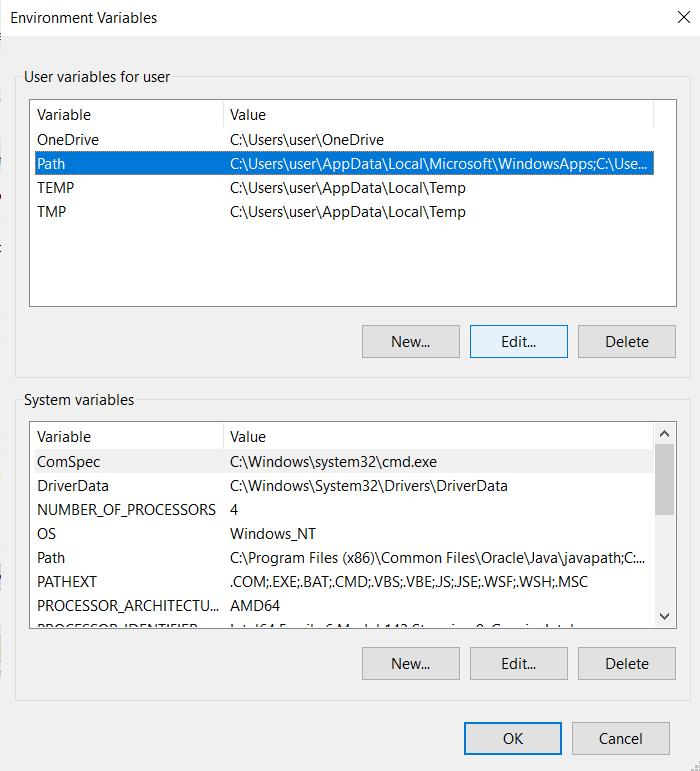
5. Now Search Environment Variables on your computer and open “Edit the system environment variables”.
6. Go to the advanced tab, then click Environment Variables.
7. Go to the path and click Edit.
8. Then click New and paste the copied path here.
9. Click ok, and you are done with your installation. Grails, groovy, and JVM are installed.
10. You can go to cmd and run grails --version to see the installed version of grails, groovy, and JVM.
Creating First Application using Grails
For creating an application using Grails run the below command.
grails create-app demoApp
After this, a default package will be created with the same name as the application. You can change the default package name manually by going to path grails-app\conf\application.yml or specify a new package name with the below command.
grails create-app org.grails.guides.demoApp
Using Grails, you can make an application profile also. Using the command
grails list-profiles
you can check what profiles you can make.
If you want detailed information about the profile, you can use the command
grails profile-info
For running this application, first, you have to change your directory and go to the application folder using the command
cd demoApp
Now type command
grails run-app
The Default port will be 8080, so to open your application, you can simply type this on your browser http://localhost:8090/, but if you want to change the server port number, let’s suppose you want your port number 8090 instead of 8080 or anything else then you can go to the path grails-app/conf/ and open application.yml file and paste the below piece of code, i.e.,
server:
port: 8090
Now you can open http://localhost:8090/ on your browser and see your first demo application with grails.
You can make changes in the application by editing grails-app/views/index.gsp.
Making REST Application with Grails
We can make a REST Application using Grails, and that application will contain a few default features like
Set of commands for creating and generating REST Endpoints.
JSON views for rendering RESPONSE.
Few Plugins
Use the below command for making a REST application with Grails:
grails create-app demo-api --profile rest-api
After running the above command, you will see an application will be created at the path wherever you have run this command. And you will see a message on the command prompt is as follows.
Application created at C:\Users\user\demo-api
Now let’s change the directory to demo-api and run our REST API application.
Run command
cd demo-api
Then, run
grails run-app
Now go to a browser and type http://localhost:8080 to see a demo of your REST API application.
You can also change the port number here as well by just going to the path grails-app/conf/ and open application.yml file, and you can write the below code.
server:
port: 8090
Instead of 8090, you can type any port number to test your application, or by default, it will be 8080.
You can also make an AngularJS application using Grails with the above command just by Replacing rest-api with the word angularjs
Making Domain classes using Grails
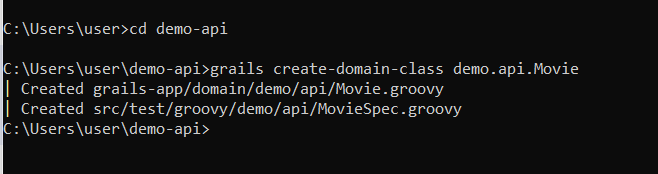
For making Domain classes, first, you can change the directory to your application folder, and then you can run the below command.
You can see created Domain class file in the Domain folder as shown below.
Frequently Asked Questions
What are HTTP methods?
HTTP methods stand for Hypertext Transfer Protocol. HTTP methods are request methods that client uses while sending requests to servers for performing a certain action.
What is Groovy?
For the JAVA platform, we use Groovy. Groovy is both a static and dynamic object-oriented programming language.
What is an API?
API is an Application Programming Interface. It is an interface that helps two software systems communicate with each other.
Does REST API help in backend or frontend?
As REST API helps in making backend API so we can say that REST API is a backend.
What is JSON?
JSON stands for JavaScript Object Notation. We write JSON in text format, and it is used in storing and transferring data. Rest API supports JSON format and XML (Extensible Markup Language) format.
Conclusion
In this article, we have understood Grails, Rest API. We have also discussed how REST API works across clients and servers using HTTP methods as REQUEST and receiving HTTP status code as a RESPONSE. We also understand how we can install Grails on our machine and use it for making REST applications. To know more about Grails and REST you can read the below articles
I hope this article has helped you in understanding Grails. If you find this article useful then you can read many such articles on our platform Code Studio. Code studio helps in enhancing your knowledge. It explains every topic very descriptively, which helps you in understanding each topic very easily. You can also prepare for Technical exams and Technical interviews on our platform to enhance your programming skills.










 5+ registered

