Do you think IIT Guwahati certified course can help you in your career?
Introduction
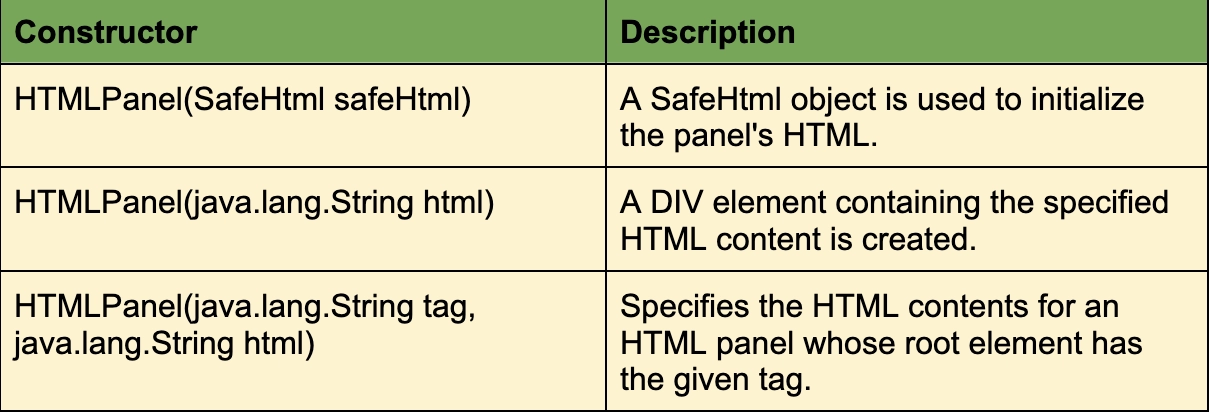
GWT Web Applications are laid out using panels. GWT Panels layout their child Widgets by using HTML elements like DIV and TABLE. In addition to Widgets, Panels may contain other Panels as well. In the browser, they define the layout of the user interface. The HTML contents of an HTMLPanel are displayed. It is possible to add child widgets to identified elements within that HTML content.
This class inherits functions from the following classes −
com.google.gwt.user.client.ui.UIObject
com.google.gwt.user.client.ui.Widget
com.google.gwt.user.client.ui.Panel
com.google.gwt.user.client.ui.ComplexPanel
java.lang.Object
HTMLPanel Widget Example
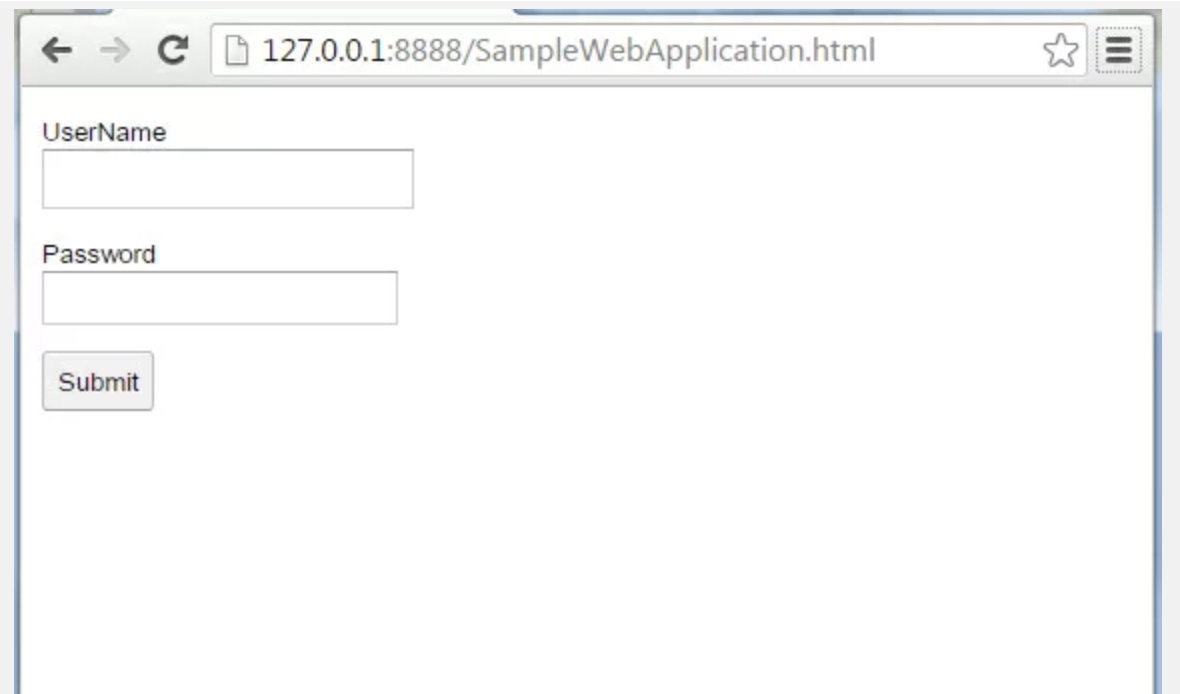
In this case, we used HTMLPanel to design the login page. Upon clicking the submit button, the user enters Username/Password and validations are performed.
SampleWebApplication:java
/**
 * This is the entry point method.
 */
public void onModuleLoad() {

    String html =
            "<div id='LoginPage' name='LoginPage'>" +
              "<p id='uname' >" +
                "<label>UserName<br/>" +
              "</p>" +
              "<p id='password'>" +
                "<label>Password<br/>" +
              "</p>" +
              "<p id='submit' class='submit'>" +
              "</p>" +
            "</div>";

    HTMLPanel htmlPanel = new HTMLPanel(html);

    // The username field
    TextBox user = new TextBox();
    user.getElement().setId("user_name");
    htmlPanel.add(user, "uname");

    // The password field
    TextBox password = new PasswordTextBox();
    password.getElement().setId("user_password");
    htmlPanel.add(password, "password");

    // The log in button
    Button submit = new Button("Submit");
    submit.getElement().setId("submit");
    htmlPanel.add(submit, "submit");

    submit.addClickHandler(new ClickHandler() {

               @Override
       public void onClick(ClickEvent event) {
             // Perform Validations
                 error("<table style='width:100%', border='1'><tr><th>"
                  + "ErrorType</th><th>Error "
          + "Description</th></tr><tr><td>Fatal</td><td>"
                  + "Incorrect Password</td></tr></table>");
        }
    });
    /*
     * Add panel to the page
     */
    RootPanel.get().add(htmlPanel);
}
You can also try this code with Online Java Compiler
You can interact with the user through widgets. The placement of user interface elements on a page is controlled by panels. All browsers support widgets and panels, eliminating the need to write browser-specific code.
What is RootPanel GWT?
GWT RootPanel is the starting or the top panel to which all other Widgets are attached.
Which widget represents a panel that arranges two widgets in a single horizontal row?
The HorizantalPanel widget represents a panel that lays all of its widgets out in a single horizontal column.
Is GWT still supported?
Java 7 no longer supports the GWT compiler or server-side tooling. In this release, the GWT distribution is still compiled to run on Java 7, but there is no guarantee that it will work.
What are the features of GWT?
GWT emphasizes reusable approaches to common web development tasks, namely asynchronous remote procedure calls, history management, bookmarking, UI abstraction, internationalization, and cross-browser portability.
Conclusion
In this article, we have discussed GWT HTMLPanel Widget and its different methods. In the end, we have also looked at an example to understand the working of GWT HTMLPanel Widget. You can also visit this link if you want to learn more about other JAVA frameworks.








 7+ registered

