

Table of contents
1.
Introduction
2.
What is MVP?
3.
Example
4.
Frequently Asked Questions
4.1.
What is GWT?
4.2.
What is the Model in MVP?
4.3.
What is the Presenter in MVP?
4.4.
What distinguishes the MVC from the MVP?
5.
Conclusion 
Last Updated: Mar 27, 2024
Medium

GWT MVP

Career growth poll
Do you think IIT Guwahati certified course can help you in your career?

Introduction

One of GWT's key selling points is that you can use an industry-standard language and a set of industry-standard tools to create industry-standard web apps. But like with any significant development endeavor, it's simple to back oneself into a hole. When developing GWT-based apps, we frequently throw code wherever needed to make the program function and—sometimes more importantly—look decent.

The good news is that this problem has a well-known solution: model your apps after the model-view-presenter (MVP) paradigm.

To avoid some frequent errors, the Model View Presenter (MVP) paradigm should be used while designing your GWT-based programs.

What is MVP?

It's a method for layering code that addresses various problems when building applications haphazardly.

A good alternative to MVC is the MVP architecture pattern, which can be used to address some of its drawbacks. It offers a simple way to consider the app's structure. It offers testability, modularity, and generally a cleaner and easier-to-maintain codebase.

When the abbreviation is broken down, the following elements make up MVP:

  • Model: The segment's model is made up entirely of data. It contains the business object that must be adjusted and calculated under application requirements.
  • View: It just consists of the view, which displays the presenter's data. The code for the view can be reused because switching to a new view is so simple. It exclusively addresses HTML and CSS, which aids with independent testing.
  • Presenter: It includes all of the logic that must be used to create the application. Both the view and the model can communicate with it. It operates completely independently and offers independent JUnit testing.
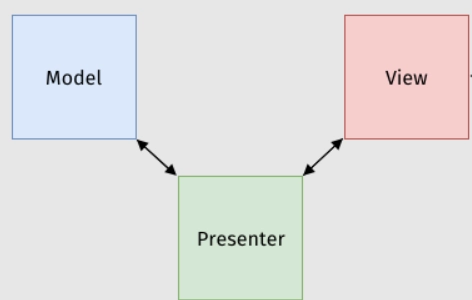
     
MVP Architecture

In MVP, the controller and view components are separated, making both the presenter and the view more lightweight. Traditionally, the controller Activity class handled both updates to the model and what is displayed on the screen.


Example

Do you know how to add links to Facebook posts? Let's attempt to implement this feature.

The URL you enter will then be retrieved and processed. You can pick one page's images, read the text, and then save the link. How can I set this up in MVP properly now? – You start by designing an abstract interface that looks like the view:

interface Display {
  HasValue<String> getUrl();
  void showResult();
  HasValue<String> getName();
  HasClickHandlers getPrevImage();
  HasClickHandlers getNextImage();
  void setImageUrl(String url);
  HasHTML getText();
  HasClickHandlers getSave();
}
You can also try this code with Online Java Compiler
Run Code


The URL you enter will then be retrieved and processed. You can pick one page's images, read the text, and then save the link. How can I set this up in MVP properly now? – You start by developing an abstract interface that resembles the view without using any GWT internals. Additionally, the implementation of a view may be altered without affecting more profound logic.

The implementation is simple, as demonstrated by the declared UI fields here:

class LinkView implements Display
  @UiField TextBox url;
  @UiField Label name;
  @UiField VerticalPanel result;
  @UiField Anchor prevImage;
  @UiField Anchor nextImage;
  @UiField Image image;
  @UiField HTML text;
  @UiField Button save;
  public HasValue<String> getUrl() {
    return url;
  }
  public void showResult() {
    result.setVisible(true);
  }
  // ... and so on ...
}
You can also try this code with Online Java Compiler
Run Code


The interface, which is customarily written inside the presenter class, is then used by the presenter to access the view:

class LinkPresenter
  interface Display {...};
  
  public LinkPresenter(final Display display) {
    display.getUrl().addValueChangeHandler(new ValueChangeHandler<String>() {
      @Override
      public void onValueChange(ValueChangeEvent<String> event) {
        Page page = parseLink(display.getUrl().getValue());
        display.getName().setValue(page.getTitle());
        // ...
        display.showResult();
      }
    });
   }
   // ... and so on ...
}
You can also try this code with Online Java Compiler
Run Code


And thus, here we are: You may effectively structure your code and make it readable using MVP.

We've learned a lot of new concepts up to this point, so let's look at some Frequently Asked Questions related to them.

Frequently Asked Questions

What is GWT?

An open-source collection of tools known as the Google Web Toolkit (GWT Web Toolkit) enables web developers to build and maintain JavaScript front-end applications.

What is the Model in MVP?

The model is made up entirely of data. It contains the business object that must be adjusted and calculated following application requirements.

What is the Presenter in MVP?

All of the logic that must be used in the application development is contained in the presenter. Both a view and the model can communicate with it.

What distinguishes the MVC from the MVP?

In MVC, the Controller, which guides the model for future tasks, handles user inputs. However, in MVP, the view that informs the presenter to run the proper methods handles user inputs.

Conclusion 

In this article, we have extensively discussed GWT MVP and learned about them using examples. 

After reading about GWT MVP, are you not feeling excited to read/explore more articles on the topic of GWT? Don't worry; Coding Ninjas has you covered. To learn, see the GWT deck panel widgetGWT tab panel widget, and GWT Composite widget.

Refer to our Guided Path on Coding Ninjas Studio to upskill yourself in Data Structures and AlgorithmsCompetitive ProgrammingJavaScriptSystem Design, and many more! 

Conclusion Image
Live masterclass


