Table of contents
1.
Introduction
2.
Spring Framework
3.
Hibernate and Spring Integration
4.
Advantages of Spring 
5.
Methods of Hibernate Template class
6.
Sample Files for Integration
7.
Frequently Asked Questions
7.1.
What distinguishes spring boot from 'hibernate'?
7.2.
What is a Hibernate Configuration File?
7.3.
What is Association in Hibernate?
7.4.
What are the differences between Heap and Stack Memory in Java?
8.
Conclusion
Last Updated: Mar 27, 2024
Medium

Hibernate and Spring Integration

Author Manish Kumar
1 upvote
Career growth poll
Do you think IIT Guwahati certified course can help you in your career?

Introduction

Hey Ninja!! Hibernate framework provides many tools for easy database integration of Java Apps. The use of the spring framework alongside hibernate is quite powerful.

Spring provides a pre-written hibernate template for easy integration, saving a lot of code and time. In this blog, you will learn Hibernate and Spring Integration using an example. Let's jump right into the details !! 😁
 

Hibernate plus spring

Spring Framework

The Spring Framework is an open-source Java application framework. It provides infrastructure support to develop polished Java applications. Spring helps developers create high-performance java apps using Plain Old Java Objects (POJO). 

Spring makes Java programming quicker, easier and safer for developers. Spring's speed, simplicity and reliability have made it the world's most famous java framework.

Hibernate and Spring Integration

In hibernate framework, we have to write all database-related information in the hibernate.cfg.xml file. 

But if we use 'hibernate' and spring integration, we don't need to create the config file. Instead, we can create an applicationContext.xml file to store all the necessary information. 

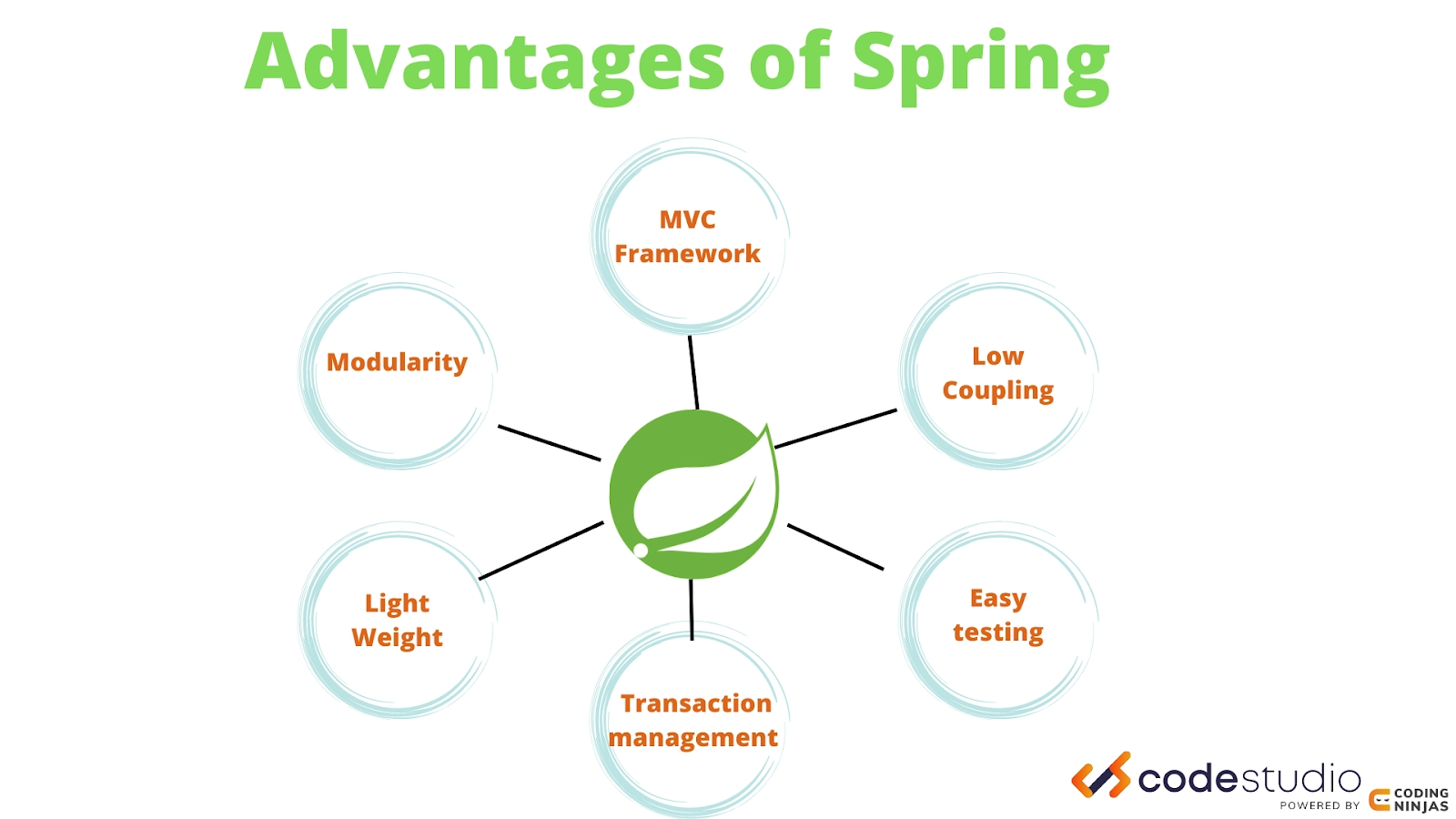
Advantages of Spring 

advantages of spring

The Spring framework has HibernateTemplate class. It removes many steps such as creating Configuration, Session, BuildSessionFactory, beginning and committing transactions etc. It saves a lot of time and code.
 

Example:

//Coding Ninjas 
//Example code to show advantages of Spring framework

//creating a new configuration  
Configuration config=new Configuration();    
config.configure("hibernate.cfg.xml");    
    
//creating session factory object    
SessionFactory factory=config.buildSessionFactory();    
    
//creating session object    
Session session=factory.openSession();    
    
//creating transaction object    
Transaction trans=session.beginTransaction();    
        
Employee e1=new Employee(127,"Ninja",50000);

//persisting the object    
session.persist(e1);

//transaction is committed        
t.commit();
session.close();  
You can also try this code with Online Java Compiler
Run Code


Using hibernate alone results in many boilerplate codes. Let us now see the Spring in action:

Employee e1=new Employee(127,"Ninja",50000);    
hibernateTemplate.save(e1); 
You can also try this code with Online Java Compiler
Run Code

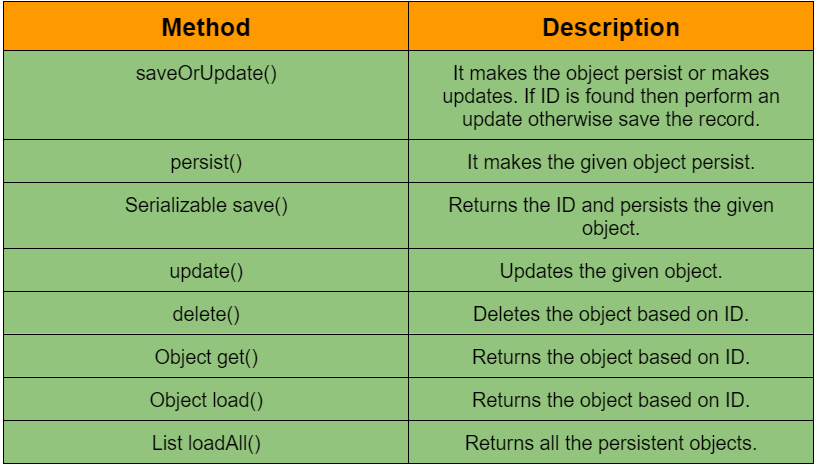
Methods of Hibernate Template class

Listed below are the commonly used methods of template class:


methods table

Sample Files for Integration

In this example, we will apply Hibernate and Spring Integration. We will use some standard files for the Hibernate and Spring Integration.

  • Table in database
  • Ninja.java
  • Ninja.hbm.xml
  • NinjaDao.java
  • applicationContext.xml
  • InsertTest.java


1. Create a table in the database

Here we would use Oracle as the database. You are free to choose the database of your choice.

CREATE TABLE "NINJA"   
   ( "ID" NUMBER(12,0) NOT NULL ENABLE,   
    "NAME" VARCHAR2(255 CHAR),   
    "SALARY" FLOAT(126),   
     PRIMARY KEY ("ID") ENABLE  
   )
You can also try this code with Online Java Compiler
Run Code


2. Ninja.java

To achieve hibernate and spring integration, create the persistent POJO class for hibernate.

package com.codingninjas;  
  
public class Ninja {  
private int id;  
private String name;  
private float rating;  
  
//getters and setters  
  
}  
You can also try this code with Online Java Compiler
Run Code


3. Ninja.hbm.xml

It is a mapping file containing all info about the persistent class.

<!-- Coding Ninjas -->
<?xml version='1.0' encoding='UTF-8'?>  
  
<hibernate-mapping>  
<class name="com.codingninjas.Ninja" table="emp558">  
          <id name="id">  
          <generator class="assigned"></generator>  
          </id>  
            
          <property name="name"></property>  
          <property name="rating"></property>  
</class>  
            
</hibernate-mapping>
You can also try this code with Online Java Compiler
Run Code


4. NinjaDao.java

It is a java class to persist the object of the Ninjas class. It uses HibernateTemplate class.


package com.codingninjas;  
import org.springframework.orm.hibernate3.HibernateTemplate;  
import java.util.*;  
public class NinjaDao {  
HibernateTemplate template;  
public void setTemplate(HibernateTemplate template) {  
    this.template = template;  
}  
//method to save ninja  
public void saveNinja(Ninja e){  
    template.save(e);  
}  
//method to update ninja  
public void updateNinja(Ninja e){  
    template.update(e);  
}  
//method to delete ninja  
public void deleteNinja(Ninja e){  
    template.delete(e);  
}  
//method to return one ninja of given id  
public Ninja getById(int id){  
    Ninja e=(Ninja)template.get(Ninja.class,id);  
    return e;  
}  
//method to return all ninjas  
public List<Ninja> getNinjas(){  
    List<Ninja> list=new ArrayList<Ninja>();  
    list=template.loadAll(Ninja.class);  
    return list;  
}  
}  
You can also try this code with Online Java Compiler
Run Code


5. applicationContext.xml

This XML file will provide all the database information in the BasicDataSource object. 

LocalSessionFactoryBean class objects make use of previously created data source objects. HibernateTemplate class uses the object of LocalSessionFactoryBean class.

<!-- Coding Ninjas -->
<!-- Sample code for reference -->
<?xml version="1.0" encoding="UTF-8"?>  
<beans  
    xmlns="https://www.springframework.org/schema/beans"  
    xmlns:xsi="https://www.w3.org/2001/XMLSchema-instance"  
    xmlns:p="https://www.springframework.org/schema/p"  
    xsi:schemaLocation="https://www.springframework.org/schema/beans  
        https://www.springframework.org/schema/beans/spring-beans-3.0.xsd">   
  
    <bean id="dataSource" class="org.apache.commons.dbcp.BasicDataSource">  
        <property name="driverClassName" value="oracle.jdbc.driver.OracleDriver"></property>  
        <property name="url" value="jdbc:oracle:thin:@localhost:3000:xe"></property>  
        <property name="username" value="system"></property>  
        <property name="password" value="oracle"></property>  
    </bean>  
      
    <bean id="mysessionFactory" class="org.springframework.orm.hibernate3.LocalSessionFactoryBean">  
        <property name="dataSource" ref="dataSource"></property>  
          
        <property name="mappingResources">  
        <list>  
        <value>ninja.hbm.xml</value>  
        </list>  
        </property>  
          
        <property name="hibernateProperties">  
            <props>  
                <prop key="hibernate.dialect">org.hibernate.dialect.Oracle9Dialect</prop>  
                <prop key="hibernate.hbm2ddl.auto">update</prop>  
                <prop key="hibernate.show_sql">true</prop>  
                  
            </props>  
        </property>  
    </bean>  
      
    <bean id="template" class="org.springframework.orm.hibernate3.HibernateTemplate">  
    <property name="sessionFactory" ref="mysessionFactory"></property>  
    </bean>  
      
    <bean id="d" class="com.codingninjas.NinjaDao">  
    <property name="template" ref="template"></property>  
    </bean>      
     </beans>
You can also try this code with Online Java Compiler
Run Code


6. InsertTest.java

This class uses the NinjaDao class object. It calls its 'saveNinja' method by passing the object of the Ninja class.


package com.codingninjas;  
  
import org.springframework.beans.factory.BeanFactory;  
import org.springframework.beans.factory.xml.XmlBeanFactory;  
import org.springframework.core.io.ClassPathResource;  
import org.springframework.core.io.Resource;  
  
public class InsertTest {  
public static void main(String[] args) {  
      
    Resource res=new ClassPathResource("applicationContext.xml");  
    BeanFactory factory=new XmlBeanFactory(res);  
      
    NinjaDao dao=(NinjaDao)factory.getBean("d");  
      
    Employee e=new Ninja();  
    e.setId(225);  
    e.setName("Manish");  
    e.setSalary(50000);  
      
    dao.saveNinja(e);  
      
}  
}  
You can also try this code with Online Java Compiler
Run Code


After performing all these steps, you will notice that the record is successfully inserted into the database. Hibernate and spring integration is now achieved.

Frequently Asked Questions

What distinguishes spring boot from 'hibernate'?

Hibernate framework is suitable for object-relational persistence, access data layers, and query retrieval services. The Spring framework is helpful for transaction management, dependency injection, and aspect-oriented programming.

What is a Hibernate Configuration File?

Hibernate Configuration Files initialise SessionFactory. It primarily includes database-specific configurations. Database type and mapping file or class details are two crucial aspects of the Hibernate Configuration File.

What is Association in Hibernate?

One of the main components of JPA and Hibernate is association mapping. They represent the connection between two database tables as attributes. It lets you easily explore your domain model's associations and JPQL or Criteria queries.

What are the differences between Heap and Stack Memory in Java?

The order of method execution and local variables commonly use the stack. Heap memory, on the other hand, is utilised to store objects. They employ dynamic memory allocation and deallocation after holding.

Conclusion

In this article, we have extensively discussed the Hibernate and Spring integration.

After reading about Hibernate and Spring Integration, are you not feeling excited to read/explore more articles on the topic of hibernate? Don't worry; Coding Ninjas has you covered. If you want to check out articles related to hibernate. Refer to these links,  Hibernate ArchitectureHibernate Configuration, and HB Generator classes.

meme

Refer to our Guided Path on Coding Ninjas Studio to upskill yourself in Data Structures and AlgorithmsCompetitive ProgrammingJavaScriptSystem Design, and many more. If you want to test your competency in programming, you may check out the mock test series and participate in the contests available on Coding Ninjas Studio!
 

 But suppose you have just started your learning process and are looking for questions asked by tech giants like Amazon, Microsoft, Uber, etc. In that case, you must look at the problemsinterview experiences, and interview bundle for placement preparations.
 

Nevertheless, you may consider our paid courses to give your career an edge over others!

Upvote our Hibernate and Spring Integration blog if you find it helpful and engaging!

Happy Learning!
thank you image
Live masterclass