Use of Bag
When you add a component to a large, uninitialized collection, bags come in handy since they prevent the collection from becoming loaded.
Bag mapping
The bag> element can be used to map a property if an entity has a list of values for that property. Java.util.ArrayList is utilised to initialise a bag.
Example of hibernate bag mapping
Employee.java
import java.util.Collection;
public class employee {
// declaring data members
private int employeeId;
private String firstName;
private String lastName;
private String className;
private String empNo;
private int age;
private Collection departments;

// below is the no-argument constructor
public employee(){

}

// below is the argument constructor
public employee(String firstName, String lastName,
String className, String empNo, int age){
this.firstName = firstName;
this.lastName = lastName;
this.className = className;
this.empNo = empNo;
this.age = age;
}

// getter and setter methods to input and output the data
public int getemployeeId() {
return employeeId;
}
public void setemployeeId(int employeeId) {
this.employeeId = employeeId;
}
public String getFirstName() {
return firstName;
}
public void setFirstName(String firstName) {
this.firstName = firstName;
}
public String getLastName() {
return lastName;
}
public void setLastName(String lastName) {
this.lastName = lastName;
}
public String getClassName() {
return className;
}
public void setClassName(String className) {
this.className = className;
}
public String getempNo() {
return empNo;
}
public void setempNo(String empNo) {
this.empNo = empNo;
}
public int getAge() {
return age;
}
public void setAge(int age) {
this.age = age;
}
public Collection getdepartments() {
return departments;
}
public void setdepartments(Collection departments) {
this.departments = departments;
}
}

You can also try this code with Online Java Compiler
Department.java
public class department {
//below is the data members
private int departmentId;
private String departmentName;

// below is the no argument constructor
public department(){

}

// below is the argument constructor
public department(String departmentName){
this.departmentName = departmentName;
}

//getter and setter methods to input and output the data
public int getdepartmentId() {
return departmentId;
}
public void setdepartmentId(int departmentId) {
this.departmentId = departmentId;
}
public String getdepartmentName() {
return departmentName;
}
public void setdepartmentName(String departmentName) {
this.departmentName = departmentName;
}

}
You can also try this code with Online Java Compiler
hibernate.cfg.xml
<?xml version='1.0' encoding='UTF-8'?>
<!DOCTYPE hibernate-configuration SYSTEM
"http://hibernate.sourceforge.net/hibernate-configuration-3.0.dtd">

<hibernate-configuration>

    <session-factory>
        <property name="dialect">
           org.hibernate.dialect.OracleDialect
        </property>
        <property name="connection.url">
           jdbc:oracle:thin:@localhost:1521:XE
        </property>
        <property name="connection.username">
           system
        </property>
        <property name="connection.password">
           oracle
        </property>
        <property name="connection.driver_class">
           oracle.jdbc.driver.OracleDriver
        </property>
        <property name="hbm2ddl.auto">
           update
        </property>
        <property name="show_sql">
           true
        </property>

        <mapping resource="employee.hbm.xml"/>
        <mapping resource="employee.hbm.xml"/>

    </session-factory>

</hibernate-configuration>
employee.hbm.xml
<?xml version='1.0' encoding='UTF-8'?>
<!DOCTYPE hibernate-mapping SYSTEM
    "http://hibernate.sourceforge.net/hibernate-mapping-3.0.dtd">

<hibernate-mapping>

 <class name="com.ninjas.employee" table="employee">
  <id name="employeeId" type="int" column="employee_Id">
<generator class="native"></generator>
  </id>

  <property name="firstName" column="First_Name" type="string"/>
  <property name="lastName" column="Last_Name" type="string"/>
  <property name="className" column="Class" type="string"/>
  <property name="rollNo" column="RollNo" type="string"/>
  <property name="age" column="Age" type="int"/>

  <bag name="subjects" cascade="all">
       <key column="employee_Id"/>
       <one-to-many class="com.ninjas.Subject"/>
  </bag>

 </class>

</hibernate-mapping>
department.hbm.xml
<?xml version='1.0' encoding='UTF-8'?>
<!DOCTYPE hibernate-mapping SYSTEM
    "http://hibernate.sourceforge.net/hibernate-mapping-3.0.dtd">

<hibernate-mapping>

  <class name="com.ninjas.department" table="department">
    <id name="departmentId" type="int" column="department_Id">
<generator class="native"></generator>
    </id>

    <property name="departmentName" column="department_Name"
                                        type="string"></property>

  </class>

</hibernate-mapping>
hibernate.util.java
import org.hibernate.SessionFactory;
import org.hibernate.cfg.Configuration;

public class HibernateUtil {
    private static final SessionFactory sessionFactory =
                                           buildSessionFactory();

    private static SessionFactory buildSessionFactory() {
     SessionFactory sessionFactory = null;
        try {
         //Creating the configuration object.
         Configuration configuration = new Configuration();
         //Initialising the configuration object
                //with the configuration file data
         configuration.configure("hibernate.cfg.xml");
         // Getting the SessionFactory object from configuration.
         sessionFactory = configuration.buildSessionFactory();
        }
        catch (Exception e) {
           e.printStackTrace();
        }
        return sessionFactory;
    }

    public static SessionFactory getSessionFactory() {
        return sessionFactory;
    }

}
You can also try this code with Online Java Compiler
Hibernate test.java
import java.util.ArrayList;
import com.ninjas.persistence.employeeDBOperations;

public class HibernateTest {
public static void main(String args[]){
ArrayList departmentList1 = new ArrayList();
departmentList1.add(new department("Data Analytics"));
departmentList1.add(new department("Business Intelligence"));

ArrayList departmentList2 = new ArrayList();
departmentList2.add(new department("software "));
departmentList2.add(new department("ecommerce"));
departmentList2.add(new department("BTA"));

//Create the employee object.
employee employee1 = new employee("Ashish", "Sharma",
"ecommerce", "ecommerce/07/72", 27);
employee employee2 = new employee("Sanidhay", "Grover",
"Data Analyst", "Data Analyst/07/73", 32);

employee1.setdepartments(departmentList1);
employee2.setdepartments(departmentList2);

employeeDBOperations obj = new employeeDBOperations();
//insert employee object.
obj.addemployee(employee1);
obj.addemployee(employee2);

//show all employee object.
obj.showAllemployeeDetails();

}
}
You can also try this code with Online Java Compiler
employeeDBOperations.java
import java.util.List;
import java.util.Set;
import org.hibernate.HibernateException;
import org.hibernate.Session;
import org.hibernate.Transaction;
import com.ninjas.employee;
import com.ninjas.Subject;

public class employeeDBOperations {
public Integer addemployee(employee employee){
    Transaction tx = null;
    Integer employeeId = null;
    //Getting the session object.
    Session session =
                  HibernateUtil.getSessionFactory().openSession();
    try{
        tx = session.beginTransaction();
        employeeId = (Integer) session.save(employee);
        tx.commit();
      }catch (HibernateException e) {
        if(tx!=null){
         tx.rollback();
        }
        e.printStackTrace();
      }finally {
        session.close();
      }
      return employeeId;
}

public void showAllemployeeDetails(){
    Transaction tx = null;
    //Get the session object.
             Session session =
                     HibernateUtil.getSessionFactory().openSession();
    try{
        tx = session.beginTransaction();
        List<employee> employees =
                          session.createQuery("FROM employee").list();
        for(employee employee : employees){
         System.out.println("First Name: "
                                            + employee.getFirstName());
         System.out.println("Last Name: "
                                             + employee.getLastName());
         System.out.println("departmentname: "
                                            + employee.getdeptName());
         System.out.println("empNo: "
                                               + employee.getempNo());
         System.out.println("Age: "
                                                  + employee.getAge());
         Collection<Subject> departmentname =
                                                employee.getdepartments();
         for(Subject subject : subjects){
             System.out.println("Subject Name:"
                                          + subject.getdepartmentName());
         }
        }
        tx.commit();
      }catch (HibernateException e) {
        if(tx!=null){
         tx.rollback();
        }
        e.printStackTrace();
      }finally {
        session.close();
      }
}
}
You can also try this code with Online Java Compiler
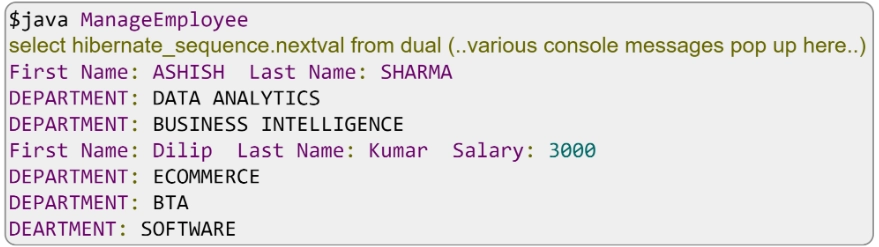
Output
Frequently Asked Questions
What distinguishes a Hibernate list from a bag?
Because Lists and Bags are both mapped by java. util. List, Hibernate's naming of the various collection types is a little bit muddled. A List is ordered, whereas a Bag is unordered.
Define hibernate mapping?
One of the main components of hibernate is mappings. In your model, they define the association between two database tables as attributes. It enables you to navigate your model and criteria queries' associations with ease.
What does Hibernate's persistent bag mean?
PersistentBag class. an unkeyed, unordered collection that allows numerous instances of the same element. Curiously, there is no Bag in the Java collections API. Hibernate adopts this method since it appears that the majority of developers use lists to describe bag semantics.
Conclusion
In this article, we discussed about the hibernate, hibernate bag mapping, bag in collection, use of bag, bag mapping and examples. We have started with the introduction to hibernate then bag mapping then example to show the bag mapping.
After reading about Introduction to JavaFX Scaling, are you not feeling excited to read/explore more articles on the topic of file systems? Don't worry; Coding Ninjas has you covered. If you want to check out articles related to Java, refer to these links, Overloading and Overriding static Methods in java, Understanding Association, Aggregation, and Composition in Java, java interview questions, Multiple Inheritance in Java, Multilevel Inheritance in Java.
Refer to our Guided Path on Coding Ninjas Studio to upskill yourself in Data Structures and Algorithms, Competitive Programming, JavaScript, System Design, and many more! If you wish to test your competency in coding, you may check out the mock test series and can participate in the contests hosted on Coding Ninjas Studio! But suppose you have just started your learning process and are looking for questions asked by tech giants like Amazon, Microsoft, Uber, etc. In that case, you must look at the problems, interview experiences, and interview bundle for placement preparations.
Nevertheless, you may consider our paid courses to give your career an edge over others!
Do upvote our blogs if you find them helpful and engaging!
Happy Learning!








 7+ registered

