




Introduction
Hibernate is an open-source Object-relational mapping tool used to store and query persistent data for Java applications. It provides a way for handling persistent data, thereby making it easier for developers and reducing development costs and time.
This article will discuss Hibernate Set Mapping. We will use an example to illustrate the notion of Hibernate Set Mapping.

Hibernate Set Mapping
A set in java is a data structure used to store unique elements. Duplications are not allowed in a set collection. To be able to add an element to a set, it must implement both the equals() and hashCode() methods. These two methods are used by java to find whether two elements are identical or not.
In the mapping table, a Set is mapped with an <set> element and initialized with java.util.HashSet. A set can also be used to make sure that there are no duplicate elements in a collection.
Define RDBMS Tables
Let’s take an example of employees in an organization. All the employees have to take one or more certificates. To store the data of both the employees and certificates, we have defined two separate RDBMS tables. The mapping between these two tables will be ONE to MANY.
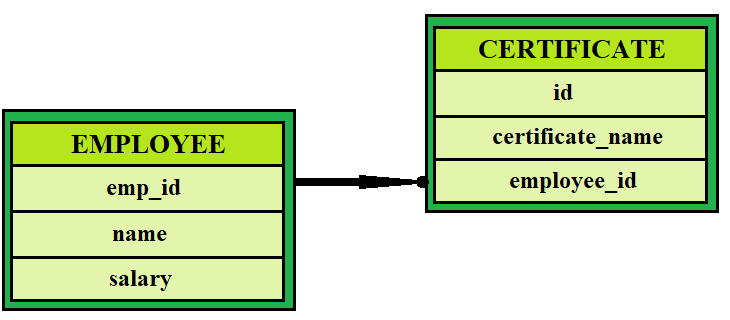
Structure of Employee table -
CREATE TABLE EMPLOYEE (
   emp_id INT NOT NULL auto_increment,
   name VARCHAR(40) default NULL,
   salary     INT  default NULL,
   PRIMARY KEY (emp_id)
);
Structure of certificate table -
CREATE TABLE CERTIFICATE (
   id INT NOT NULL auto_increment,
   certificate_name VARCHAR(30) default NULL,
   employee_id INT default NULL,
   PRIMARY KEY (id)
);
Define Plain Old Java Object(POJO) Class
Next, we will define plain old java object classes for employees and certificates. Since an employee can have only one certificate of each kind, we will define the certificate variable in an employee as Set.
Defining Employee class -
import java.util.*;
public class Employee {
   private int emp_id;
   private String name;
   private int salary;
   private Set certificates;


   public Employee() {}

   public Employee(String name, int salary) {
      this.name = name;
      this.salary = salary;
   }

   public int getId() {
      return emp_id;
   }

   public void setId( int id ) {
      this.emp_id = id;
   }

   public String getName() {
      return name;
   }

   public void setName( String name ) {
      this.name = name;
   }

   public int getSalary() {
      return salary;
   }

   public void setSalary( int salary ) {
      this.salary = salary;
   }


/* using set variable to store certificates associated with each employee */
   public Set getCertificates() {
      return certificates;
   }

   public void setCertificates( Set certificates ) {
      this.certificates = certificates;
   }
}
Defining Certificate class -
The certificate class should have both the equals() and hashCode() methods, as discussed earlier. It is necessary to check whether the elements are unique or not if declared as a set.
public class Certificate {
   private int id;
   private String certificate_name;


   public Certificate() {}

   public Certificate(String name) {
      this.name = name;
   }

   public int getId() {
      return id;
   }

   public void setId( int id ) {
      this.id = id;
   }

   public String getName() {
      return certificate_name;
   }

   public void setName( String name ) {
      this.certificate_name = name;
   }

/*Equals( ) method is necessary as  certificate is used as a set collection in employee. */
   public boolean equals(Object obj) {
      if (obj == null) return false;
      if (!this.getClass().equals(obj.getClass())) return false;


      Certificate obj2 = (Certificate)obj;
      if((this.id == obj2.getId()) && (this.name.equals(obj2.getName()))) {
         return true;
      }
      return false;
   }

/*HashCode() method is also necessary for certificate to be a set. */
   public int hashCode() {
      int tmp = 0;
      tmp = ( id + name ).hashCode();
      return tmp;
   }
}
Now that we have defined both the POJO classes the next step is to define the hibernate mapping file.
Defining Hibernate Mapping File
The best feature of hibernate is its way of handling persistent data. It is because of this feature that it is used by developers so much these days. We have defined the required plain old java object classes and the RDBMS tables.
The next thing we need to do is, create a mapping file and instruct hibernate on how to deal with the data. We have to map the class with the RDBMS table in the database. We need to specify that certificates are a set collection. To do so, we have to use the <set> element in hibernate.
You have to save this mapping file in a specific format - <classname>.hbm.xml.
Hibernate Mapping File -
<?xml version = "1.0" encoding = "utf-8"?>
<!DOCTYPE hibernate-mapping PUBLIC
"-//Hibernate/Hibernate Mapping DTD//EN"
"http://www.hibernate.org/dtd/hibernate-mapping-3.0.dtd">


<hibernate-mapping>
   <class name = "Employee" table = "EMPLOYEE">

      <meta attribute = "class-description">
         This class contains the information about the employee.
      </meta>

      <id name = "emp_id" type = "int" column = "emp_id">
         <generator class="native"/>
      </id>

      <set name = "certificates" cascade="all">
         <key column = "employee_id"/>
         <one-to-many class="Certificate"/>
      </set>

      <property name = "name" column = "name" type = "string"/>
      <property name = "salary" column = "salary" type = "int"/>

   </class>


   <class name = "Certificate" table = "CERTIFICATE">

      <meta attribute = "class-description">
         This class contains the information about certificates.
      </meta>

      <id name = "id" type = "int" column = "id">
         <generator class="native"/>
      </id>

      <property name = "name" column = "certificate_name" type = "string"/>

   </class>


</hibernate-mapping>
Define Application class
We have defined the RDBMS tables and plain old java object classes. We have also defined the mapping class. The last thing we need to do is to create the application class which has the main method.
This class will have all the other necessary/helper functions to encapsulate the object creation. Like we will have the addEmployee method that will take in the arguments of employee details and create an employee object in one line of code.
Application class File -
import java.util.*;
import org.hibernate.SessionFactory;
import org.hibernate.Session;
import org.hibernate.cfg.Configuration;
import org.hibernate.Transaction;
import org.hibernate.HibernateException;


/* This class will help in keeping the records of all the employees at one place*/
public class ManageEmployee {
   private static SessionFactory factory;
   public static void main(String[] args) {

      try {
         factory = new Configuration().configure().buildSessionFactory();
      } catch (Throwable ex) {
         System.err.println("Failed to create sessionFactory object." + ex);
         throw new ExceptionInInitializerError(ex);
      }

      ManageEmployee obj = new ManageEmployee();


      /* Define some certificates for first employee  */
      HashSet tmp_set1 = new HashSet();
      tmp_set1.add(new Certificate("BTech"));
      tmp_set1.add(new Certificate("MCA"));
      tmp_set1.add(new Certificate("MBA"));

      /* Define certificates for another employee  */
      HashSet set2 = new HashSet();
      set2.add(new Certificate("BTech));
      set2.add(new Certificate("MBA"));


      /*Now we can perform some CRUD operations on Employees */


      /* Create Employee object */
      Integer empID1 = ME.addEmployee("Ninja Employee", 8000, set1);


      /* Create another employee object*/
      Integer empID2 = ME.addEmployee("Coding Ninjas Studio Employee", 10000, set2);


      /* Print the list of all Employees  */
      ME.listEmployees();


      /* Performing update operations*/
      ME.updateEmployee(empID2, 15000);


      /* rPerforming Delete operations */
      ME.deleteEmployee(empID1);


      /* Again print the list of Employees */
      ME.listEmployees();
   }


   /* Helper Method to add an employee in the database */
   public Integer addEmployee(String name, int salary, Set cert){
      Session session = factory.openSession();
      Transaction tx = null;
      Integer employeeID = null;

      try {
         tx = session.beginTransaction();
         Employee employee = new Employee(fname, lname, salary);
         employee.setCertificates(cert);
         employeeID = (Integer) session.save(employee);
         tx.commit();
      } catch (HibernateException e) {
         if (tx!=null) tx.rollback();
         e.printStackTrace();
      } finally {
         session.close();
      }
      return employeeID;
   }


   /* Helper Method to list all the employees*/
   public void listEmployees( ){
      Session session = factory.openSession();
      Transaction tx = null;
      try {
         tx = session.beginTransaction();
         List employees = session.createQuery("FROM Employee").list();
         for (Iterator iterator1 = employees.iterator(); iterator1.hasNext();){
            Employee employee = (Employee) iterator1.next();
            System.out.print("Employee Name: " + employee.getName());
            System.out.println("  Salary: " + employee.getSalary());
            Set certificates = employee.getCertificates();
            for (Iterator iterator2 = certificates.iterator(); iterator2.hasNext();){
               Certificate certName = (Certificate) iterator2.next();
               System.out.println("Certificate: " + certName.getName());
            }
         }
         tx.commit();
      } catch (HibernateException e) {
         if (tx!=null) tx.rollback();
         e.printStackTrace();
      } finally {
         session.close();
      }
   }

   /* Helper Method to update salary for an employee */
   public void updateEmployee(Integer EmployeeID, int salary ){
      Session session = factory.openSession();
      Transaction tx = null;

      try {
         tx = session.beginTransaction();
         Employee employee = (Employee)session.get(Employee.class, EmployeeID);
         employee.setSalary( salary );
         session.update(employee);
         tx.commit();
      } catch (HibernateException e) {
         if (tx!=null) tx.rollback();
         e.printStackTrace();
      } finally {
         session.close();
      }
   }

   /*Helper Method to delete an employee from the database*/
   public void deleteEmployee(Integer EmployeeID){
      Session session = factory.openSession();
      Transaction tx = null;

      try {
         tx = session.beginTransaction();
         Employee employee = (Employee)session.get(Employee.class, EmployeeID);
         session.delete(employee);
         tx.commit();
      } catch (HibernateException e) {
         if (tx!=null) tx.rollback();
         e.printStackTrace();
      } finally {
         session.close();
      }
   }
}
Compile and Execute
All you have to do now is compile your java source files and execute the compiled file and you can see the results for yourself. First, you need to create a configuration file with the formate- hibernate.cfg.xml. Next, you need to create the Employee.hbm.xml mapping file. After this, you need to compile your employee.java and certificate.java files. Next, compile and run your application file. And you will see the output.
Output
Employee Name: Ninja Employee    Salary: 8000
Certificate: BTech
Certificate: MBA
Certificate: MCA
Employee Name: Coding Ninjas Studio Employee    Salary: 10000
Certificate: BTech
Certificate: MBA
Employee Name: Coding Ninjas Studio Employee    Salary: 15000
Certificate: BTech
Certificate: MBA


 1+ registered

