Do you think IIT Guwahati certified course can help you in your career?
Introduction
The essential component of business intelligence is perhaps the dataTable. Its most basic form consists of a set of cells where rows and columns meet as well as a header row with the names of the columns. This is done in order to help the user grasp the table's content.
DataTable in JSF
To render and format HTML tables, JSF offers a powerful control by the name of DataTable. A DataTable can cycle through an array or collection of values to show data. DataTable offers features that make it simple to alter its data. Tabular data can be displayed inside a JSF view using the dataTable component. In this tutorial, a dataTable will be used to display an example list of people.
The dataTable tag
A table is made on the page using the JSF dataTable Tag. The component is displayed as a table element in HTML.
On the page, a table is made using this element. The element is shown as a table in HTML. UIColumn's child components do the rendering of the table's columns. You can insert any component, such as an input text box, an output text box, a command button, etc., in these columns. A column is made with the <h:column> tag. The dataTable tag may contain a number of column tags. In this table, we can define the header and footer. The <f:facet> tag is utilized for this. The dataTable can use the header and footer facet in JSF component and its child column component.
Associating with Backing Bean
This table component is related to the backing bean. In order to display the data on the table, we can retrieve it from the backing bean. The Association of Backing Beans might be beneficial for handling events as well. If the command button was added to the table's columns, event handling could then be used. Cascading stylesheets (CSS) can be utilized to customize the table. The headers, footer, rows, and columns of the table will all seem better as a result of this.
Uses of DataTable
We know that the dataTable in JSF is one of the most widely used components. We have listed its uses for better understanding.
Data is displayed on JSF view pages using the dataTable tag.
The data-bound table components show the relational data in a tabular fashion.
The data components are displayed using the <h:dataTable> element.
The <h:column> tag loops through each row-displayed record in the data source.
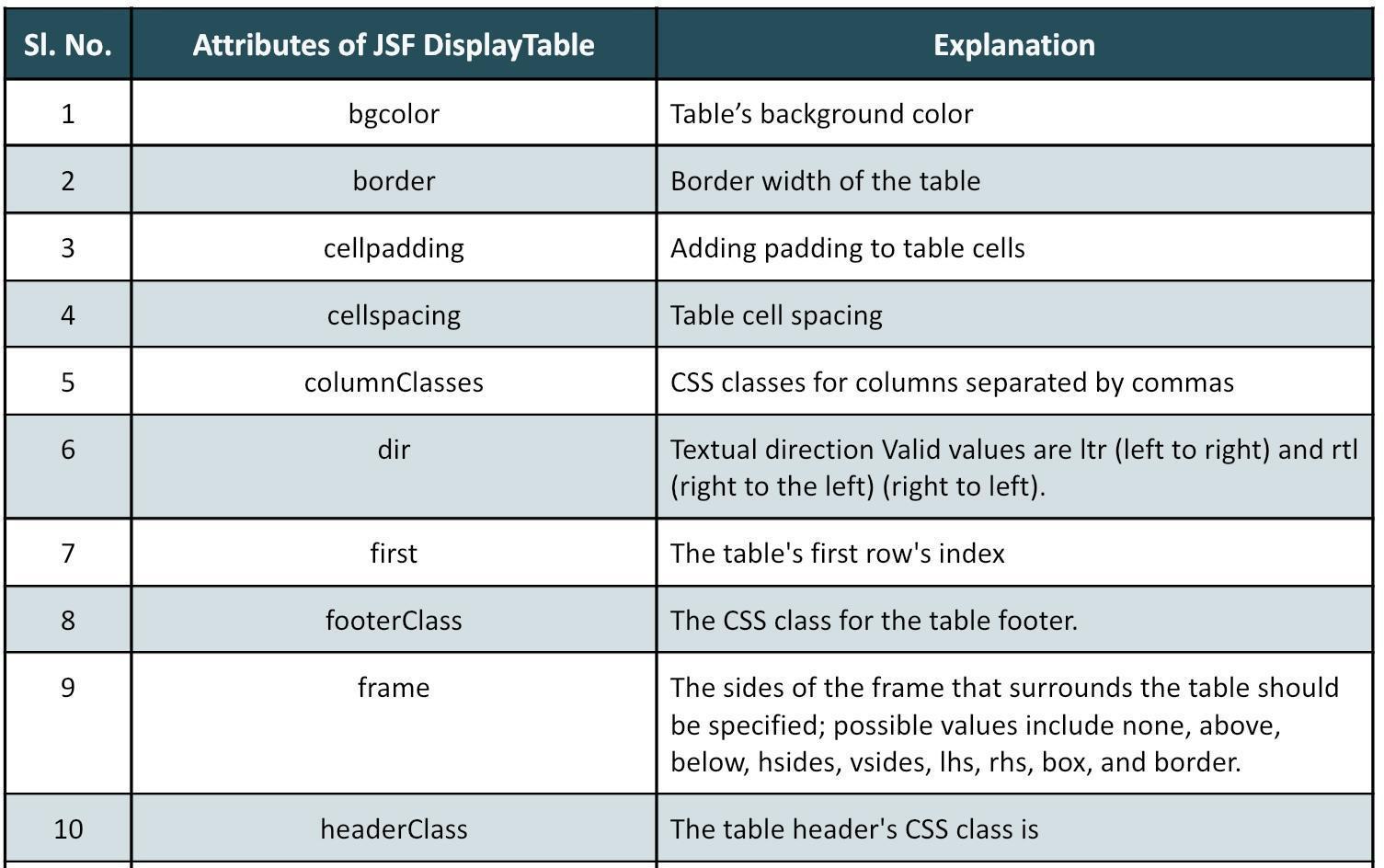
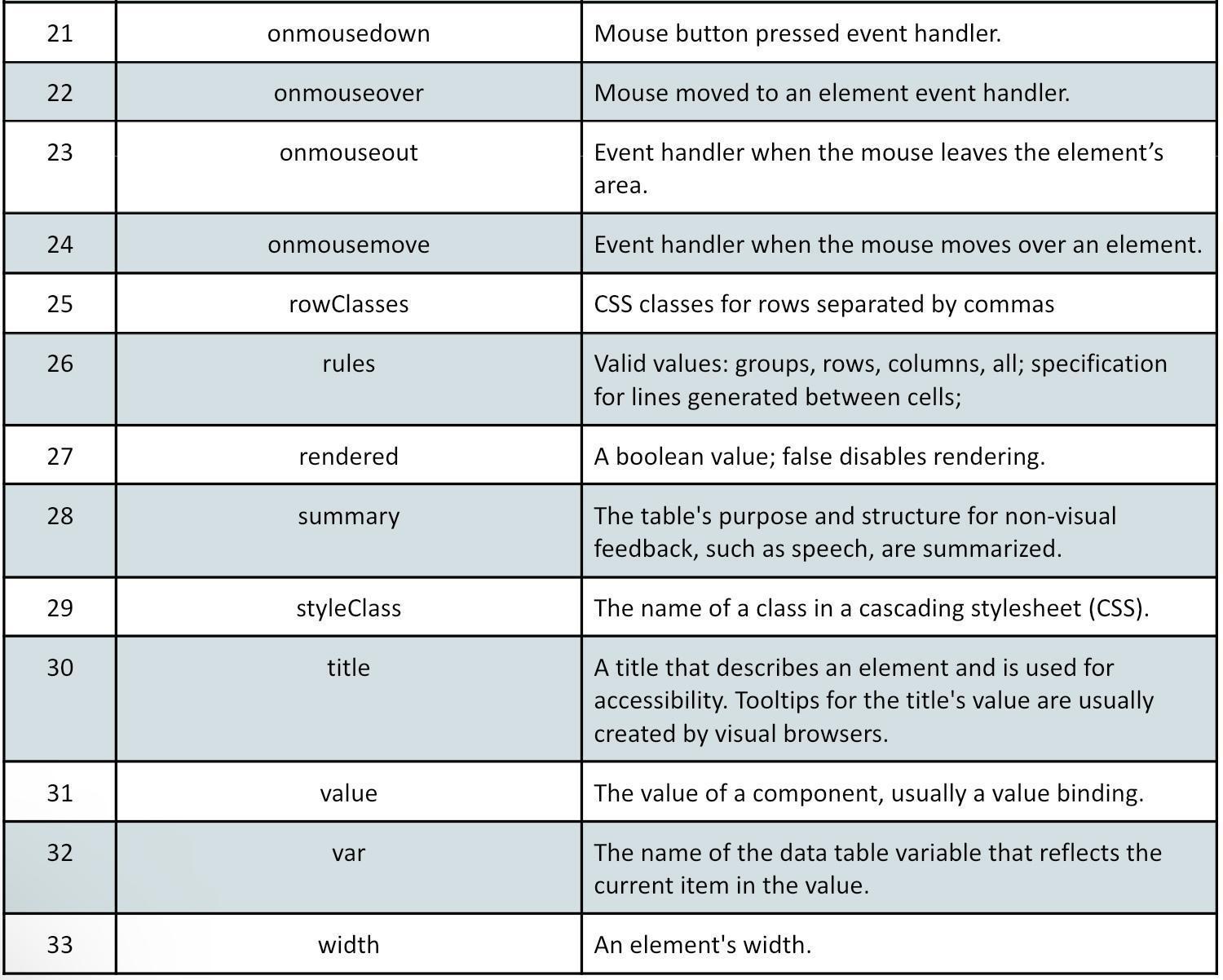
Attributes of Tags
We will talk about the JSF DataTable's attributes and their description. These have been covered below:
Example
We will be going through the steps of DataTable in JSF with a working example. Here, we have taken an example where we display different countries' names, capitals, and populations.
Creating the Managed Bean
We will be updating the 'CountryClassification.java' file as below:
import java.io.Serializable;
import java.util.ArrayList;
import java.util.Arrays;

import javax.faces.bean.ManagedBean;
import javax.faces.bean.SessionScoped;
/**********************
Managed Bean
@author codingninjas
**********************/

@ManagedBean(name = "countryClassification", eager = true)
@SessionScoped
public class CountryClassification implements Serializable {
  private static final long serialVersionUID = 1L;
  private String name;
  private String capital;
  private double population;
  private static final ArrayList<Country> countries
     = new ArrayList<Country>(Arrays.asList(
     new Country("USA", "WashingtonDC", 332915000),
     new Country("Japan", "Marketing", 125836000),
     new Country("VaticanCity", "VaticanCity", 825),
  ));


  public ArrayList<Country> getCountries() {
     return countries;
  }

  public String addCountry() {
     Country country = new Country(name,capital,population);
     countries.add(country);
     return null;
  }

  public String deleteCountry(Country country) {
     countries.remove(country);
     return null;
  }

  public String editCountry(Country country) {
     country.setCanEdit(true);
     return null;
  }

  public String saveCountries() {

     // To set the "canEdit" of all countries to false

     for (Country country : countries) {
       country.setCanEdit(false);
     }
     return null;
  }

  public String getName() {
     return name;
  }

  public void setName(String name) {
     this.name = name;
  }

  public String getCapital() {
     return capital;
  }

  public void setCapital(String capital) {
     this.capital = capital;
  }

  public double getPopulation() {
     return population;
  }

  public void setPopulation(double population) {
     this.population = population;
  }
}
You can also try this code with Online Java Compiler
<?xml version = "1.0" encoding = "UTF-8"?>
<!DOCTYPE html PUBLIC "-//W3C//DTD XHTML 1.0 Transitional//EN"
"http://www.w3.org/TR/xhtml1/DTD/xhtml1-transitional.dtd">

<html xmlns = "http://www.w3.org/1999/xhtml"
xmlns:h = "http://java.sun.com/jsf/html"
xmlns:f = "http://java.sun.com/jsf/core">

  <h:head>
     <title>Coding Ninjas Country Classification in JSF</title>
  </h:head>

  <h:body>
     <h2>CodingNinjas Display DataTable Example</h2>
     <hr>
     <h3>Country Classification DataTable in JSF</h3>
     <h:form>
        <h:dataTable value = "#{countryClassification.countries}" var = "country">

           <h:column>
              <f:facet name = "header">Country Name</f:facet>
              #{country.name}
           </h:column>

           <h:column>
              <f:facet name = "header">Capital</f:facet>
              #{country.capital}
           </h:column>

           <h:column>
              <f:facet name = "header">Population</f:facet>
              #{country.population}
           </h:column>
        </h:dataTable>
     </h:form>
  </h:body>
</html>
Output
The output will be displayed in 'http://localhost:8000/datatable/faces/home.xhtml'.
We can see the displayed dataTable in JSF as the output. It describes the names, capitals, and populations of different countries. Now, let's discuss some benefits and shortcomings of using the data table in JSF:
Advantages
Here, we have listed the advantages of using DataTable in JSF.
Focusing on the table's columns and rows makes it simpler to rapidly understand the data's significance.
Data with an increasing or declining trend and sudden values are readily available, facilitating data analysis.
It makes it simple to represent different amounts that are connected to a quantity.
JSF Tables are helpful for data with precise quantities rather than estimates.
The tabular format displays data in a streamlined and straightforward manner.
The ability to keep a lot of records in an easily accessible and understandable format
Disadvantages
The following are the disadvantages of using DataTable in JSF.
With large amounts of data, a dataTable in JSF suffers scroll and search issues.
Found slow with dense or vast data (i.e., records more than 100000)
It is committed to displaying data in a concise manner, making it difficult to enter large data into the tables.
Limited capacity to draw attention to crucial information A data table's fundamental flaw is that it neutrally exhibits a large amount of data, especially in tabular reports. The end-user is left to sort through or analyze it to determine what the business senses.
Frequently Asked Questions
Why is the <f:facet> tag used?
In a data table, the header and footer can be customized. To make the data more intelligible, a data table component and its children column component can use the header and footer facet.
What are custom components in JSF?
An application may need a new facility or a component with more capability. The creation of new components or the ability to extend existing ones' functionality is made possible by JavaServer Faces technology. The term "custom components" refers to this ability to create.
List the key DataTable operations.
The key Data Table operations are: Show DataTable, Add information, Using the data model, edit and delete data.
Conclusion
One of the most often utilized components in JSF is dataTables. It nevertheless plays a crucial part in business intelligence, provided that its limits are appropriately understood, despite its role being more heavily weighted towards reporting than analysis. We have learned how to show dataTable in JSF in this article. We have also seen its advantages and disadvantages. Explore our courses on HTML and CSS here for free. You can check out various Java topics and blogs on JSF to follow.
Explore Code Studio to find more exciting stuff. Happy Coding!








 7+ registered

