




Introduction
Hey Readers!!
We all have come across the Alert pop-ups on a web page. They are alert messages with specific messages.
In this article, you'll learn how to handle alerts in Katalon Studio.
Let's begin!!
Alert
An alert in JavaScript is a specific kind of popup notification for users of the script. A dialogue box with a specified message and OK/Cancel buttons appears.
Handle Alerts using Katalon Studio
Let’s look into handling alerts using the Katalon Studio.
Handle Accept Alert
This alerting method is used to verify a user's activity. You can do it manually or automatically.
Manual Mode
- Launching the browser and using the Open Browser technique to navigate to the Alert current page
- Maximize the browser window using the command Maximize window.
- Press on button
- Accept the Alert

Script Mode
import static com.kms.katalon.core.testobject.ObjectRepository.findTestObject
import com.kms.katalon.core.webui.keyword.WebUiBuiltInKeywords as WebUI

'Launching the browser and using the Open Browser technique to navigate to the Alert current page'
WebUI.openBrowser('C:\\\\Users\\\\asus\\\\Desktop\\\\How to Handle Alerts.html')

'Maximize the browser window using the command Maximize window.'
WebUI.maximizeWindow()

'Press on button '
WebUI.click(findTestObject('Alerts/button_ClickHere'))

'Accept the Alert'
WebUI.acceptAlert()
Handle Dismiss Alert
This method is used when the user wants to cancel something.
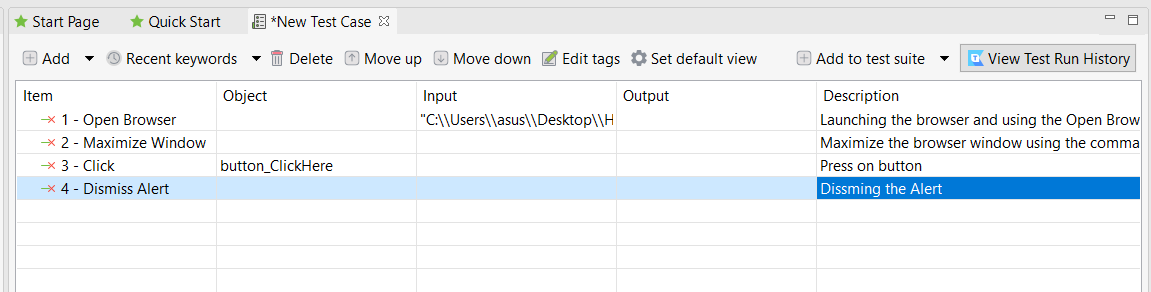
Manual Mode
- Launching the browser and using the Open Browser technique to navigate to the Alert current page
- Maximize the browser window using the command Maximize window.
- Press on button
- Dismissing the Alert.
Script Mode
import static com.kms.katalon.core.testobject.ObjectRepository.findTestObject
import com.kms.katalon.core.webui.keyword.WebUiBuiltInKeywords as WebUI

'Launching the browser and using the Open Browser technique to navigate to the Alert current page'
WebUI.openBrowser('C:\\\\Users\\\\asus\\\\Desktop\\\\How to Handle Alerts.html')

'Maximize the browser window using the command Maximize window.'
WebUI.maximizeWindow()

'Press on button '
WebUI.click(findTestObject('Alerts/button_ClickHere'))

'Dissming the Alert'
WebUI.dismissAlert()
Send data to an alert dialog
The sendKeys() method allows text to be passed to an Alert text message.
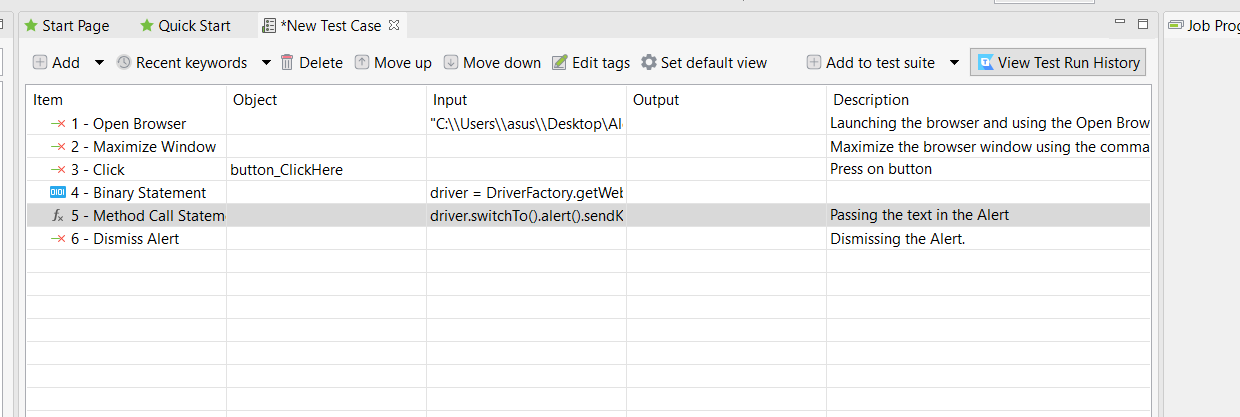
Manual Mode
- Launching the browser and using the Open Browser technique to navigate to the Alert current page
- Maximize the browser window using the command Maximize window.
- Press on button
- With the help of the sendKeys method, pass the Text to an Alert.
Script Mode
import static com.kms.katalon.core.testobject.ObjectRepository.findTestObject
import org.openqa.selenium.WebDriver as WebDriver
import com.kms.katalon.core.webui.driver.DriverFactory as DriverFactory
import com.kms.katalon.core.webui.keyword.WebUiBuiltInKeywords as WebUI

'Launching the browser and using the Open Browser technique to navigate to the Alert current page\r\n'
WebUI.openBrowser('C:\\\\Users\\\\asus\\\\Desktop\\Alerts\\How to Handle Alerts2.html')

'Maximize the browser window using the command Maximize window.'
WebUI.maximizeWindow()

'Press on button \r\n'
WebUI.click(findTestObject('Alerts/button_ClickHere'))

WebDriver driver = DriverFactory.getWebDriver()

'Passing the text in the Alert\r\n'
driver.switchTo().alert().sendKeys('Testing')

'Dismissing the Alert.'
WebUI.dismissAlert()
Capture the alert message
Capture the message on Alert with the getText() method.
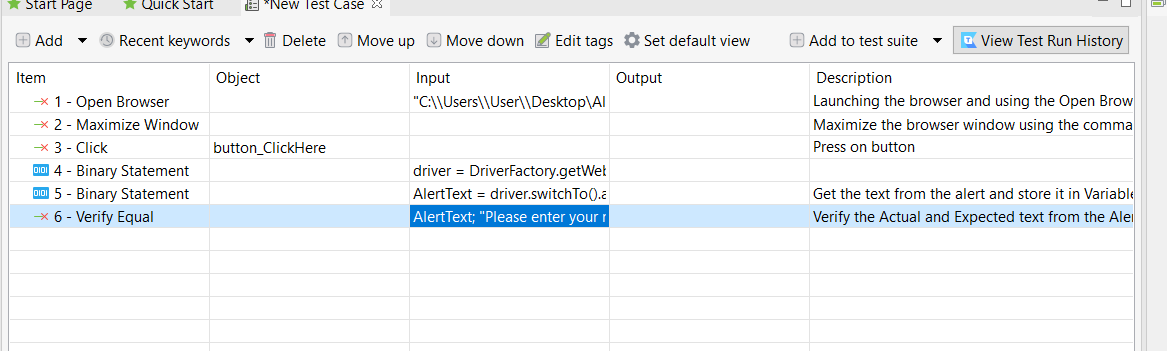
Manual Mode
- Launching the browser and using the Open Browser technique to navigate to the Alert current page
- Maximize the browser window using the command Maximize window.
- Press on button
- Get the text from the Alert and store it in the Variable
- Verify the Actual and Expected text from the Alert
Script Mode
import static com.kms.katalon.core.testobject.ObjectRepository.findTestObject
import org.openqa.selenium.WebDriver as WebDriver
import com.kms.katalon.core.webui.driver.DriverFactory as DriverFactory
import com.kms.katalon.core.webui.keyword.WebUiBuiltInKeywords as WebUI


'Launching the browser and using the Open Browser technique to navigate to the Alert current page\r\n'
WebUI.openBrowser('C:\\\\Users\\\\User\\\\Desktop\\Alerts\\How to Handle Alerts2.html')

'Maximize the browser window using the command Maximize window.'
WebUI.maximizeWindow()

'Press on button \r\n'
WebUI.click(findTestObject('Alerts/button_ClickHere'))

WebDriver driver = DriverFactory.getWebDriver()

'Get the text from the alert and store it in Variable'
String AlertText = driver.switchTo().alert().getText()

'Verify the Actual and Expected text from the Alert'
WebUI.verifyEqual(AlertText, 'Please enter your name')


 5+ registered

