Integrate Katalon TestOps with Katalon Studio
Before moving forward with the topic: integrate Katalon TestOps with Katalon Studio, firstly we will see what exactly Katalon TestOps is.
Katalon TestOps
With the aid of cognitive analytics and continuous test execution, Katalon TestOps is a collection of cloud-based services that may be used to streamline software quality.
-
TestOps Center: Katalon Studio, JUnit, TestNG, and Jira are just a few of the sources of quality data that may be connected and gathered through the TestOps Center. You can keep an eye on and enable analytics for your projects using TestOps Center.
-
TestOps CI: Using Kubernetes, CircleCI, and TestOps CI, you can manage test environments and schedule remote executions on local workstations. Its deployment and configuration are made simple so that QAs can concentrate on testing tasks.
-
TestOps Reports: offer comprehensive views and dynamic perspectives on your automated testing operations.
-
TestOps Vision is a visual-based testing tool that uses AI to quickly find new GUI bugs in application code.
To send test results to Katalon TestOps for system testing and reports, you can setup TestOps integration in Katalon Studio.
Remote execution with TestOps
Katalon TestOps allows you to do the following:
✴️Test management, test planning, and test execution are its main parts. With testing frameworks, CI/CD tools, and other Katalon products, it integrates without any issues.
✴️Strong reporting and analytics capabilities are included in Katalon TestOps.
✴️By generating real-time test reports and enabling users to keep an eye on test quality, coverage, flakiness, etc.
✴️The tool offers insights into the testing processes. The most important components can be highlighted by ranking the testing regions. Test results are shown as specific KPIs on dashboards, and all execution patterns are documented in photos and videos.
✴️To have complete control over the testing process, customizable alarms can also be set up.
Enable Katalon TestOps integration
Follow these steps to enable Katalon TestOps integration:
Step 1: Launch Katalon Studio.
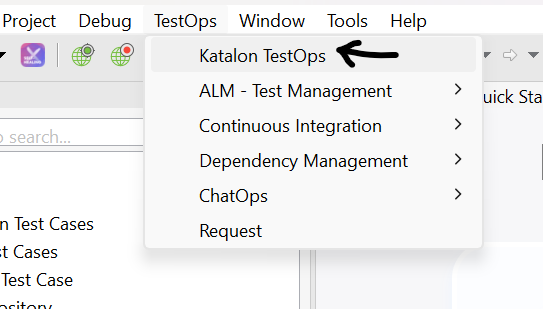
Step 2: To access Katalon TestOps, go to Project -> Settings.
Step 3: Select the checkbox next to Enable Katalon TestOps Integration. You must wait while Katalon Studio establishes a connection with Katalon TestOps.
Step 4: The Team and Project sections each have a drop-down menu where you can select your Team and Project.
Step 5: Click apply and close.
You've enabled Katalon TestOps integration in Katalon Studio, so congratulations.
There is also an option to override authentication in Katalon TestOps. To override authentication, go to Project -> Settings -> Katalon TestOps.
You will see that by default, the override authentication option is disabled. When you enable the override authentication option, you can enter different Server URLs and user credentials.
Switch Organization in Katalon Studio
By doing the following, you can change to a different Organization in Katalon Studio:
Step 1: Launch Katalon Studio and select the Profile icon in the top right corner.
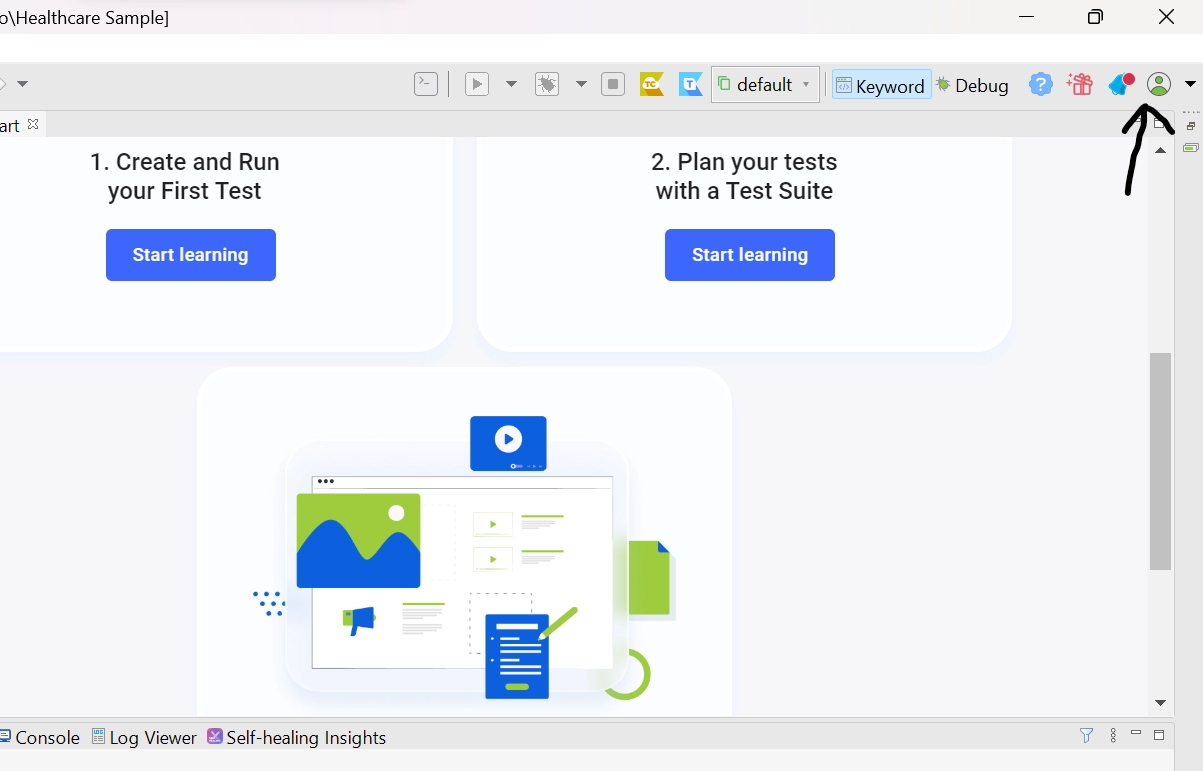
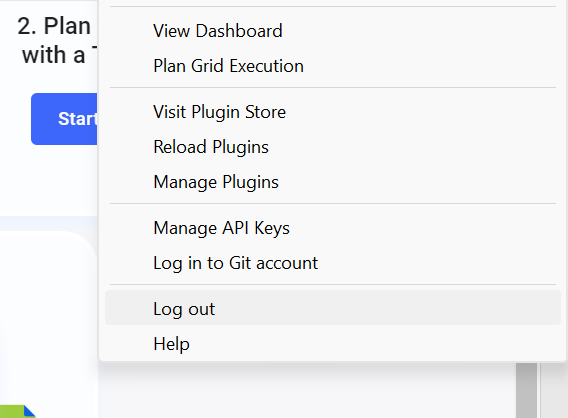
Step 2: Select Log out. The activation box for Katalon Studio appears.
Step 3: Activate after entering the new email address and password.
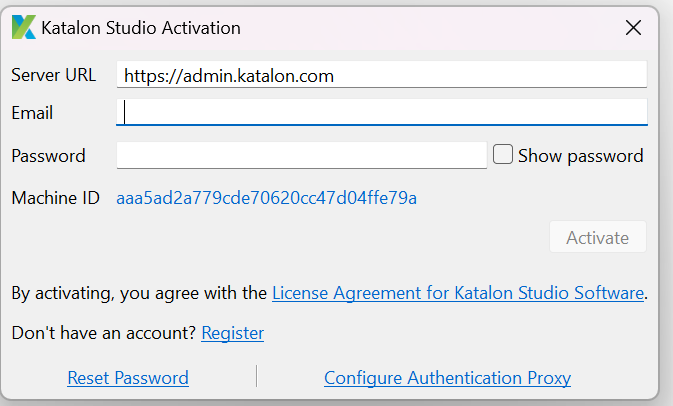
✴️Congrats! You are currently signed in to another Organization.
Frequently Asked Questions
What characteristics does Katalon Studio have?
Simple Deployment, Quick & Easy Set-up, Faster & Weightier Outcomes, Flexible Modes, Easy Usage, Cross-Browser Application, etc. are some of Katalon Studio's key features.
Do you need to code in Katalon?
For customers with varying levels of coding expertise, Katalon offers two scripting interfaces. As a result, testers with no programming experience can use a user interface that is easier to use.
Which framework does Katalon Studio use?
Groovy, a Java-based language used by Katalon Studio, requires the loading of numerous libraries in order to parse test data, test objects, and logs. Groovy is a scripting language with a syntax comparable to Java. Groovy makes it easy to create code while keeping syntax by using dot-separated notation.
Conclusion
In this article, we have discussed some of the basics of the Katalon Studio. Then we saw the uses and generation of Katalon API keys in Katalon Studio. Later, we saw how to integrate Katalon TestOps with Katalon Studio. In this we discussed Katalon TestOps, remote execution with TestOps, enabling Katalon TestOps integration and switching organisation in Katalon Studio.
If you think this blog has helped you enhance your knowledge about the above question, and if you want to learn more, check out our articles.
🔥 Sample API tests project in Katalon
🔥 Katalon Studio for Linux(GUI)
🔥 Toolbars and Views in Katalon Studio
🔥 Tips and Tricks in Katalon Studio
And many more on our website.
Visit our website to read more such blogs. Make sure that you enroll in the courses we provide, take mock tests, solve problems available, and interview puzzles. Also, you can pay attention to interview stuff- interview experiences and an interview bundle for placement preparations.
Please upvote our blog to help other ninjas grow.
Happy Learning!







 1+ registered

