




Introduction
Is Data Security a critical concern for you or your business? Data Security is of high importance to users and much more to companies. Testing in a secure environment where sensitive data is isolated can be required to secure your data.
The field of TestOps in Katalon Studio focuses on managing testing operations to scale code quality, teams, and activities. It includes all testing activities and assists teams in better planning, organising, and managing tests and gaining insights that boost ongoing work.
In this article, we will cover the TestOps Private Instance Integration and the Uploading of Test results to Katalon TestOps from Katalon Studio.
TestOps Integration
This section provides an overview of the TestOps Private Instance service and explains how to integrate it with Katalon Studio.
Supported Version: 8.3.5 onwards
TestOps Private Instance
It is a single-tenant cloud architecture where a single software instance and its underlying infrastructure/database serve only one customer(tenant). The following diagram shows the single-tenant design:
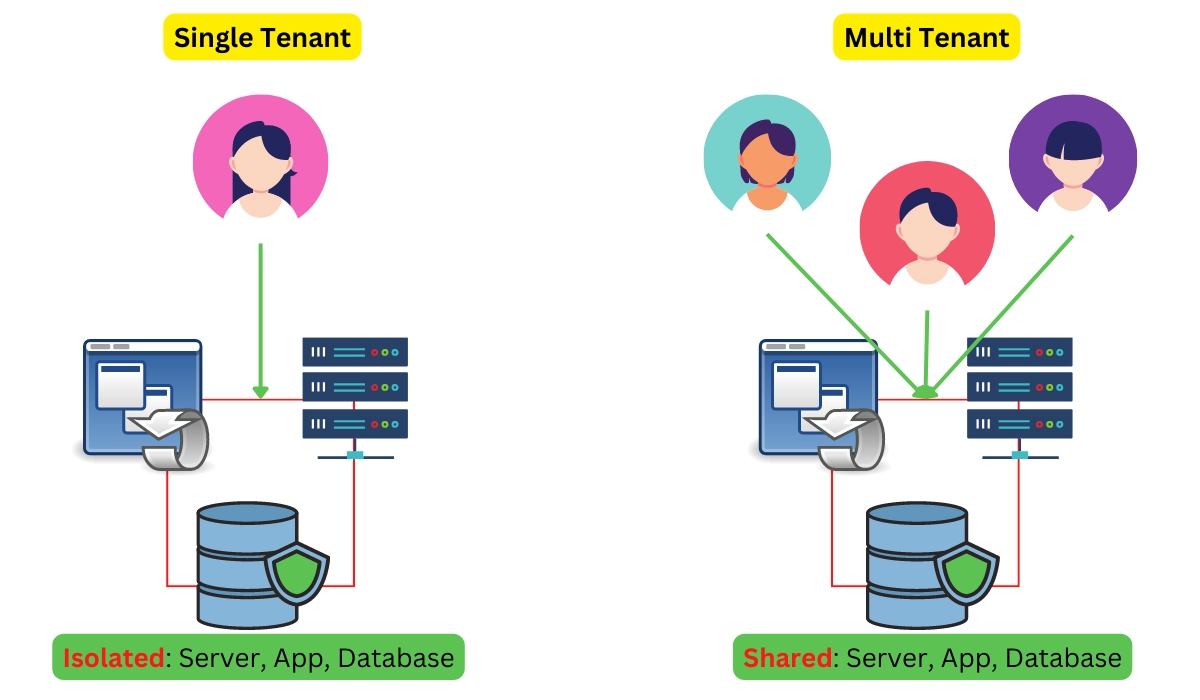
With the help of Single-tenant, users can have separate TestOps Instances with the following services:
-
Separate app nodes.
-
Isolated Networking.
-
Separated Database resources.
This produces a more secure system for testing than a multi-tenant design where a single software instance and database serve several users.
Advantages
The following are the advantages of using TestOps Private Instance:
🧩 Data isolation: It helps users to deal with sensitive information and robust data storage needs.
🧩 Data residency: This is helpful for users who must certify where their data have compliance needs. For example, to comply with General Data Protection Regulation (GDPR).
🧩 Separated Katalon App: It is helpful for users with predictable workloads who desire more excellent performance. A dedicated app ensures that tests are running without being delayed by scalability issues.
🧩 Maintenance free: It is fully managed by Katalon. Users don’t need to manage or maintain the system.
Enable TestOps Private Instance Integration
The basic requirements for enabling the TestOps Private instance integration are:
-
Katalon Studio version 8.3.5 onwards.
-
A TestOps private instance URL.
Follow the steps to enable the TestOps private Instance.
Step 1: Open Katalon Studio.
Step 2: To use Katalon TestOps, go to Project > Settings.
Step 3: Put the Private Instance URL, username, and password in the Authentication area.
Step 4:Enable the Override Authentication to On.
Step 5: Select the Fetch Organizations option.
Step 6: In the Company dropdown menu, choose your organisation.
Step 7: Select the Enable Katalon TestOps Integration checkbox in the Integration section to automatically transfer test results to your Private Instance.
Step 8: Integrate TestOps private Instance.
Step 9: Select Apply and Close buttons.
When the integration between TestOps Private Instance and Katalon Studio is enabled, you may run tests and upload the results to your private instance.


 1+ registered

