

Table of contents
1.
Introduction
2.
Integrations
2.1.
What are integrations and why are they needed?
2.2.
What software does ReadyAPI offer integrations for?
3.
Integrations Tab
4.
Managing Integrations
4.1.
Installing via File
4.2.
Updating an Integration
4.3.
Deleting an Integration
4.4.
Viewing Integration Details
5.
Frequently Asked Questions
5.1.
Can I create a custom .jar file for some software I want to integrate?
5.2.
What does CI/CD software do?
5.3.
Is any more software required for software development?
6.
Conclusion
Last Updated: Mar 27, 2024

Integrations Tab and Managing Integrations in ReadyAPI

Author Satvik Gupta
0 upvote
Career growth poll
Do you think IIT Guwahati certified course can help you in your career?

Introduction

ReadyAPI is an API testing tool offering many different testing services. For developers who are creating any sort of API, Ready API is a robust and powerful tool to test the API in various ways. You can perform functional tests, security tests, performance tests, and more.

ReadyAPI offers robust functionality, such as setting up functional testing, Environments, and even integration with CI-CD workflows. We can send requests over HTTP and HTTPS. We can even configure SSL certificates for the same. 

Integrations tab and Managing integrations in ReadyAPI

In this blog, we will see what integrations are in ReadyAPI, why they are needed - and how to manage them.

Integrations

What are integrations and why are they needed?

For a small project, we generally do not need many tools or any formality in setting up the workflow. We can just start coding and launch the project in whatever way we wish. At the max, we will need to set up a Github repository for the project so that multiple people can work on it.

But, for large-scale projects built for business clients or developed for use by thousands of people - a formal environment and procedure for building them are needed. For this, we use various tools, such as :

  • Git and GitHub - (for source control)
  • Slack - (for communication)
  • Jira - (for Project Management)
  • Jenkins - (for CI-CD)
  • Docker -  (for containerisation)
  • and many more. 
     

ReadyAPI is also one tool that we can use for API testing. When adding a new tool to our project, it would be better if we could integrate it with our existing toolbox. 
Imagine how easy it would be - if your GitHub repo were linked to your live website. The live site gets updated with the new code for every new commit. All the compiling and building would happen itself. In fact, this is what CI-CD software does. That would certainly make life easier!

ReadyAPI also offers integrations for this purpose, called plugins. It makes adding ReadyAPI to our toolbox an ease and a pleasure . We know it will link seamlessly with everything we have already set up. ReadyAPI can also be connected similarly to GitHub, as we discussed - it will automatically run all your tests on the new code!

Check out most important Git Interview Questions here.

What software does ReadyAPI offer integrations for?

ReadyAPI offers plugins (we use the terms integrations and plugins synonymously) for a wide variety of softwares, some of which are:

  1. Docker
  2. Jenkins
  3. Maven
  4. Azure DevOps
  5. Jira
  6. Git
  7. Postman
  8. Slack
  9. Selenium
  10. CouchDB
software ReadyAPI offer integration for

And many, many more. Third-party software developers can also create their own plugins for ReadyAPI. They can then submit them to ReadyAPI to be listed and installed by users.

You can also install ReadyAPI plugins via a .jar file. According to their guidelines, the plugin should have been created to work with ReadyAPI. 
Integrations Tab

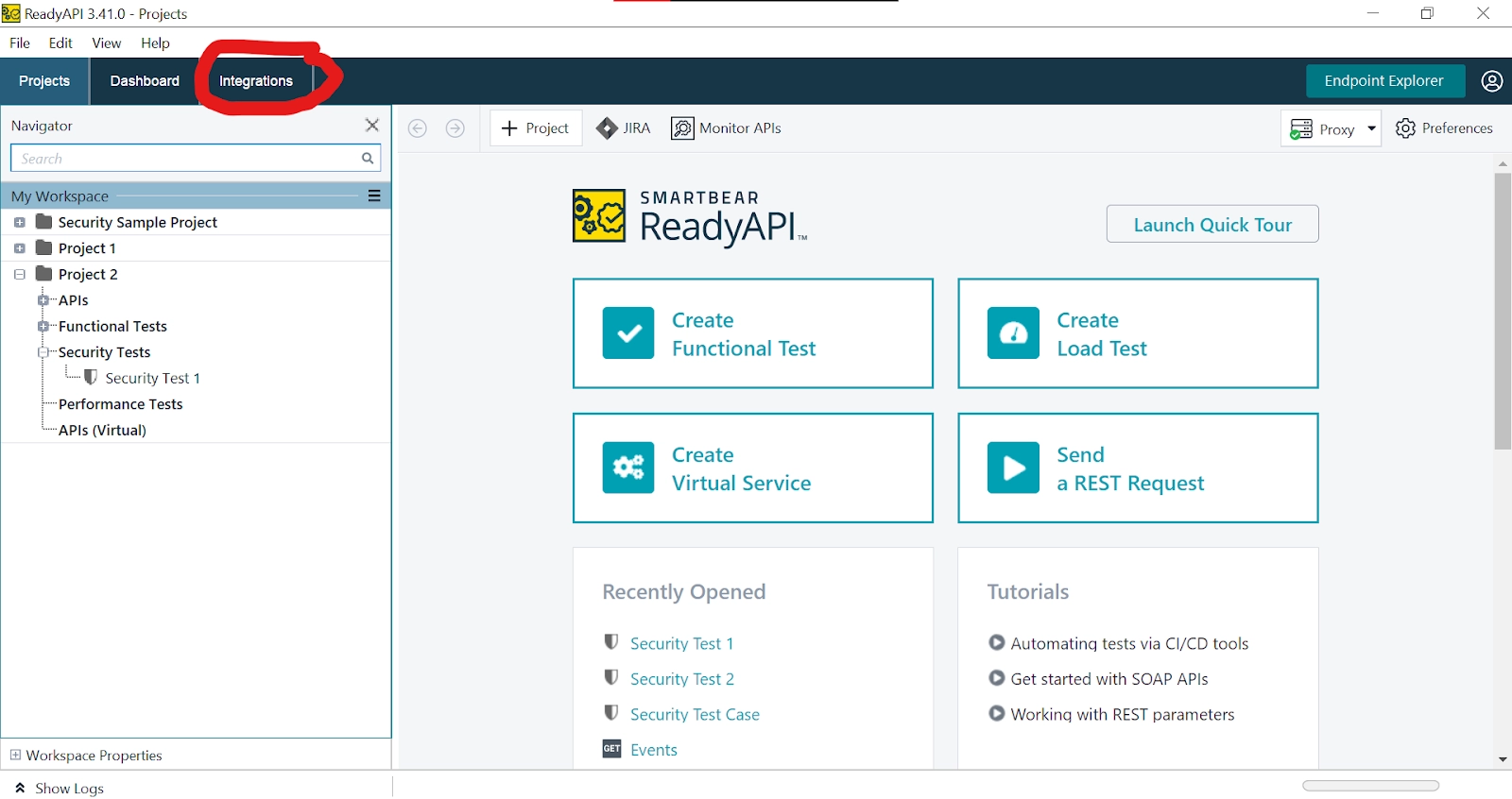
Integrations Tab is one of the three tabs seen in ReadyAPI when you open it. You can see it here below.

Integrations tab on home screen

Let's open it and see how it looks.

Integrations Tab opened

We can see it has many sections, such as :

  • Featured Integrations - Like the featured section in social media feeds, this contains the integrations that are popular with users of ReadyAPI. These are the most widely used or the best-made plugins. The two featured plugins here are Docker Containers and Postman Plugin. Docker and Postman are extremely popular softwares. So it is no surprise that their plugins would be popular too.
  • All Available Integrations - This section lists all the available plugins in ReadyAPI. It has been divided into types for ease of use. We can also use the search bar, to look up any particular plugin we want. It might not always be present, though.
  • Manage Installed Integrations. This is the third section and is on the right-hand side window. We will be taking a closer look at it soon.

Managing Integrations

The Integrations tab allows us to do everything we might need with integrations. Let's take a look at all the possible things. 

Installing an Integration
Let's see how we can install an integration in ReadyAPI:

  1. Go to the integrations tab
  2. In the All Available Integrations section, search for the integration you want - or scroll down to it.
     
All Available Integrations

3. Click on Install, then click on Yes if prompted.

Installing

4. ReadyAPI will install it! You can check, as it should now show on the right-hand side under Manage Installed Integrations.

Manage Installed Integrations

Installing via File

We can also install plugins via a .jar file that is in the correct format as defined by ReadyAPI. It should implement a particular Plugin class from the SoapUI package that is created by SmartBear (the company that created ReadyAPI). SoapUI is the free version of ReadyAPI. 

The steps to install from a file are:

  1. Download a valid plugin that should be in the form of a .jar file.
  2. Go into the integrations tab and choose Install via file.
Installing via File

3. Choose the file from the file explorer.

4. The plugin will be installed if it is valid.

Updating an Integration

  1. If an update is available for any plugin, ReadyAPI will show an orange Update button next to its name in Manage Installed Integrations.
Updating an Integration

2. Click on the button, and click Yes to confirm the action (if asked).

3. The plugin will be updated.

Deleting an Integration

  1. Find the integration you want to remove in the Manage Installed Integrations section.
  2. Click the Delete button next to it (it should have a trash icon).
Deleting an Integration

3. Click on Yes if prompted.

Click on Yes in the Prompt

4. You may need to restart ReadyAPI to apply the changes.

5. Check in the Manage Installed Integrations section. That plugin should now be removed!

Viewing Integration Details

Plugins offer their details or documentation in order to help the developers that are using them. ReadyAPI provides links for those in the Integrations tab itself. 

You may see two types of plugins, both shown below.

Viewing Integration Details

One has a blue Details button. The other one has Read full documentation written in blue text. Both these things generally mean the same thing, although the Details button might point to something different - such as a GitHub link.

Either way, by clicking any of these - and going through the resource they link to, a developer can understand how to use these integrations.

Frequently Asked Questions

Can I create a custom .jar file for some software I want to integrate?

The answer is yes! You can surely do so. ReadyAPI will accept any .jar file that is in a valid format. However, it should follow the ReadyAPI standards and should contain an implementation of the class we talked about above (specifically, it is the com.eviware.soapui.plugins class). 

What does CI/CD software do?

CI/CD software is Continuous Integration and Continuous Deployment software. CI means a developer's changes are built, tested, and merged into a repository. CD means the new code is automatically shipped to different environments - such as development, test, or even live production environments!

Is any more software required for software development?

This totally depends upon your software and business needs. All the softwares listed above may be too much, or too little - depending on the size, scale and requirements of the product that you're building. If it's just an academic project or for a small group of people, you probably don't need all those. If it's for millions of users, you might need more.

Conclusion

This blog has explored what integrations are and why they are necessary. We have also seen the integrations offered by ReadyAPI - and how we can manage them using the Integrations tab.

We hope you leave this article with a broader knowledge of ReadyAPI, development tools and integrations. We recommend that you explore our different articles on these topics as well, such as:

What is Ready API

Installing ReadyAPI

You can practice questions on various problems on Coding Ninjas Studio, attempt mock tests, go through interview experiences, interview bundle, go along guided paths for preparations, and a lot more!

Keep coding, keep reading Ninjas. 

Live masterclass


